
Introduction to AUD Exelix EA MT5
AUD Exelix EA is an automated trading Expert Advisor (EA) designed for MetaTrader 5, focusing on structured execution and flexible risk-based lot sizing. It allows traders to define precise trading schedules for each weekday while offering multiple auto lot risk modes. This EA is suitable for traders who want consistent trading across specific sessions with scalable risk control.
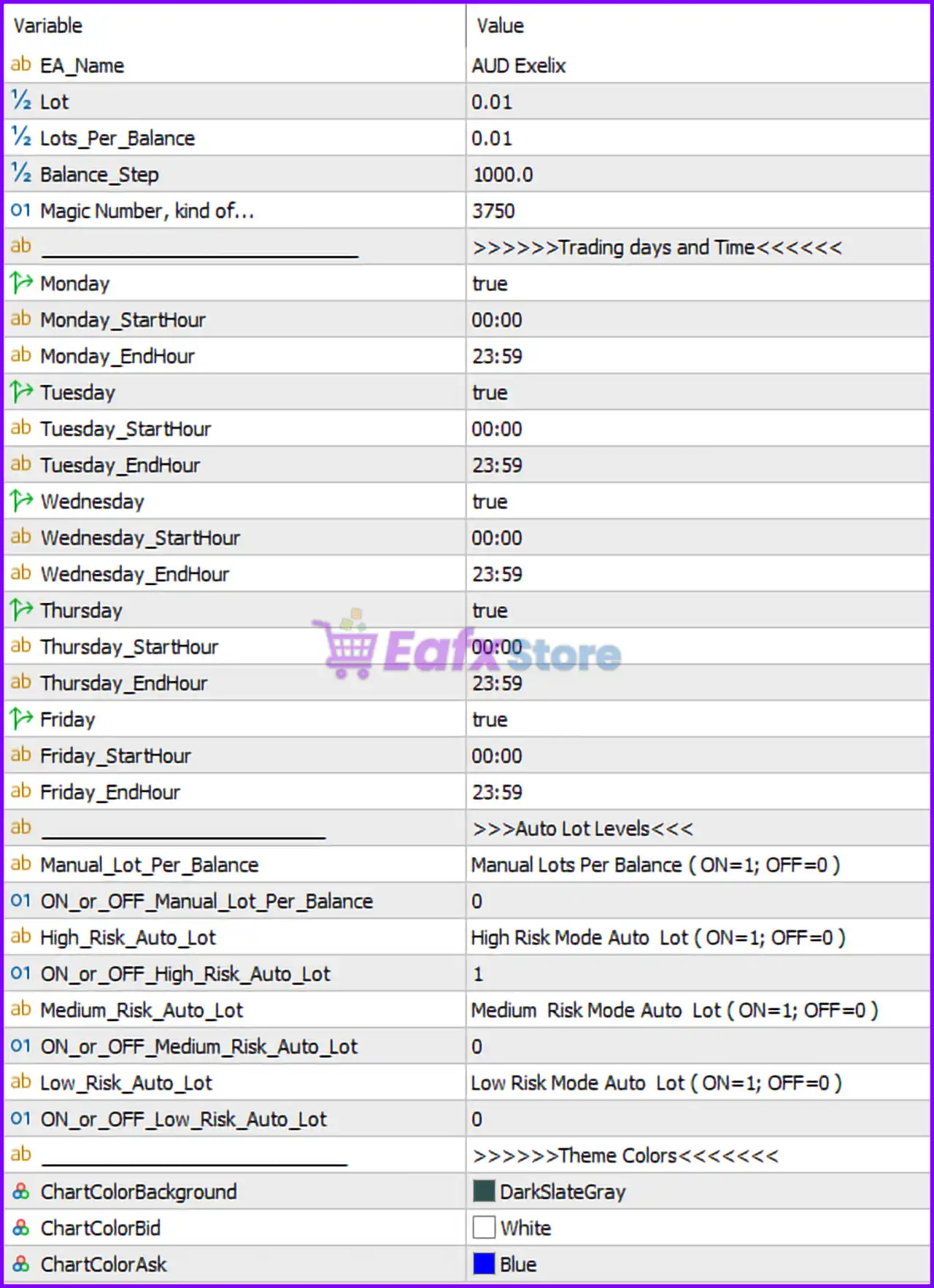
Full Parameters
- EA_Name = AUD Exelix: Defines the name of the Expert Advisor as “AUD Exelix”.
- Lot = 0.01: Sets the default fixed trading lot size to 0.01.
- Lots_Per_Balance = 0.01: Specifies that 0.01 lot is allocated per balance step.
- Balance_Step = 1000.0: Defines that each 1000.0 account balance unit increases the lot size proportionally.
- Magic Number, kind of... = 3750: Unique identifier (3750) used to track and manage trades opened by this EA.
>>>>> Trading days and Time <<<<<<
- Monday = true: Enables trading on Monday.
- Monday_StartHour = 00:00: Trading starts at 00:00 on Monday.
- Monday_EndHour = 23:59: Trading ends at 23:59 on Monday.
- Tuesday = true: Enables trading on Tuesday.
- Tuesday_StartHour = 00:00: Trading starts at 00:00 on Tuesday.
- Tuesday_EndHour = 23:59: Trading ends at 23:59 on Tuesday.
- Wednesday = true: Enables trading on Wednesday.
- Wednesday_StartHour = 00:00: Trading starts at 00:00 on Wednesday.
- Wednesday_EndHour = 23:59: Trading ends at 23:59 on Wednesday.
- Thursday = true: Enables trading on Thursday.
- Thursday_StartHour = 00:00: Trading starts at 00:00 on Thursday.
- Thursday_EndHour = 23:59: Trading ends at 23:59 on Thursday.
- Friday = true: Enables trading on Friday.
- Friday_StartHour = 00:00: Trading starts at 00:00 on Friday.
- Friday_EndHour = 23:59: Trading ends at 23:59 on Friday.
>>>> Auto Lot Levels <<<<
- Manual_Lot_Per_Balance = Manual Lots Per Balance (ON=1; OFF=0): Description of manual lot scaling based on balance.
- ON_or_OFF_Manual_Lot_Per_Balance = 0: Disables manual lot per balance mode.
- High_Risk_Auto_Lot = High Risk Mode Auto Lot (ON=1; OFF=0): Description of high-risk auto lot mode.
- ON_or_OFF_High_Risk_Auto_Lot = 1: Enables high-risk auto lot mode.
- Medium_Risk_Auto_Lot = Medium Risk Mode Auto Lot (ON=1; OFF=0): Description of medium-risk mode.
- ON_or_OFF_Medium_Risk_Auto_Lot = 0: Disables medium-risk auto lot mode.
- Low_Risk_Auto_Lot = Low Risk Mode Auto Lot (ON=1; OFF=0): Description of low-risk mode.
- ON_or_OFF_Low_Risk_Auto_Lot = 0: Disables low-risk auto lot mode.
>>>>> Theme Colors <<<<<<
- ChartColorBackground = DarkSlateGray: Sets chart background color to DarkSlateGray.
- ChartColorBid = White: Sets the bid price line color to White.
- ChartColorAsk = Blue: Sets the ask price line color to Blue.
Conclusion
The AUD Exelix EA MT5 settings provide a clear and structured approach to automated trading, combining full-day session control with flexible risk-based lot sizing. By enabling all weekdays and using high-risk auto lot mode, this configuration is geared toward active trading with higher potential returns. Understanding each parameter allows traders to fine-tune execution, control exposure, and adapt the EA to different market conditions.
FAQs
❓ What does Balance_Step = 1000.0 mean?
It means that for every 1000.0 units in account balance, the lot size increases based on the defined ratio.
❓ Why is ON_or_OFF_High_Risk_Auto_Lot = 1 important?
It enables aggressive lot sizing, increasing both potential profit and risk.
❓ Can I limit trading to specific hours?
Yes, each day has customizable StartHour and EndHour parameters.
❓ What is the role of Magic Number = 3750?
It uniquely identifies trades opened by this EA.
❓ Is manual lot sizing enabled in this setup?
No, ON_or_OFF_Manual_Lot_Per_Balance = 0 means manual lot scaling is disabled.