Introduction to Hexa AI Bot MT5
Hexa AI Bot MT5 is an advanced automated trading Expert Advisor (EA) developed for the MetaTrader 5 platform. It combines swing detection, ADX trend confirmation, Kijun-Sen filtering, ATR-based volatility analysis, and dynamic risk management to identify high-probability market opportunities.
With integrated spike protection, daily profit/loss limits, and intelligent order management, this EA is designed for traders seeking structured and disciplined algorithmic trading.
Full Parameters
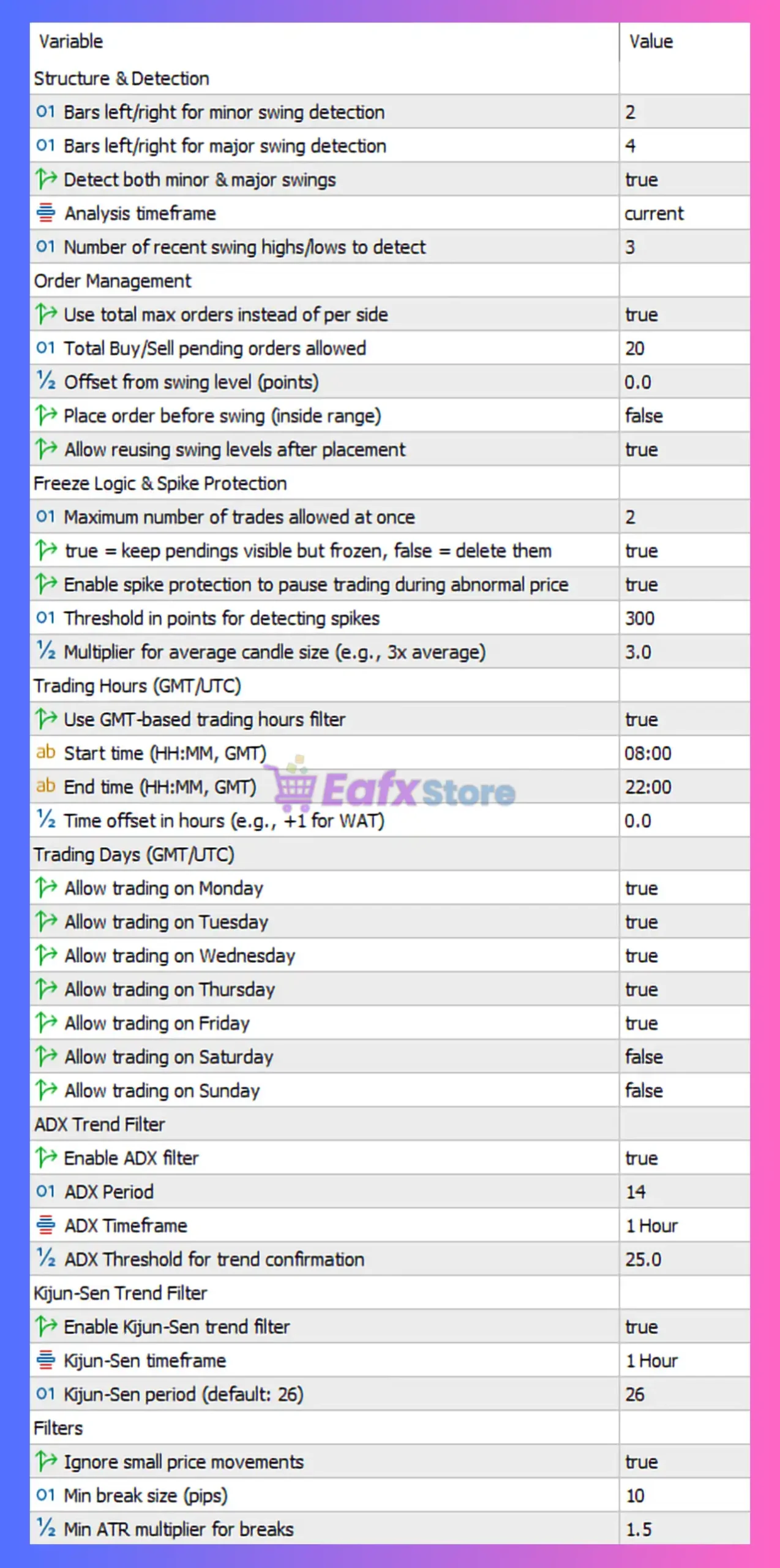
Structure & Detection
- Bars left/right for minor swing detection = 2: Uses 2 bars on both sides to identify minor swing highs and lows.
- Bars left/right for major swing detection = 4: Uses 4 bars on both sides for major swing point confirmation.
- Detect both minor & major swings = true: Enables simultaneous detection of both minor and major swing structures.
- Analysis timeframe = current: Uses the currently selected chart timeframe for market analysis.
- Number of recent swing highs/lows to detect = 3: Detects the latest 3 swing highs and lows for structure analysis.
Order Management
- Use total max orders instead of per side = true: Applies a combined total order limit rather than separate buy/sell limits.
- Total Buy/Sell pending orders allowed = 20: Allows a maximum of 20 pending orders in total.
- Offset from swing level (points) = 0.0: No offset added from detected swing levels.
- Place order before swing (inside range) = false: Disables placing orders before swing confirmation.
- Allow reusing swing levels after placement = true: Allows previously used swing levels to be reused for new orders.
Freeze Logic & Spike Protection
- Maximum number of trades allowed at once = 2: Limits active trades to a maximum of 2 simultaneously.
- true = keep pendings visible but frozen, false = delete them = true: Keeps pending orders visible but frozen during restricted conditions.
- Enable spike protection to pause trading during abnormal price = true: Activates spike protection against abnormal market volatility.
- Threshold in points for detecting spikes = 300: Detects spikes when price moves exceed 300 points.
- Multiplier for average candle size (e.g., 3x average) = 3.0: Defines abnormal candles as 3.0 times larger than average size.
Trading Hours (GMT/UTC)
- Use GMT-based trading hours filter = true: Enables GMT/UTC-based trading session filtering.
- Start time (HH:MM, GMT) = 08:00: Trading begins at 08:00 GMT.
- End time (HH:MM, GMT) = 22:00: Trading ends at 22:00 GMT.
- Time offset in hours (e.g., +1 for WAT) = 0.0: No timezone offset applied.
Trading Days (GMT/UTC)
- Allow trading on Monday = true: Enables trading on Monday.
- Allow trading on Tuesday = true: Enables trading on Tuesday.
- Allow trading on Wednesday = true: Enables trading on Wednesday.
- Allow trading on Thursday = true: Enables trading on Thursday.
- Allow trading on Friday = true: Enables trading on Friday.
- Allow trading on Saturday = false: Disables trading on Saturday.
- Allow trading on Sunday = false: Disables trading on Sunday.
ADX Trend Filter
- Enable ADX filter = true: Activates ADX-based trend strength filtering.
- ADX Period = 14: Uses ADX period 14 for trend analysis.
- ADX Timeframe = 1 Hour: ADX calculations are based on the 1-hour timeframe.
- ADX Threshold for trend confirmation = 25.0: Requires ADX value above 25.0 to confirm trend strength.
Kijun-Sen Trend Filter
- Enable Kijun-Sen trend filter = true: Enables Ichimoku Kijun-Sen trend filtering.
- Kijun-Sen timeframe = 1 Hour: Kijun-Sen calculations use the 1-hour timeframe.
- Kijun-Sen period (default: 26) = 26: Uses Kijun-Sen period of 26.
Filters
- Ignore small price movements = true: Prevents trading during insignificant price fluctuations.
- Min break size (pips) = 10: Minimum breakout movement required is 10 pips.
- Min ATR multiplier for breaks = 1.5: Breakouts must exceed 1.5 times ATR value.
Risk Management
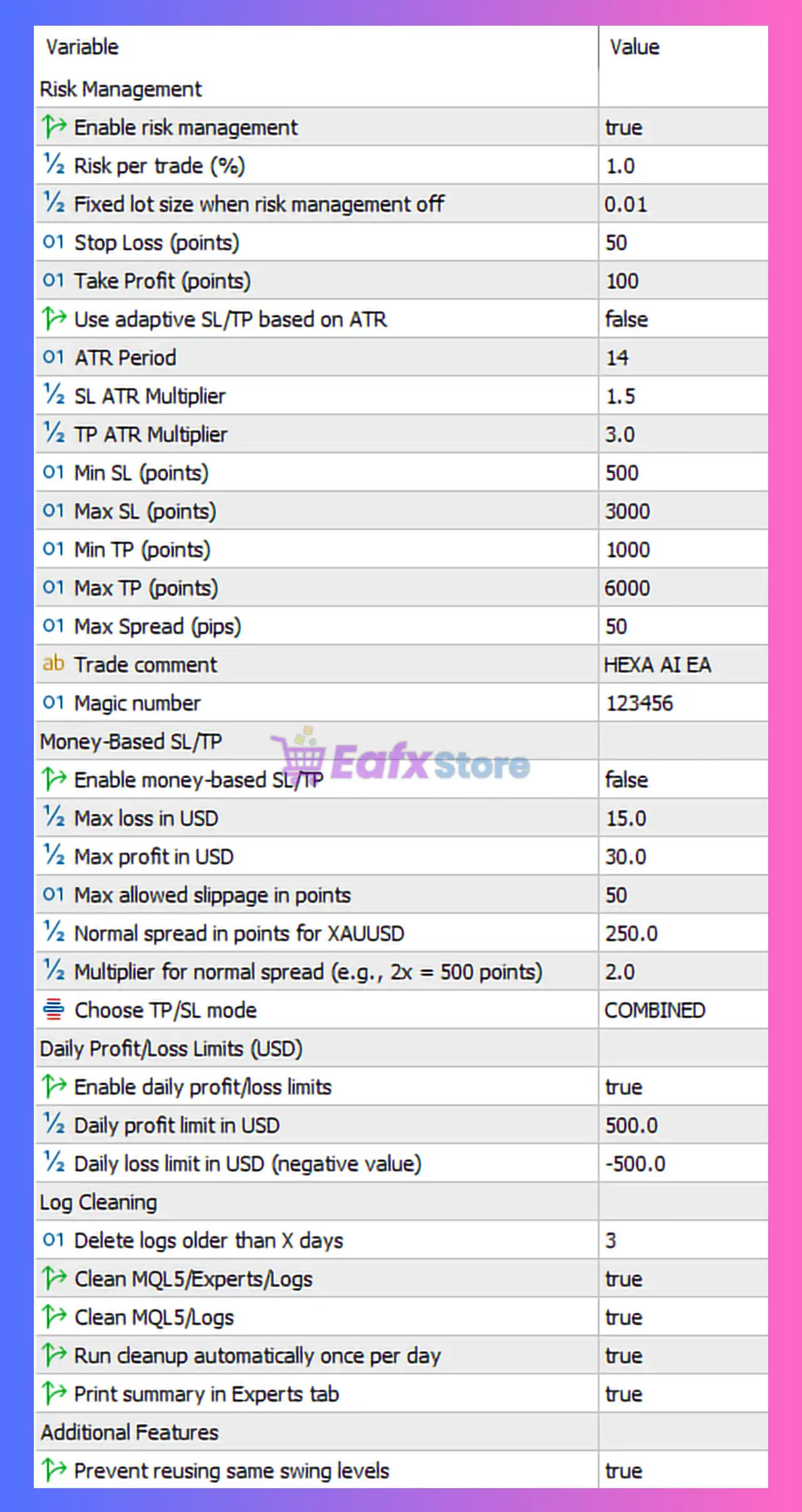
- Enable risk management = true: Activates automatic risk management features.
- Risk per trade (%) = 1.0: Risks 1.0% of account balance per trade.
- Fixed lot size when risk management off = 0.01: Uses fixed lot size 0.01 if risk management is disabled.
- Stop Loss (points) = 50: Stop Loss distance set to 50 points.
- Take Profit (points) = 100: Take Profit target set to 100 points.
- Use adaptive SL/TP based on ATR = false: Disables ATR-based adaptive SL/TP calculations.
- ATR Period = 14: Uses ATR period 14 for volatility calculations.
- SL ATR Multiplier = 1.5: ATR multiplier of 1.5 for Stop Loss calculations.
- TP ATR Multiplier = 3.0: ATR multiplier of 3.0 for Take Profit calculations.
- Min SL (points) = 500: Minimum Stop Loss distance is 500 points.
- Max SL (points) = 3000: Maximum Stop Loss distance capped at 3000 points.
- Min TP (points) = 1000: Minimum Take Profit target is 1000 points.
- Max TP (points) = 6000: Maximum Take Profit target capped at 6000 points.
- Max Spread (pips) = 50: Trading is blocked if spread exceeds 50 pips.
- Trade comment = HEXA AI EA: Adds “HEXA AI EA” as the trade comment.
- Magic number = 123456: Unique identifier (123456) for EA trade management.
Money-Based SL/TP
- Enable money-based SL/TP = false: Disables money-based Stop Loss and Take Profit mode.
- Max loss in USD = 15.0: Maximum allowed loss per trade is 15.0 USD.
- Max profit in USD = 30.0: Maximum target profit per trade is 30.0 USD.
- Max allowed slippage in points = 50: Maximum permitted slippage is 50 points.
- Normal spread in points for XAUUSD = 250.0: Defines normal XAUUSD spread as 250.0 points.
- Multiplier for normal spread (e.g., 2x = 500 points) = 2.0: Spread multiplier set to 2.0.
- Choose TP/SL mode = COMBINED: Uses combined Stop Loss and Take Profit management logic.
Daily Profit/Loss Limits (USD)
- Enable daily profit/loss limits = true: Activates daily profit and loss protection.
- Daily profit limit in USD = 500.0: Stops trading after reaching 500.0 USD daily profit.
- Daily loss limit in USD (negative value) = -500.0: Stops trading after reaching -500.0 USD daily loss.
Log Cleaning
- Delete logs older than X days = 3: Deletes logs older than 3 days.
- Clean MQL5/Experts/Logs = true: Cleans Expert Advisor log files automatically.
- Clean MQL5/Logs = true: Cleans general MT5 log files automatically.
- Run cleanup automatically once per day = true: Executes cleanup process daily.
- Print summary in Experts tab = true: Displays cleanup summary in the Experts tab.
Additional Features
- Prevent reusing same swing levels = true: Prevents the EA from using identical swing levels repeatedly.
Conclusion
The Hexa AI Bot MT5 settings provide a highly advanced trading framework that combines market structure analysis, volatility filters, trend confirmation and comprehensive risk management. Features such as ADX filtering, Kijun-Sen confirmation, spike protection, and daily profit/loss limits make this EA suitable for disciplined and professional trading environments. Understanding each parameter allows traders to optimize performance while maintaining strict control over exposure and execution quality.
FAQs
❓ What does Enable ADX filter = true do?
It ensures trades are only taken when market trend strength is confirmed by the ADX indicator.
❓ Why is Risk per trade (%) = 1.0 important?
It limits each trade’s risk to 1.0% of account balance for better capital preservation.
❓ What is the purpose of spike protection?
It pauses trading during abnormal volatility to reduce exposure to unpredictable price movements.
❓ Why are Saturday and Sunday disabled?
Weekend trading is disabled to avoid gaps and unstable liquidity conditions.
❓ What happens when Daily profit limit in USD = 500.0 is reached?
The EA stops trading for the day after reaching 500.0 USD profit.