

Introduction
Aurum Break Pro EA is an automated trading Expert Advisor (EA) developed for the MetaTrader 5 platform. Its configuration focuses on breakout trading, with customizable position sizing, risk management, account protection, and trading session controls.
The EA provides both fixed lot and risk-based position sizing options, allowing traders to adjust their trading volume according to their account size and preferred risk level. It also includes daily loss protection, maximum risk per trade restrictions, minimum margin level monitoring, and optional Break-Even and Trailing Stop functionality.

Additionally, Aurum Break Pro EA MT5 features an internal trading hour filter, custom session configuration, spread and slippage controls, and a built-in control panel for monitoring trading activity.
This guide explains all available input parameters, including their default values and functions, to help traders understand and configure Aurum Break Pro EA MT5.
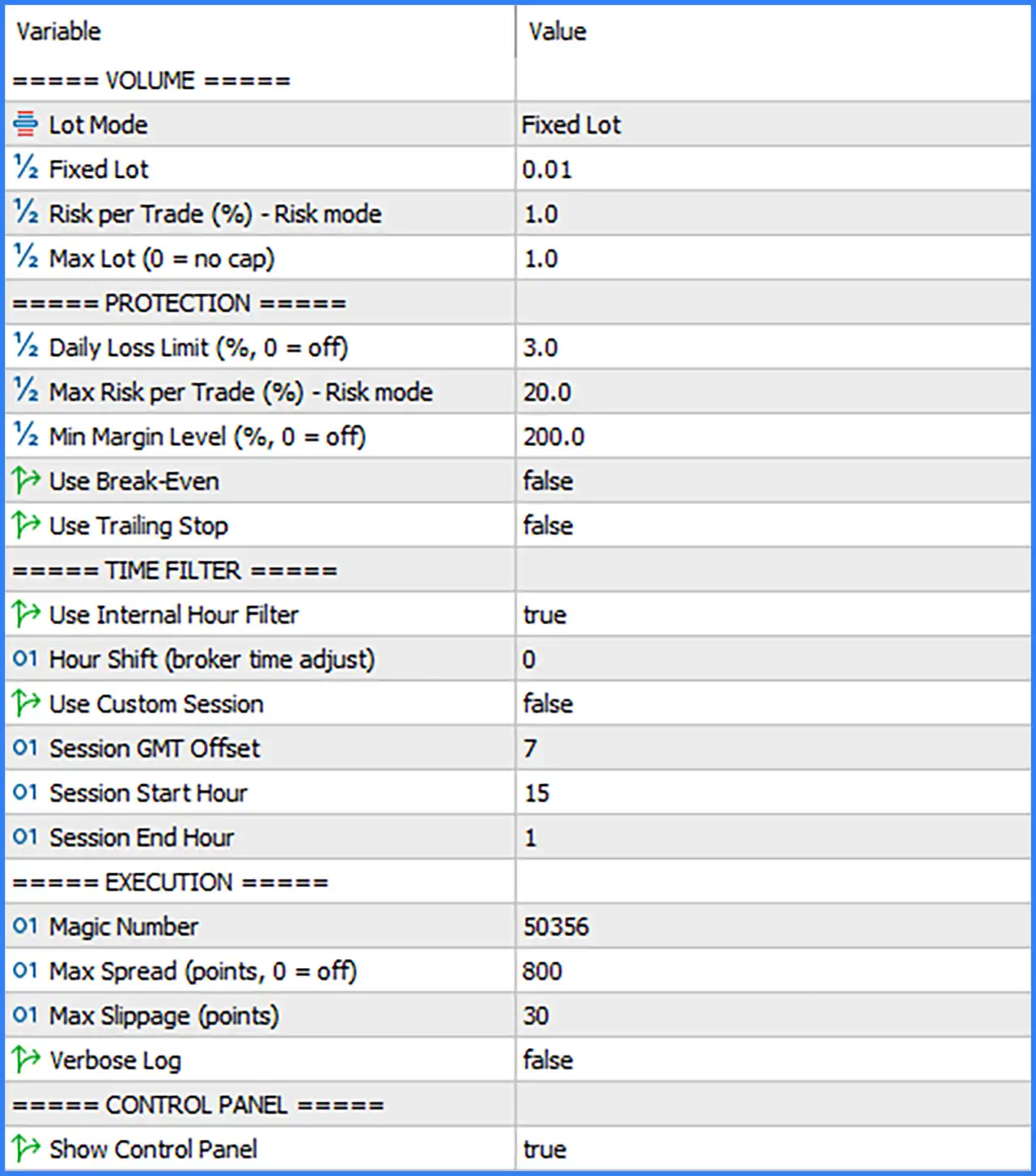
Volume and Lot Management Settings
🔹 Lot Mode: Fixed Lot – Selects the position-sizing method used by the EA. Fixed Lot mode opens trades using a predefined lot size instead of calculating trading volume dynamically according to account risk.
🔹 Fixed Lot: 0.01 – Sets the default trading volume to 0.01 lots, defining the position size used when Fixed Lot mode is selected.
🔹 Risk per Trade (%) - Risk mode: 1.0 – Sets the intended risk per trade to 1.0%, determining the percentage of account capital allocated to an individual position when Risk mode is selected.
🔹 Max Lot (0 = no cap): 1.0 – Sets the maximum permitted trading volume to 1.0 lot, preventing the EA from opening positions larger than the configured lot limit. A value of 0 disables this maximum lot restriction.
Risk Protection Settings
🔹 Daily Loss Limit (%, 0 = off): 3.0 – Sets the maximum daily loss threshold to 3.0%, providing a daily account protection limit. A value of 0 disables this particular restriction.
🔹 Max Risk per Trade (%) - Risk mode: 20.0 – Sets the maximum risk-per-trade restriction to 20.0%, defining the upper risk boundary used by the EA when operating in Risk mode.
🔹 Min Margin Level (%, 0 = off): 200.0 – Sets the minimum required account margin level to 200.0%. This parameter helps prevent the EA from opening additional positions when the account's margin level falls below the configured threshold. A value of 0 disables this restriction.
🔹 Use Break-Even: false – Disables the Break-Even function. When enabled, the EA can adjust a trade's Stop Loss toward its entry price after the configured internal activation conditions are satisfied.
🔹 Use Trailing Stop: false – Disables automatic Trailing Stop functionality. When enabled, the EA can dynamically adjust protective Stop Loss levels as the market moves in a favorable direction.
Trading Time Filter Settings
🔹 Use Internal Hour Filter: true – Enables the EA's internal trading-hour filter, allowing it to control trading activity according to its configured time restrictions.
🔹 Hour Shift (broker time adjust): 0 – Sets the broker time adjustment to 0 hours, meaning no additional hourly correction is applied to the EA's internal time calculations.
🔹 Use Custom Session: false – Disables the custom trading session filter. When enabled, the EA can restrict its trading activity to the specific session defined by the GMT offset, start hour, and end hour parameters.
🔹 Session GMT Offset: 7 – Sets the custom trading session's GMT offset to +7 hours, providing the time-zone reference used when calculating the configured session schedule.
🔹 Session Start Hour: 15 – Sets the custom session starting hour to 15:00, defining the beginning of the permitted trading period when the custom session filter is activated.
🔹 Session End Hour: 1 – Sets the custom session ending hour to 01:00, defining the end of the configured trading period. Together with the 15:00 start time, this represents a session that crosses midnight.
Trade Execution Settings
🔹 Magic Number: 50356 – Assigns the unique Magic Number 50356 to trades opened by Aurum Break Pro EA MT5, allowing the EA to identify and manage its positions separately from manual trades and other Expert Advisors.
🔹 Max Spread (points, 0 = off): 800 – Sets the maximum permitted spread to 800 points. The EA can use this threshold to prevent new trades from being opened when market spread exceeds the configured limit. A value of 0 disables spread filtering.
🔹 Max Slippage (points): 30 – Sets the maximum permitted execution slippage to 30 points, controlling the acceptable difference between the requested order price and the actual execution price.
🔹 Verbose Log: false – Disables detailed logging. When enabled, the EA can display or record additional diagnostic information about its internal operations, trading decisions, and execution processes.
Control Panel Settings
🔹 Show Control Panel: true – Enables the on-chart control panel, allowing traders to monitor relevant EA information and trading status directly from the MetaTrader 5 chart.
Conclusion
Aurum Break Pro EA offers a configurable breakout trading system with multiple position-sizing options, account protection mechanisms, trading-hour restrictions, and execution controls.
The displayed configuration uses Fixed Lot mode with an initial volume of 0.01 lots and a maximum lot limit of 1.0. Its risk management settings include a daily loss limit of 3.0%, a maximum risk-per-trade parameter of 20.0%, and a minimum margin level of 200.0%.
The EA's internal hour filter is enabled, while the custom trading session filter is disabled. Its execution settings include a Magic Number of 50356, a maximum spread of 800 points, and maximum slippage of 30 points.
Break-Even and Trailing Stop functionality are currently disabled, meaning traders should carefully evaluate their preferred trade protection approach before using the EA in live market conditions.
Overall, Aurum Break Pro EA provides several important configuration options for automated breakout execution and risk management. Traders should pay particular attention to the daily loss limit, maximum risk settings, margin protection, and spread restrictions to ensure that the configuration matches their account size and trading objectives.