

Introduction
WI BTC Killer Pro EA is an automated trading Expert Advisor (EA) designed for the MetaTrader 4 platform, with configurable trading parameters for position sizing, profit targets, stop loss management, drawdown control, and trading schedules.

The EA provides adjustable risk settings, multiple lot multiplication parameters, and configurable Stop Loss (SL) and Take Profit (TP) distances. It also includes additional trade management controls, such as minimum distance between subsequent operations, drawdown-based closing conditions, and customizable trading hours.
Another feature is its chart visualization system, which allows traders to customize BUY and SELL line colors, information display settings, text colors, and font sizes. These options provide greater flexibility in monitoring trading activity directly from the MetaTrader 4 chart.
This guide explains all available input parameters and their default values to help traders understand and configure WI BTC Killer Pro EA.
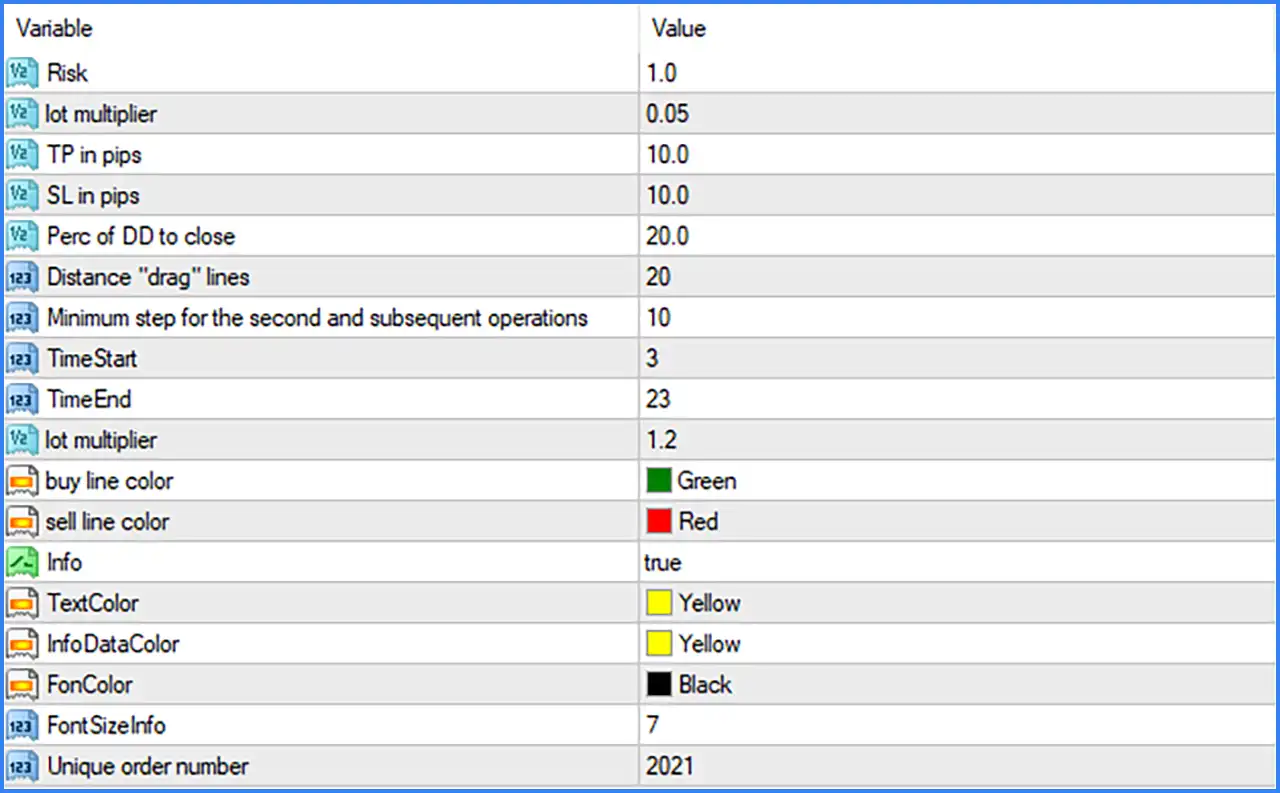
Risk Management and Position Sizing Settings
🔹 Risk: 1.0 – Sets the risk parameter to 1.0, defining the configured risk level used by the EA's internal position-sizing or trading management system. Its exact percentage or monetary interpretation depends on the EA's programming.
🔹 lot multiplier (First): 0.05 – Sets the first lot multiplier parameter to 0.05, providing a configurable factor for the EA's position-sizing or lot adjustment calculations.
🔹 lot multiplier (Second): 1.2 – Sets the second lot multiplier parameter to 1.2, defining an additional lot adjustment factor that may be used by the EA when managing subsequent trading operations. Its precise relationship with the first multiplier depends on the internal trading algorithm.
Take Profit and Stop Loss Settings
🔹 TP in pips: 10.0 – Sets the Take Profit distance to 10.0 pips, defining the configured price movement target required for a trade to reach its profit-taking level.
🔹 SL in pips: 10.0 – Sets the Stop Loss distance to 10.0 pips, establishing the configured protective exit distance to help limit losses when the market moves against an open position.
Drawdown and Trade Management Settings
🔹 Perc of DD to close: 20.0 – Sets the drawdown percentage parameter to 20.0, defining the configured drawdown threshold associated with the EA's automatic position-closing mechanism. Traders should verify whether this represents account drawdown or another internal drawdown calculation.
🔹 Distance "drag" lines: 20 – Sets the distance between the EA's draggable chart lines to 20, controlling the spacing used for visual trade management or price-level adjustments.
🔹 Minimum step for the second and subsequent operations: 10 – Sets the minimum step distance for the second and subsequent trading operations to 10, helping determine the minimum spacing between additional positions or operations.
🔹 Unique order number: 2021 – Assigns the unique order identification number 2021 to trades managed by the EA, helping distinguish its trading activity from other automated systems and manual positions.
Trading Time Settings
🔹 TimeStart: 3 – Sets the beginning of the permitted trading period to hour 3 (03:00), defining when the EA can start its scheduled trading activity.
🔹 TimeEnd: 23 – Sets the end of the permitted trading period to hour 23 (23:00), defining the scheduled time when the EA stops initiating trades according to its trading-hour configuration.
Chart Visualization and Information Display Settings
🔹 buy line color: Green – Sets the color of BUY-related trading lines to green, helping traders visually identify BUY entry levels and associated chart information.
🔹 sell line color: Red – Sets the color of SELL-related trading lines to red, providing a clear visual distinction between BUY and SELL trading levels.
🔹 Info: true – Enables the information display function, allowing the EA to show relevant trading information directly on the MetaTrader 4 chart.
🔹 TextColor: Yellow – Sets the general information text color to yellow, improving the visual distinction of displayed text and trading information.
🔹 InfoDataColor: Yellow – Sets the color of information data to yellow, allowing numerical values and other displayed trading details to stand out on the chart.
🔹 FonColor: Black – Sets the information panel or text background color to black, providing contrast against the yellow information text.
🔹 Font SizeInfo: 7 – Sets the information display font size to 7, controlling the text size used by the EA's chart information panel.
Conclusion
WI BTC Killer Pro EA MT4 provides a configurable trading management system with adjustable risk parameters, lot multipliers, Take Profit and Stop Loss settings, drawdown controls, and trading-hour restrictions.
The displayed configuration uses a Risk value of 1.0, two separate lot multiplier parameters of 0.05 and 1.2, and equal Take Profit and Stop Loss distances of 10.0 pips. It also includes a drawdown closing parameter of 20.0 and a minimum step of 10 for subsequent trading operations.
The EA's trading schedule is configured from 03:00 to 23:00, while its chart visualization system uses green BUY lines, red SELL lines, yellow information text, and a black background.
Overall, WI BTC Killer Pro EA offers several adjustable parameters for trade execution, position management, and chart monitoring. Traders should pay particular attention to the lot multipliers, drawdown closing threshold, and minimum spacing between subsequent operations because these settings can influence overall trading exposure.