
Introduction to Black EA MT5
Black EA MT5 is an automated trading Expert Advisor (EA) designed for MetaTrader 5, primarily configured for Gold (XAUUSD) trading. It combines an AI-based signal filtering system, economic news protection, smart lot scaling, drawdown recovery options, and funded account risk management.

The EA supports the M15 and H1 timeframes, with the supplied default Period Time set to 1 Hour. Its Smart AI Signal Filter evaluates AI confidence, signal strength, trend direction, market volatility, and market noise before allowing trading signals to proceed.
Black EA MT5 also includes configurable Stop Trading Before News and Resume Trading After News periods, optional funded account protection, and a Smart Per-Trade Profit Lock mechanism designed to help manage open-position profits.
Strategy Settings
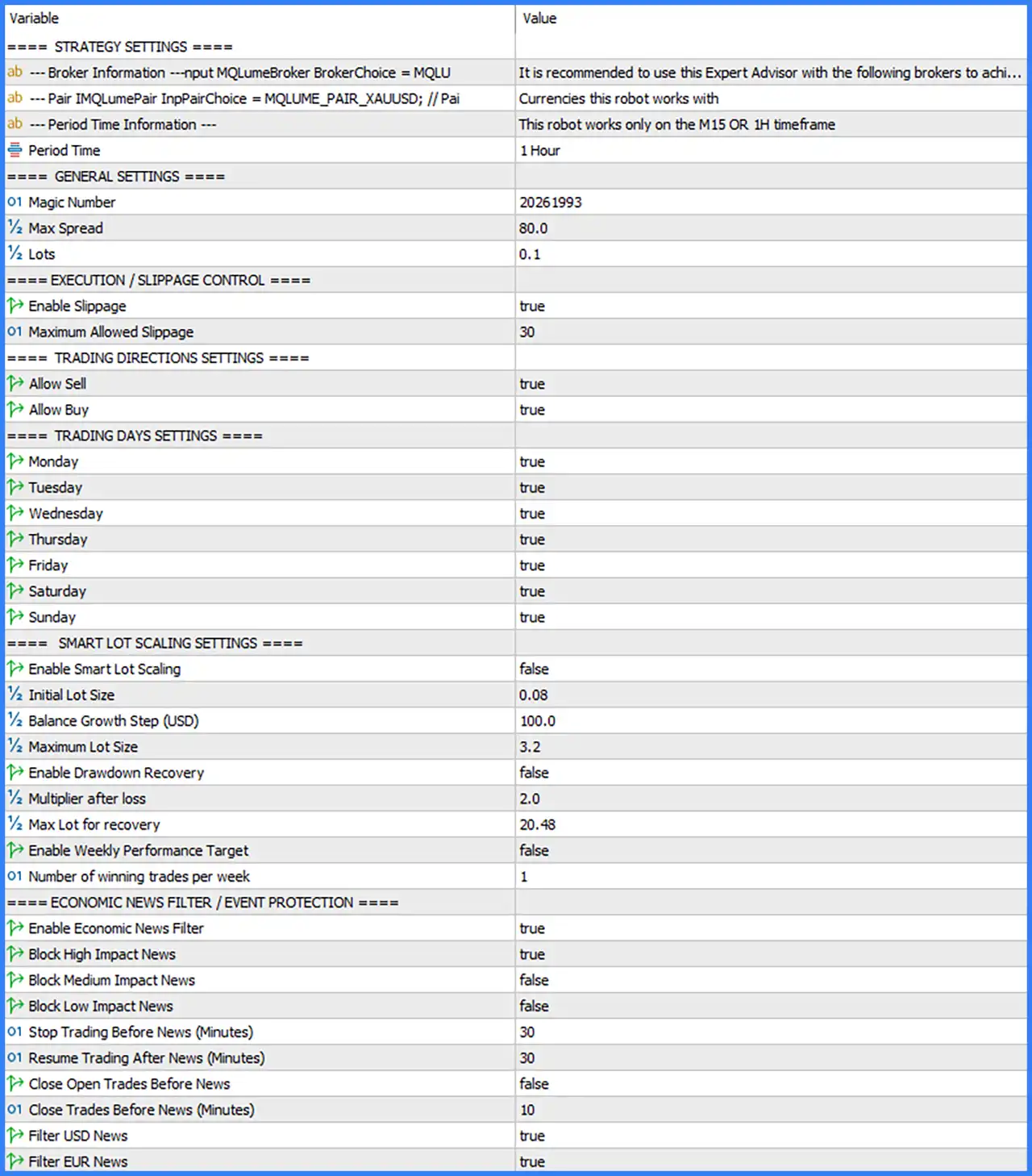
This section contains broker recommendations, supported currency pairs, and timeframe information.
🔹 Broker Information – BrokerChoice = MQLU: Displays the broker selection reference as MQLU. The accompanying description recommends using the Expert Advisor with specific brokers, but the complete broker list is cut off in the screenshot.
🔹 Pair – InpPairChoice = MQLUME_PAIR_XAUUSD: Identifies XAUUSD as the selected trading instrument, indicating that the EA is configured for Gold trading.
🔹 Period Time Information: Indicates that Black EA MT5 works only on the M15 or H1 timeframe, defining the supported chart periods stated in the Inputs panel.
🔹 Period Time = 1 Hour: Sets the default trading timeframe to H1, allowing the EA to operate using 1-hour chart data.
General Settings
This section controls trade identification, spread limitations, and default position sizing.
🔹 Magic Number = 20261993: Assigns the Magic Number 20261993 to the EA's trading operations, allowing MetaTrader 5 to identify and distinguish positions opened by Black EA MT5.
🔹 Max Spread = 80.0: Sets the maximum permitted spread to 80.0, defining the spread threshold used by the EA when evaluating market execution conditions.
🔹 Lots = 0.1: Sets the default trading volume to 0.1 lots, determining the configured position size for the EA's trading operations.
Execution / Slippage Control
These settings control order execution tolerance and the maximum permitted slippage.
🔹 Enable Slippage = true: Enables slippage control, allowing the EA to apply its configured maximum slippage restriction when executing trading orders.
🔹 Maximum Allowed Slippage = 30: Sets the maximum permitted slippage to 30, defining the execution deviation threshold accepted by the EA.
Trading Directions Settings
This section determines whether Black EA MT5 can open Buy and Sell positions.
🔹 Allow Sell = true: Enables Sell trading operations, allowing the EA to open short positions when its trading conditions are satisfied.
🔹 Allow Buy = true: Enables Buy trading operations, allowing the EA to open long positions when its configured entry conditions are satisfied.
Trading Days Settings
These parameters control the days on which the Expert Advisor is permitted to trade.
🔹 Monday = true: Enables trading on Monday, allowing the EA to execute eligible trading signals during the first trading day of the week.
🔹 Tuesday = true: Enables trading on Tuesday, keeping automated trading active on this weekday.
🔹 Wednesday = true: Enables trading on Wednesday, allowing the EA to process and execute valid trading opportunities.
🔹 Thursday = true: Enables trading on Thursday, permitting the EA to continue its configured trading operations.
🔹 Friday = true: Enables trading on Friday, allowing the EA to open eligible positions before the weekend.
🔹 Saturday = true: Enables the Saturday trading-day option, although actual execution depends on the broker's available trading sessions.
🔹 Sunday = true: Enables the Sunday trading-day option, subject to the instrument's trading availability and broker server schedule.
Smart Lot Scaling Settings
This section provides automatic lot scaling, balance growth parameters, and optional drawdown recovery functionality.
🔹 Enable Smart Lot Scaling = false: Disables automatic smart lot scaling, meaning the EA does not activate this particular lot adjustment feature under the supplied default configuration.
🔹 Initial Lot Size = 0.08: Sets the initial lot size to 0.08, defining the starting volume used by the Smart Lot Scaling mechanism when enabled.
🔹 Balance Growth Step (USD) = 100.0: Sets the balance growth increment to $100.0, defining the account balance increase associated with the smart lot scaling calculation.
🔹 Maximum Lot Size = 3.2: Sets the maximum lot size to 3.2 lots, establishing the upper position-volume limit for the Smart Lot Scaling feature.
🔹 Enable Drawdown Recovery = false: Disables drawdown recovery functionality, keeping the additional recovery-based lot adjustment inactive by default.
🔹 Multiplier after loss = 2.0: Sets the recovery multiplier to 2.0, defining the configured lot multiplication factor after a losing trade when drawdown recovery is enabled.
🔹 Max Lot for recovery = 20.48: Sets the maximum recovery lot size to 20.48 lots, establishing the configured upper volume limit for recovery-based trading.
🔹 Enable Weekly Performance Target = false: Disables the weekly performance target feature, meaning the EA does not activate this specific weekly trading objective by default.
🔹 Number of winning trades per week = 1: Sets the weekly winning-trade target to 1, defining the configured number of profitable trades required by the weekly performance feature when enabled.
Economic News Filter / Event Protection
This section controls economic news filtering and trading restrictions around scheduled market announcements.
🔹 Enable Economic News Filter = true: Enables the economic news filter, allowing Black EA MT5 to apply its configured trading restrictions around selected economic events.
🔹 Block High Impact News = true: Enables high-impact news blocking, preventing the EA from initiating trades during the configured restriction period surrounding major economic announcements.
🔹 Block Medium Impact News = false: Disables medium-impact news blocking, allowing trading activity to continue without applying this specific event restriction.
🔹 Block Low Impact News = false: Disables low-impact news blocking, meaning low-impact economic announcements do not trigger this particular trading restriction.
🔹 Stop Trading Before News (Minutes) = 30: Sets the pre-news trading suspension period to 30 minutes, defining how long before a qualifying economic announcement the EA should stop opening new trades.
🔹 Resume Trading After News (Minutes) = 30: Sets the post-news waiting period to 30 minutes, defining how long after a qualifying announcement the EA should wait before resuming trading.
🔹 Close Open Trades Before News = false: Disables automatic closing of existing positions before economic announcements, meaning open trades are not automatically closed through this option.
🔹 Close Trades Before News (Minutes) = 10: Sets the pre-news closing interval to 10 minutes, defining the configured timing for closing existing trades if the corresponding closing option is enabled.
🔹 Filter USD News = true: Enables USD economic news filtering, allowing the EA to apply news protection to relevant United States economic announcements.
🔹 Filter EUR News = true: Enables EUR economic news filtering, allowing the EA to apply news protection to relevant Eurozone economic announcements.
Smart AI Signal Filter Settings
The Smart AI Signal Filter is designed to evaluate trading opportunities using configurable confidence, signal strength, sensitivity, and market condition filters. These parameters determine the minimum signal quality required before the EA accepts a trading opportunity.
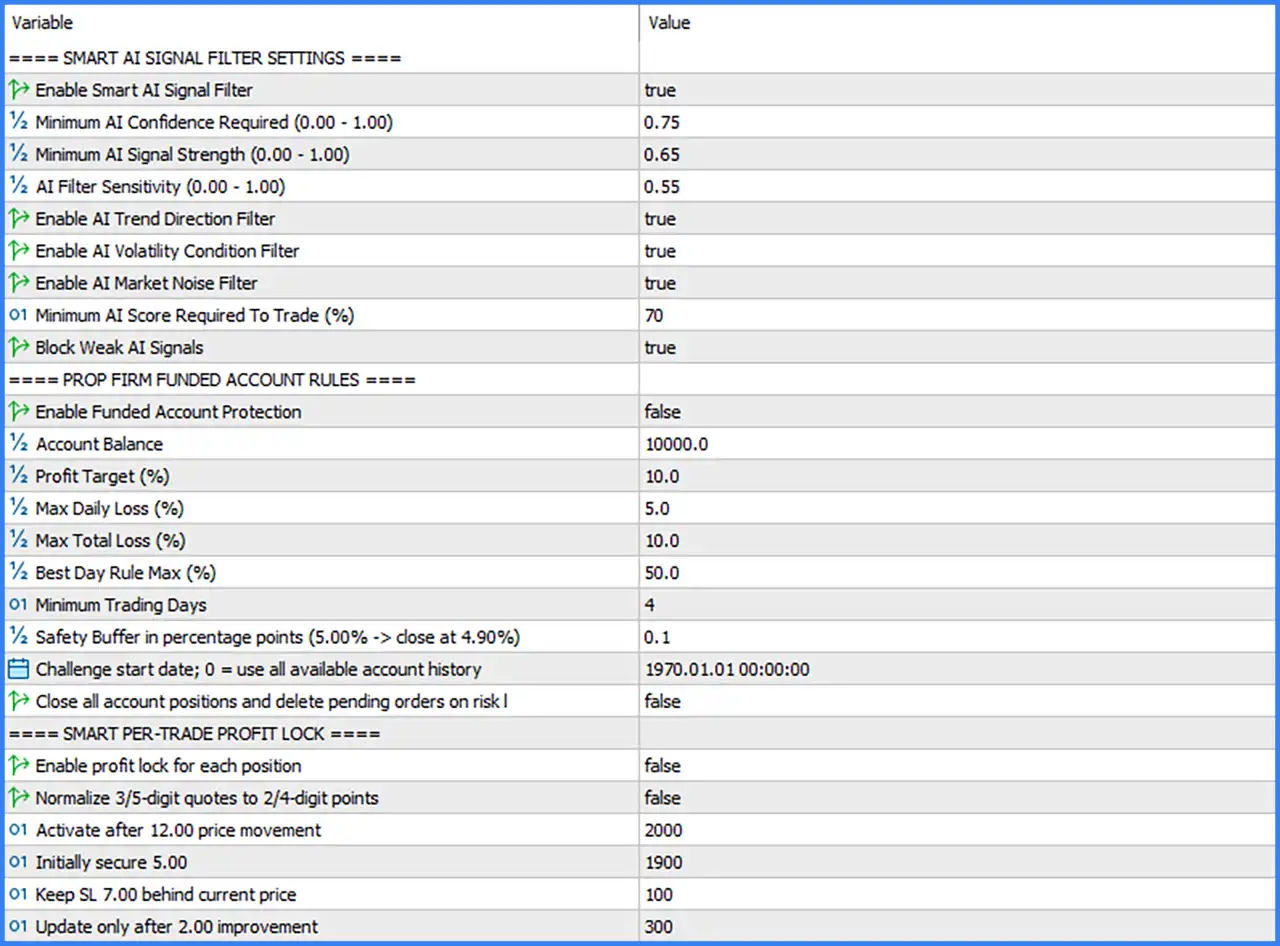
🔹 Enable Smart AI Signal Filter = true: Enables the Smart AI Signal Filter, allowing the EA to apply its configured AI-based signal evaluation before executing trades.
🔹 Minimum AI Confidence Required (0.00 - 1.00) = 0.75: Sets the minimum AI confidence threshold to 0.75, requiring a confidence score of at least 75% on the displayed 0.00–1.00 scale.
🔹 Minimum AI Signal Strength (0.00 - 1.00) = 0.65: Sets the minimum AI signal strength to 0.65, requiring a signal strength score of at least 65% on the configured scale.
🔹 AI Filter Sensitivity (0.00 - 1.00) = 0.55: Sets AI filter sensitivity to 0.55, defining the sensitivity level used by the AI signal evaluation system.
🔹 Enable AI Trend Direction Filter = true: Enables AI trend direction filtering, allowing the EA to evaluate market direction before accepting trading signals.
🔹 Enable AI Volatility Condition Filter = true: Enables AI volatility condition filtering, allowing the EA to evaluate market volatility when determining whether trading conditions are suitable.
🔹 Enable AI Market Noise Filter = true: Enables the AI market noise filter, helping the EA reject signals associated with unfavorable or noisy market conditions.
🔹 Minimum AI Score Required To Trade (%) = 70: Sets the minimum AI score required for trading to 70%, establishing the minimum score a signal must achieve before it can qualify for execution.
🔹 Block Weak AI Signals = true: Enables weak-signal blocking, preventing the EA from accepting trading opportunities that fail to meet its configured AI signal quality requirements.
Prop Firm Funded Account Rules
This section provides configurable account protection parameters for traders using funded accounts or proprietary trading firm challenges.
🔹 Enable Funded Account Protection = false: Disables the funded account protection system, meaning the EA does not activate the configured proprietary trading account restrictions by default.
🔹 Account Balance = 10000.0: Sets the reference account balance to 10,000.0, providing the starting balance used by the funded account rule calculations.
🔹 Profit Target (%) = 10.0: Sets the funded account profit target to 10.0%, defining the configured profit objective relative to the reference account balance.
🔹 Max Daily Loss (%) = 5.0: Sets the maximum daily loss threshold to 5.0%, defining the configured daily drawdown limit for funded account protection.
🔹 Max Total Loss (%) = 10.0: Sets the maximum total loss threshold to 10.0%, establishing the configured overall drawdown restriction relative to the applicable account reference.
🔹 Best Day Rule Max (%) = 50.0: Sets the Best Day Rule maximum to 50.0%, defining the configured upper percentage associated with the best-day consistency requirement.
🔹 Minimum Trading Days = 4: Sets the minimum trading-day requirement to 4 days, defining the number of trading days required by the funded account configuration.
🔹 Safety Buffer in percentage points (5.00% -> close at 4.90%) = 0.1: Sets the safety buffer to 0.1 percentage points, providing an additional margin before the configured risk threshold is reached; the displayed example indicates a 5.00% limit with a protective level of 4.90%.
🔹 Challenge start date; 0 = use all available account history = 1970.01.01 00:00:00: Sets the challenge start date to January 1, 1970, at 00:00:00, representing the displayed default date for calculating account performance history; the description also states that 0 can be used to select all available account history.
🔹 Close all account positions and delete pending orders on risk limit = false: Disables the automatic account-wide emergency action, meaning the EA will not activate this particular option to close all open positions and delete pending orders when a configured risk limit is reached.
Smart Per-Trade Profit Lock
The Smart Per-Trade Profit Lock section contains parameters designed to secure profits on individual positions by adjusting their Stop Loss levels as the market moves favorably.
🔹 Enable profit lock for each position = false: Disables individual trade profit locking, meaning the EA does not activate this position-level profit protection feature by default.
🔹 Normalize 3/5-digit quotes to 2/4-digit points = false: Disables quote normalization, meaning the EA does not apply the optional conversion of 3-digit and 5-digit broker quotes into 2-digit and 4-digit point conventions through this setting.
🔹 Activate after 12.00 price movement = 2000: Sets the activation parameter to 2000, defining the configured price-movement threshold associated with the displayed 12.00 movement description before the profit-lock mechanism becomes active.
🔹 Initially secure 5.00 = 1900: Sets the initial profit-security parameter to 1900, defining the configured amount associated with the displayed 5.00 initial secured-profit description.
🔹 Keep SL 7.00 behind current price = 100: Sets the Stop Loss distance parameter to 100, defining the configured distance associated with keeping the protective Stop Loss 7.00 behind the current market price.
🔹 Update only after 2.00 improvement = 300: Sets the Stop Loss update parameter to 300, defining the configured improvement threshold associated with the displayed 2.00 price improvement before another adjustment is made.
Conclusion
Black EA MT5 provides a comprehensive automated trading configuration combining AI-based signal filtering, smart lot scaling, economic news protection, and funded account risk management.
Its default configuration is centered on XAUUSD trading using the H1 timeframe, with M15 also supported. The EA uses a default lot size of 0.1 and a maximum spread setting of 80.0.
One of its key components is the Smart AI Signal Filter, which is enabled by default with a minimum confidence requirement of 0.75, minimum signal strength of 0.65, and minimum trading score of 70%. Trend direction, volatility, and market noise filters are also enabled to provide additional signal evaluation.
The economic news filter is enabled, with high-impact news blocking active and 30-minute restrictions before and after qualifying announcements. USD and EUR news filtering are both enabled.
For risk management, Black EA MT5 includes optional smart lot scaling, drawdown recovery, funded account protection, and individual trade profit locking. However, these four protection features are disabled in the supplied default configuration.
Overall, Black EA MT5 offers multiple adjustable trading and risk management components suitable for traders who want to customize automated Gold trading strategies. Before deploying it on a live account, traders should test the AI filtering parameters, lot sizing, news protection, and funded account restrictions through backtesting and forward testing.