

This guide walks through the inputs of Black Bird EA MT4 with the values recommended for live trading. The set files that come with the EA already contain these settings, so you can load them in one click and adjust only what your broker or account needs.
🔢 Black Bird EA MT4 Settings Guide – Complete Parameters & Configuration
Black Bird EA MT4 is a specialized automated trading Expert Advisor designed with configurable trend-based execution, position sizing, money management, time controls, gap filtering and risk-management parameters.
The settings panel provides traders with detailed control over lot size, maximum lot exposure, trading mode, market conditions, time filters, gap settings, profit targets, stop-loss protection and trade identification.
With its “WORK ON TREND” configuration and multiple market-condition levels, Black Bird EA MT4 can be customized for different trading environments and risk preferences.
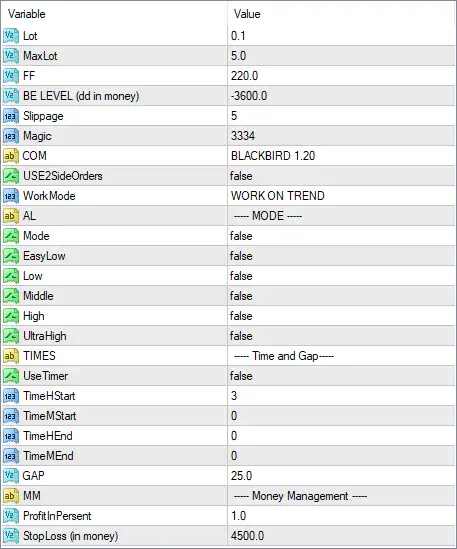
General Trading Settings
🔹 Lot: 0.1 — Sets the initial trading lot size to 0.1, defining the default volume used when the EA opens a position.
🔹 MaxLot: 5.0 — Sets the maximum permitted lot size to 5.0, limiting the highest position volume that the EA can use.
🔹 FF: 220.0 — Sets the FF parameter to 220.0. This value is part of the EA's internal trading configuration and should be retained according to the original strategy settings.
🔹 BE LEVEL (dd in money): -3600.0 — Sets the Break-Even level based on drawdown in monetary terms to -3600.0. This parameter controls the configured monetary threshold associated with the EA's break-even logic.
🔹 Slippage: 5 — Allows a maximum configured execution slippage of 5 points, helping control the acceptable difference between requested and executed prices.
🔹 Magic: 3334 — Assigns the Magic Number 3334 to Black Bird EA MT4, allowing the EA to identify and manage its own trades separately from other strategies.
🔹 COM: BLACKBIRD 1.20 — Sets the trade comment to BLACKBIRD 1.20, providing an identification label for trades generated by the EA.
🔹 USE2SideOrders: false — Disables the use of two-sided orders, so the EA is not configured to simultaneously utilize both directional order sides through this function.
Work Mode & Trend Configuration
🔹 WorkMode: WORK ON TREND — Configures the EA to WORK ON TREND, indicating that the selected trading approach is based on trend conditions.
🔹 AL: ---- MODE ---- — Section label identifying the available trading-mode configuration options.
🔹 Mode: false — Disables the general Mode option.
🔹 EasyLow: false — Disables the EasyLow market/trading condition.
🔹 Low: false — Disables the Low condition.
🔹 Middle: false — Disables the Middle condition.
🔹 High: false — Disables the High condition.
🔹 UltraHigh: false — Disables the UltraHigh condition.
These market-level parameters appear to provide selectable operating conditions. In the supplied configuration, all five levels are set to false, meaning none of these optional mode switches is currently enabled.
Time & Gap Settings
🔹 TIMES: ---- Time and Gap ---- — Section label for the EA's time-management and gap-related parameters.
🔹 UseTimer: false — Disables the timer-based trading restriction.
🔹 TimeHStart: 3 — Sets the timer start-hour parameter to 3.
🔹 TimeMStart: 0 — Sets the timer start-minute parameter to 0, giving a configured start time of 03:00 when the timer function is enabled.
🔹 TimeHEnd: 0 — Sets the timer end-hour parameter to 0.
🔹 TimeMEnd: 0 — Sets the timer end-minute parameter to 0, giving a configured end time of 00:00 when the timer function is enabled.
🔹 GAP: 25.0 — Sets the gap parameter to 25.0, defining the configured gap threshold used by the EA's gap-related trading logic.
Money Management Settings
🔹 MM: ---- Money Management ---- — Section label identifying the money-management configuration.
🔹 ProfitInPersent: 1.0 — Sets the profit target parameter to 1.0, representing the configured profit percentage level used by the money-management logic.
🔹 StopLoss (in money): 4500.0 — Sets the monetary Stop Loss threshold to 4500.0, defining the configured loss amount for the EA's money-based risk protection.
🔢 Conclusion
Black Bird EA MT4 provides a compact but highly configurable framework for automated trend-based trading. The supplied configuration uses a 0.1 initial lot, 5.0 maximum lot, 3334 Magic Number, and BLACKBIRD 1.20 trade comment, while the primary operating mode is set to WORK ON TREND.
The configuration also includes a 25.0 GAP parameter, 1.0 profit percentage target, and 4500.0 monetary Stop Loss setting. The timer is currently disabled, and the optional EasyLow, Low, Middle, High, and UltraHigh modes are all set to false. Traders should carefully test these parameters with historical data and on a demo account before applying them to live trading, particularly the lot-size, MaxLot, recovery/break-even, and monetary Stop Loss settings.
🔢 FAQs
❓ What is the default lot size of Black Bird EA MT4?
The configured Lot value is 0.1, while MaxLot is set to 5.0.
❓ What trading strategy does Black Bird EA MT4 use in these settings?
The WorkMode is set to WORK ON TREND, indicating that the supplied configuration is designed around trend-based trading conditions.
❓ What is the Magic Number of Black Bird EA MT4?
The Magic Number is 3334, which allows the EA to distinguish its positions from trades generated by other Expert Advisors or manual trading.
❓ Is the timer function enabled?
No. UseTimer = false, so the configured TimeHStart = 3, TimeMStart = 0, TimeHEnd = 0, and TimeMEnd = 0 values are not actively restricting trading through the timer function.
❓ What are the money-management settings?
The EA has ProfitInPersent = 1.0 and StopLoss (in money) = 4500.0. These parameters define the configured profit-percentage and monetary-loss management levels.
Get Black Bird EA MT4
Download Black Bird EA MT4 with its set files, read the full product details and requirements here: Black Bird EA MT4 →