

Installation information
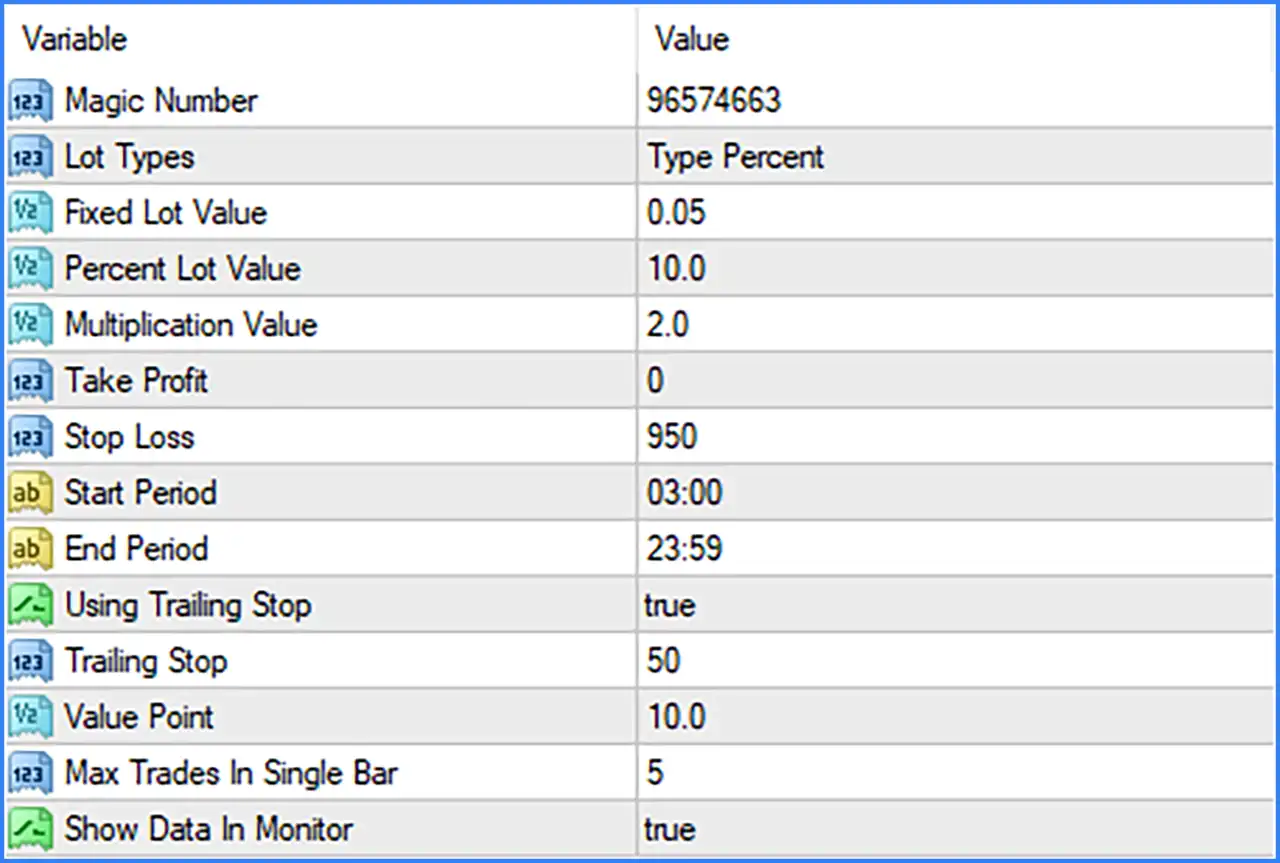
Black Diamond Special EA is an automated trading system featuring configurable position sizing, lot multiplication, trading-hour restrictions, Stop-Loss protection, and trailing-stop management. Its input parameters also include trade identification, maximum trade frequency per bar, and an on-chart data monitoring option.

Trade Identification & Money Management
🔹 Magic Number [Magic Number] — Default: 96574663 — Assigns a unique identification number to trades opened by Black Diamond Special EA. This helps distinguish the EA's positions from manually opened trades and positions managed by other Expert Advisors.
🔹 Lot Types [Lot Types] — Default: Type Percent — Selects the position-sizing method used by the EA. The displayed default is Type Percent, indicating percentage-based lot sizing rather than the fixed-lot option.
🔹 Fixed Lot Value [Fixed Lot Value] — Default: 0.05 — Defines the lot size used when the fixed-lot calculation mode is selected. The default value is 0.05 lots.
🔹 Percent Lot Value [Percent Lot Value] — Default: 10.0 — Defines the percentage value used by the percentage-based position-sizing mode. The default is 10.0. The exact capital reference and lot calculation formula are not specified in the Inputs panel.
🔹 Multiplication Value [Multiplication Value] — Default: 2.0 — Sets the lot multiplication factor used by the EA's position-sizing logic. The default multiplier is 2.0. Its exact activation conditions and calculation sequence are not shown.
Stop-Loss & Take-Profit
🔹 Take Profit [Take Profit] — Default: 0 — Defines the Take-Profit parameter for the EA's trades. The default value is 0, which may represent a disabled fixed Take-Profit setting, depending on the EA's internal implementation.
🔹 Stop Loss [Stop Loss] — Default: 950 — Sets the Stop-Loss parameter used to define the trade's loss-protection level. The screenshot does not specify whether this value represents points, pips, or another distance unit.
Trading Hours
🔹 Start Period [Start Period] — Default: 03:00 — Defines the starting time of the permitted trading period. The EA uses this setting as the beginning of its configured trading schedule.
🔹 End Period [End Period] — Default: 23:59 — Defines the ending time of the permitted trading period. The default setting allows the configured trading period to continue until 23:59.
Trailing Stop Management
🔹 Using Trailing Stop [Using Trailing Stop] — Default: true — Enables or disables the trailing-stop function. When set to true, the EA can manage the Stop-Loss through its trailing mechanism.
🔹 Trailing Stop [Trailing Stop] — Default: 50 — Defines the trailing-stop distance or parameter used by the EA. Its exact measurement unit and adjustment rules are not specified in the screenshot.
🔹 Value Point [Value Point] — Default: 10.0 — Defines an additional numerical parameter used by the EA's point-value configuration. The screenshot does not provide its precise calculation or relationship with the trailing-stop function.
Trade Frequency & Monitoring
🔹 Max Trades In Single Bar [Max Trades In Single Bar] — Default: 5 — Sets the maximum number of trades that the EA can open within a single chart bar. The default configuration allows up to 5 trades per bar.
🔹 Show Data In Monitor [Show Data In Monitor] — Default: true — Enables or disables the display of EA information in the monitoring interface. When enabled, the corresponding data display is active.
Conclusion
Black Diamond Special EA offers a configurable trading framework with percentage-based or fixed-lot position sizing, lot multiplication, trading-hour controls, Stop-Loss protection, and trailing-stop management. Its additional parameters allow the trading frequency to be controlled through a maximum of 5 trades per bar and provide an on-screen monitoring option.
The displayed configuration uses percentage-based money management with a value of 10.0, a multiplication factor of 2.0, a Stop-Loss of 950, and an enabled trailing-stop function. Particular attention should be given to the lot-sizing formula, multiplication behaviour, and the units used by the Stop-Loss and trailing-stop parameters. These details should be verified before live deployment to ensure that the EA's exposure and trade management are consistent with the intended risk level.