

This guide walks through the inputs of BTC AI EA MT5 with the values recommended for live trading. The set files that come with the EA already contain these settings, so you can load them in one click and adjust only what your broker or account needs.
🔢 BtcAI EA MT5 Settings Explained – Complete Parameter Guide
BtcAI EA is an advanced cryptocurrency trading Expert Advisor for MetaTrader 5 designed to automate trading on major crypto pairs using technical analysis, intelligent position sizing and structured trade management.
The EA combines RSI, MACD, Moving Average, and Fibonacci levels with configurable risk management, partial profit-taking, and trailing stop features to help traders optimize Bitcoin and Ethereum trading strategies.

🔢 Installation Panel Parameters
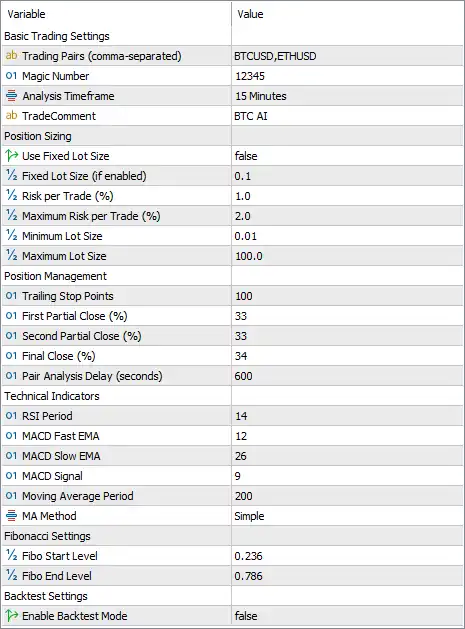
Below are the details of the parameters in the advisor’s trading system settings table:
🔶 Basic Trading Settings
🔹 Trading Pairs (comma-separated) = BTCUSD,ETHUSD – Specifies the cryptocurrency symbols that the EA will monitor and trade.
🔹 Magic Number = 12345 – Assigns the unique Magic Number 12345 so the EA can identify and manage its own positions.
🔹 Analysis Timeframe = 15 Minutes – Performs market analysis and trade execution using the 15-minute (M15) chart.
🔹 TradeComment = BTC AI – Adds the trade comment "BTC AI" to every order opened by the EA.
🔶 Position Sizing
🔹 Use Fixed Lot Size = false – Disables fixed lot trading and allows the EA to calculate position size using risk management.
🔹 Fixed Lot Size (if enabled) = 0.1 – Uses a fixed trading volume of 0.1 lots when fixed lot mode is enabled.
🔹 Risk per Trade (%) = 1.0 – Risks 1.0% of the account balance or equity on each trade.
🔹 Maximum Risk per Trade (%) = 2.0 – Limits the maximum allowable risk on any single trade to 2.0%.
🔹 Minimum Lot Size = 0.01 – Sets the smallest trade volume allowed to 0.01 lots.
🔹 Maximum Lot Size = 100.0 – Restricts the largest possible trade size to 100.0 lots.
🔶 Position Management
🔹 Trailing Stop Points = 100 – Activates or maintains the trailing stop using a distance of 100 points.
🔹 First Partial Close (%) = 33 – Closes 33% of the position when the first profit target is reached.
🔹 Second Partial Close (%) = 33 – Closes another 33% of the remaining position at the second profit target.
🔹 Final Close (%) = 34 – Closes the final 34% of the position at the last exit target.
🔹 Pair Analysis Delay (seconds) = 600 – Waits 600 seconds (10 minutes) before reanalyzing the selected trading pairs.
🔶 Technical Indicators
🔹 RSI Period = 14 – Uses a 14-period Relative Strength Index (RSI) for momentum analysis.
🔹 MACD Fast EMA = 12 – Sets the fast Exponential Moving Average period for the MACD indicator to 12.
🔹 MACD Slow EMA = 26 – Sets the slow Exponential Moving Average period for the MACD indicator to 26.
🔹 MACD Signal = 9 – Uses a 9-period signal line for MACD confirmation.
🔹 Moving Average Period = 200 – Applies a 200-period Moving Average to identify the primary market trend.
🔹 MA Method = Simple – Uses the Simple Moving Average (SMA) calculation method.
🔶 Fibonacci Settings
🔹 Fibo Start Level = 0.236 – Sets the Fibonacci starting retracement level to 0.236.
🔹 Fibo End Level = 0.786 – Sets the Fibonacci ending retracement level to 0.786.
🔶 Backtest Settings
🔹 Enable Backtest Mode = false – Disables backtesting mode so the EA operates in normal live trading mode.
🔢 Conclusion
BtcAI EA MT5 provides a balanced combination of cryptocurrency trading automation, intelligent risk management, and technical indicator analysis. With support for BTCUSD and ETHUSD, configurable percentage-based risk, RSI, MACD, 200-period SMA filtering, Fibonacci retracement levels, partial profit-taking, and trailing stop management, the EA offers traders a flexible framework for both live trading and strategy optimization.
🔢 FAQs
❓ Which cryptocurrency pairs does BtcAI EA MT5 support?
The default configuration trades BTCUSD and ETHUSD, and additional symbols may be added if supported by your broker.
❓ Does BtcAI EA MT5 use percentage-based risk management?
Yes. The EA is configured to risk 1.0% per trade, with a maximum risk limit of 2.0%.
❓ What timeframe is recommended for BtcAI EA MT5?
The default Analysis Timeframe is 15 Minutes (M15).
❓ Which technical indicators are built into BtcAI EA MT5?
The EA uses RSI (14), MACD (12, 26, 9), a 200-period Simple Moving Average, and Fibonacci retracement levels (0.236–0.786).
❓ Does BtcAI EA MT5 support partial profit-taking?
Yes. The EA closes 33%, 33%, and 34% of the position across three profit targets while also supporting a 100-point trailing stop for trade management.
Get BTC AI EA MT5
Download BTC AI EA MT5 with its set files, read the full product details and requirements here: BTC AI EA MT5 →