

This guide walks through the inputs of Squid X EA MT5 with the values recommended for live trading. The set files that come with the EA already contain these settings, so you can load them in one click and adjust only what your broker or account needs.
Squid X EA MT5 Settings Guide
Squid X EA is an automated Expert Advisor configured specifically for XAU (Gold) trading. The displayed version is Squid X, with H1 as the recommended timeframe and a BUY-only trading mode. The EA provides configurable risk management, fixed or percentage-based lot calculation, Take Profit and Stop Loss controls, daily order limits, trading-hour restrictions, recovery management, spread and slippage protection, drawdown settings for Prop Firm-style risk management, Trendline analysis, and Fibonacci Retracement confirmation.
This combination of configurable trading and risk-management parameters allows traders to adapt Squid X EA MT5 to different account sizes, broker conditions and trading requirements.
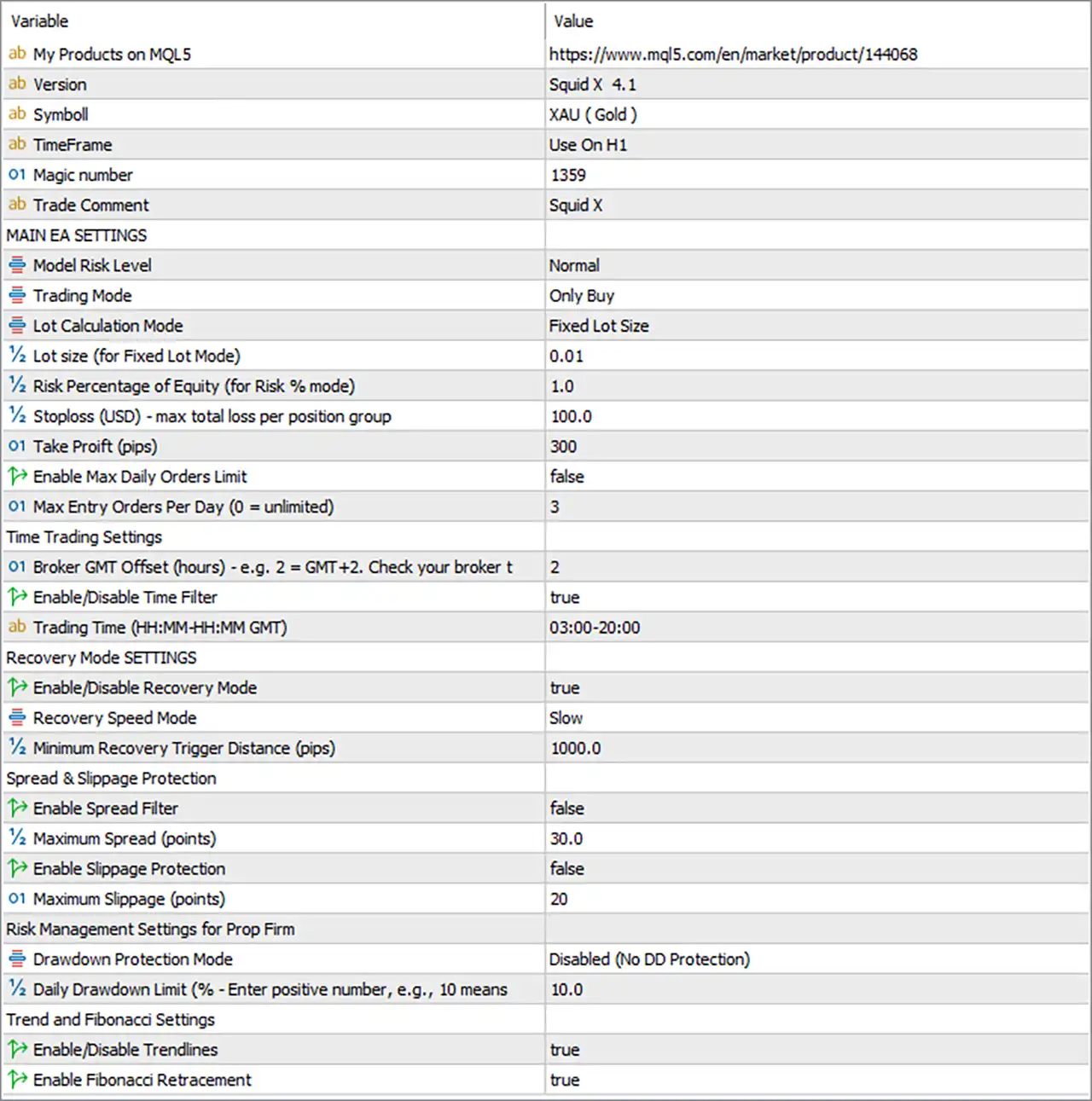
General EA Information
🔹 Symbol = XAU (Gold) — Specifies XAU (Gold) as the trading instrument for the displayed configuration.
🔹 TimeFrame = Use On H1 — Indicates that the EA is designed to be used on the H1 (1 Hour) timeframe.
🔹 Magic number = 1359 — Sets the EA's unique Magic Number to 1359, allowing its trades to be identified separately from other strategies.
🔹 Trade Comment = Squid X — Sets Squid X as the comment attached to EA-generated trades.
Main EA Settings
🔹 Model Risk Level = Normal — Sets the EA's risk profile to Normal, defining the selected overall risk-management mode.
🔹 Trading Mode = Only Buy — Restricts the current configuration to BUY trades only.
🔹 Lot Calculation Mode = Fixed Lot Size — Selects fixed-lot sizing as the active position-volume calculation method.
🔹 Lot size (for Fixed Lot Mode) = 0.01 — Sets the fixed trading volume to 0.01 lots.
🔹 Risk Percentage of Equity (for Risk % mode) = 1.0 — Sets the equity risk percentage to 1.0% when the Risk % lot-calculation mode is selected.
🔹 Stoploss (USD) - max total loss per position group = 100.0 — Sets the maximum total loss per position group to 100.0 USD according to the EA's internal risk-management calculation.
🔹 Take Profit (pips) = 300 — Sets the Take Profit target to 300 pips.
🔹 Enable Max Daily Orders Limit = false — Disables the maximum daily order restriction.
🔹 Max Entry Orders Per Day (0 = unlimited) = 3 — Sets the maximum daily entry-order value to 3; however, the daily-order limit is currently disabled because Enable Max Daily Orders Limit = false.
Time Trading Settings
🔹 Broker GMT Offset (hours) = 2 — Sets the broker's GMT offset to +2 hours for time-based calculations.
🔹 Enable/Disable Time Filter = true — Enables the EA's trading-time filter.
🔹 Trading Time (HH:MM-HH GMT) = 03:00-20:00 — Restricts the EA's configured trading period to 03:00–20:00 GMT.
Recovery Mode Settings
🔹 Enable/Disable Recovery Mode = true — Enables the EA's Recovery Mode.
🔹 Recovery Speed Mode = Slow — Selects Slow as the Recovery Speed Mode.
🔹 Minimum Recovery Trigger Distance (pips) = 1000.0 — Sets the minimum distance required before the recovery mechanism can be triggered to 1000.0 pips.
Spread & Slippage Protection
🔹 Enable Spread Filter = false — Disables the spread filter in the current configuration.
🔹 Maximum Spread (points) = 30.0 — Sets the maximum spread threshold to 30.0 points if the spread filter is enabled.
🔹 Enable Slippage Protection = false — Disables slippage protection.
🔹 Maximum Slippage (points) = 20 — Sets the maximum permitted slippage parameter to 20 points when slippage protection is enabled.
Risk Management Settings for Prop Firm
🔹 Drawdown Protection Mode = Disabled (No DD Protection) — Disables the dedicated drawdown protection mechanism.
🔹 Daily Drawdown Limit (% - Enter positive number, e.g., 10 means 10%) = 10.0 — Sets the daily drawdown threshold to 10.0% when the drawdown protection mode is enabled.
Trend and Fibonacci Settings
🔹 Enable/Disable Trendlines = true — Enables Trendline analysis within the EA's trading logic.
🔹 Enable Fibonacci Retracement = true — Enables Fibonacci Retracement analysis as part of the EA's trading setup.
Current Configuration Summary
🔹 Trading Instrument: The displayed configuration is designed for XAU (Gold).
🔹 EA Version: The Inputs identify the software as Squid X 4.1.
🔹 Timeframe: The EA is configured for use on H1 (1 Hour).
🔹 Trading Direction: The current Trading Mode is Only Buy, restricting the setup to BUY positions.
🔹 Lot Calculation: The active calculation method is Fixed Lot Size, using 0.01 lots.
🔹 Risk Percentage: A 1.0% equity-risk setting is available when Risk % mode is selected, but the current mode is Fixed Lot Size.
🔹 Stop Loss Protection: The maximum total loss per position group is configured at 100.0 USD.
🔹 Take Profit: The configured Take Profit is 300 pips.
🔹 Daily Orders: The maximum daily order setting is 3, but the feature is currently disabled.
🔹 Trading Hours: The Time Filter is enabled for 03:00–20:00 GMT, with a broker GMT offset of 2 hours.
🔹 Recovery System: Recovery Mode is enabled with Slow recovery speed and a 1000.0-pip minimum recovery trigger distance.
🔹 Spread Protection: The Spread Filter is disabled, although its threshold is configured at 30.0 points.
🔹 Slippage Protection: Slippage protection is disabled, with a configured maximum slippage value of 20 points.
🔹 Drawdown Protection: Dedicated Drawdown Protection is disabled, while the configured daily drawdown limit is 10.0%.
🔹 Trend Analysis: Trendlines are enabled.
🔹 Fibonacci Analysis: Fibonacci Retracement is enabled.
Important Notes About the Settings
🔹 Fixed Lot Mode: Because Lot Calculation Mode = Fixed Lot Size, the active volume is 0.01 lots. The 1.0% Risk Percentage of Equity setting applies when Risk % mode is selected.
🔹 Daily Order Limit: Max Entry Orders Per Day = 3 does not currently restrict trading because Enable Max Daily Orders Limit = false.
🔹 Trading Time: The EA uses 03:00–20:00 GMT, while Broker GMT Offset = 2 is configured for broker-time calculations.
🔹 Recovery Mode: Recovery Mode is active, but the selected Slow mode requires a minimum 1000.0-pip distance before the recovery mechanism can be triggered.
🔹 Spread Filter: The 30.0-point maximum spread value is configured but inactive because Enable Spread Filter = false.
🔹 Slippage Protection: The 20-point maximum slippage setting is configured but inactive because Enable Slippage Protection = false.
🔹 Drawdown Protection: The 10.0% daily drawdown limit is configured, but the protection itself is disabled through Drawdown Protection Mode = Disabled (No DD Protection).
🔹 Trend and Fibonacci Tools: Both Trendlines = true and Fibonacci Retracement = true, so these analytical components are enabled in the displayed configuration.
Conclusion
Squid X EA MT5 is configured as a Gold-focused automated trading system using XAU (Gold) on the H1 timeframe. The displayed setup uses Only Buy trading, Fixed Lot Size, and a 0.01-lot position size. It also includes a 300-pip Take Profit, 100.0 USD maximum total loss per position group, and a 03:00–20:00 GMT trading window.
The configuration has Recovery Mode enabled with Slow recovery speed and a 1000.0-pip trigger distance. Trendline and Fibonacci Retracement analysis are also enabled. At the same time, Spread Filter, Slippage Protection, and dedicated Drawdown Protection are disabled, although their respective thresholds remain configured.
Before using these settings on a live Gold account, traders should verify the EA's pip/point calculations against their broker's XAUUSD contract specifications and carefully test the Recovery Mode and position-management behavior. Demo and Strategy Tester validation can help confirm how the displayed parameters translate into actual trading conditions.
Get Squid X EA MT5
Download Squid X EA MT5 with its set files, read the full product details and requirements here: Squid X EA MT5 →