

Introduction
Classic Breakout Surfer MT5 is an automated trading Expert Advisor (EA) designed for the MetaTrader 5 platform. Its configuration focuses on breakout trading, dynamic position sizing, risk management, and automated trade protection.

The EA includes customizable BUY and SELL trading options, order limits, distance scaling, and spike protection functionality. It also provides risk-based position sizing, fixed lot configuration, maximum total risk controls, and daily loss limit parameters.
Another important feature is its integrated economic news filter, which can restrict trading around high-impact USD announcements. The EA also includes an optional trading dashboard, customizable panel positioning, and chart theme settings.
This guide explains all available input parameters, including their default values and functions, to help traders understand and configure Classic Breakout Surfer MT5.
General Trading Settings
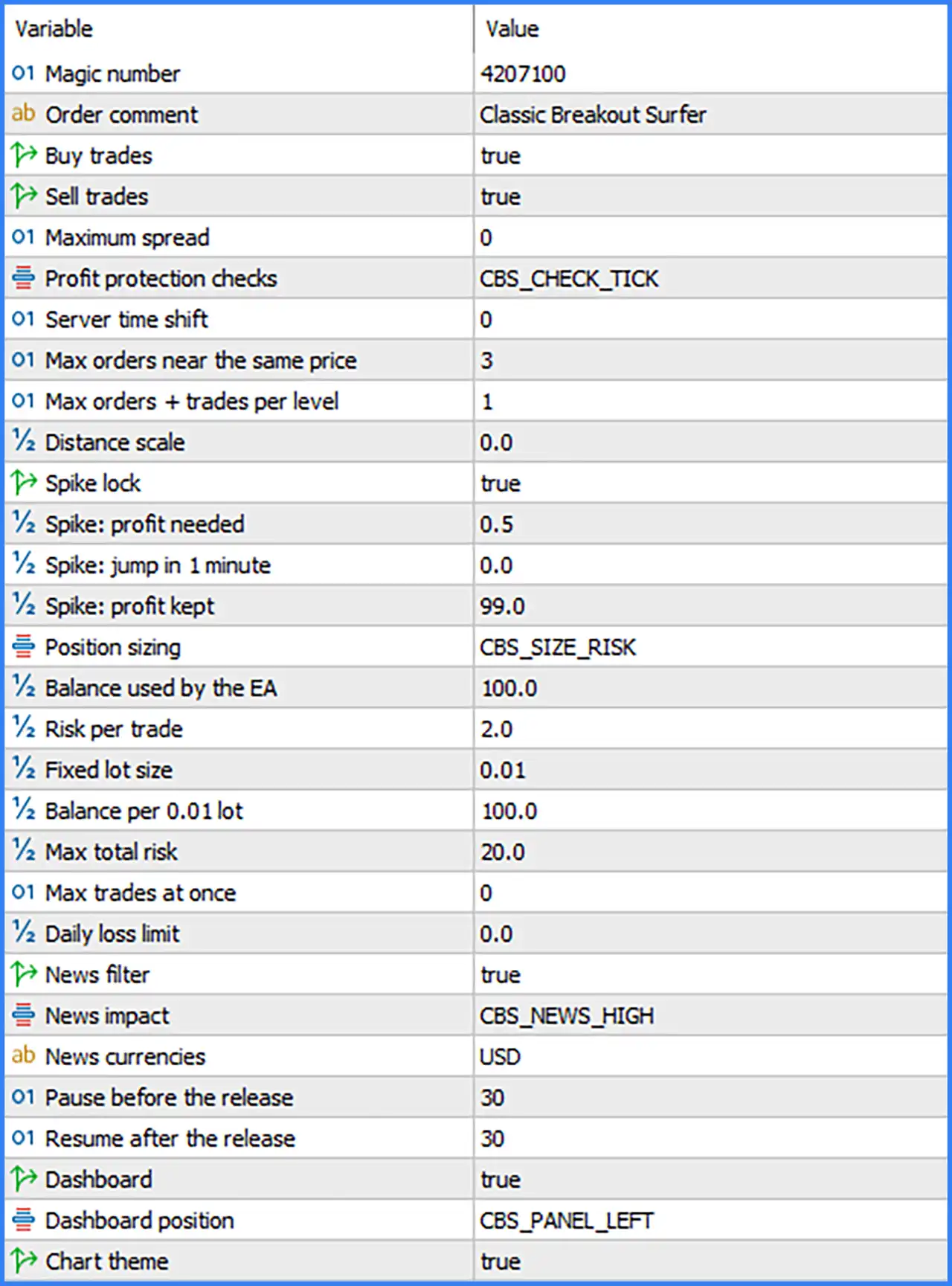
🔹 Magic number: 4207100 – Assigns the unique Magic Number 4207100 to trades opened by Classic Breakout Surfer MT5, allowing the EA to identify and manage its positions separately from manual trades and other Expert Advisors.
🔹 Order comment: Classic Breakout Surfer – Sets the custom comment attached to orders, making it easier to identify trades generated by this trading system in the MetaTrader 5 terminal.
🔹 Buy trades: true – Enables BUY trading functionality, allowing the EA to identify and execute potential bullish breakout opportunities.
🔹 Sell trades: true – Enables SELL trading functionality, allowing the EA to identify and execute potential bearish breakout opportunities.
🔹 Maximum spread: 0 – Sets the maximum permitted spread parameter to 0. This may indicate that the spread restriction is disabled or that the EA uses a special internal interpretation for this value.
🔹 Profit protection checks: CBS_CHECK_TICK – Selects the tick-based profit protection checking mode, allowing the EA to evaluate its profit protection conditions using incoming market price ticks.
🔹 Server time shift: 0 – Sets the server time adjustment to 0, meaning no additional time shift is applied through this parameter.
🔹 Max orders near the same price: 3 – Limits the number of orders permitted near the same price level to 3, helping prevent excessive order concentration around similar entry prices.
🔹 Max orders + trades per level: 1 – Sets the maximum combined number of orders and trades permitted at each price level to 1, controlling order distribution across different trading levels.
🔹 Distance scale: 0.0 – Sets the distance scaling factor to 0.0. This parameter is associated with adjusting trading distances or spacing, although its exact calculation depends on the EA's internal algorithm.
Spike Protection Settings
🔹 Spike lock: true – Enables spike protection functionality, allowing the EA to apply its configured locking mechanism when sudden market price movements or spike-related conditions are detected.
🔹 Spike: profit needed: 0.5 – Sets the required profit threshold for the spike protection mechanism to 0.5, defining the configured profit condition associated with activating this protection logic.
🔹 Spike: jump in 1 minute: 0.0 – Sets the one-minute price jump threshold to 0.0. This parameter is used by the spike detection system to evaluate sudden market movements within a one-minute period.
🔹 Spike: profit kept: 99.0 – Sets the spike protection profit retention parameter to 99.0, defining the configured amount or percentage of profit intended to be retained by the spike management mechanism. Its exact unit depends on the EA's internal implementation.
Money Management and Position Sizing Settings
🔹 Position sizing: CBS_SIZE_RISK – Selects the risk-based position sizing mode, allowing the EA to calculate trading volume according to its configured risk and account balance parameters.
🔹 Balance used by the EA: 100.0 – Sets the account balance allocation parameter to 100.0, defining the balance reference or percentage used by the EA's position sizing calculations.
🔹 Risk per trade: 2.0 – Sets the configured risk value per trade to 2.0. This parameter determines the intended risk allocation for individual positions under the selected risk-based position sizing mode.
🔹 Fixed lot size: 0.01 – Sets the fixed trading volume to 0.01 lots, providing the default position size when fixed lot sizing is used instead of risk-based calculations.
🔹 Balance per 0.01 lot: 100.0 – Defines the account balance reference of 100.0 for every 0.01 lot of trading volume, helping the EA calculate position sizes according to the available account balance.
🔹 Max total risk: 20.0 – Sets the maximum total risk parameter to 20.0, providing an overall risk limitation for the EA's position management system.
🔹 Max trades at once: 0 – Sets the maximum simultaneous trades parameter to 0. This may represent an unlimited or disabled explicit trade limit, depending on the EA's internal interpretation of zero.
🔹 Daily loss limit: 0.0 – Sets the daily loss limit to 0.0. This may indicate that the dedicated daily loss restriction is disabled under the current configuration.
Economic News Filter Settings
🔹 News filter: true – Enables the economic news filter, allowing Classic Breakout Surfer MT5 to restrict trading activity around scheduled economic announcements.
🔹 News impact: CBS_NEWS_HIGH – Selects the high-impact news filtering mode, instructing the EA to focus on important economic announcements classified as high impact.
🔹 News currencies: USD – Specifies USD as the currency monitored by the economic news filter, allowing the EA to identify relevant US economic announcements that may influence financial markets.
🔹 Pause before the release: 30 – Configures a 30-minute trading restriction before scheduled economic news releases, helping reduce exposure to volatility leading up to important announcements.
🔹 Resume after the release: 30 – Configures a 30-minute waiting period after economic news releases before the EA resumes normal trading activity.
Dashboard and Chart Display Settings
🔹 Dashboard: true – Enables the EA's on-chart dashboard, allowing traders to view available trading information and system status directly within the MetaTrader 5 interface.
🔹 Dashboard position: CBS_PANEL_LEFT – Sets the dashboard display position to the left side of the chart, providing a consistent location for monitoring the EA's trading information.
🔹 Chart theme: true – Enables the chart theme customization feature, allowing the EA to apply its configured visual chart presentation.
Conclusion
Classic Breakout Surfer MT5 combines automated breakout trading with flexible position sizing, spike protection, and economic news filtering. Its configuration provides separate BUY and SELL trading controls, order distribution limits, and risk management parameters.
The displayed settings use both BUY and SELL trading enabled, a Magic Number of 4207100, and a maximum of 3 orders near the same price. The EA also uses risk-based position sizing with a risk value of 2.0, a balance reference of 100.0, and a maximum total risk parameter of 20.0.
Its spike protection and high-impact USD news filter are enabled, with a 30-minute restriction before and after scheduled news releases. Additionally, the dashboard is enabled and positioned on the left side of the chart.
Overall, Classic Breakout Surfer MT5 offers several configurable tools for breakout execution, position management, and market volatility protection. Traders should carefully verify the meaning of the risk values, zero-based settings, and spike protection parameters before deploying the EA on a live account. Backtesting and demo testing are recommended to evaluate its behavior under different market conditions.