

Introduction
Scott Welsh Heron EA is an automated trading Expert advisor (EA) designed for the MetaTrader 4 platform. Its configuration combines Moving Average (MA) parameters, Commodity Channel Index (CCI) indicators, variable lot sizing, and time-based trading controls to manage automated trading activities.

The EA provides configurable trading sessions, allowing users to specify when the system can open trades during the week. Its Moving Average settings use different periods to configure fast and slow trend calculations, while the CCI parameters provide separate long and short signal thresholds.
For money management, Scott Welsh Heron EA supports variable position sizing based on a configurable risk percentage, alongside fixed lot settings and a maximum lot restriction. It also includes Stop Loss, Take Profit, execution filters, and automatic position closure after a specified holding period.
This guide explains all available Scott Welsh Heron EA MT4 input parameters, preserving their original names and default values to help traders understand and configure the Expert Advisor.
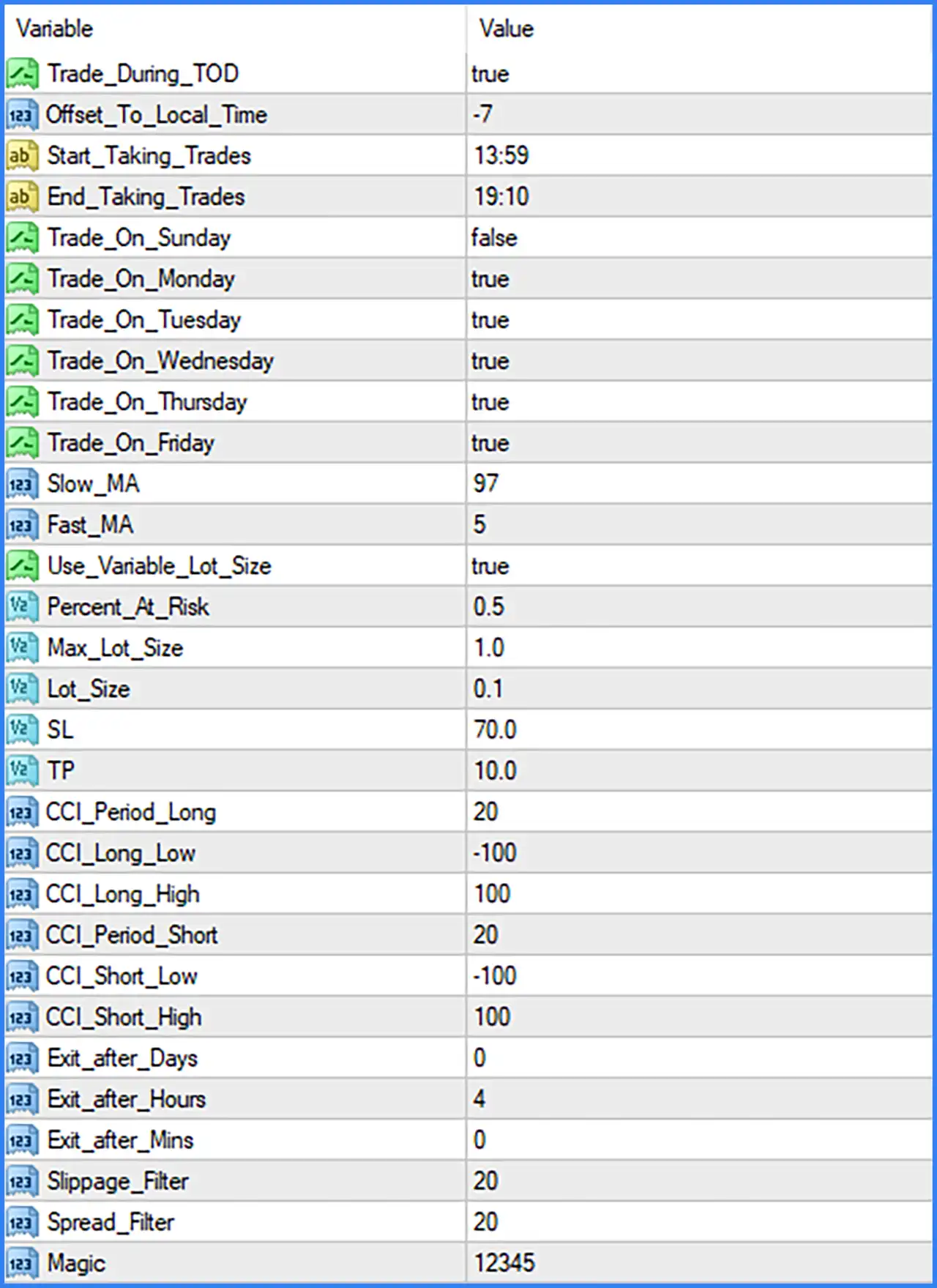
Trading Time Settings
🔹 Trade_During_TOD: true – Enables the time-of-day trading filter, allowing the EA to open trades only within the configured trading session.
🔹 Offset_To_Local_Time: -7 – Sets the time offset to -7 hours, adjusting the EA's trading schedule relative to its reference time and local time configuration.
🔹 Start_Taking_Trades: 13:59 – Defines the starting time for opening new trades at 13:59, according to the EA's adjusted time reference.
🔹 End_Taking_Trades: 19:10 – Defines the ending time for opening new trades at 19:10, preventing new entries outside the configured trading window.
🔹 Trade_On_Sunday: false – Disables trading on Sunday, preventing the EA from opening new positions on this day.
🔹 Trade_On_Monday: true – Enables automated trading on Monday, allowing the EA to evaluate and execute valid trading signals.
🔹 Trade_On_Tuesday: true – Enables automated trading on Tuesday according to the configured trading strategy and time restrictions.
🔹 Trade_On_Wednesday: true – Enables automated trading on Wednesday when the required market conditions and entry signals are satisfied.
🔹 Trade_On_Thursday: true – Enables automated trading on Thursday, allowing the EA to execute qualified trading opportunities.
🔹 Trade_On_Friday: true – Enables automated trading on Friday, subject to the configured trading session and other entry conditions.
Moving Average Settings
🔹 Slow_MA: 97 – Sets the slow Moving Average period to 97, providing a longer-term trend reference for the EA's trading signal calculations.
🔹 Fast_MA: 5 – Sets the fast Moving Average period to 5, allowing the EA to evaluate shorter-term price movements and potential changes in market direction.
Money Management and Lot Size Settings
🔹 Use_Variable_Lot_Size: true – Enables variable lot sizing, allowing the EA to calculate trading volume dynamically instead of relying exclusively on a fixed lot size.
🔹 Percent_At_Risk: 0.5 – Sets the risk percentage parameter to 0.5, defining the configured risk level used by the variable lot calculation.
🔹 Max_Lot_Size: 1.0 – Sets the maximum permitted trading volume to 1.0 lot, limiting the position size generated by the EA's lot management system.
🔹 Lot_Size: 0.1 – Sets the fixed lot size parameter to 0.1 lots, providing the reference trading volume when fixed lot sizing is used or required by the EA.
Stop Loss and Take Profit Settings
🔹 SL: 70.0 – Sets the Stop Loss parameter to 70.0, defining the configured loss protection distance for trading positions. The actual price distance depends on the EA's point or pip calculation.
🔹 TP: 10.0 – Sets the Take Profit parameter to 10.0, defining the configured profit target for closing positions automatically when the required price movement is reached.
CCI Long Trading Settings
🔹 CCI_Period_Long: 20 – Sets the CCI calculation period for long trading signals to 20, determining the number of price bars used in the Commodity Channel Index calculation.
🔹 CCI_Long_Low: -100 – Sets the lower CCI threshold for long trading conditions to -100, providing a reference level for identifying potential oversold market conditions.
🔹 CCI_Long_High: 100 – Sets the upper CCI threshold for long trading conditions to 100, establishing the upper indicator boundary used by the EA's long signal logic.
CCI Short Trading Settings
🔹 CCI_Period_Short: 20 – Sets the CCI calculation period for short trading signals to 20, determining the number of price bars used to calculate the short-side indicator.
🔹 CCI_Short_Low: -100 – Sets the lower CCI threshold for short trading conditions to -100, defining the lower reference boundary used by the EA's short signal calculations.
🔹 CCI_Short_High: 100 – Sets the upper CCI threshold for short trading conditions to 100, providing the upper indicator boundary for evaluating potential short trading opportunities.
Automatic Trade Exit Settings
🔹 Exit_after_Days: 0 – Sets the automatic position exit period in days to 0, indicating that no additional full-day holding period is specified through this parameter.
🔹 Exit_after_Hours: 4 – Sets the automatic position holding period to 4 hours, allowing the EA to close positions after the configured number of hours.
🔹 Exit_after_Mins: 0 – Sets the additional automatic exit period in minutes to 0, meaning no extra minutes are added to the configured holding period.
Trade Execution and Identification Settings
🔹 Slippage_Filter: 20 – Sets the maximum slippage filter parameter to 20, defining the permitted execution deviation according to the EA's internal point or slippage calculation.
🔹 Spread_Filter: 20 – Sets the maximum spread filter parameter to 20, allowing the EA to apply a spread restriction when evaluating new trading opportunities.
🔹 Magic: 12345 – Assigns the Magic Number 12345 to orders generated by Scott Welsh Heron EA MT4, allowing the Expert Advisor to identify and manage its own positions separately from manual trades and other automated systems.