

Introduction
Signal Pro EA is an automated trading Expert Advisor (EA) designed for the MetaTrader 4 platform. According to its configuration information, the EA is recommended for trading EURUSD and USDJPY using the M15 or H1 timeframe.
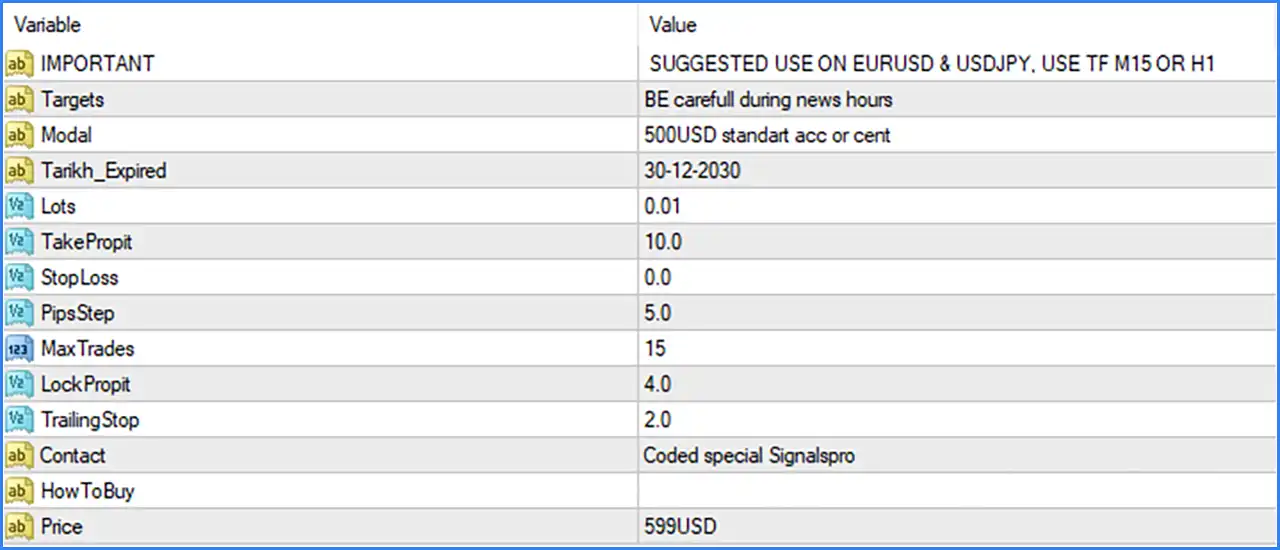
Signal Pro EA MT4 provides configurable trading parameters, including lot size, Take Profit, Stop Loss, grid step distance, maximum trade limits, profit locking, and trailing stop management. These settings allow traders to customize position sizing, trading frequency, and automated profit management.
Important Trading Information
🔹 IMPORTANT: SUGGESTED USE ON EURUSD & USDJPY, USE TF M15 OR H1 – Provides the developer's recommended trading instruments and timeframes. Signal Pro EA MT4 is suggested for EURUSD and USDJPY, using either the 15-minute (M15) or 1-hour (H1) chart.
🔹 Targets: BE careful during news hours – Provides a warning about trading during economic news releases, reminding traders to exercise caution when market volatility and price fluctuations increase around important announcements.
🔹 Modal: 500USD standart acc or cent – Specifies a recommended account starting capital of 500 USD for either a standard or cent account. This serves as the developer's suggested account configuration rather than a guaranteed minimum requirement.
🔹 Tankh_Expired: 30-12-2030 – Displays the configured expiration date of 30 December 2030, indicating the validity date associated with this EA configuration.
Lot Size and Trading Parameters
🔹 Lots: 0.01 – Sets the trading volume to 0.01 lots, defining the configured position size used when the EA opens trading orders.
🔹 TakeProfit: 10.0 – Sets the Take Profit parameter to 10.0, defining the configured profit target for automatically closing trading positions when the required profit condition is reached.
🔹 StopLoss: 0.0 – Sets the Stop Loss parameter to 0.0, indicating that no numerical Stop Loss distance is configured by this input. Traders should verify whether the EA uses another form of protective exit management.
🔹 PipsStep: 5.0 – Sets the step distance to 5.0 pips, defining the configured price interval used by the EA's trading logic when determining subsequent trading levels or entries.
🔹 MaxTrades: 15 – Limits the maximum number of trades to 15, controlling how many trading positions the EA can maintain according to its internal order management rules.
Profit Protection and Trailing Stop Settings
🔹 LockProfit: 4.0 – Sets the profit-locking parameter to 4.0, defining the configured threshold associated with the EA's profit protection mechanism. Its exact activation and calculation method depend on the internal implementation.
🔹 TrailingStop: 2.0 – Sets the trailing stop parameter to 2.0, defining the configured trailing distance or adjustment value used to protect accumulated profits as the market moves favorably.