

This guide walks through the inputs of EA Budak Ubat MT4 with the values recommended for live trading. The set files that come with the EA already contain these settings, so you can load them in one click and adjust only what your broker or account needs.
EA Budak Ubat MT4 Settings Guide
EA Budak Ubat MT4 is an automated Forex Expert Advisor configured around Ichimoku-based market analysis, Buy & Sell trading, grid trading, configurable position sizing, distance-based order management, and optional martingale-style volume scaling.
The supplied settings show an initial lot size of 0.01, Grid Trading enabled, a 1.3 martingale multiplier, a 500.0 maximum lot size, and a very high 99999 maximum trade limit. The EA is configured to operate from 00:00 to 23:59, while hedging is disabled. An Automatic Config AI option is also available but is currently disabled.
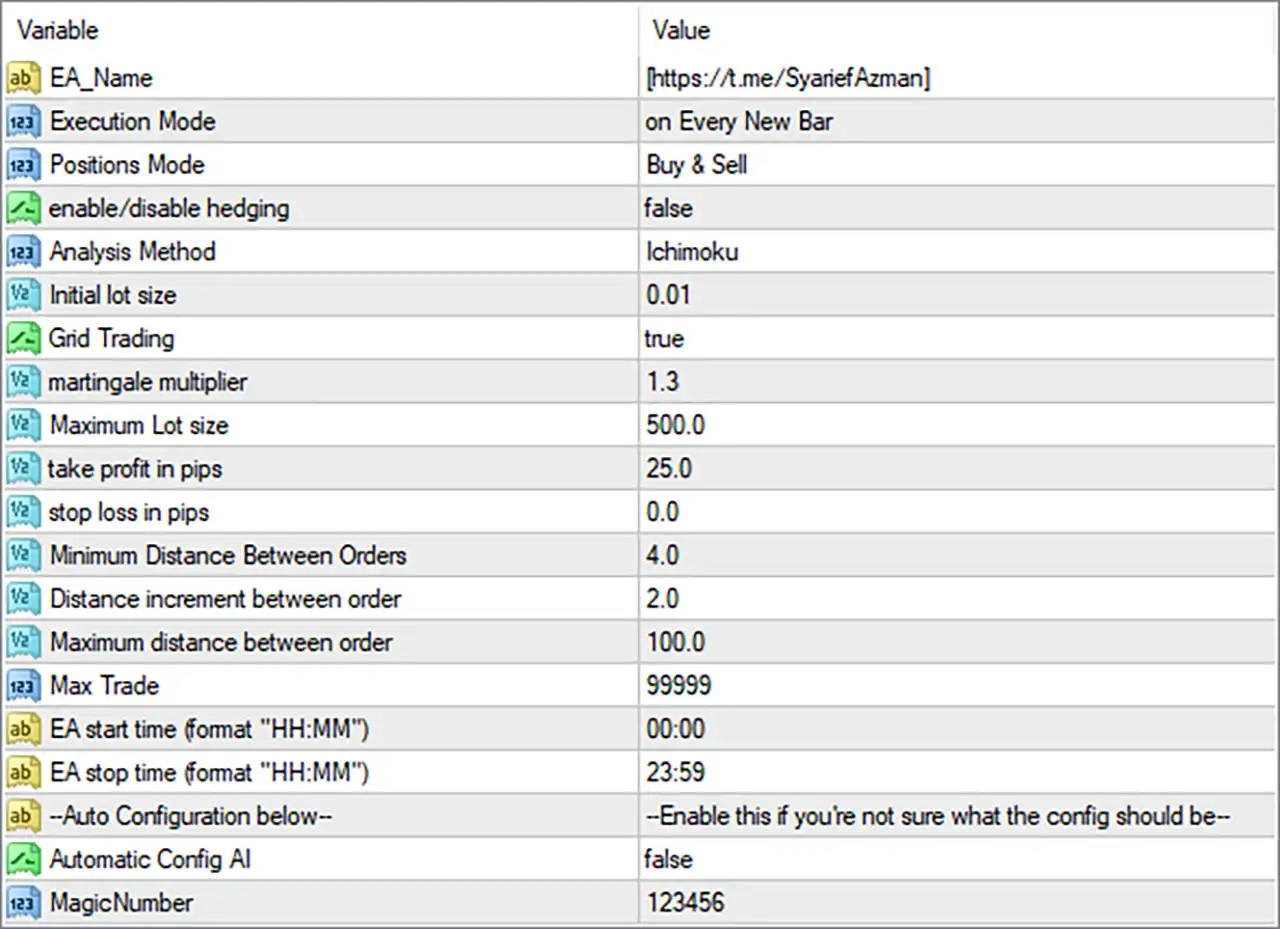
EA Budak Ubat MT4 Settings Explained
General & Execution Settings
🔹 Execution Mode: on Every New Bar — Configures the EA to evaluate or execute its trading logic on every new bar rather than continuously on every tick.
🔹 Positions Mode: Buy & Sell — Allows the EA to operate in both Buy and Sell directions.
🔹 enable/disable hedging: false — Disables the EA's hedging functionality.
🔹 Analysis Method: Ichimoku — Selects Ichimoku as the technical-analysis method used by the EA.
Lot Size & Grid Trading Settings
🔹 Initial lot size: 0.01 — Sets the initial trading volume to 0.01 lots for the first position.
🔹 Grid Trading: true — Enables the EA's grid-trading functionality, allowing additional positions to be managed according to the configured distance rules.
🔹 martingale multiplier: 1.3 — Sets the position-size multiplier to 1.3 for the EA's martingale-style volume calculation.
🔹 Maximum Lot size: 500.0 — Sets the maximum permitted lot size to 500.0 lots according to the EA's internal lot-management rules.
Take Profit & Stop Loss Settings
🔹 take profit in pips: 25.0 — Sets the Take Profit target to 25.0 pips.
🔹 stop loss in pips: 0.0 — Sets Stop Loss to 0.0 pips, which typically indicates that a fixed Stop Loss is disabled under this configuration, subject to the EA's internal logic.
Grid Distance Settings
🔹 Minimum Distance between Orders: 4.0 — Sets the minimum permitted distance between orders to 4.0 according to the EA's configured distance unit.
🔹 Distance increment between order: 2.0 — Sets the incremental increase in order spacing to 2.0.
🔹 Maximum distance between order: 100.0 — Sets the maximum permitted distance between orders to 100.0.
🔹 Max Trade: 99999 — Sets the maximum trade limit to 99999, representing an extremely high configured ceiling for the number of trades.
Trading Schedule
🔹 EA start time (format "HH:MM"): 00:00 — Sets the EA's trading start time to 00:00.
🔹 EA stop time (format "HH:MM"): 23:59 — Sets the EA's trading stop time to 23:59.
🔹 Trading Window: 00:00–23:59 — Based on the supplied start and stop values, the EA is configured to operate across almost the entire trading day.
Automatic Configuration
🔹 Auto Configuration: --Enable this if you're not sure what the config should be-- — Provides an instruction indicating that the automatic configuration feature can be used when the trader is unsure how to configure the EA.
🔹 Automatic Config AI: false — Disables the Automatic Config AI feature in the supplied configuration.
Trade Identification
🔹 MagicNumber: 123456 — Assigns 123456 as the EA's Magic Number, allowing MT4 to identify positions opened by this Expert Advisor.
Key Configuration Highlights
🔹 Execution Mode: on Every New Bar.
🔹 Trading Direction: Buy & Sell.
🔹 Hedging: Disabled with false.
🔹 Analysis Method: Ichimoku.
🔹 Initial Lot: 0.01.
🔹 Grid Trading: Enabled with true.
🔹 Martingale Multiplier: 1.3.
🔹 Maximum Lot: 500.0.
🔹 Take Profit: 25.0 pips.
🔹 Stop Loss: 0.0 pips.
🔹 Minimum Order Distance: 4.0.
🔹 Order Distance Increment: 2.0.
🔹 Maximum Order Distance: 100.0.
🔹 Maximum Trades: 99999.
🔹 Start Time: 00:00.
🔹 Stop Time: 23:59.
🔹 Automatic Config AI: Disabled with false.
🔹 Magic Number: 123456.
Risk Management Analysis
🔹 Initial Exposure: The EA starts with 0.01 lots, providing a relatively small initial position size compared with the configured maximum of 500.0 lots.
🔹 Grid Exposure: With Grid Trading = true, multiple positions can potentially accumulate as price moves through the configured order-distance levels.
🔹 Martingale Scaling: The 1.3 multiplier can increase subsequent position sizes according to the EA's internal martingale/grid logic. This can cause exposure to grow during extended adverse movements.
🔹 Maximum Lot Risk: Although Maximum Lot size = 500.0, the actual lot size used depends on broker limits, account conditions, and the EA's internal calculations.
🔹 Stop Loss: stop loss in pips = 0.0 means there is no fixed pip-based Stop Loss configured in the supplied settings. This is important because grid and martingale-style systems can accumulate exposure when positions remain open.
🔹 Take Profit: Each relevant position or basket may use the configured 25.0-pip Take Profit, depending on the EA's internal trade-management logic.
🔹 Order Spacing: The EA uses 4.0 minimum distance, a 2.0 distance increment, and 100.0 maximum distance to control grid-order placement.
🔹 Trade Limit: The configured Max Trade = 99999 is extremely high and should not be interpreted as a recommendation to maintain that many positions. Actual exposure will also depend on broker restrictions and account margin.
🔹 Hedging: Hedging = false, meaning the dedicated hedging feature is disabled.
Conclusion
EA Budak Ubat MT4 is configured as an Ichimoku-based Buy & Sell Expert Advisor with a strong emphasis on grid trading, progressive order spacing, configurable lot scaling, and automated execution on every new bar.
The supplied configuration starts with an Initial lot size of 0.01, enables Grid Trading, and uses a 1.3 martingale multiplier. Order placement is controlled through Minimum Distance = 4.0, Distance Increment = 2.0, and Maximum Distance = 100.0.
The EA uses a 25.0-pip Take Profit, while Stop Loss = 0.0 pips, meaning no fixed pip-based Stop Loss is configured in the supplied settings. The maximum configured lot size is 500.0, and Max Trade = 99999, creating a potentially very large theoretical exposure range.
Trading is scheduled from 00:00 to 23:59, while hedging is disabled and the Automatic Config AI feature is also disabled. The EA uses MagicNumber = 123456 for trade identification.
Because the configuration combines grid trading, a 1.3 multiplier, no fixed Stop Loss, a 500.0 maximum lot size, and Max Trade = 99999, careful risk management and extensive backtesting are particularly important. The actual behavior and exposure should be evaluated under realistic broker conditions before using the EA on a live account.
FAQs
❓ What trading strategy does EA Budak Ubat MT4 use?
The EA uses Ichimoku as its analysis method and has Grid Trading = true, allowing it to manage multiple orders according to its grid rules.
❓ What is the initial lot size?
The configured Initial lot size is 0.01 lots.
❓ What is the martingale multiplier?
The martingale multiplier is 1.3, which can increase subsequent position sizes according to the EA's internal grid/martingale logic.
❓ Does EA Budak Ubat MT4 use a Stop Loss?
The displayed stop loss in pips is 0.0, indicating that a fixed pip-based Stop Loss is not configured in the supplied settings.
❓ What are the EA's trading hours?
The EA is configured to start at 00:00 and stop at 23:59, providing an almost full-day trading window.
Get EA Budak Ubat MT4
Download EA Budak Ubat MT4 with its set files, read the full product details and requirements here: EA Budak Ubat MT4 →