

This guide walks through the inputs of BreakoutPulse MT5 with the values recommended for live trading. The set files that come with the EA already contain these settings, so you can load them in one click and adjust only what your broker or account needs.
🔢 BreakoutPulse MT5 Settings Explained – Complete Parameter Guide
BreakoutPulse MT5 is an advanced breakout trading Expert Advisor for MetaTrader 5 that combines adaptive market regime detection, Bollinger Band and Keltner Channel squeeze analysis, ATR-based risk management, trend confirmation, momentum filtering, and intelligent breakout execution. Its comprehensive settings allow traders to optimize breakout performance while maintaining strict risk control across various market conditions.

🔢 Installation Panel Parameters
Below are the details of the parameters in the advisor’s trading system settings table:
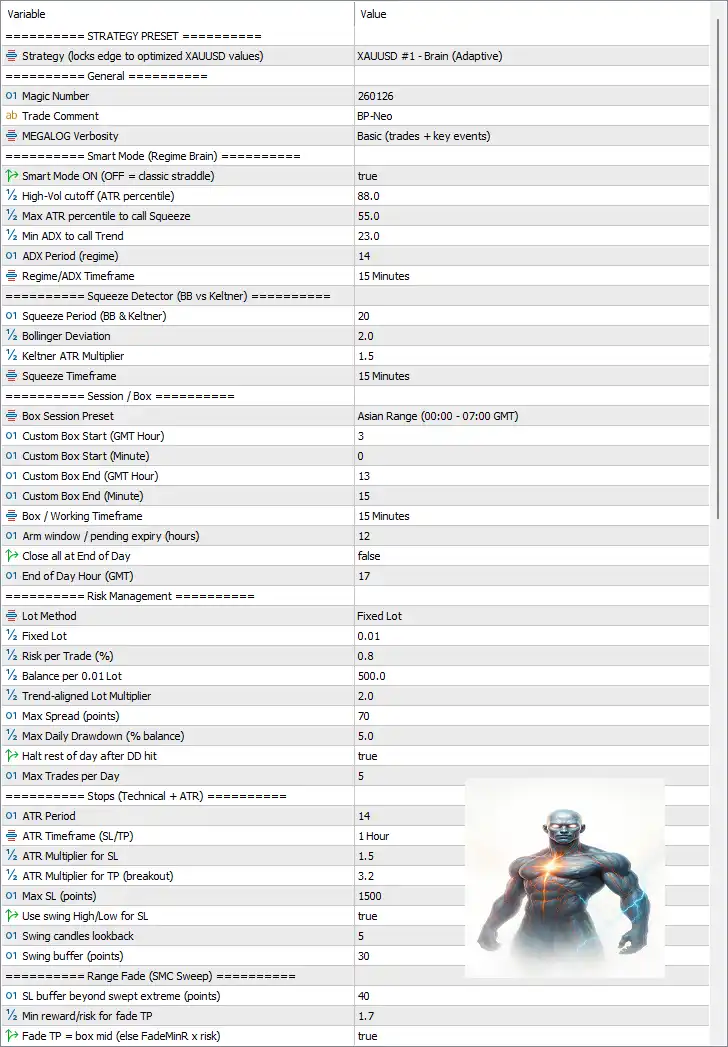
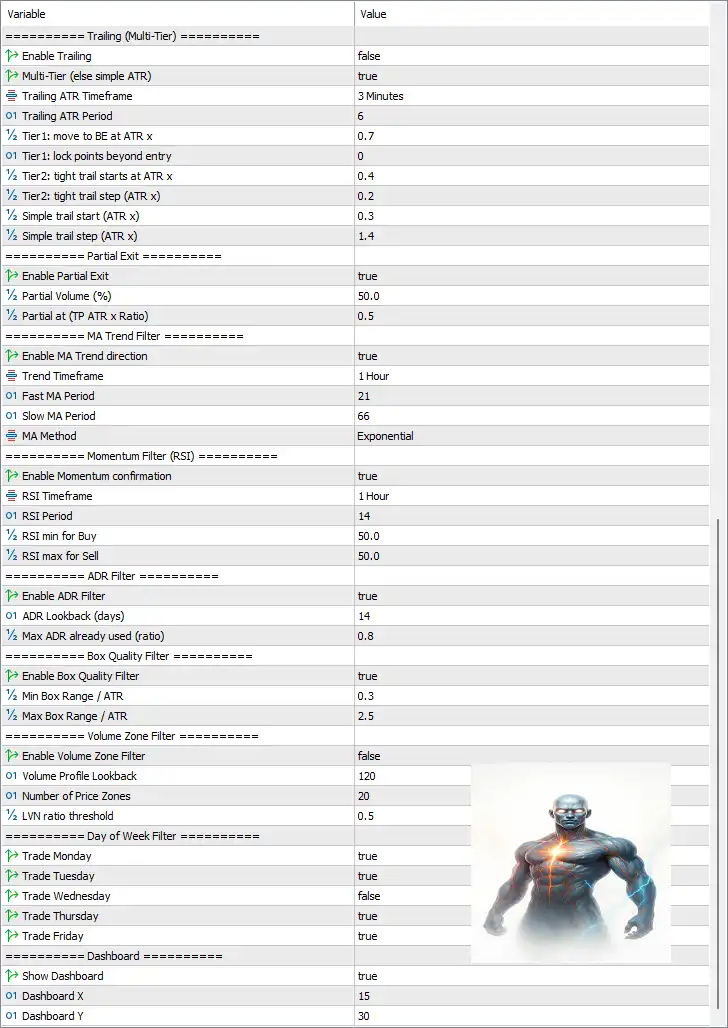
🔶 Strategy Preset
🔹 Strategy (locks edge to optimized XAUUSD values) = XAUUSD #1 - Brain (Adaptive) – Loads the optimized adaptive trading preset specifically designed for XAUUSD breakout trading.
🔶 General Settings
🔹 Magic Number = 260126 – Assigns the unique Magic Number 260126 to identify trades opened by BreakoutPulse MT5.
🔹 Trade Comment = BP-Neo – Adds the trade comment "BP-Neo" to every order for easier identification.
🔹 MEGALOG Verbosity = Basic (trades + key events) – Controls log detail, displaying trade activity and important EA events.
🔶 Smart Market Regime Settings
🔹 Smart Mode ON (OFF = classic straddle) = true – Enables adaptive market regime detection instead of the traditional breakout straddle mode.
🔹 High-Vol cutoff (ATR percentile) = 88.0 – Defines 88.0 as the ATR percentile threshold for identifying high-volatility conditions.
🔹 Max ATR percentile to call Squeeze = 55.0 – Uses an ATR percentile below 55.0 to classify the market as being in a squeeze.
🔹 Min ADX to call Trend = 23.0 – Requires an ADX value of at least 23.0 before recognizing a trending market.
🔹 ADX Period (regime) = 14 – Uses an ADX calculation period of 14.
🔹 Regime/ADX Timeframe = 15 Minutes – Calculates market regime using the 15 Minutes timeframe.
🔶 Squeeze Detector (BB vs Keltner)
🔹 Squeeze Period (BB & Keltner) = 20 – Uses a 20-period Bollinger Band and Keltner Channel calculation.
🔹 Bollinger Deviation = 2.0 – Sets the Bollinger Bands deviation to 2.0.
🔹 Keltner ATR Multiplier = 1.5 – Uses an ATR multiplier of 1.5 for the Keltner Channel.
🔹 Squeeze Timeframe = 15 Minutes – Detects squeeze conditions on the 15 Minutes chart.
🔶 Session / Box Settings
🔹 Box Session Preset = Asian Range (00:00 - 07:00 GMT) – Uses the Asian trading session as the breakout range.
🔹 Custom Box Start (GMT Hour) = 3 – Sets the custom session start hour to 03 GMT.
🔹 Custom Box Start (Minute) = 0 – Starts at 00 minutes.
🔹 Custom Box End (GMT Hour) = 13 – Ends the session at 13 GMT.
🔹 Custom Box End (Minute) = 15 – Ends at 15 minutes.
🔹 Box / Working Timeframe = 15 Minutes – Builds the breakout box on the M15 chart.
🔹 Arm window / pending expiry (hours) = 12 – Pending breakout orders expire after 12 hours.
🔹 Close all at End of Day = false – Does not automatically close all positions at the end of the trading day.
🔹 End of Day Hour (GMT) = 17 – End-of-day reference is 17 GMT.
🔶 Risk Management
🔹 Lot Method = Fixed Lot – Uses a fixed lot sizing model.
🔹 Fixed Lot = 0.01 – Opens trades with 0.01 lots.
🔹 Risk per Trade (%) = 0.8 – Risks 0.8% of account equity per trade when percentage risk is enabled.
🔹 Balance per 0.01 Lot = 500.0 – Allocates 0.01 lot for every 500.0 balance units.
🔹 Trend-aligned Lot Multiplier = 2.0 – Doubles position size when trading in the direction of the detected trend.
🔹 Max Spread (points) = 70 – Blocks new trades if spread exceeds 70 points.
🔹 Max Daily Drawdown (% balance) = 5.0 – Stops trading after a 5.0% daily drawdown.
🔹 Halt rest of day after DD hit = true – Stops trading for the remainder of the day after reaching the daily drawdown limit.
🔹 Max Trades per Day = 5 – Limits trading to 5 trades per day.
🔶 Stop Loss & Take Profit (Technical + ATR)
🔹 ATR Period = 14 – Uses a 14-period ATR calculation.
🔹 ATR Timeframe (SL/TP) = 1 Hour – Calculates ATR using the H1 timeframe.
🔹 ATR Multiplier for SL = 1.5 – Stop Loss equals 1.5 × ATR.
🔹 ATR Multiplier for TP (breakout) = 3.2 – Take Profit equals 3.2 × ATR.
🔹 Max SL (points) = 1500 – Maximum Stop Loss distance is 1500 points.
🔹 Use swing High/Low for SL = true – Places Stop Loss using recent swing highs or lows.
🔹 Swing candles lookback = 5 – Evaluates the last 5 candles for swing detection.
🔹 Swing buffer (points) = 30 – Adds a 30-point safety buffer beyond swing levels.
🔶 Range Fade (SMC Sweep)
🔹 SL buffer beyond swept extreme (points) = 40 – Places Stop Loss 40 points beyond the swept liquidity level.
🔹 Min reward/risk for fade TP = 1.7 – Requires a minimum Risk-to-Reward ratio of 1.7.
🔹 Fade TP = box mid (else FadeMinR x risk) = true – Uses the box midpoint as the preferred Take Profit for fade setups.
🔶 Trailing Stop (Multi-Tier)
🔹 Enable Trailing = false – Standard trailing stop is disabled.
🔹 Multi-Tier (else simple ATR) = true – Enables advanced multi-stage trailing management.
🔹 Trailing ATR Timeframe = 3 Minutes – Uses the M3 timeframe for trailing calculations.
🔹 Trailing ATR Period = 6 – Uses an ATR period of 6.
🔹 Tier1: move to BE at ATR x = 0.7 – Moves Stop Loss to Break-even after 0.7 × ATR.
🔹 Tier1: lock points beyond entry = 0 – Locks 0 points beyond entry.
🔹 Tier2: tight trail starts at ATR x = 0.4 – Begins aggressive trailing after 0.4 × ATR.
🔹 Tier2: tight trail step (ATR x) = 0.2 – Uses 0.2 × ATR as the trailing increment.
🔹 Simple trail start (ATR x) = 0.3 – Starts simple trailing after 0.3 × ATR.
🔹 Simple trail step (ATR x) = 1.4 – Adjusts the simple trailing stop every 1.4 × ATR.
🔶 Partial Exit
🔹 Enable Partial Exit = true – Enables partial profit-taking.
🔹 Partial Volume (%) = 50.0 – Closes 50.0% of the position.
🔹 Partial at (TP ATR x Ratio) = 0.5 – Executes the partial exit at 50% of the ATR-based Take Profit target.
🔶 MA Trend Filter
🔹 Enable MA Trend direction = true – Uses Moving Average trend confirmation.
🔹 Trend Timeframe = 1 Hour – Trend filter operates on the H1 chart.
🔹 Fast MA Period = 21 – Fast Moving Average period is 21.
🔹 Slow MA Period = 66 – Slow Moving Average period is 66.
🔹 MA Method = Exponential – Uses an Exponential Moving Average (EMA).
🔶 Momentum Filter (RSI)
🔹 Enable Momentum confirmation = true – Enables RSI confirmation.
🔹 RSI Timeframe = 1 Hour – RSI uses the H1 timeframe.
🔹 RSI Period = 14 – RSI calculation period is 14.
🔹 RSI min for Buy = 50.0 – Buy trades require RSI above 50.0.
🔹 RSI max for Sell = 50.0 – Sell trades require RSI below 50.0.
🔶 ADR Filter
🔹 Enable ADR Filter = true – Enables Average Daily Range filtering.
🔹 ADR Lookback (days) = 14 – Calculates ADR over 14 days.
🔹 Max ADR already used (ratio) = 0.8 – Prevents entries after 80% of the ADR has already been consumed.
🔶 Box Quality Filter
🔹 Enable Box Quality Filter = true – Filters breakout boxes based on quality.
🔹 Min Box Range / ATR = 0.3 – Minimum box size is 0.3 × ATR.
🔹 Max Box Range / ATR = 2.5 – Maximum box size is 2.5 × ATR.
🔶 Volume Zone Filter
🔹 Enable Volume Zone Filter = false – Volume profile filtering is disabled.
🔹 Volume Profile Lookback = 120 – Uses 120 candles for volume calculations.
🔹 Number of Price Zones = 20 – Divides the profile into 20 price zones.
🔹 LVN ratio threshold = 0.5 – Uses 0.5 as the Low Volume Node threshold.
🔶 Day of Week Filter
🔹 Trade Monday = true – Trading is allowed on Monday.
🔹 Trade Tuesday = true – Trading is allowed on Tuesday.
🔹 Trade Wednesday = false – Trading is disabled on Wednesday.
🔹 Trade Thursday = true – Trading is allowed on Thursday.
🔹 Trade Friday = true – Trading is allowed on Friday.
🔶 Dashboard
🔹 Show Dashboard = true – Displays the on-chart trading dashboard.
🔹 Dashboard X = 15 – Sets the dashboard horizontal position to 15.
🔹 Dashboard Y = 30 – Sets the dashboard vertical position to 30.
🔢 Conclusion
BreakoutPulse MT5 is a sophisticated breakout Expert Advisor that integrates adaptive market regime analysis, ATR-based volatility measurements, trend and momentum confirmation, intelligent breakout boxes, multi-tier trailing stops and advanced risk management.
With its extensive filtering system and configurable trade management tools, the EA provides traders with a highly flexible framework for trading XAUUSD and other breakout markets while maintaining disciplined risk control.
🔢 FAQs
❓ What strategy does BreakoutPulse MT5 use?
BreakoutPulse MT5 combines breakout trading with adaptive market regime detection, Bollinger Band and Keltner squeeze analysis, ATR volatility measurements, and trend confirmation.
❓ Can I use percentage-based risk instead of fixed lots?
Yes. The EA supports both Fixed Lot trading and Risk per Trade (%) money management.
❓ Does BreakoutPulse MT5 support partial profit taking?
Yes. Partial Exit is enabled by default, closing 50% of the position at 50% of the ATR-based Take Profit target.
❓ Which indicators are used by BreakoutPulse MT5?
The EA utilizes ATR, ADX, Bollinger Bands, Keltner Channels, EMA, RSI, ADR, and swing high/low analysis to filter and manage trades.
❓ Does BreakoutPulse MT5 include daily risk protection?
Yes. It includes Max Daily Drawdown (5.0%), daily trade limits, spread filtering, and automatic trading suspension after the daily drawdown threshold is reached.
Get BreakoutPulse MT5
Download BreakoutPulse MT5 with its set files, read the full product details and requirements here: BreakoutPulse MT5 →