

This guide walks through the inputs of Solution EA MT5 with the values recommended for live trading. The set files that come with the EA already contain these settings, so you can load them in one click and adjust only what your broker or account needs.
🔢 Solution EA MT5 Settings Explained – Complete Parameter Guide
Solution EA is an automated MetaTrader 5 Expert Advisor designed with a streamlined configuration for efficient Forex trading. It focuses on essential trade management features such as Take Profit, Trailing Stop, configurable money management, and trade identification. Its simplified settings make it suitable for both beginners and experienced traders looking for an easy-to-configure automated trading solution.

🔢 Installation Panel Parameters
Below are the details of the parameters in the advisor’s trading system settings table:
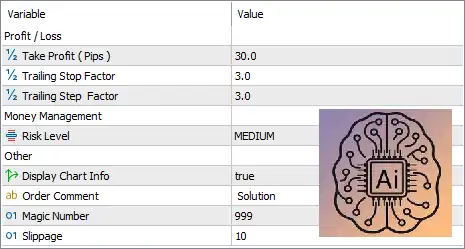
🔶 Profit / Loss Settings
🔹 Take Profit (Pips) = 30.0 – Sets the default Take Profit target to 30.0 pips for each completed trade.
🔹 Trailing Stop Factor = 3.0 – Defines the multiplier used to calculate the Trailing Stop distance dynamically after a position moves into profit.
🔹 Trailing Step Factor = 3.0 – Sets the multiplier used for each Trailing Stop adjustment, allowing the Stop Loss to follow favorable price movement while locking in profits.
🔶 Money Management
🔹 Risk Level = MEDIUM – Configures the EA to use the MEDIUM risk profile, providing a balanced approach between capital preservation and trading performance.
🔶 Other Settings
🔹 Display Chart Info = true – Displays the EA information panel and trading statistics directly on the MetaTrader 5 chart.
🔹 Order Comment = Solution – Adds the comment "Solution" to every order opened by the Expert Advisor for easy trade identification.
🔹 Magic Number = 999 – Assigns the unique Magic Number 999 to distinguish the EA's trades from manual trades or other Expert Advisors.
🔹 Slippage = 10 – Allows a maximum execution slippage of 10 points when placing or closing orders.
🔢 Conclusion
Solution EA MT5 offers a clean and user-friendly configuration that emphasizes simplicity without sacrificing essential trading controls. With configurable Take Profit, dynamic Trailing Stop management, a balanced money management profile, and clear trade identification through Magic Numbers and comments, the EA is well suited for traders seeking reliable automated trading with minimal setup complexity.
🔢 FAQs
❓ What is the default Take Profit setting in Solution EA MT5?
The default Take Profit is set to 30.0 pips.
❓ What does the Risk Level parameter control?
The Risk Level determines the EA's money management profile. The default MEDIUM setting provides a balanced level of trading risk.
❓ Does Solution EA MT5 include Trailing Stop management?
Yes. The EA includes both Trailing Stop Factor and Trailing Step Factor, each set to 3.0 by default.
❓ Why is the Magic Number important?
The Magic Number (999) allows MetaTrader 5 to identify trades opened by Solution EA MT5 separately from manual trades or other Expert Advisors.
❓ Can I monitor the EA directly from the chart?
Yes. With Display Chart Info = true, the EA displays trading information and status directly on the chart for convenient monitoring.
Get Solution EA MT5
Download Solution EA MT5 with its set files, read the full product details and requirements here: Solution EA MT5 →