

This guide walks through the inputs of HamzaFX EA MT4 with the values recommended for live trading. The set files that come with the EA already contain these settings, so you can load them in one click and adjust only what your broker or account needs.
🔢 HamzaFX EA MT4 Settings Guide
HamzaFX EA MT4 is an automated trading Expert Advisor configured for XAUUSD (Gold), with flexible money-management controls, maximum trade limits, optional economic-news filters, and an ATR-based trailing-stop framework.
The supplied settings emphasize configurable risk sizing and adaptive trade management, allowing traders to control lot calculation, trailing behavior, and volatility-based stop adjustments.
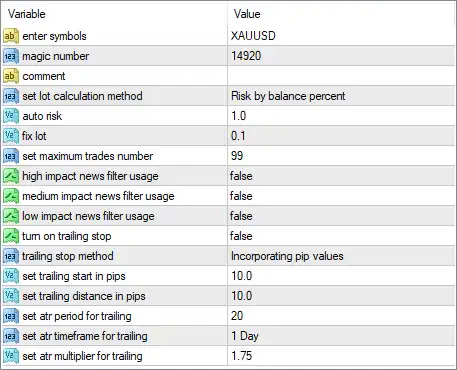
General & Trading Settings
🔹 Enter Symbols: XAUUSD — Defines XAUUSD (Gold) as the trading symbol for the EA.
🔹 Magic Number: 14920 — Provides the unique identifier 14920 so the EA can distinguish its own trades from other positions or EAs.
🔹 Comment: "" — The trade comment field is empty, meaning no custom comment is specified in this setting.
🔹 Set Lot Calculation Method: Risk by balance percent — Selects percentage-based risk calculation using the account balance rather than relying solely on a fixed lot size.
🔹 Auto Risk: 1.0 — Sets the automatic risk parameter to 1.0 according to the selected balance-percentage calculation method.
🔹 Fix Lot: 0.1 — Defines a fixed lot size of 0.1 when fixed-lot sizing is used instead of the selected automatic risk method.
🔹 Set Maximum Trades Number: 99 — Allows a maximum of 99 trades, providing a very high upper limit for simultaneous EA-managed trades.
News Filter Settings
🔹 High Impact News Filter Usage: false — Disables the high-impact economic-news filter.
🔹 Medium Impact News Filter Usage: false — Disables the medium-impact economic-news filter.
🔹 Low Impact News Filter Usage: false — Disables the low-impact economic-news filter.
With all three news-filter options set to false, the supplied configuration does not use economic-news impact levels to block trading.
Trailing Stop Settings
🔹 Turn On Trailing Stop: false — Disables the trailing-stop function in the current configuration.
🔹 Trailing Stop Method: Incorporating pip values — Specifies that the trailing-stop system uses pip-based values for its calculations when enabled.
🔹 Set Trailing Start in Pips: 10.0 — Sets the trailing activation threshold to 10.0 pips.
🔹 Set Trailing Distance in Pips: 10.0 — Defines a trailing distance of 10.0 pips between the market price and the trailing stop.
🔹 Set ATR Period for Trailing: 20 — Uses an ATR calculation period of 20 for volatility-based trailing calculations.
🔹 Set ATR Timeframe for Trailing: 1 Day — Specifies the 1 Day timeframe for the ATR trailing calculation.
🔹 Set ATR Multiplier for Trailing: 1.75 — Sets the ATR multiplier to 1.75, which can be used to scale the volatility-based trailing distance when ATR trailing functionality is applied.
🔢 HamzaFX EA MT4 Settings Summary
🔹 Trading Symbol: XAUUSD
🔹 Magic Number: 14920
🔹 Lot Calculation: Risk by balance percent
🔹 Auto Risk: 1.0
🔹 Fixed Lot: 0.1
🔹 Maximum Trades: 99
🔹 High Impact News Filter: false
🔹 Medium Impact News Filter: false
🔹 Low Impact News Filter: false
🔹 Trailing Stop: false
🔹 Trailing Method: Incorporating pip values
🔹 Trailing Start: 10.0 pips
🔹 Trailing Distance: 10.0 pips
🔹 ATR Period: 20
🔹 ATR Timeframe: 1 Day
🔹 ATR Multiplier: 1.75
🔢 How These Settings Work Together
🔹 XAUUSD Focus: The EA is configured specifically for XAUUSD, making the settings relevant to Gold's price behavior and volatility.
🔹 Risk-Based Position Sizing: The selected Risk by balance percent method works with the Auto Risk 1.0 setting, while Fix Lot 0.1 provides a fixed-lot alternative.
🔹 High Trade Limit: The 99-trade maximum is considerably higher than a typical small trade limit, so traders should carefully evaluate exposure and margin requirements.
🔹 News Protection Disabled: All three news-impact filters are set to false, meaning the EA is not configured to pause trading based on high-, medium-, or low-impact news.
🔹 Trailing Stop Currently Disabled: Although detailed trailing parameters are configured, Turn On Trailing Stop = false, so the trailing mechanism is not active under the supplied configuration.
🔹 ATR-Based Framework: The EA uses an ATR period of 20, the 1 Day timeframe, and an ATR multiplier of 1.75 for its volatility-based trailing calculations when applicable.
🔢 Risk Considerations
🔹 Auto Risk 1.0: Traders should verify exactly how the EA interprets this value on their broker and account type before using it live.
🔹 Fixed Lot 0.1: A fixed 0.1-lot size can create substantially different monetary exposure depending on account size and XAUUSD contract specifications.
🔹 Maximum Trades 99: A maximum of 99 trades can potentially create significant cumulative exposure if the EA opens multiple positions.
🔹 News Filters Disabled: Because all news filters are false, the EA may continue operating during important market announcements.
🔹 Trailing Stop Disabled: The configured 10.0-pip start and 10.0-pip distance do not activate the trailing mechanism while Turn On Trailing Stop remains false.
🔢 Conclusion
HamzaFX EA MT4 provides a straightforward but flexible configuration for automated XAUUSD trading, combining balance-based risk sizing, fixed-lot capability, trade-count control, optional news protection, and an ATR-based trailing framework.
The supplied configuration uses XAUUSD, Magic Number 14920, Risk by balance percent, Auto Risk 1.0, Fixed Lot 0.1, and a maximum of 99 trades. All economic-news filters are currently disabled, while trailing stop functionality is also disabled despite having a 10.0-pip start, 10.0-pip distance, ATR period of 20, 1 Day timeframe, and 1.75 multiplier configured.
Before using these settings on a live account, traders should backtest them with their intended broker, verify contract specifications for XAUUSD, and evaluate maximum exposure and drawdown under different market conditions.
🔢 FAQs
❓ What symbol is HamzaFX EA MT4 configured to trade?
The supplied configuration uses XAUUSD, representing Gold.
❓ What is the Magic Number of HamzaFX EA MT4?
The Magic Number is 14920.
❓ What lot calculation method is selected?
The selected method is Risk by balance percent, with Auto Risk = 1.0. The fixed-lot value is 0.1.
❓ Are economic-news filters enabled?
No. The high-impact, medium-impact, and low-impact news filters are all set to false.
❓ Is the trailing stop currently active?
No. Turn On Trailing Stop = false. The configuration nevertheless specifies 10.0 pips for both trailing start and trailing distance, an ATR period of 20, a 1 Day timeframe, and an ATR multiplier of 1.75.
Get HamzaFX EA MT4
Download HamzaFX EA MT4 with its set files, read the full product details and requirements here: HamzaFX EA MT4 →