





EA Dragon Fire X.10 Source Code MQ4 + SetFiles

Subscriptions for Special Plan
- 30 EA package is more economical!
- Special package with 99%
- Download 1 EA/Day

Subscriptions for Premium Membership
- Download Unlimited in 1 Year
- Get 100% Discount
- Get free access to all

Subscriptions for Gold Membership
- 1 Year Membership
- Get 100% Discount
- Access EA+Indicator+Course
Frequently bought together 🎁
Add these products to enhance your purchase


What is EA Dragon Fire X.10?
EA Dragon Fire X.10 is an automated Expert Advisor (EA) designed for MetaTrader 4. It provides configurable trading volume, distance-based parameters, position sequence limits, and basket-management controls. Traders can adjust the initial lot size, multiplier, and maximum number of trades in a sequence to match their trading approach.
The EA also includes an equity-stop option intended to close a trading sequence when a specified loss threshold is reached. Its configuration offers flexibility, but the underlying entry and averaging logic should be evaluated carefully before live deployment.
🔶 Vender Website: Click here
Key Features of EA Dragon Fire X.10
Flexible Lot Sizing
EA Dragon Fire X.10 allows traders to configure the initial trading volume and position size limits according to their preferred trading approach and account risk tolerance.
Adjustable Position Spacing
The EA includes configurable distance parameters that influence trade placement according to its internal trading logic, allowing traders to customize the spacing between trading levels.
Progressive Lot Management
The multiplier setting supports progressive position sizing when applied to subsequent trades. This approach may help manage a sequence of positions, but it can also increase market exposure during prolonged adverse movements.
Automated Trade Sequence Management
EA Dragon Fire X.10 provides controls for managing multiple positions within a trading sequence, helping define how many trades can be opened as part of its trading process.
Equity-Based Protection
The EA includes an option to close a trading sequence when its equity-stop condition is triggered, providing an additional layer of loss control during unfavorable market conditions.
Customizable Trading Options
Traders can configure spread filtering, pip-based calculations, and timeout-related behavior to suit their preferred setup. The actual effect of each option depends on whether the relevant feature is enabled and how the EA implements it.
On-Chart Information Panel
The EA supports an on-chart information panel that displays trading-related information directly on the MetaTrader chart, making it easier to monitor the system while it operates.
EA Dragon Fire X.10 MT4 Review
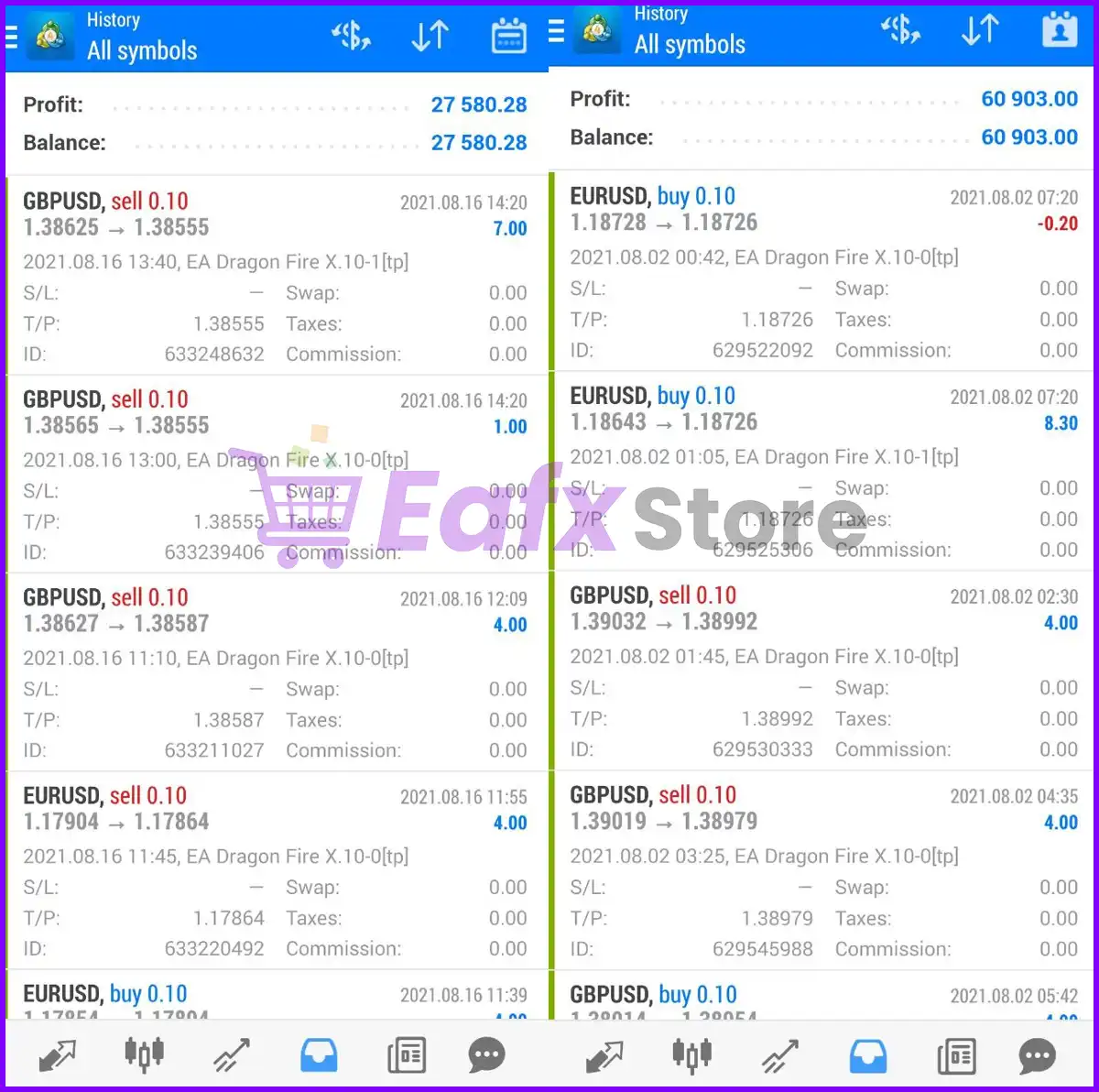
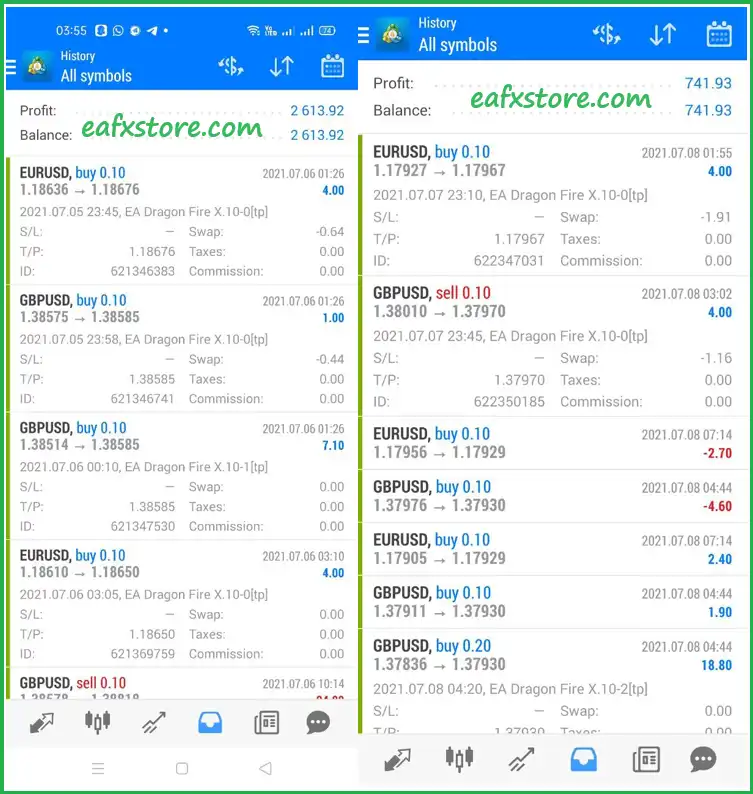
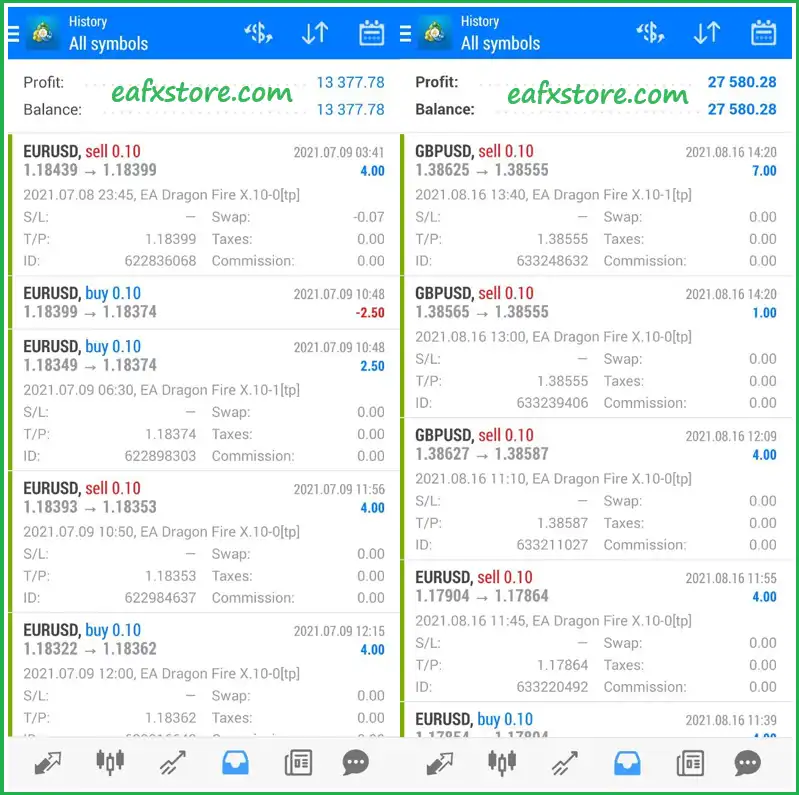
EA Dragon Fire achieves impressive profit performance on real trading accounts. The advisor maintains stability and safety even during strong market fluctuations.
Dragon Fire EA Results
EA Dragon Fire X.10 MT4 Reviews
EA Dragon Fire X.10 MT4 Reviews
Weaknesses and Risk Warnings
Progressive Lot Sizing Can Increase Exposure
The 1.5 multiplier may cause position sizes to rise with each additional trade if applied progressively.
During prolonged adverse price movements, this can increase floating losses and margin requirements.
The Sequence Limit Allows Multiple Positions
A maximum of 20 trades per sequence can permit substantial cumulative exposure.
The risk depends on the distance between entries, lot progression, instrument volatility, and the direction and duration of market movements.
The Equity Stop Is Not a Guaranteed Loss Cap
The 30.0% equity-stop threshold is a configured trigger, not a guarantee that realized losses will remain below 30.0%.
Rapid price movements, slippage, gaps, and execution delays can result in worse outcomes.
Spread Filtering Is Disabled
The spread-filter parameter is set to 0.0, which the supplied label identifies as disabling this filter.
If the EA does not apply another internal spread restriction, it may open or manage trades under unfavorable spread conditions.
Timeout-Based Closing Is Disabled
Although TimeOutHours is set to 48.0, the option to close all trades after the timeout is disabled.
The 48-hour value should not be interpreted as an active automatic exit unless the relevant option is enabled.
Performance Has Not Been Verified
The supplied material contains configuration information but no verified live account record or historical performance statistics.
Profitability, win rate, recovery behavior, and real-world drawdown therefore remain unconfirmed.
Who Should Use EA Dragon Fire X.10?
MetaTrader 4 Traders
EA Dragon Fire X.10 may suit traders seeking an Expert Advisor with configurable trading parameters and automated position management on MetaTrader 4.
Experienced Averaging Strategy Users
Traders familiar with progressive lot sizing and multi-position sequences may find the configurable multiplier and trade limit useful, provided they understand the risks of accumulating exposure.
Traders Who Monitor Account Risk
The EA may appeal to users who regularly monitor equity drawdown, margin levels, and floating losses instead of relying only on closed-trade profit.
Users Who Test Before Live Trading
Traders willing to run demo tests, examine adverse market scenarios, and verify the EA’s internal behavior are better positioned to assess whether its settings suit their risk tolerance.
Recommended Settings
Recommended settings and parameters to pay attention to from developers and experts:
| Features | Type |
|---|---|
| Trading platform | MetaTrader 4 (MT4) |
| Currency pairs | EURUSD, GBPUSD, AUDUSD and USDCHF |
| Time frames | M5, M15 |
| Minimum / Recommended deposit | $100+ |
| Setup files | Available |
| Product type | Unlimited |
| Additional services | Unlock and Decompile |
| Recommended brokers | Exness Broker, Icmarkets Broker |
| Recommended VPS | MyfxVPS.com ( Blue VPS, Golden VPS). Lowest Latency, 2 week Free Trial, 100% Free for 12-18 Months. |
Product Download Package?
The download package of the product suite includes:
Source Code
✅ EA Dragon Fire X.10.ex4
✅ EA Dragon Fire X.10.mq4
SetFiles
✅ EURUSD 100$ M5.set
✅ GBPUSD 500$ M5.set
➡️ Reviewed by David Easton
Conclusion
EA Dragon Fire X.10 offers flexible automated trading controls, adjustable position sizing, and built-in equity protection for MetaTrader 4 users. Its configurable settings may appeal to experienced traders familiar with averaging strategies and basket management. However, progressive lot sizing can increase market exposure during unfavorable conditions.
Careful testing, disciplined risk management, and continuous monitoring are essential before using the EA on a live account.
🔢 EA Dragon Fire X.10 Settings: Complete Inputs Guide
EA Dragon Fire X.10 is an automated trading Expert Advisor for MetaTrader 4 that uses configurable lot sizing, position spacing, trade multipliers, and basket-management controls. Its inputs allow traders to adjust trading volume, define the distance between price levels, configure trade limits, and manage equity protection.
Understanding these settings is essential because progressive lot sizing and averaging can increase market exposure during extended price movements.
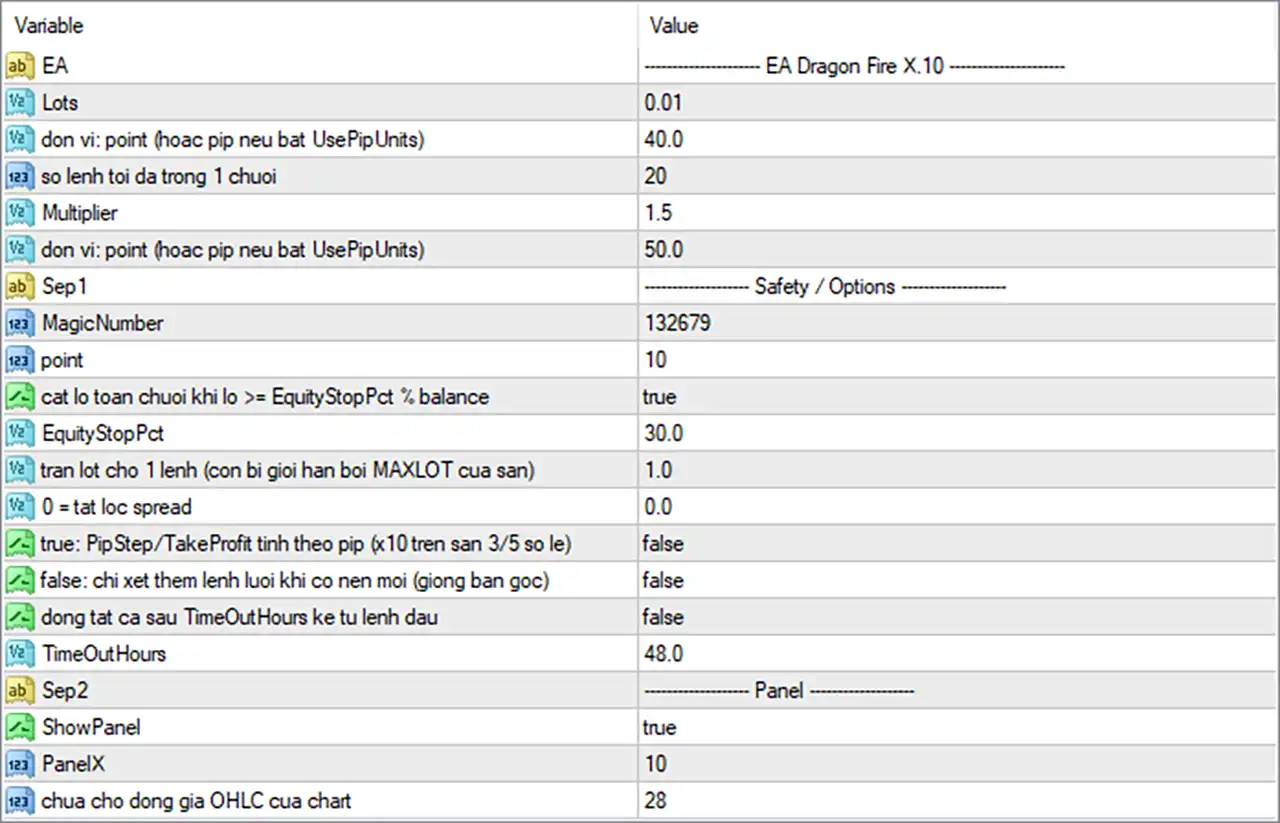
EA Dragon Fire X.10 Settings Panel
⚙️ Basic Trading Settings
🔹 Lots = 0.01: Sets the initial trading volume to 0.01 lots, providing the starting position size for the EA’s trading sequence.
🔹 don vi: point (hoac pip neu bat UsePipUnits) = 40.0: Sets the first distance-related parameter to 40.0 points, or pips if the EA’s UsePipUnits option is enabled. This parameter’s exact function should be confirmed from the EA’s internal logic.
🔹 so lenh toi da trong 1 chuoi = 20: Sets the maximum number of trades in one sequence to 20, limiting how many positions can be opened within the applicable trading sequence.
🔹 Multiplier = 1.5: Sets the lot multiplier to 1.5. If the EA applies this multiplier to each subsequent position, the lot size increases by a factor of 1.5 at each level.
🔹 don vi: point (hoac pip neu bat UsePipUnits) = 50.0: Sets the second distance-related parameter to 50.0 points, or pips if UsePipUnits is enabled. Because the screenshot does not show separate descriptive labels for the two distance fields, their individual roles cannot be identified with certainty from the image alone.
⚙️ Safety and Options Settings
🔹 MagicNumber = 132679: Assigns the trade identifier 132679, helping the EA distinguish its own orders from trades managed by other Expert Advisors.
🔹 point = 10: Sets the point-related parameter to 10. The exact purpose depends on the EA’s implementation and may relate to distance calculations or point-to-pip handling.
🔹 cat lo toan chuoi khi lo >= EquityStopPct % balance = true: Enables the option to close the entire trading sequence when its loss reaches the configured equity-stop threshold relative to the account balance.
🔹 EquityStopPct = 30.0: Sets the equity-stop threshold to 30.0% of the balance. With the sequence-closing option enabled, this value is intended to trigger the corresponding loss-control action when the EA’s calculated condition is met.
🔹 tran lot cho 1 lenh (con bi gioi han boi MAXLOT cua san) = 1.0: Sets the maximum lot size for an individual order to 1.0 lot, subject to any lower maximum-lot restriction imposed by the broker or the EA.
🔹 0 = tat loc spread = 0.0: Sets the spread-filter parameter to 0.0, which the label indicates disables the spread filter.
🔹 true: PipStep/TakeProfit tinh theo pip (x10 tren san 3/5 so le) = false: Disables the option to calculate PipStep and Take Profit in pip units with a ×10 conversion for 3/5-digit brokers. With this option set to false, the EA uses its alternative point-unit calculation.
🔹 false: chi xet them lenh luoi khi co nen moi (giong ban goc) = false: Keeps the option for adding grid trades only when a new candle appears disabled. The EA’s exact order-entry timing therefore depends on its other internal rules.
🔹 dong tat ca sau TimeOutHours ke tu lenh dau = false: Disables the option to close all trades after the configured number of hours has elapsed since the first order.
🔹 TimeOutHours = 48.0: Sets the timeout duration to 48.0 hours. This duration becomes relevant if the timeout-based close-all option is enabled.
⚙️ Panel Settings
🔹 ShowPanel = true: Enables the EA’s on-chart information panel, allowing supported trading information to be displayed directly on the chart.
🔹 PanelX = 10: Sets the panel’s horizontal positioning parameter to 10, controlling its placement along the chart’s X-axis.
🔹 chua cho dong gia OHLC cua chart = 28: Sets the parameter associated with the chart’s OHLC price display to 28. The exact display behavior and positioning should be verified in the running EA because the label does not fully specify its function.
🔢 Conclusion
EA Dragon Fire X.10 provides adjustable trade volume, distance parameters, a maximum of 20 trades per sequence, a 1.5 lot multiplier, and configurable safety controls. The displayed settings also enable the 30.0% equity-stop threshold and the option to close a sequence when its loss reaches that threshold, while the spread filter and timeout-based close-all feature are disabled.
The most important settings to review are Multiplier = 1.5, the maximum of 20 trades per sequence, and EquityStopPct = 30.0. A multiplier can cause exposure to grow rapidly, and an equity-stop setting is not a guarantee that losses will be capped at precisely 30.0% under all market conditions. Backtesting, demo testing, and monitoring margin usage are recommended before live deployment.
1 review for EA Dragon Fire X.10 Source Code MQ4 + SetFiles
Only logged in customers who have purchased this product may leave a review.
1. What is Dragon Fire X.10 EA Source Code?
It is a fully functional Expert Advisor (EA) for MetaTrader 4 (MT4) that allows trading on forex pairs. This version includes editable source code, so users can modify or optimize strategies based on their own needs.
2. Who is this EA suitable for — beginners or advanced traders?
The EA is designed for both beginners and experienced traders. Beginners can use the default settings, while advanced users can modify the source code to create personalized strategies.
3. What currency pairs does Dragon Fire X.10 EA support?
It officially supports EURUSD, GBPUSD, AUDUSD, and USDCHF, but users can test and adapt it to other pairs based on their preferences.
4. What is the minimum deposit required to run this EA?
You can start with $100 on a Cent account or $300 on a Standard account, depending on your broker and account type.
5. Does this EA support multiple timeframes?
Yes. The recommended timeframes are M5 and M15, but users are free to experiment with other timeframes if desired.
6. Is the EA fully automated or does it require manual input?
Dragon Fire X.10 is a fully automated trading system, but since it includes source code, users can add manual elements or hybrid strategies if needed.
7. Can I modify the EA’s trading strategy?
Yes. This package includes the source code, allowing full customization of the trading logic, risk management, and entry/exit conditions.
8. Is the EA profitable in live trading?
Yes, its performance has been proven on real accounts over long periods, as highlighted in the provided trading results.
🔥 Get This EA for FREE with Our Membership! 🚀🚀
Unlock access to this EA, premium Indicators, and exclusive trading tools completely FREE with any of our Membership Plans! Thousands of traders already benefit from our VIP library—join them and level up your trading instantly. Choose Your Membership:
- SPECIAL – 1 Month Membership
- GOLD – 1 Year Membership
- PREMIUM – 1 Year Membership
-
 Original price was: $9,999.00.$249.00Current price is: $249.00.
 -
 Original price was: $30,000.00.$249.00Current price is: $249.00.
 -
 Original price was: $30,000.00.$249.00Current price is: $249.00.
 -
 Original price was: $5,000.00.$249.00Current price is: $249.00.
-
 0Original price was: $1,999.00.$249.00Current price is: $249.00.
 -
 1Original price was: $2,500.00.$299.00Current price is: $299.00.
 -
 0Original price was: $900.00.$199.00Current price is: $199.00.
 -
 1Original price was: $3,599.00.$199.00Current price is: $199.00.
admin (verified owner) –
best ea