
This guide walks through the inputs of Sun EA MT5 with the values recommended for live trading. The set files that come with the EA already contain these settings, so you can load them in one click and adjust only what your broker or account needs.
🔢 Sun EA MT5 Settings Guide
Sun EA MT5 is a fully automated Expert Advisor for MetaTrader 5 that combines cycle-based trading, flexible money management, account protection, news filtering, FTMO compatibility, and an intuitive graphical interface.
The EA allows traders to configure trading cycles, automatic lot sizing, equity protection, news event handling, and chart visualization, making it suitable for both retail traders and funded account users.
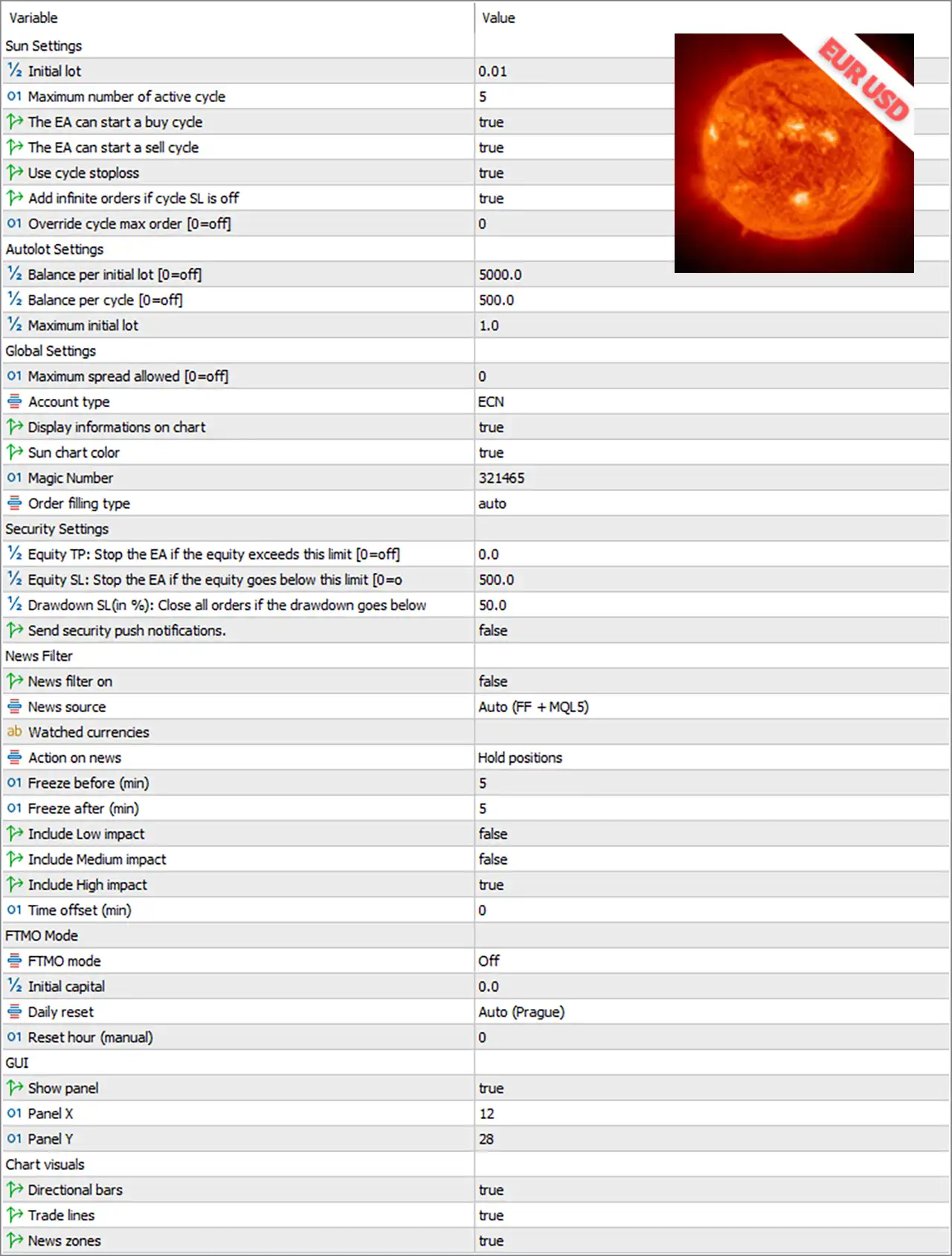
🔢 Sun EA MT5 Settings Explained
🔶 Sun Settings
🔹 Initial lot = 0.01 – Sets the initial trading volume to 0.01 lots for every new trading cycle.
🔹 Maximum number of active cycle = 5 – Allows a maximum of 5 active trading cycles simultaneously.
🔹 The EA can start a buy cycle = true – Enables the EA to initiate BUY trading cycles.
🔹 The EA can start a sell cycle = true – Enables the EA to initiate SELL trading cycles.
🔹 Use cycle stoploss = true – Activates stop loss protection for each trading cycle.
🔹 Add infinite orders if cycle SL is off = true – Allows unlimited additional orders when the cycle Stop Loss feature is disabled.
🔹 Override cycle max order [0=off] = 0 – Keeps the default maximum number of orders per cycle because the override is disabled.
🔶 AutoLot Settings
🔹 Balance per initial lot [0=off] = 5000.0 – Uses 5000.0 account balance as the reference for calculating the initial lot size.
🔹 Balance per cycle [0=off] = 500.0 – Increases lot sizing for every additional 500.0 balance units.
🔹 Maximum initial lot = 1.0 – Limits the starting position size to 1.0 lot.
🔶 Global Settings
🔹 Maximum spread allowed [0=off] = 0 – Disables spread filtering, allowing trading regardless of spread.
🔹 Account type = ECN – Optimizes the EA for ECN trading accounts.
🔹 Display informations on chart = true – Displays trading information directly on the chart.
🔹 Sun chart color = true – Applies the Sun EA visual color theme to the trading chart.
🔹 Magic Number = 321465 – Uses 321465 as the unique identifier for all trades opened by the EA.
🔹 Order filling type = auto – Automatically selects the most appropriate order filling method supported by the broker.
🔶 Security Settings
🔹 Equity TP: Stop the EA if the equity exceeds this limit [0=off] = 0.0 – Disables automatic EA shutdown after reaching a target equity.
🔹 Equity SL: Stop the EA if the equity goes below this limit [0=off] = 500.0 – Stops the EA if account equity falls below 500.0 when enabled.
🔹 Drawdown SL (%): Close all orders if the drawdown goes below = 50.0 – Closes all open positions when account drawdown reaches 50.0%.
🔹 Send security push notifications = false – Disables push notifications for security events.
🔶 News Filter
🔹 News filter on = false – Disables the built-in economic news filter.
🔹 News source = Auto (FF + MQL5) – Automatically retrieves news from Forex Factory and MQL5.
🔹 Watched currencies = (blank) – No specific currencies are selected for news monitoring.
🔹 Action on news = Hold positions – Keeps existing trades open during important news events.
🔹 Freeze before (min) = 5 – Stops opening new trades 5 minutes before scheduled news.
🔹 Freeze after (min) = 5 – Resumes trading 5 minutes after the news event.
🔹 Include Low impact = false – Ignores low-impact economic news.
🔹 Include Medium impact = false – Ignores medium-impact economic news.
🔹 Include High impact = true – Monitors only high-impact economic events.
🔹 Time offset (min) = 0 – Applies 0 minutes of time correction to the news schedule.
🔶 FTMO Mode
🔹 FTMO mode = Off – Disables funded account compliance mode.
🔹 Initial capital = 0.0 – No custom starting capital is specified for FTMO calculations.
🔹 Daily reset = Auto (Prague) – Automatically resets daily statistics using the Prague timezone.
🔹 Reset hour (manual) = 0 – Uses automatic daily reset instead of a manually specified hour.
🔶 GUI Settings
🔹 Show panel = true – Displays the EA control panel on the chart.
🔹 Panel X = 12 – Positions the control panel 12 pixels from the left side.
🔹 Panel Y = 28 – Positions the control panel 28 pixels from the top.
🔶 Chart Visuals
🔹 Directional bars = true – Displays directional trading bars on the chart.
🔹 Trade lines = true – Shows entry, exit, Stop Loss, and Take Profit lines.
🔹 News zones = true – Highlights scheduled news periods directly on the trading chart.
🔢 Conclusion
Sun EA MT5 provides a comprehensive set of configuration options designed for automated cycle trading with strong emphasis on capital protection and ease of use. Its flexible AutoLot system, configurable security controls, integrated news management, FTMO compatibility, and customizable chart interface allow traders to adapt the EA to different account sizes, broker environments, and risk preferences while maintaining efficient trade management.
Get Sun EA MT5
Download Sun EA MT5 with its set files, read the full product details and requirements here: Sun EA MT5 →