

This guide walks through the inputs of Exp TickSniper PRO FULL MT5 with the values recommended for live trading. The set files that come with the EA already contain these settings, so you can load them in one click and adjust only what your broker or account needs.
🔢 Exp TickSniper PRO FULL EA MT5 – Complete Settings & Parameters Guide
Exp TickSniper PRO FULL EA is a professional tick-based trading Expert Advisor for MetaTrader 5 that specializes in detecting short-term price movements using spread analysis, tick activity, trend filtering, averaging management, auto lot sizing, trailing stop mechanisms, Telegram integration and advanced trade filtering.
The EA provides extensive customization options, making it suitable for scalpers, active traders, and advanced users seeking precise control over trade execution and risk management.

🔢 Installation Panel Parameters
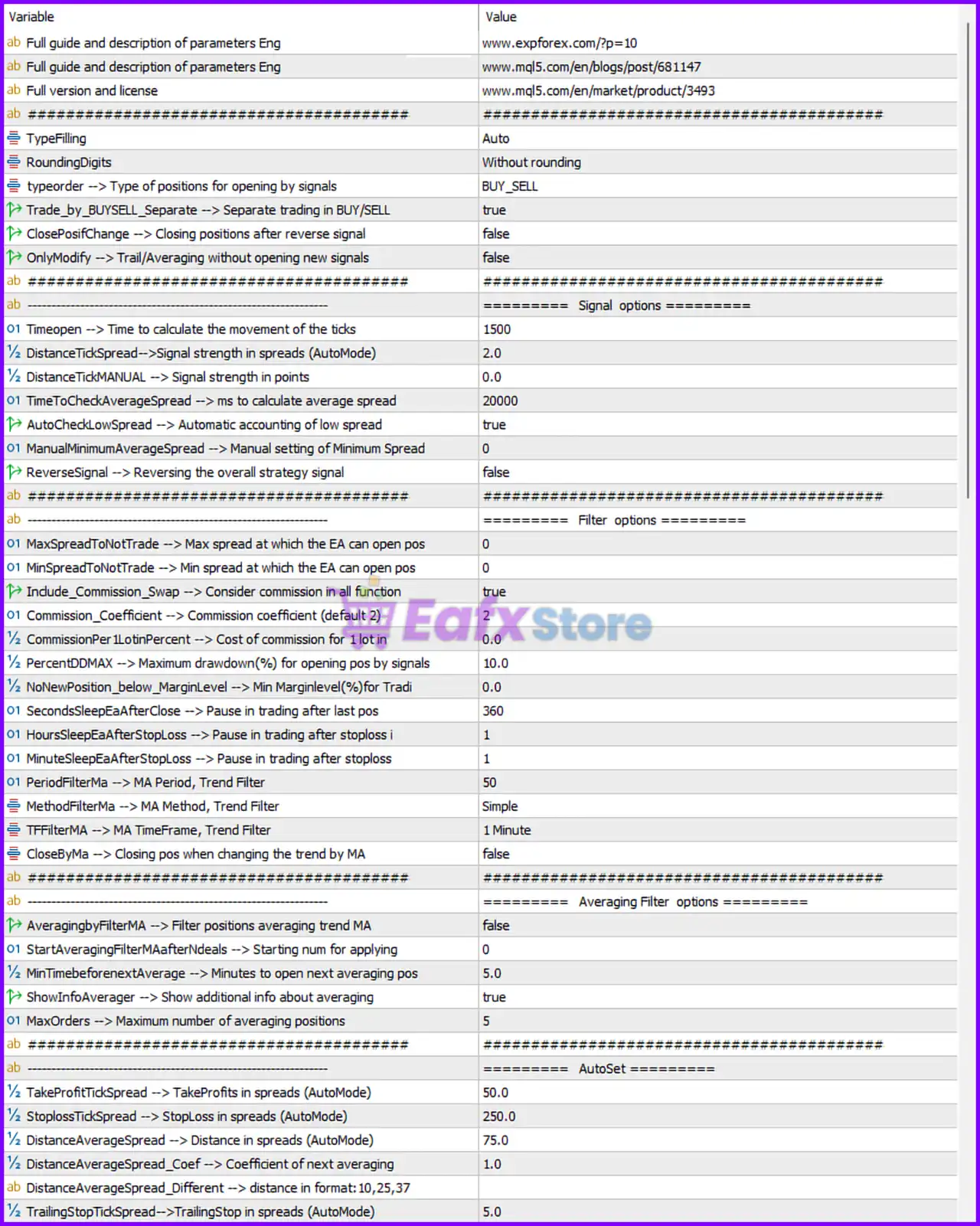
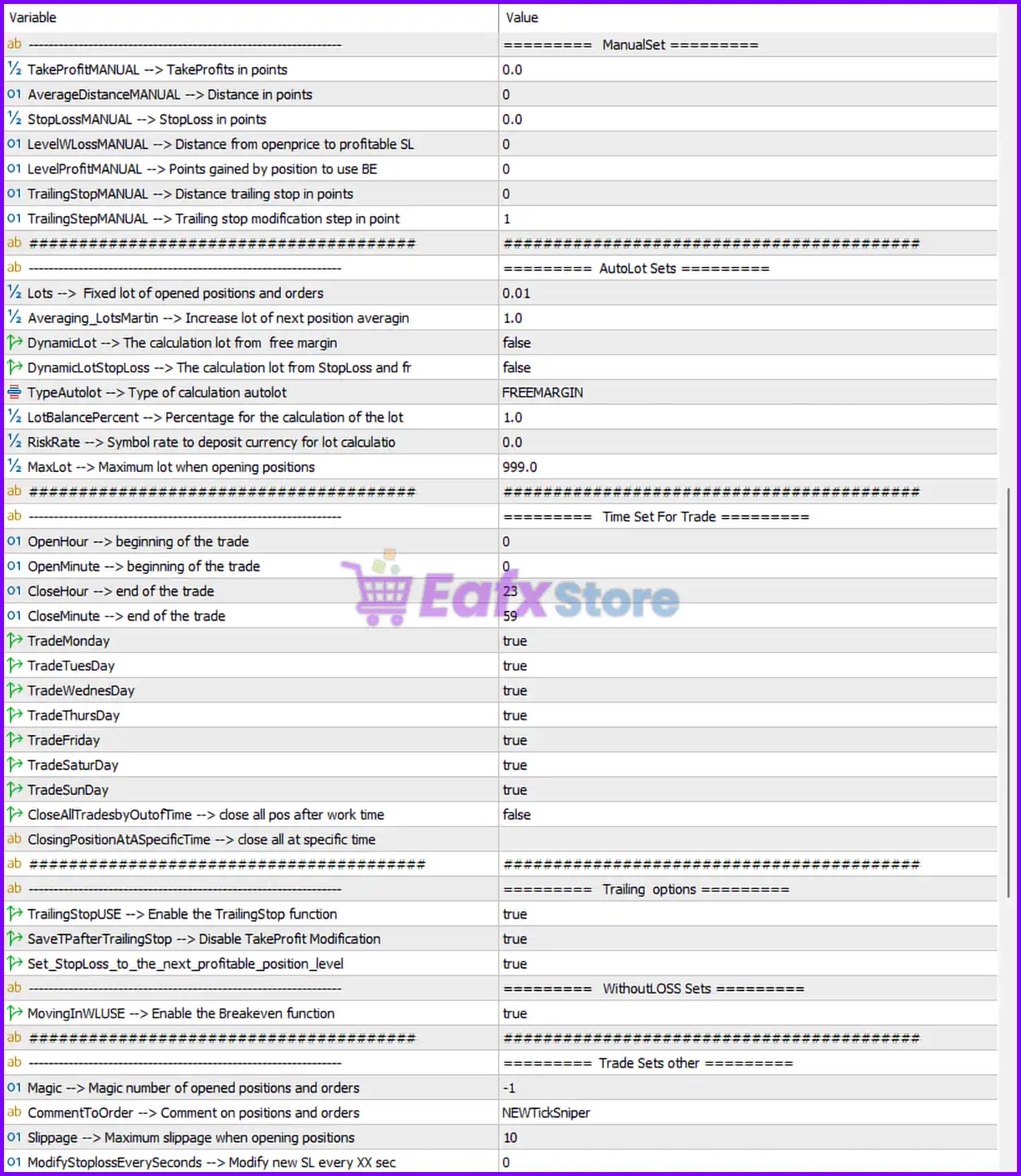
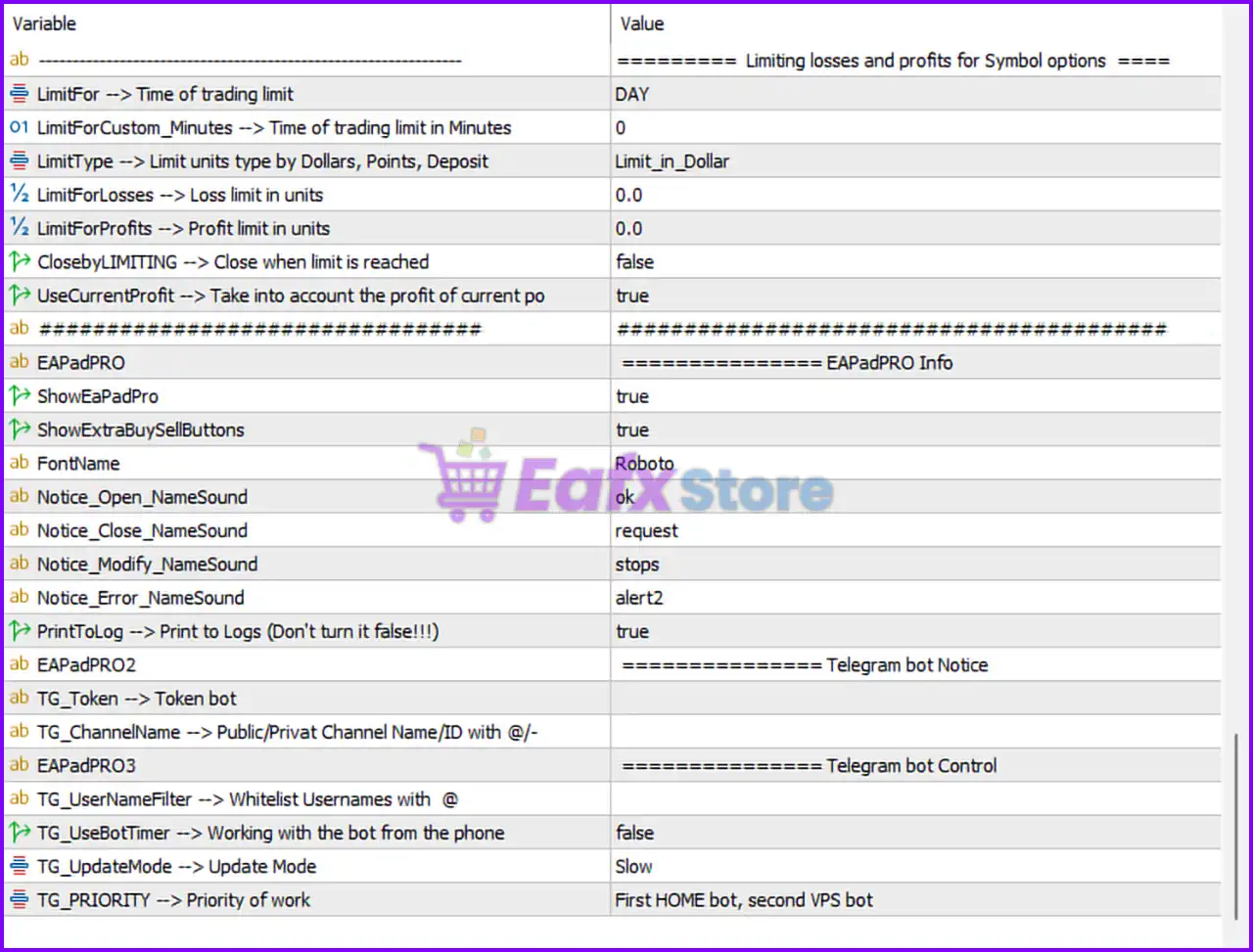
Below are the details of the parameters in the advisor’s trading system settings table:
🔶 Limiting Losses and Profits for Symbol Options
🔹 LimitFor = DAY — Defines the period used for profit and loss limitation calculations; currently set to daily limits.
🔹 LimitForCustom_Minutes = 0 — Custom trading limit period in minutes; 0 means disabled.
🔹 LimitType = Limit_in_Dollar — Uses dollar-based profit and loss limits.
🔹 LimitForLosses = 0.0 — Maximum allowed loss limit in dollars; 0.0 means disabled.
🔹 LimitForProfits = 0.0 — Maximum allowed profit limit in dollars; 0.0 means disabled.
🔹 ClosebyLIMITING = false — Does not automatically close positions when limits are reached.
🔹 UseCurrentProfit = true — Includes current floating profit when calculating limits.
🔶 EAPadPRO Information
🔹 ShowEaPadPro = true — Displays the EAPadPRO control panel on the chart.
🔹 ShowExtraBuySellButtons = true — Shows additional Buy and Sell buttons for manual trading.
🔹 FontName = Roboto — Font used within the EA panel.
🔹 Notice_Open_NameSound = ok — Sound played when opening positions.
🔹 Notice_Close_NameSound = request — Sound played when closing positions.
🔹 Notice_Modify_NameSound = stops — Sound played when modifying positions.
🔹 Notice_Error_NameSound = alert2 — Sound played when errors occur.
🔹 PrintToLog = true — Records EA activity into the MT5 Expert log.
🔶 Telegram Bot Notification Settings
🔹 TG_Token = (empty) — Telegram bot token field for notification integration.
🔹 TG_Channel = (empty) — Telegram public/private channel or chat ID.
🔶 Telegram Bot Control
🔹 TG_UserNameFilter = (empty) — Username whitelist for Telegram bot access control.
🔹 TG_UseBotTimer = false — Mobile bot timer control disabled.
🔹 TG_UpdateMode = Slow — Telegram update frequency set to Slow mode.
🔹 TG_PRIORITY = First HOME bot, second VPS bot — Defines priority order between local and VPS bot instances.
🔶 General Trading Configuration
🔹 TypeFilling = Auto — Automatically selects the best order filling mode.
🔹 RoundingDigits = Without rounding — Lot and price values are not rounded.
🔹 typeorder = BUY_SELL — EA can open both Buy and Sell trades.
🔹 Trade_by_BUYSELL_Separate = true — Buy and Sell operations are managed independently.
🔹 ClosePosifChange = false — Positions are not closed when signals reverse.
🔹 OnlyModify = false — EA can open new positions rather than only modifying existing ones.
🔶 Signal Options
🔹 Timeopen = 1500 — Tick calculation period used to detect market movement.
🔹 DistanceTickSpread = 2.0 — Spread-based signal strength threshold in Auto Mode.
🔹 DistanceTickMANUAL = 0.0 — Manual signal strength threshold; disabled when 0.0.
🔹 TimeToCheckAverageSpread = 20000 — Time period used to calculate average spread.
🔹 AutoCheckLowSpread = true — Automatically detects low spread conditions.
🔹 ManualMinimumAverageSpread = 0 — Manual minimum spread requirement disabled.
🔹 ReverseSignal = false — Signal direction is not reversed.
🔶 Trade Filter Options
🔹 MaxSpreadToNotTrade = 0 — No maximum spread restriction applied.
🔹 MinSpreadToNotTrade = 0 — No minimum spread restriction applied.
🔹 Include_Commission_Swap = true — Includes commission and swap in calculations.
🔹 Commission_Coefficient = 2 — Commission adjustment coefficient.
🔹 CommissionPer1LotinPercent = 0.0 — Commission percentage per lot.
🔹 PercentDDMAX = 10.0 — Maximum drawdown percentage allowed for signal entries.
🔹 NoNewPosition_below_MarginLevel = 0.0 — No margin-level restriction for opening trades.
🔹 SecondsSleepEaAfterClose = 360 — EA pauses 360 seconds after closing a position.
🔹 HoursSleepEaAfterStopLoss = 1 — EA pauses for 1 hour after a Stop Loss event.
🔹 MinuteSleepEaAfterStopLoss = 1 — Additional pause of 1 minute after Stop Loss.
🔹 PeriodFilterMa = 50 — Moving Average period used for trend filtering.
🔹 MethodFilterMa = Simple — Uses Simple Moving Average (SMA).
🔹 TFfilterMA = 1 Minute — MA trend filter calculated on M1 timeframe.
🔹 CloseByMa = false — Positions are not closed when MA trend changes.
🔶 Averaging Filter Options
🔹 AveragingbyFilterMA = false — MA-based averaging filter disabled.
🔹 StartAveragingFilterMAafterNdeals = 0 — Averaging filter activates immediately.
🔹 MinTimebeforeNextAverage = 5.0 — Wait 5 minutes before opening another averaging trade.
🔹 ShowInfoAverager = true — Displays averaging information on chart.
🔹 MaxOrders = 5 — Maximum number of averaging positions allowed.
🔶 AutoSet Parameters
🔹 TakeProfitTickSpread = 50.0 — Automatic TP based on spread calculations.
🔹 StoplossTickSpread = 250.0 — Automatic SL based on spread calculations.
🔹 DistanceAverageSpread = 75.0 — Automatic averaging distance.
🔹 DistanceAverageSpread_Coef = 1.0 — Averaging distance coefficient.
🔹 DistanceAverageSpread_Different = (empty) — Custom averaging distance sequence.
🔹 TrailingStopTickSpread = 5.0 — Automatic trailing stop distance.
🔶 ManualSet Parameters
🔹 TakeProfitMANUAL = 0.0 — Manual Take Profit disabled.
🔹 AverageDistanceMANUAL = 0 — Manual averaging distance disabled.
🔹 StoplossMANUAL = 0.0 — Manual Stop Loss disabled.
🔹 LevelWLossMANUAL = 0 — Distance from entry to move SL into profit.
🔹 LevelProfitMANUAL = 0 — Profit required to activate Break Even.
🔹 TrailingStopMANUAL = 0 — Manual trailing stop disabled.
🔹 TrailingStepMANUAL = 1 — Manual trailing stop modification step.
🔶 Auto Lot Settings
🔹 Lots = 0.01 — Fixed lot size for new positions.
🔹 Averaging_LotsMartin = 1.0 — Lot multiplier for averaging trades.
🔹 DynamicLot = false — Dynamic lot sizing disabled.
🔹 DynamicLotStopLoss = false — Lot sizing based on Stop Loss disabled.
🔹 TypeAutoLot = FREEMARGIN — Auto lot calculation uses available free margin.
🔹 LotBalancePercent = 1.0 — Lot calculation percentage factor.
🔹 RiskRate = 0.0 — Symbol risk conversion rate.
🔹 MaxLot = 999.0 — Maximum lot size allowed.
🔶 Trading Schedule
🔹 OpenHour = 0 — Trading starts at 00:00.
🔹 OpenMinute = 0 — Trading start minute.
🔹 CloseHour = 23 — Trading ends at 23:00.
🔹 CloseMinute = 59 — Trading ends at minute 59.
🔹 TradeMonday = true — Trading enabled on Monday.
🔹 TradeTuesday = true — Trading enabled on Tuesday.
🔹 TradeWednesday = true — Trading enabled on Wednesday.
🔹 TradeThursday = true — Trading enabled on Thursday.
🔹 TradeFriday = true — Trading enabled on Friday.
🔹 TradeSaturday = true — Trading enabled on Saturday.
🔹 TradeSunday = true — Trading enabled on Sunday.
🔹 CloseAllTradesbyOutofTime = false — Positions remain open after trading hours.
🔹 ClosingPositionAtASpecificTime = (not configured) — No fixed closing schedule specified.
🔶 Trailing Stop Options
🔹 TrailingStopUSE = true — Enables trailing stop management.
🔹 SaveTPafterTrailingStop = true — Take Profit remains unchanged when trailing is active.
🔹 Set_StopLoss_to_the_next_profitable_position_level = true — Moves Stop Loss to the next profitable level.
🔶 Break Even Settings
🔹 MovingInWLUSE = true — Enables Break Even functionality.
🔶 Additional Trade Settings
🔹 Magic = -1 — Magic Number used to identify EA positions.
🔹 CommentToOrder = NEWTickSniper — Trade comment attached to all orders.
🔹 Slippage = 10 — Maximum slippage allowed during execution.
🔹 ModifyStoplossEverySeconds = 0 — Stop Loss modification timer disabled.
🔢 Conclusion
Exp TickSniper PRO FULL EA is a highly configurable tick-trading and scalping Expert Advisor that combines spread analysis, averaging systems, auto lot sizing, trend filtering, trailing stop management, Telegram integration and extensive risk-control tools.
Its flexible architecture allows traders to customize nearly every aspect of trade execution, making it suitable for both conservative and aggressive trading styles.
🔢 FAQs
❓ What is the primary trading logic of Exp TickSniper PRO FULL EA MT5?
The EA uses tick movement analysis, spread monitoring, and trend filtering to identify trading opportunities.
❓ Does Exp TickSniper PRO FULL EA MT5 support automatic lot sizing?
Yes. The EA includes Auto Lot functionality based on free margin calculations, although DynamicLot is currently disabled.
❓ Can the EA trade both Buy and Sell positions?
Yes. The parameter typeorder = BUY_SELL allows both Buy and Sell trading.
❓ Does Exp TickSniper PRO FULL EA MT5 include Telegram integration?
Yes. The EA supports Telegram notifications and remote bot control via Telegram settings.
❓ Can the EA automatically move trades to Break Even?
Yes. The MovingInWLUSE = true setting enables automatic Break Even management to protect profits.
Get Exp TickSniper PRO FULL MT5
Download Exp TickSniper PRO FULL MT5 with its set files, read the full product details and requirements here: Exp TickSniper PRO FULL MT5 →