





Exp TickSniper PRO FULL MT5 (Latest version) – GroupBuy
Select a variant to see availability.
What is Exp TickSniper PRO FULL?
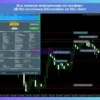
Exp TickSniper PRO FULL is a high-speed automated trading Expert Advisor (EA) designed to scalp using real-time tick data and spread dynamics. The EA automatically adapts trading parameters per symbol, focusing on stability, adaptability, and disciplined risk management while optimizing entries, exits and protective logic across changing market conditions.
🔶 Vendor Website: View here
🔶 This is GroupBuy ==> How to Join
About the Author
This product is compiled by Vladislav Andruschenko. This author has more than +14 years of experience working on MQL5 with many famous products such as Exp TickSniper PRO FULL EA, Exp5 The xCustomEA for MT5, Exp5 AI Sniper for MT5 and others. Among them, Exp TickSniper PRO FULL MT5 is his best performing products.
Key Features of Exp TickSniper PRO FULL for MT5
🔹 Auto Parameter Calculation: Automatically adjusts stop loss, take profit, trailing and averaging distances per symbol.
🔹 Tick & Spread Intelligence: Uses tick speed, spread behavior, and contract specs for precise, adaptive execution.
🔹 Universal Symbol Support: Works on any currency pair and timeframe without manual optimization or tuning.
🔹 Built-In Risk Controls: Applies stop loss, breakeven, and trailing logic to protect equity during volatility.
🔹 Fully Automated Operation: Runs hands-free with preconfigured logic, reducing execution errors and overtrading.
Why Choose & Use Exp TickSniper PRO FULL?
🔹 Designed for Stability: Focuses on controlled execution and protective logic rather than aggressive exposure.
🔹 Highly Adaptable System: Automatically responds to spread and tick changes without manual intervention.
🔹 Risk-Aware Scalping: Combines stop loss, breakeven and trailing stop to manage downside during fast markets.
🔹 No Optimization Needed: Ready-to-use logic saves time and reduces configuration mistakes.
🔹 Marketplace-Ready EA: Built for reliability across symbols, brokers and evolving market conditions.
Exp TickSniper PRO FULL MT5 Review
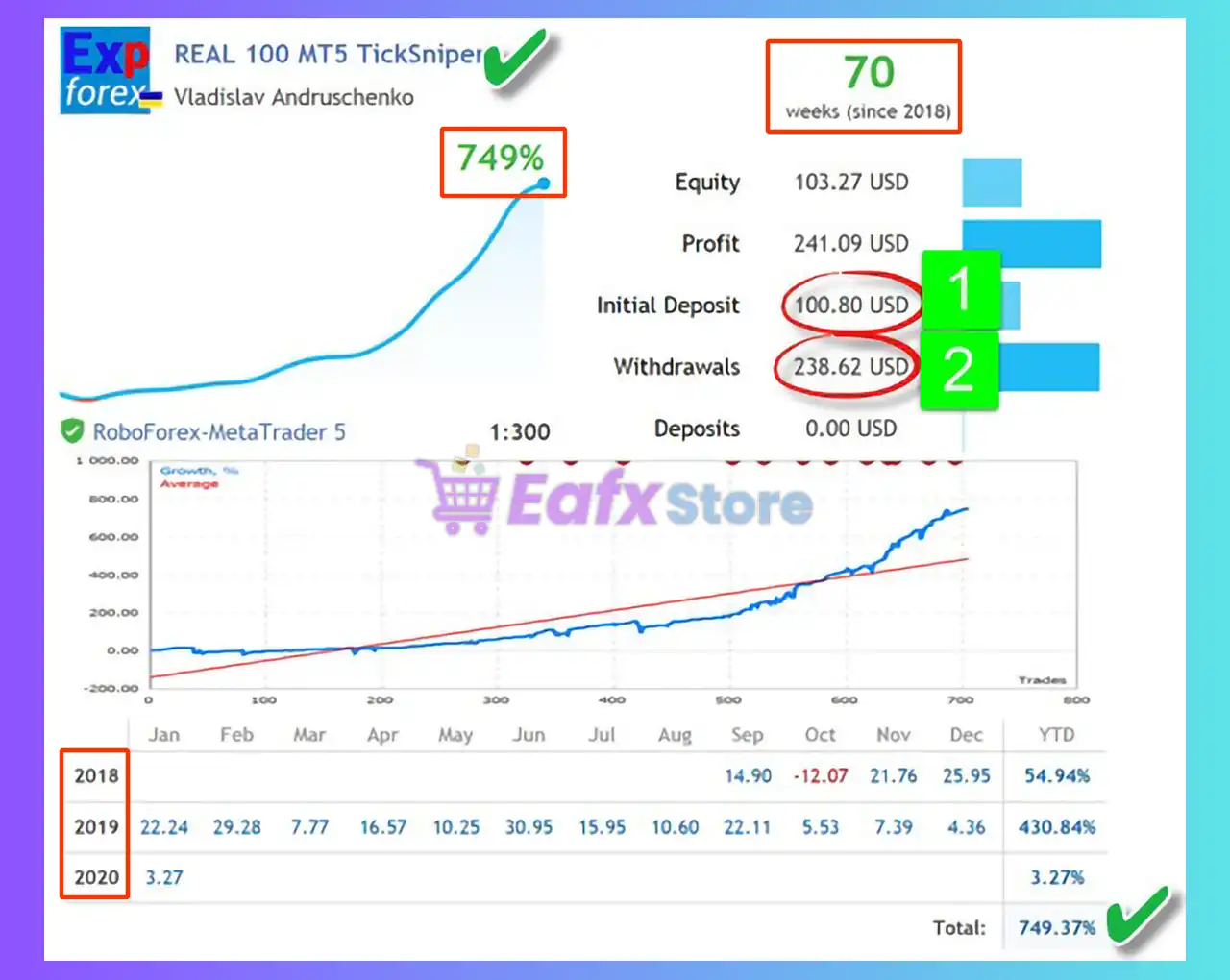
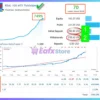
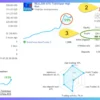
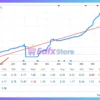
The Exp TickSniper PRO FULL EA achieved impressive profit performance when trading with Forex pairs. Trading results on real account for 70 weeks of trading.
 Initial Deposit: $100
Growth Rate: +749%
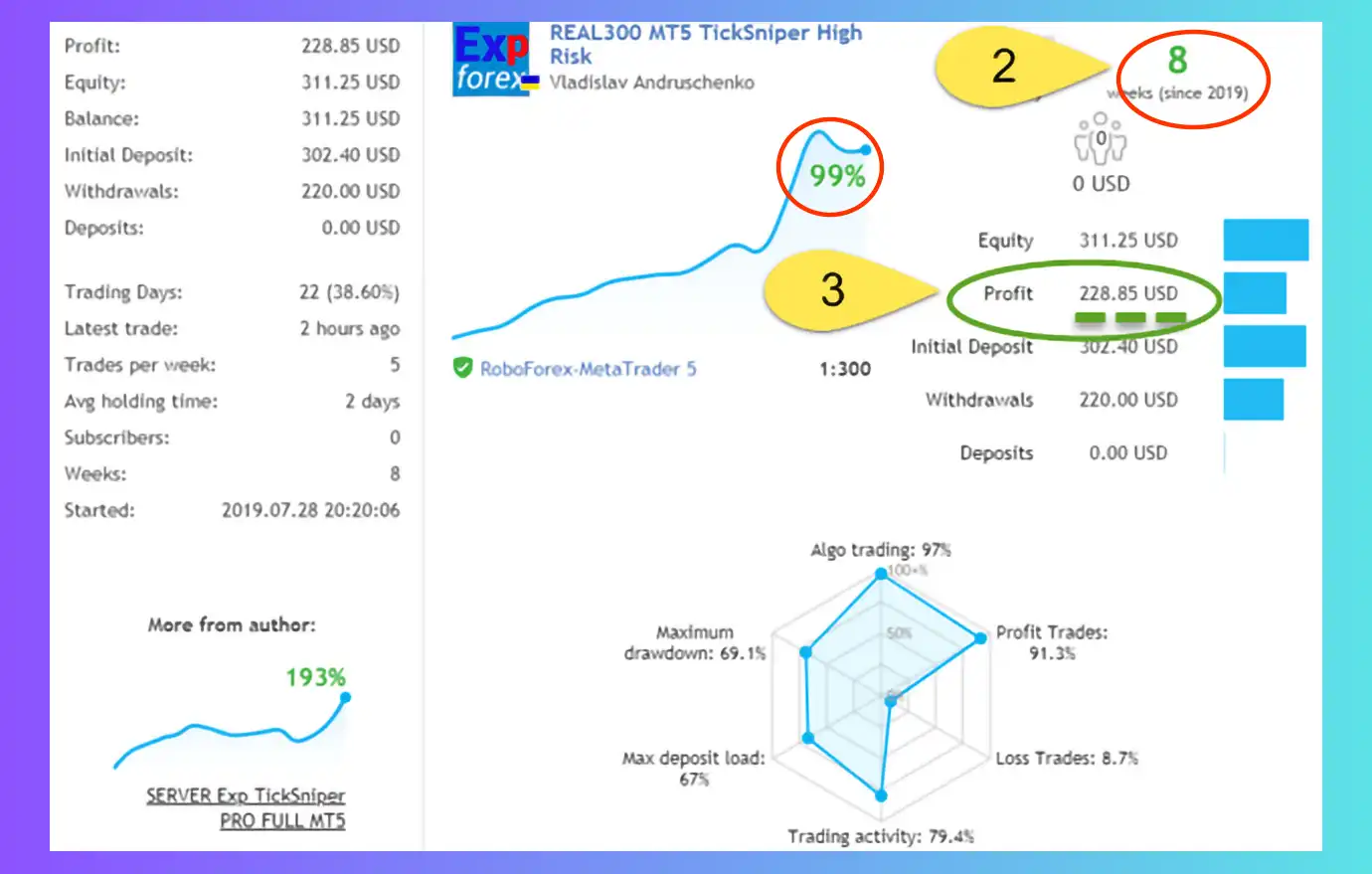
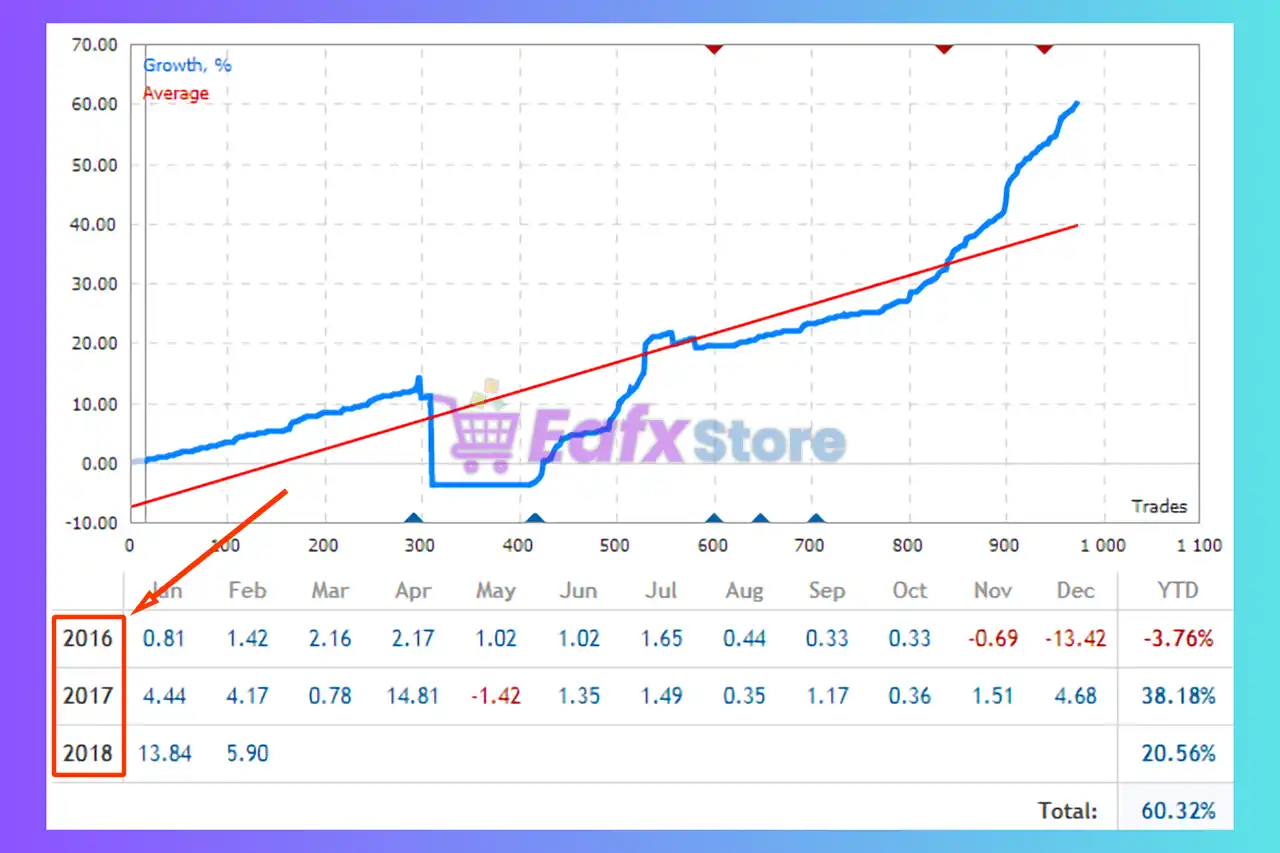
Exp TickSniper PRO FULL MT5 Signal Results
Exp TickSniper PRO FULL Signal Results
Recommended settings
Recommended settings and parameters to pay attention to from developers and experts:
| Features | Type |
|---|---|
| Trading platform | MetaTrader 5 (MT5) |
| Time frames | Any |
| Currency pairs | Any FX Pairs |
| Minimum / Recommended deposit | $100 |
| Minimum / Recommended leverage | Any |
| Account type | Any |
| Product type | Original version |
| Additional services | Unlock and Decompile |
| Recommended brokers | Exness Broker, Icmarkets Broker |
| Recommended VPS | MyfxVPS.com (Blue VPS, Golden VPS). Lowest Latency, 2 week Free Trial, 100% Free for 12-18 Months. |
 Reviewed by David Easton
Product Download Package?
The download package of the product suite includes:
Setting (If Any).docx
Installation Guide.docx
Conclusion: Explode Your Capital with Exp TickSniper PRO FULL MT5
In short, Exp TickSniper PRO FULL EA is the ultimate “money-making machine” for day trading in 2026. With a real-world growth of +749% in 70 weeks, this robot proves its ability to leverage tick data to generate exceptional profits. Its automated parameter calculation technology leaves you completely hands-free while the equity protection system operates continuously.
🔢 Exp TickSniper PRO FULL EA MT5 – Complete Settings & Parameters Guide
Exp TickSniper PRO FULL EA is a professional tick-based trading Expert Advisor for MetaTrader 5 that specializes in detecting short-term price movements using spread analysis, tick activity, trend filtering, averaging management, auto lot sizing, trailing stop mechanisms, Telegram integration and advanced trade filtering.
The EA provides extensive customization options, making it suitable for scalpers, active traders, and advanced users seeking precise control over trade execution and risk management.
Exp TickSniper PRO FULL MT5 Settings
🔢 Installation Panel Parameters
Below are the details of the parameters in the advisor’s trading system settings table:
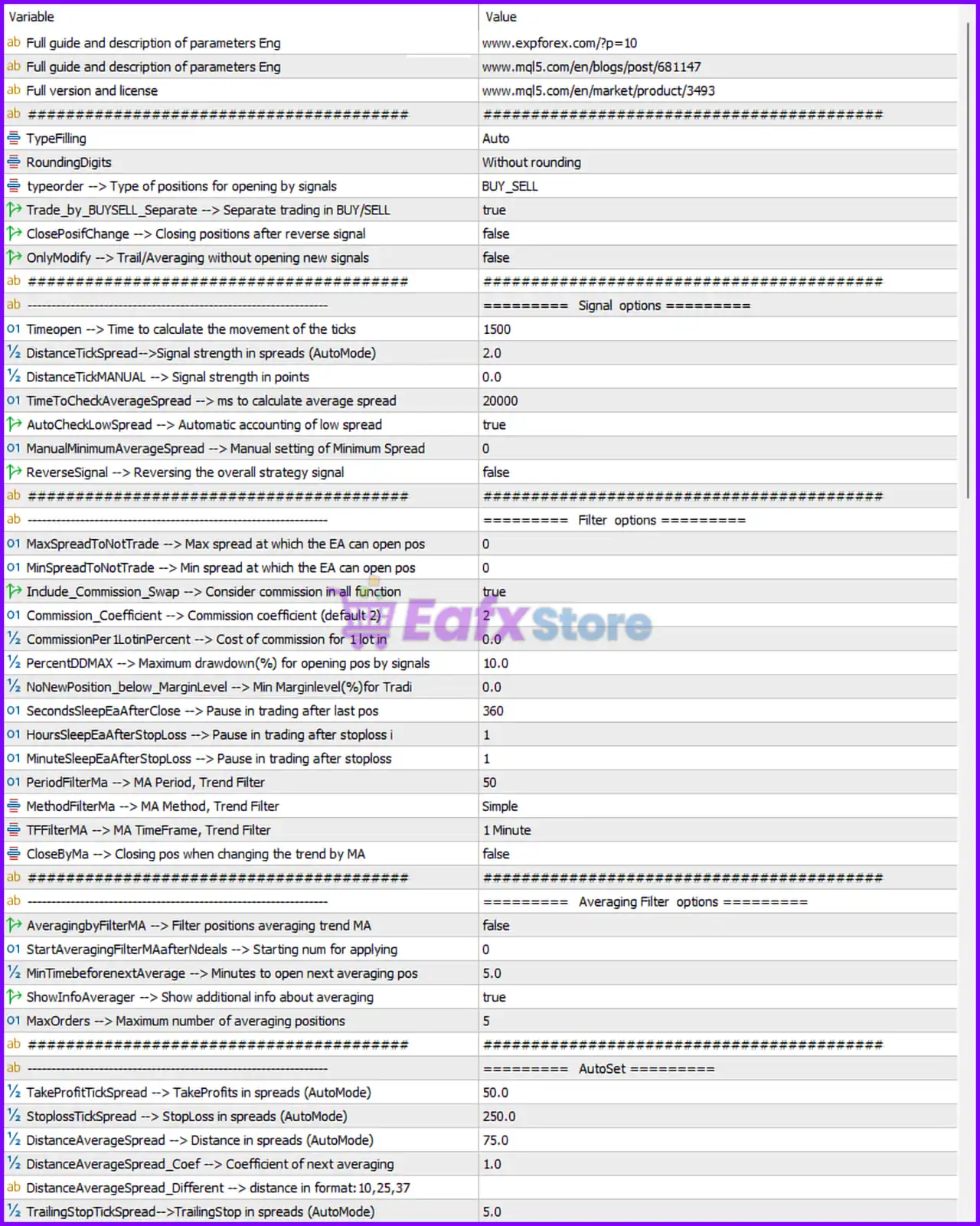
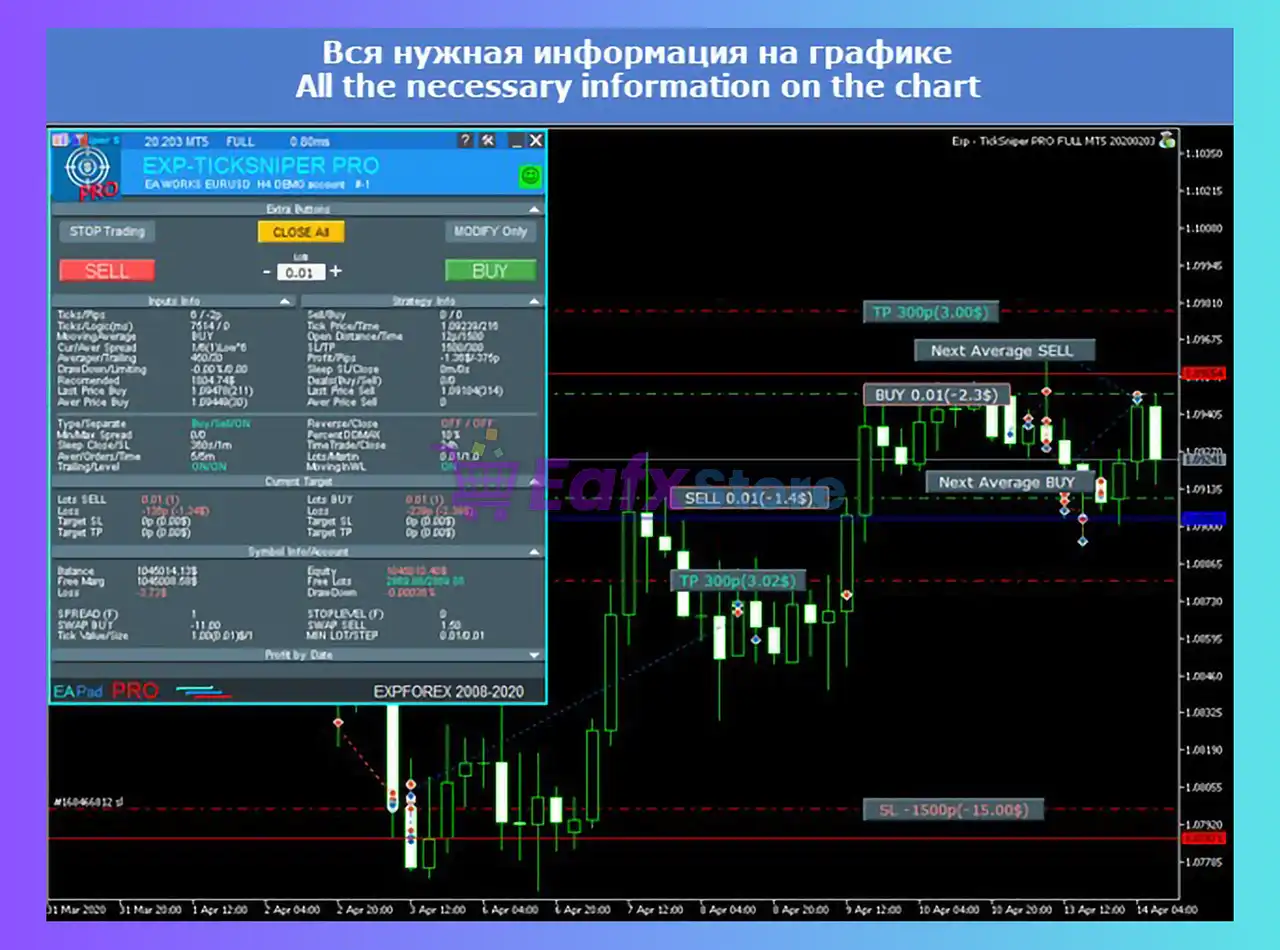
Exp TickSniper PRO FULL EA MT5 Settings Panel
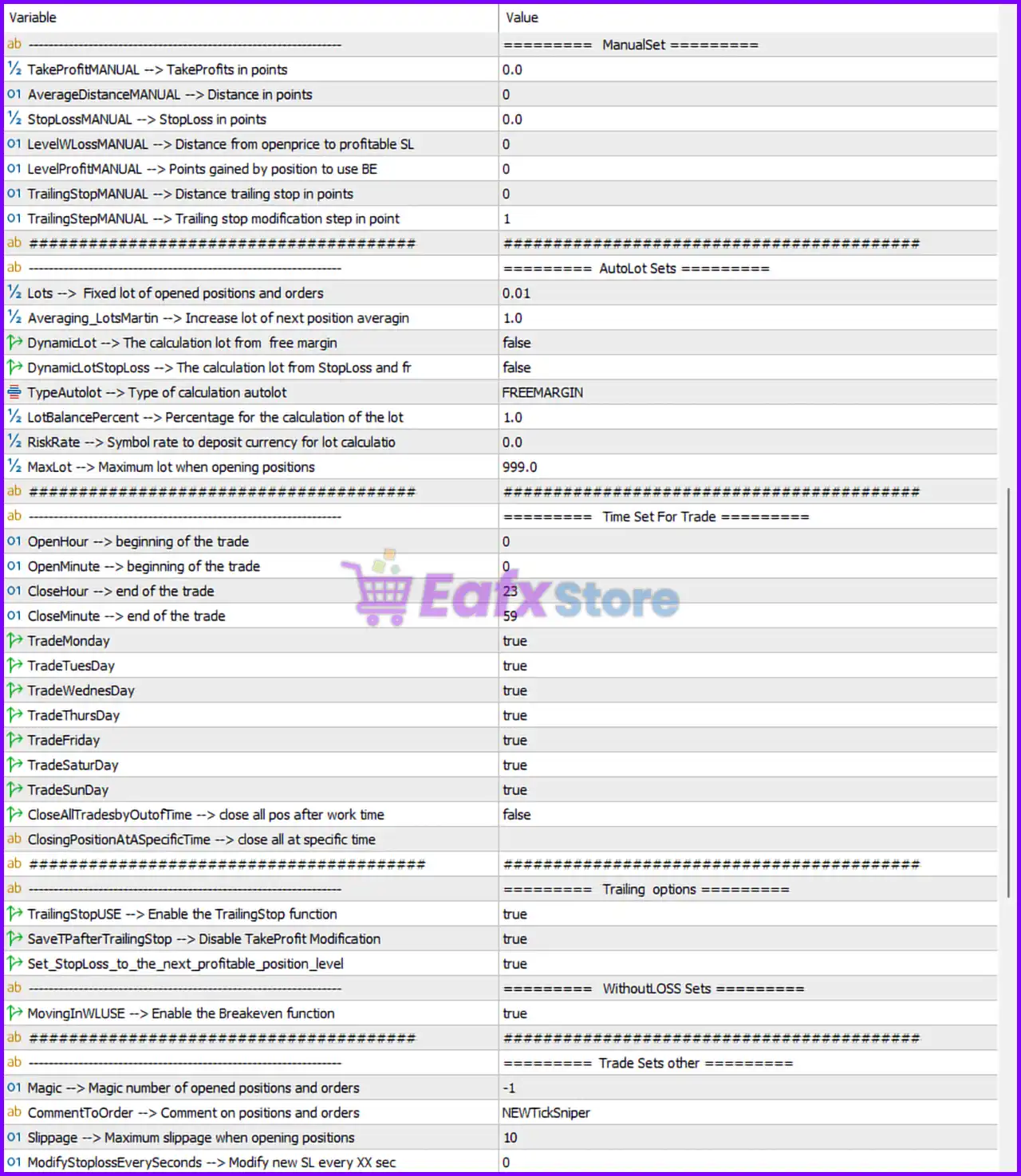
Exp TickSniper PRO FULL MT5 Settings Panel
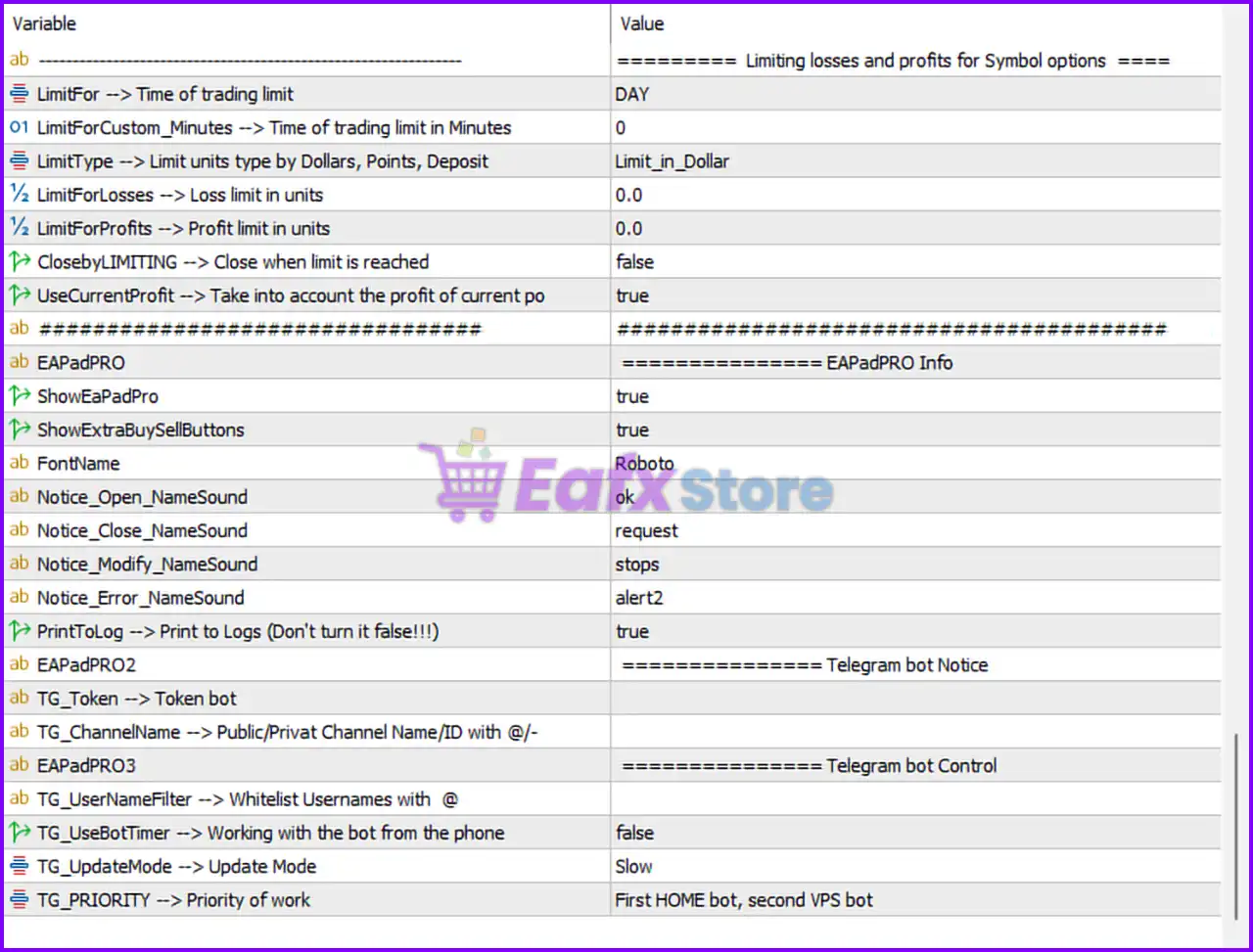
Exp TickSniper PRO FULL EA Settings Panel
🔶 Limiting Losses and Profits for Symbol Options
🔹 LimitFor = DAY — Defines the period used for profit and loss limitation calculations; currently set to daily limits.
🔹 LimitForCustom_Minutes = 0 — Custom trading limit period in minutes; 0 means disabled.
🔹 LimitType = Limit_in_Dollar — Uses dollar-based profit and loss limits.
🔹 LimitForLosses = 0.0 — Maximum allowed loss limit in dollars; 0.0 means disabled.
🔹 LimitForProfits = 0.0 — Maximum allowed profit limit in dollars; 0.0 means disabled.
🔹 ClosebyLIMITING = false — Does not automatically close positions when limits are reached.
🔹 UseCurrentProfit = true — Includes current floating profit when calculating limits.
🔶 EAPadPRO Information
🔹 ShowEaPadPro = true — Displays the EAPadPRO control panel on the chart.
🔹 ShowExtraBuySellButtons = true — Shows additional Buy and Sell buttons for manual trading.
🔹 FontName = Roboto — Font used within the EA panel.
🔹 Notice_Open_NameSound = ok — Sound played when opening positions.
🔹 Notice_Close_NameSound = request — Sound played when closing positions.
🔹 Notice_Modify_NameSound = stops — Sound played when modifying positions.
🔹 Notice_Error_NameSound = alert2 — Sound played when errors occur.
🔹 PrintToLog = true — Records EA activity into the MT5 Expert log.
🔶 Telegram Bot Notification Settings
🔹 TG_Token = (empty) — Telegram bot token field for notification integration.
🔹 TG_Channel = (empty) — Telegram public/private channel or chat ID.
🔶 Telegram Bot Control
🔹 TG_UserNameFilter = (empty) — Username whitelist for Telegram bot access control.
🔹 TG_UseBotTimer = false — Mobile bot timer control disabled.
🔹 TG_UpdateMode = Slow — Telegram update frequency set to Slow mode.
🔹 TG_PRIORITY = First HOME bot, second VPS bot — Defines priority order between local and VPS bot instances.
🔶 General Trading Configuration
🔹 TypeFilling = Auto — Automatically selects the best order filling mode.
🔹 RoundingDigits = Without rounding — Lot and price values are not rounded.
🔹 typeorder = BUY_SELL — EA can open both Buy and Sell trades.
🔹 Trade_by_BUYSELL_Separate = true — Buy and Sell operations are managed independently.
🔹 ClosePosifChange = false — Positions are not closed when signals reverse.
🔹 OnlyModify = false — EA can open new positions rather than only modifying existing ones.
🔶 Signal Options
🔹 Timeopen = 1500 — Tick calculation period used to detect market movement.
🔹 DistanceTickSpread = 2.0 — Spread-based signal strength threshold in Auto Mode.
🔹 DistanceTickMANUAL = 0.0 — Manual signal strength threshold; disabled when 0.0.
🔹 TimeToCheckAverageSpread = 20000 — Time period used to calculate average spread.
🔹 AutoCheckLowSpread = true — Automatically detects low spread conditions.
🔹 ManualMinimumAverageSpread = 0 — Manual minimum spread requirement disabled.
🔹 ReverseSignal = false — Signal direction is not reversed.
🔶 Trade Filter Options
🔹 MaxSpreadToNotTrade = 0 — No maximum spread restriction applied.
🔹 MinSpreadToNotTrade = 0 — No minimum spread restriction applied.
🔹 Include_Commission_Swap = true — Includes commission and swap in calculations.
🔹 Commission_Coefficient = 2 — Commission adjustment coefficient.
🔹 CommissionPer1LotinPercent = 0.0 — Commission percentage per lot.
🔹 PercentDDMAX = 10.0 — Maximum drawdown percentage allowed for signal entries.
🔹 NoNewPosition_below_MarginLevel = 0.0 — No margin-level restriction for opening trades.
🔹 SecondsSleepEaAfterClose = 360 — EA pauses 360 seconds after closing a position.
🔹 HoursSleepEaAfterStopLoss = 1 — EA pauses for 1 hour after a Stop Loss event.
🔹 MinuteSleepEaAfterStopLoss = 1 — Additional pause of 1 minute after Stop Loss.
🔹 PeriodFilterMa = 50 — Moving Average period used for trend filtering.
🔹 MethodFilterMa = Simple — Uses Simple Moving Average (SMA).
🔹 TFfilterMA = 1 Minute — MA trend filter calculated on M1 timeframe.
🔹 CloseByMa = false — Positions are not closed when MA trend changes.
🔶 Averaging Filter Options
🔹 AveragingbyFilterMA = false — MA-based averaging filter disabled.
🔹 StartAveragingFilterMAafterNdeals = 0 — Averaging filter activates immediately.
🔹 MinTimebeforeNextAverage = 5.0 — Wait 5 minutes before opening another averaging trade.
🔹 ShowInfoAverager = true — Displays averaging information on chart.
🔹 MaxOrders = 5 — Maximum number of averaging positions allowed.
🔶 AutoSet Parameters
🔹 TakeProfitTickSpread = 50.0 — Automatic TP based on spread calculations.
🔹 StoplossTickSpread = 250.0 — Automatic SL based on spread calculations.
🔹 DistanceAverageSpread = 75.0 — Automatic averaging distance.
🔹 DistanceAverageSpread_Coef = 1.0 — Averaging distance coefficient.
🔹 DistanceAverageSpread_Different = (empty) — Custom averaging distance sequence.
🔹 TrailingStopTickSpread = 5.0 — Automatic trailing stop distance.
🔶 ManualSet Parameters
🔹 TakeProfitMANUAL = 0.0 — Manual Take Profit disabled.
🔹 AverageDistanceMANUAL = 0 — Manual averaging distance disabled.
🔹 StoplossMANUAL = 0.0 — Manual Stop Loss disabled.
🔹 LevelWLossMANUAL = 0 — Distance from entry to move SL into profit.
🔹 LevelProfitMANUAL = 0 — Profit required to activate Break Even.
🔹 TrailingStopMANUAL = 0 — Manual trailing stop disabled.
🔹 TrailingStepMANUAL = 1 — Manual trailing stop modification step.
🔶 Auto Lot Settings
🔹 Lots = 0.01 — Fixed lot size for new positions.
🔹 Averaging_LotsMartin = 1.0 — Lot multiplier for averaging trades.
🔹 DynamicLot = false — Dynamic lot sizing disabled.
🔹 DynamicLotStopLoss = false — Lot sizing based on Stop Loss disabled.
🔹 TypeAutoLot = FREEMARGIN — Auto lot calculation uses available free margin.
🔹 LotBalancePercent = 1.0 — Lot calculation percentage factor.
🔹 RiskRate = 0.0 — Symbol risk conversion rate.
🔹 MaxLot = 999.0 — Maximum lot size allowed.
🔶 Trading Schedule
🔹 OpenHour = 0 — Trading starts at 00:00.
🔹 OpenMinute = 0 — Trading start minute.
🔹 CloseHour = 23 — Trading ends at 23:00.
🔹 CloseMinute = 59 — Trading ends at minute 59.
🔹 TradeMonday = true — Trading enabled on Monday.
🔹 TradeTuesday = true — Trading enabled on Tuesday.
🔹 TradeWednesday = true — Trading enabled on Wednesday.
🔹 TradeThursday = true — Trading enabled on Thursday.
🔹 TradeFriday = true — Trading enabled on Friday.
🔹 TradeSaturday = true — Trading enabled on Saturday.
🔹 TradeSunday = true — Trading enabled on Sunday.
🔹 CloseAllTradesbyOutofTime = false — Positions remain open after trading hours.
🔹 ClosingPositionAtASpecificTime = (not configured) — No fixed closing schedule specified.
🔶 Trailing Stop Options
🔹 TrailingStopUSE = true — Enables trailing stop management.
🔹 SaveTPafterTrailingStop = true — Take Profit remains unchanged when trailing is active.
🔹 Set_StopLoss_to_the_next_profitable_position_level = true — Moves Stop Loss to the next profitable level.
🔶 Break Even Settings
🔹 MovingInWLUSE = true — Enables Break Even functionality.
🔶 Additional Trade Settings
🔹 Magic = -1 — Magic Number used to identify EA positions.
🔹 CommentToOrder = NEWTickSniper — Trade comment attached to all orders.
🔹 Slippage = 10 — Maximum slippage allowed during execution.
🔹 ModifyStoplossEverySeconds = 0 — Stop Loss modification timer disabled.
🔢 Conclusion
Exp TickSniper PRO FULL EA is a highly configurable tick-trading and scalping Expert Advisor that combines spread analysis, averaging systems, auto lot sizing, trend filtering, trailing stop management, Telegram integration and extensive risk-control tools.
Its flexible architecture allows traders to customize nearly every aspect of trade execution, making it suitable for both conservative and aggressive trading styles.
🔢 FAQs
❓ What is the primary trading logic of Exp TickSniper PRO FULL EA MT5?
The EA uses tick movement analysis, spread monitoring, and trend filtering to identify trading opportunities.
❓ Does Exp TickSniper PRO FULL EA MT5 support automatic lot sizing?
Yes. The EA includes Auto Lot functionality based on free margin calculations, although DynamicLot is currently disabled.
❓ Can the EA trade both Buy and Sell positions?
Yes. The parameter typeorder = BUY_SELL allows both Buy and Sell trading.
❓ Does Exp TickSniper PRO FULL EA MT5 include Telegram integration?
Yes. The EA supports Telegram notifications and remote bot control via Telegram settings.
❓ Can the EA automatically move trades to Break Even?
Yes. The MovingInWLUSE = true setting enables automatic Break Even management to protect profits.
User Reviews
Only logged in customers who have purchased this product may leave a review.
❓ What is Exp TickSniper PRO FULL EA?
Exp TickSniper PRO FULL is a high-frequency scalping Expert Advisor that uses tick data and spread analysis to execute fast trades. It is designed to be fully automatic, requiring no manual optimization.
❓ Who is the developer of Exp TickSniper PRO FULL?
The EA was created by Vladislav Andruschenko, a top-rated MQL5 developer with 13+ years of experience and the developer of the Smart AI Aggressive Mode MT5.
❓ Do I need "Set Files" for Exp TickSniper PRO FULL?
No. One of its best features is the Auto Parameter Calculation. The EA automatically detects the contract specifications and spread of any symbol to set its own SL, TP, and trailing distances.
❓ Does Exp TickSniper PRO FULL work on Gold (XAUUSD)?
Yes, it works on any symbol. However, for volatile assets like Gold, it is recommended to have a larger capital base to handle the spread fluctuations and averaging sequences.
❓ Is Exp TickSniper PRO FULL a Martingale EA?
It uses a smart averaging system to manage losing trades, which can be similar to Martingale. However, it combines this with tight Stop Loss and Breakeven logic to prioritize account stability.
❓ Can I use Exp TickSniper PRO FULL for Prop Firms?
You should be cautious. Because it is a high-frequency scalper, some prop firms might flag it as HFT. Always check your firm's rules regarding "Tick Scalping" and "Averaging" before using it on a challenge account.
❓ What is the minimum deposit for Exp TickSniper PRO FULL?
You can start with as little as $100. For balances under $500, using a Cent Account is highly recommended to give the averaging logic enough room to breathe.
❓ Why is a low-latency VPS mandatory?
Since Exp TickSniper PRO FULL analyzes every tick, any delay (latency) between your terminal and the broker server can result in poor entries or missed profits. A Forex VPS with latency under 50ms is ideal.
❓ Does it include a News Filter?
Yes, it is compatible with the Expforex News Filter. It can be set to stop trading or close all positions before high-impact news to avoid slippage during extreme volatility.
❓ How do I install Exp TickSniper PRO FULL?
Installation is simple: just attach the EA to any chart. Ensure "AutoTrading" is enabled and your broker has low spreads. The EA will handle the rest, including Smart AI Aggressive Mode MT5 style risk adaptations if configured.
-
 Price range: $89.00 through $6,600.00
 -
 Price range: $89.00 through $6,600.00
 -
 Price range: $89.00 through $599.00
 -
 Original price was: $799.00.$69.00Current price is: $69.00.
-
 2
2 -
 7Original price was: $1,199.00.$229.00Current price is: $229.00.
 -
 1
1 -
 1Price range: $89.00 through $599.00
There are no reviews yet.