
What is GBPUSD Robot MT4?
GBPUSD Robot MT4 is a fully automated Expert Advisor (EA) optimized specifically for the GBP/USD pair on the M5 timeframe. It employs a dual-directional trading approach with a martingale-like recovery mechanism to quickly adjust trade size after losses, balanced by dynamic risk management and an active news filter.
📌📌📌 Buy this unlimited GBPUSD Robot MT4 product here 📌📌📌
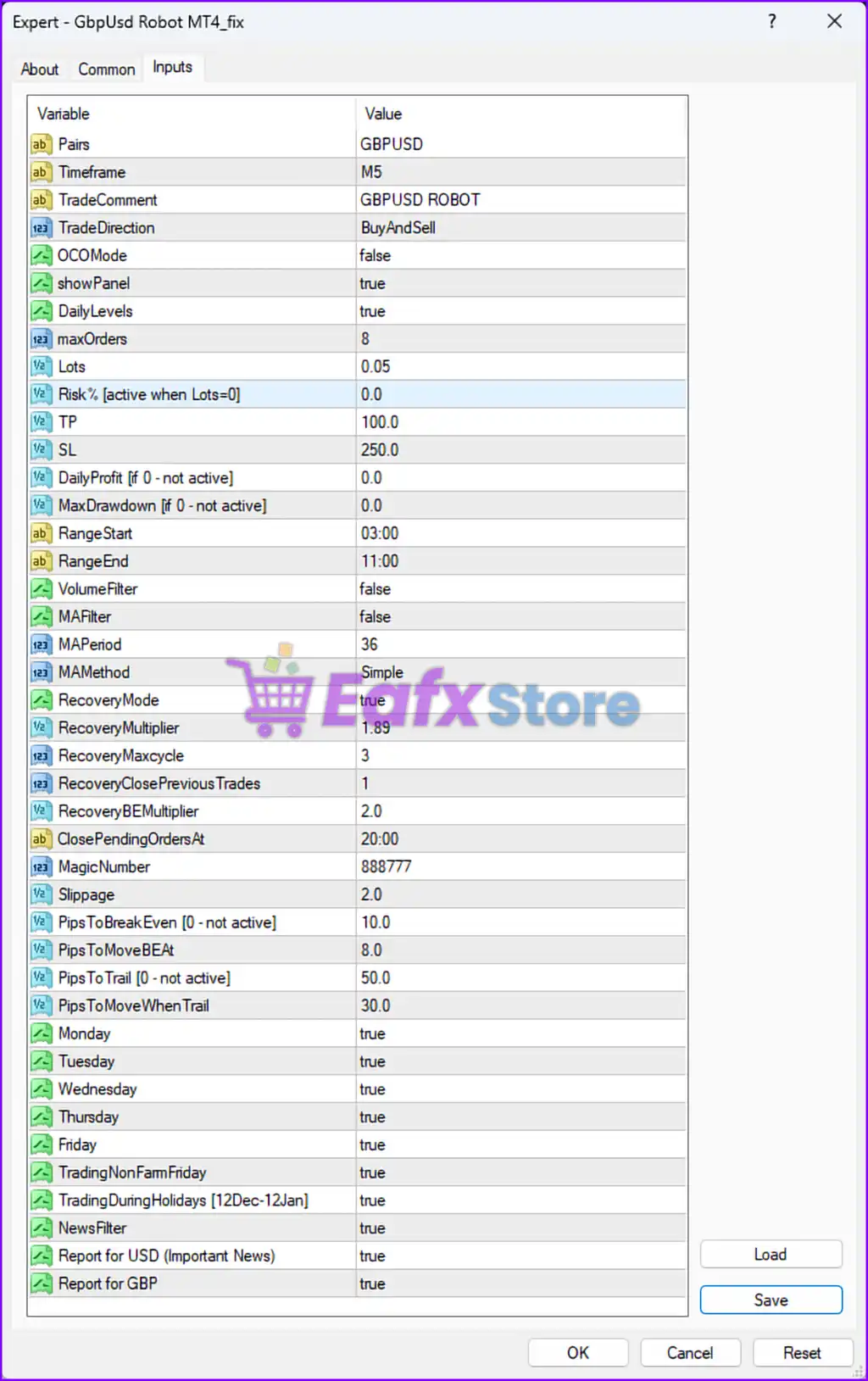
📌 Key Trading Parameters
- Pairs: GBP/USD (Designed specifically for this currency pair)
- Timeframe: M5 (5-Minute)
- Trade Direction: Buy and Sell (Can open both long and short trades)
- Max Orders: 8 (Limits the number of concurrent trades)
- Lots: 0.05 (Fixed lot size per trade)
- Risk % [active when Lots=0]: 0.0 (Uses fixed lot size instead of risk-based lot allocation)
- Take Profit (TP): 100.0 pips (Closes trades when profit target is reached)
- Stop Loss (SL): 250.0 pips (Closes trades when maximum risk tolerance is reached)
✅ Strategy: The EA follows a dual-directional trading approach that allows for both buy and sell orders, optimizing market opportunities on GBP/USD.
📈 Risk Management & Recovery Settings
- Daily Profit (if 0 - not active): 0.0 (No forced daily profit target)
- Max Drawdown (if 0 - not active): 0.0 (No predefined stop for max loss)
- Recovery Mode: True (Activates recovery trading when losses occur)
- Recovery Multiplier: 1.89 (Increases lot size after a loss to recover losses faster)
- Recovery Max Cycle: 3 (Limits recovery to a maximum of 3 cycles)
- Recovery Close Previous Trades: 1 (Closes previous losing trades during recovery)
- Recovery BE Multiplier: 2.0 (Adjusts recovery breakeven levels)
⚠️ Risk Consideration:
This EA utilizes a martingale-like recovery mechanism, increasing position sizes after losses. While this enhances profit recovery, it also exposes the account to potential higher drawdowns.
📊 Trade Execution & Filtering Rules
- Close Pending Orders At: 20:00 (Server Time) (Prevents overnight exposure)
- Slippage: 2.0 (Controls execution price deviation tolerance)
- Pips to Break Even: 10.0 (Moves stop loss to breakeven after 10 pips in profit)
- Pips to Move BE At: 8.0 (Sets when breakeven is triggered)
- Pips to Trail: 50.0 (Trailing stop distance for securing profits)
- Pips to Move When Trail: 30.0 (Adjusts trailing stop when activated)
📌 Trailing Stop Strategy:
This EA uses dynamic trailing stops, ensuring profitable trades lock in gains while reducing losses.
📆 Trading Days & News Filters
- ✅ Monday - Friday: True (Trades all weekdays)
- ✅ Trading Non-Farm Payroll (NFP) Friday: True (Trades during major US employment reports)
- ✅ Trading During Holidays (12 Dec - 12 Jan): True (Trades through year-end market volatility)
- ✅ News Filter: True (Avoids trading around high-impact news events)
- ✅ Report for USD & GBP: True (Monitors key news events affecting GBP/USD)
📌 News Impact Strategy:
The EA has built-in news filtering, helping it avoid volatile events that may cause spikes or unexpected price movement.
🔍 Final Verdict – Is GBPUSD Robot MT4 a Good Choice?
✅ Fully Automated: Supports both buy and sell trades
✅ Dynamic Risk Management: Uses break-even, trailing stops, and news filtering
✅ Recovery Mechanism: Adjusts trade size dynamically to recover losses
⚠️ Risk Consideration: Uses martingale-like recovery, which may lead to high drawdowns if not managed properly
👉 Best For: Traders who prefer aggressive recovery-based trading strategies with a strong risk management system.
💡 Recommended Settings: Use on a low-spread broker with a minimum deposit of $1,000-$3,000 for optimal performance.