

BitcoinRobot MT4 Overview
QuatronPro EA is a powerful automated trading Expert Advisor (EA) designed specifically for the MetaTrader 4 (MT4) platform. Optimized for Forex trading performance, QuatronPro EA works best on the EURUSD currency pair. Highly customizable, this EA allows users to increase profits and follow their personal trading strategies. QuatronPro EA integrates stop-loss and take-profit orders to protect trading accounts and minimize risks.
Detailed Analysis of QuatronPro EA
The QuatronPro EA is a semi-automated trading system designed to optimize trade execution, money management, and risk control. Below is a detailed breakdown of its settings and potential trading strategy.
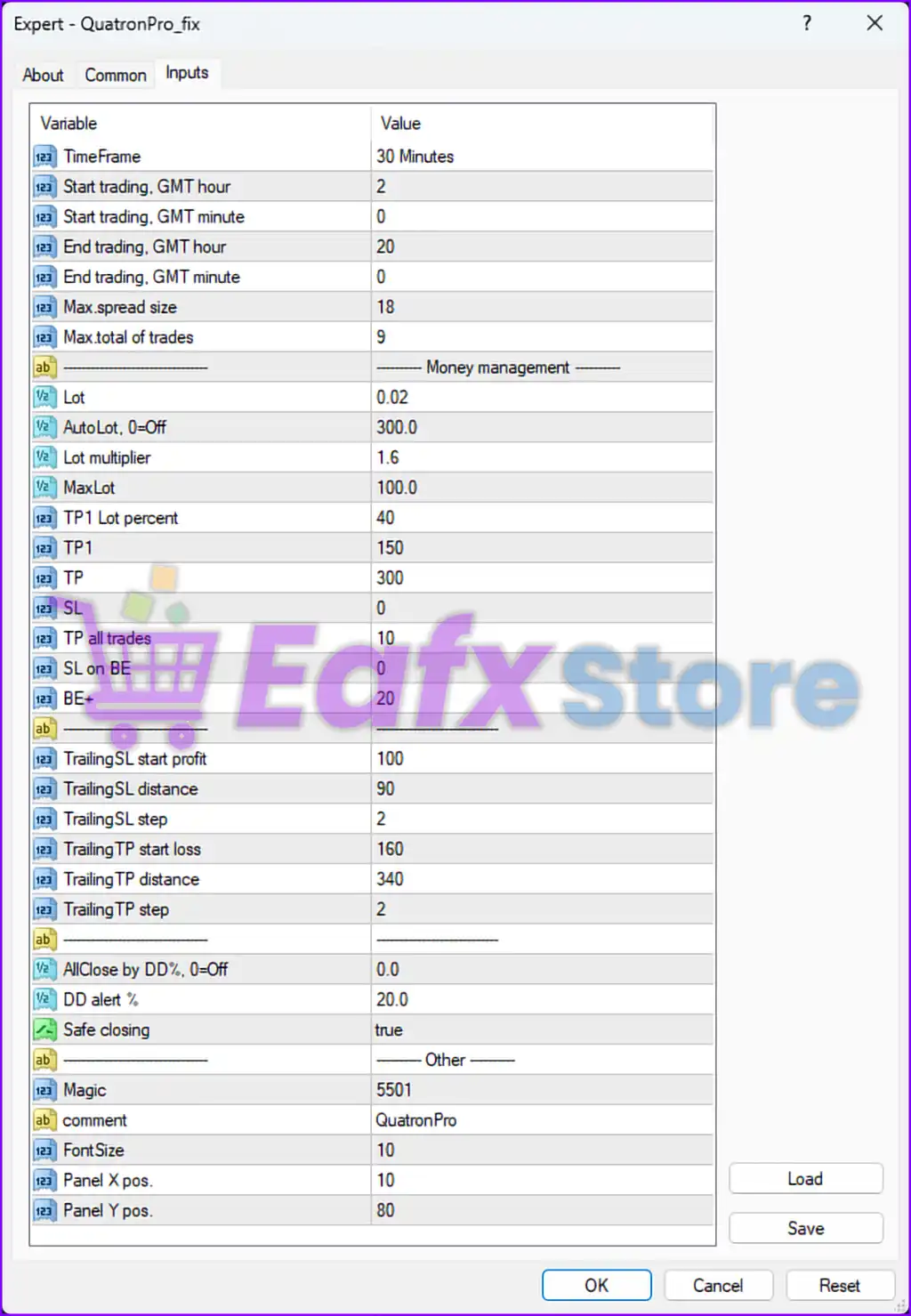
📌 1. Trading Parameters & Execution Strategy
| Setting | Value | Analysis |
|---|---|---|
| TimeFrame | 30 Minutes | ✅ The EA operates on a 30-minute timeframe, indicating a swing trading or short-term scalping approach. |
| Start Trading (GMT) | 02:00 | ✅ The EA starts trading early during the Asian session, which is a low volatility period before London opens. |
| End Trading (GMT) | 20:00 | ✅ The EA stops before New York close, avoiding major market volatility. |
| Max Spread Size | 18 | ⚠️ High spread tolerance may allow execution even in volatile conditions, potentially increasing slippage risk. |
| Max Total Trades | 9 | ✅ Limits overexposure by keeping the number of trades manageable. |
✔️ Conclusion:
- The EA is designed to trade throughout major sessions, optimizing execution based on spread control.
- Low-frequency trading strategy (max 9 trades) prevents overexposure and high drawdowns.
📊 2. Money Management & Risk Strategy
| Setting | Value | Analysis |
|---|---|---|
| Lot Size | 0.02 | ✅ Fixed lot size per trade. |
| AutoLot | 300.0 | ⚠️ High lot factor suggests aggressive risk scaling. |
| Lot Multiplier | 1.6 | ✅ Used for progressive lot sizing in case of losses. |
| Max Lot | 100.0 | ⚠️ Extremely high limit; risky if left unchecked. |
| TP1 & TP | 150 / 300 | ✅ Take Profit levels indicate moderate risk-reward settings. |
| SL | 0 | ❌ No fixed Stop Loss, which could result in high drawdowns if left running. |
✔️ Conclusion:
- The lot multiplier (1.6) suggests a form of Martingale or progressive position sizing.
- No Stop Loss (SL = 0) means trades must be manually closed or use trailing mechanisms.
📈 3. Trailing Stop & Dynamic Risk Adjustments
| Setting | Value | Analysis |
|---|---|---|
| Trailing SL Start Profit | 100 | ✅ Trailing stop activates after 100 pips in profit, securing gains. |
| Trailing SL Distance | 90 | ⚠️ Keeps trades too close to the market, risking premature exits. |
| Trailing TP Start Loss | 160 | ✅ Stops excessive losses before hitting the 340 pip trailing TP. |
| Trailing TP Distance | 340 | ✅ Ensures that winning trades can ride larger trends. |
✔️ Conclusion:
- Aggressive trailing settings allow the EA to lock in profits early.
- Trailing SL Distance (90) vs TP Distance (340) creates a high-reward, moderate-risk trade-off.
🚨 4. Risk Management & Safety Measures
| Setting | Value | Analysis |
|---|---|---|
| AllClose by DD% | 0.0 | ❌ No automatic drawdown protection, which is risky for large drawdowns. |
| DD Alert % | 20.0 | ✅ Sends alerts when the drawdown reaches 20%, giving manual intervention time. |
| Safe Closing | True | ✅ Ensures trades close safely under specific conditions. |
✔️ Conclusion:
- No automatic closing based on drawdown (AllClose DD = 0) increases risk.
- Manual monitoring is required to prevent excessive losses.
📝 5. Final Evaluation & Recommendations
| Aspect | Current Setting | Suggested Improvement |
|---|---|---|
| Trade Timing | Asian + London + NY Sessions | ✅ Good timing selection, covers major volatility zones. |
| Lot Multiplier | 1.6 (High-Risk) | ⚠️ Reduce to 1.2–1.3 for lower risk. |
| Stop Loss (SL) | 0 (No SL) | ❌ Set a fixed SL (e.g., 200-300 pips) to avoid excessive risk. |
| Max Trades | 9 Trades | ✅ Keeps risk exposure in check. |
| AllClose by DD% | 0.0 (Off) | ⚠️ Enable automatic risk protection (e.g., 30% DD limit). |
🚀 Final Thoughts:
- ✅ Strong potential for trend-based profits with effective trailing stop mechanisms.
- ⚠️ High-risk Martingale component (lot multiplier of 1.6) should be reduced.
- ❌ No Stop Loss is a major red flag; this should be manually monitored.