


GOLD Eagle MT5 with SetFiles (Latest version) - Unlimited

Subscriptions for Special Plan
- 30 EA package is more economical!
- Special package with 99%
- Download 1 EA/Day

Subscriptions for Premium Membership
- Download Unlimited in 1 Year
- Get 100% Discount
- Get free access to all

Subscriptions for Gold Membership
- 1 Year Membership
- Get 100% Discount
- Access EA+Indicator+Course
Frequently bought together 🎁
Add these products to enhance your purchase

GOLD Eagle MT5: Adaptive and Manual Trend Trading for XAUUSD (Gold)
GOLD Eagle MT5 is a trend trading strategy Expert Advisor (EA) specifically optimized for the XAUUSD (GOLD) pair, designed to work well in sideways market conditions, which typically account for 80-90% of trading time. This EA uses a trend scalping strategy, using the TrendLine PRO indicator as an entry signal. It opens the first order at the indicator signal and sets a fixed Take Profit (TP), but will automatically open additional orders to average the total TP closer to the entry point if the price falls again.
 Vendor Website: View here
About the Author
This product is compiled by Evgenii Aksenov. This author has more than +9 years of experience working on MQL5 with many famous products such as GOLD EAgle mt5, TrendLine GRID MT5, Wall Street Scalper MT5, Trend Line PRO EA mt5 and other advisors. Among them, GOLD EAgle mt5 is his best performing products.
Delivery time 24h-48h after payment.
Refund if not delivered.
You will receive the current version without any limitations (ID+Time).
Key Features of GOLD EAgle mt5
🔹Flat Market Strategy: Specifically designed to take advantage of flat market conditions, which are the majority of trading time.
🔹Trend Scalping with Indicator Signals: Uses a trend scalping strategy, where the first order is opened based on a signal from the TrendLine PRO indicator.
🔹Adaptive Take Profit Averaging: If the price does not reach the initial Take Profit (TP) level and returns, the EA will automatically open additional orders to average the total Take Profit.
🔹Manual Trading Integration: Allows users to open manual trades, which the EA will then integrate and manage in the system.
Additional Features
🔹News Filter: Ability to enable a news filter to pause trading before and after important news releases, minimizing the risk of sudden market movements.
🔹Daily Trading Frequency: Designed to trade almost every day, ensuring consistent interaction with the market.
🔹Compatibility: Fully compatible with other Expert Advisors and trading systems, allowing flexible portfolio management.
🔹Integrated Timeframe filter: Prevents new trades from opening unless the current cycle signal coincides with the trend of the previous cycle, filtering out strong trend fluctuations.
GOLD EAgle mt5 Review
GOLD EAgle MyFxBook Results
GOLD Eagle MT5 trades on real USD Cent accounts with 1:500 leverage. This EA is designed to trade gold (XAUUSD), can use grid or martingale strategy based on high growth but large drawdown.
➡️ Total Gain: +622.86%
➡️ Deposits: $9,502.80
➡️ Monthly Return: 14.93%
GOLD Eagle MT5 Myfxbook
GOLD EAgle EA Backtest Results
The GOLD Eagle EA was tested with high historical quality (99%) on MetaTrader 5, using $2,500 initial capital. This backtest reveals a highly profitable system designed for trading XAU/USD (Gold), leveraging automated grid or recovery strategies.
➡️ Initial Deposit: $2,500
➡️ Total Net Profit: $84,140
➡️ Drawdown: 16.52%
➡️ Win Rate: 77.74%
GOLD Eagle MT5 Backtest Trading Results
GOLD Eagle MT5 Backtest Results
Why use GOLD EAgle MT5?
🔹Optimized for market conditions: Focuses on stable market conditions, is active and profitable during popular market periods.
🔹Good profit potential: Smart adaptive TP averaging mechanism helps trades become profitable faster, especially when initial momentum wanes.
🔹Unique manual trade management: The ability to integrate and manage manually opened trades into the automated system provides superior flexibility.
🔹Reduced risk from volatility: Integrated news filter to avoid opening trades during strong trend fluctuations or high-impact news.
🔹Consistent trading: Trades almost every day and is compatible with other EAs, making this EA a reliable component.
User Reviews and Feedback
GOLD EAgle mt5 delivers outstanding trading performance, especially when optimized for XAUUSD. The advisor demonstrates the potential for stable profits and is highly regarded and trusted by the MQL5 community. This expert advisor combines advanced strategies with reliable results, making it a top choice for traders looking for efficiency and profitability in the Forex market. Here are the 5-star user reviews:
⭐⭐⭐⭐⭐ Mohamed El (2024.05.30): “I recently purchased the gold eagle EA and couldn’t be happier. The EA is easy to use and highly effective.”
⭐⭐⭐⭐⭐ Cheng Jiao Zuo (2022.08.09): “非常好的EA,给予最高的赞誉,只要按照作者提供的参数,合理控制风险,就能获得好的收益.”
⭐⭐⭐⭐⭐ Robert Gregory Tiddy (2021.12.01): “This product is unreal! Been a manual trader for so many years and having this side by side and also auto is just awesome. Keep up the amazing work, love your products.”
Recommended settings
Recommended settings and parameters to pay attention to from developers and experts:
| Features | Type |
|---|---|
| Trading platform | MetaTrader 5 (MT5) |
| Time frames | M15 (15 minute chart) |
| Currency pairs | XAUUSD (Gold) |
| Minimum / Recommended deposit | $1,000 or cents for cent (micro) accounts |
| Minimum / Recommended leverage | 1:200 and more |
| Product type | Original version |
| Additional services | Unlock and Decompile |
| Recommended brokers | Exness Broker, Icmarkets Broker |
| Recommended VPS | MyfxVPS.com (Blue VPS, Golden VPS). Lowest Latency, 2 week Free Trial, 100% Free for 12-18 Months. |
Product Download Package?
The download package of the product suite includes:
✅ Experts: GOLD EAgle MT5.ex5
➡️ Reviewed by David Easton
Conclusion
In short, GOLD EAgle MT5 is a high-performance Expert Advisor tailored for trading XAUUSD (Gold) on the MetaTrader 5 platform. Built with a hybrid strategy that blends trend scalping and adaptive grid recovery, this EA delivers robust returns in both flat and volatile market conditions. The system opens trades based on TrendLine PRO indicator signals, and if the market reverses before reaching the take profit, it dynamically averages positions to optimize profitability.
🔢 GOLD EAgle MT5 Settings Guide
GOLD EAgle MT5 is an automated Expert Advisor designed for systematic trading with flexible trend-line analysis, automatic lot management, manual trading controls, trailing-stop protection, grid functions, drawdown reduction, and account-level risk management. The EA provides extensive configuration options for trading direction, chart timeframe, position sizing, Take Profit, Stop Loss, trailing distance, grid spacing, lot multiplication, drawdown protection, time filters, candle filters, Moving Average confirmation, news filtering, notifications, and chart interface settings.
The displayed configuration is particularly detailed, giving traders control over both automated trading and manual-order management while allowing different risk and position-management mechanisms to be enabled or disabled according to the trading setup.
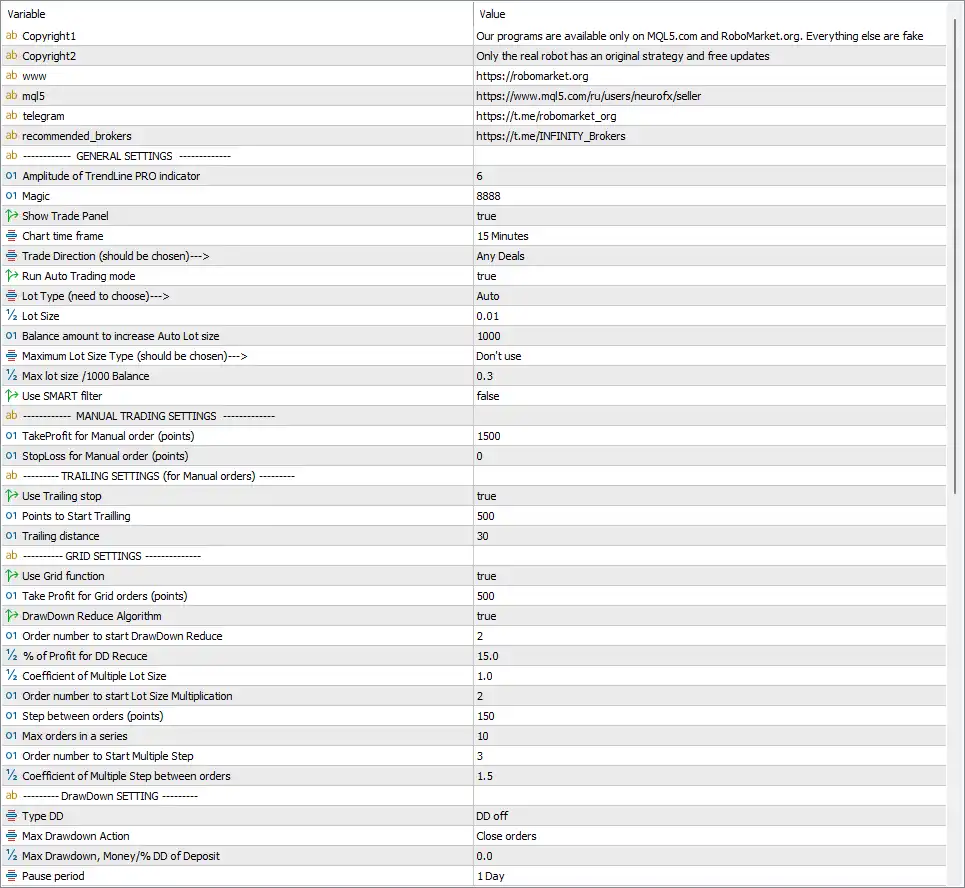
GOLD EAgle mt5 Settings Panel
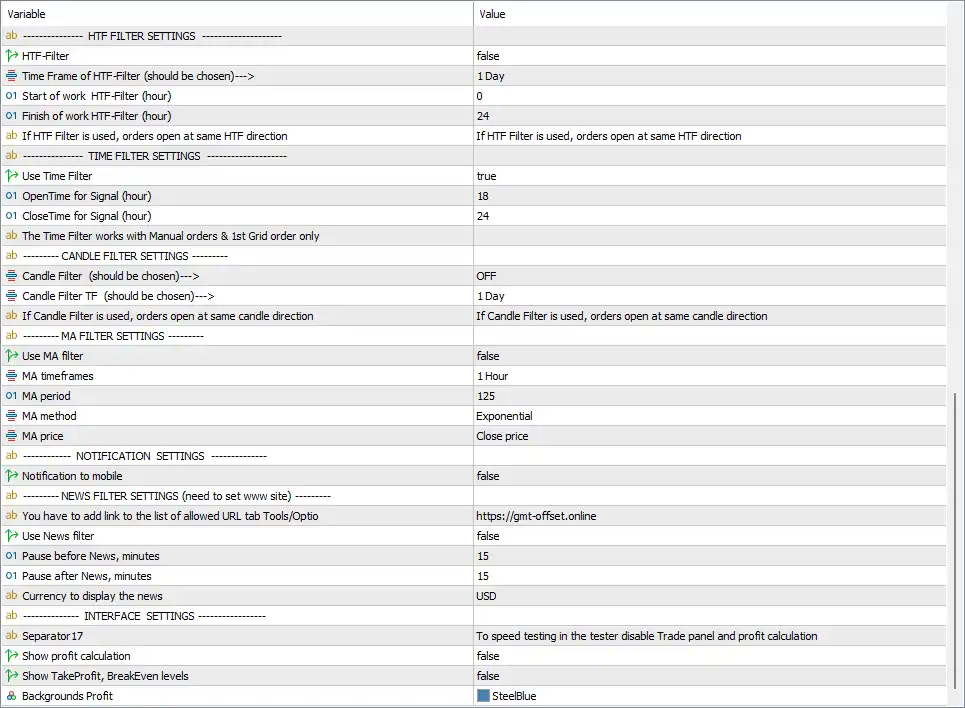
GOLD EAgle mt5 Setting Panel
General Trading Settings
🔹 Amplitude of TrendLine PRO indicator = 6 — Sets the TrendLine PRO indicator amplitude to 6, controlling the sensitivity of the trend-line calculation.
🔹 Magic = 8888 — Sets the EA Magic Number to 8888, allowing the EA to identify and manage its own trades.
🔹 Show Trade Panel = true — Enables the on-chart trading panel.
🔹 Chart time frame = 15 Minutes — Sets the EA’s chart/trading timeframe to 15 Minutes.
🔹 Trade Direction (should be chosen)—> = Any Deals — Allows the EA to operate with any supported trading direction.
🔹 Run Auto Trading mode = true — Enables the EA’s automatic trading mode.
🔹 Lot Type (need to choose)—> = Auto — Selects automatic lot calculation instead of a fixed lot-size method.
🔹 Lot Size = 0.01 — Sets the starting or base lot size to 0.01 for the automatic position-sizing calculation.
🔹 Balance amount to increase Auto Lot size = 1000 — Sets the balance increment to 1000, which determines the balance step used when increasing the automatically calculated lot size.
🔹 Maximum Lot Size Type (should be chosen)—> = Don’t use — Disables the maximum-lot-size limitation.
🔹 Max lot size /1000 Balance = 0.3 — Sets the maximum lot calculation value to 0.3 lots per 1000 balance units if the corresponding maximum-lot function is activated.
🔹 Use SMART filter = false — Disables the SMART filter.
Manual Trading Settings
🔹 TakeProfit for Manual order (points) = 1500 — Sets the Take Profit distance for manual orders to 1500 points.
🔹 StopLoss for Manual order (points) = 0 — Sets the Stop Loss for manual orders to 0 points, meaning no fixed manual-order Stop Loss is configured through this parameter.
Trailing Settings for Manual Orders
🔹 Use Trailing stop = true — Enables the trailing-stop function for manual orders.
🔹 Points to Start Trailing = 500 — Activates the trailing-stop mechanism after the position reaches 500 points of favorable movement.
🔹 Trailing distance = 30 — Sets the trailing-stop distance to 30 points.
Grid Settings
🔹 Use Grid function = true — Enables the EA’s Grid trading function.
🔹 Take Profit for Grid orders (points) = 500 — Sets the Take Profit distance for Grid orders to 500 points.
🔹 DrawDown Reduce Algorithm = true — Enables the DrawDown Reduction Algorithm to manage the position structure when the configured conditions are reached.
🔹 Order number to start DrawDown Reduce = 2 — Activates the DrawDown Reduction Algorithm starting from 2 orders.
🔹 % of Profit for DD Reduce = 15.0 — Sets the profit percentage threshold for the DrawDown Reduction mechanism to 15.0%.
🔹 Coefficient of Multiple Lot Size = 1.0 — Sets the lot-size multiplication coefficient to 1.0 for the relevant Grid/position-management calculation.
🔹 Order number to start Lot Size Multiplication = 2 — Starts the lot-size multiplication mechanism from 2 orders.
🔹 Step between orders (points) = 150 — Sets the Grid distance between consecutive orders to 150 points.
🔹 Max orders in a series = 10 — Limits a Grid series to a maximum of 10 orders.
🔹 Order number to Start Multiple Step = 3 — Starts the Multiple Step mechanism from 3 orders.
🔹 Coefficient of Multiple Step between orders = 1.5 — Sets the Multiple Step distance coefficient to 1.5, affecting how the spacing between subsequent Grid orders is adjusted.
Drawdown Settings
🔹 Type DD = DD off — Sets the DrawDown protection mode to DD off, meaning the dedicated drawdown-control module is currently disabled.
🔹 Max Drawdown Action = Close orders — Defines Close orders as the action to be taken when the configured maximum drawdown condition is reached.
🔹 % Max Drawdown, Money/% DD of Deposit = 0.0 — Sets the maximum drawdown threshold to 0.0, which corresponds to no active numerical drawdown limit under the displayed DD off configuration.
🔹 Pause period = 1 Day — Sets the drawdown-related trading pause period to 1 Day.
HTF Filter Settings
🔹 HTF-Filter = false — Disables the Higher Timeframe filter.
🔹 Time Frame of HTF-Filter (should be chosen)—> = 1 Day — Sets the Higher Timeframe reference to 1 Day when the HTF filter is enabled.
🔹 Start of work HTF-Filter (hour) = 0 — Sets the HTF filter’s starting hour to 0.
🔹 Finish of work HTF-Filter (hour) = 24 — Sets the HTF filter’s ending hour to 24.
🔹 If HTF Filter is used, orders open at same HTF direction = If HTF Filter is used, orders open at same HTF direction — Indicates that when the HTF filter is enabled, orders are opened in the same direction as the selected Higher Timeframe trend.
Time Filter Settings
🔹 Use Time Filter = true — Enables the trading-time filter.
🔹 OpenTime for Signal (hour) = 18 — Sets the signal-opening time to 18:00.
🔹 CloseTime for Signal (hour) = 24 — Sets the signal-closing time to 24:00.
🔹 The Time Filter works with Manual orders & 1st Grid order only — Indicates that the Time Filter applies to manual orders and the first Grid order only.
Candle Filter Settings
🔹 Candle Filter (should be chosen)—> = OFF — Disables the Candle Filter.
🔹 Candle Filter TF (should be chosen)—> = 1 Day — Sets the Candle Filter timeframe to 1 Day when the filter is enabled.
🔹 If Candle Filter is used, orders open at same candle direction = If Candle Filter is used, orders open at same candle direction — Indicates that orders follow the direction of the selected candle when the Candle Filter is activated.
MA Filter Settings
🔹 Use MA filter = false — Disables the Moving Average filter.
🔹 MA timeframes = 1 Hour — Sets the Moving Average analysis timeframe to 1 Hour.
🔹 MA period = 125 — Sets the Moving Average period to 125.
🔹 MA method = Exponential — Selects the Exponential Moving Average (EMA) calculation method.
🔹 MA price = Close price — Uses the Close price as the source for the Moving Average calculation.
Notification Settings
🔹 Notification to mobile = false — Disables mobile notifications from the EA.
News Filter Settings
🔹 You have to add link to the list of allowed URL tab Tools/Options = https://gmt-offset.online — Provides the URL that should be added to the allowed URL list in MetaTrader’s Tools/Options settings when the news function requires it.
🔹 Use News filter = false — Disables the News Filter.
🔹 Pause before News, minutes = 15 — Defines a 15-minute pause before a news event when the News Filter is enabled.
🔹 Pause after News, minutes = 15 — Defines a 15-minute pause after a news event when the News Filter is enabled.
🔹 Currency to display the news = USD — Sets USD as the currency for news events displayed by the EA.
Interface Settings
🔹 Separator17 = To speed testing in the tester disable Trade panel and profit calculation — Provides an informational note recommending that the Trade Panel and profit calculation can be disabled to speed up Strategy Tester testing.
🔹 Show profit calculation = false — Disables the profit-calculation display.
🔹 Show TakeProfit, BreakEven levels = false — Disables the display of Take Profit and BreakEven levels on the chart.
🔹 Backgrounds Profit = SteelBlue — Sets the profit interface background color to SteelBlue.
Current Configuration Summary
🔹 Trading Timeframe: The main Chart time frame is 15 Minutes, providing the primary timeframe for the displayed EA configuration.
🔹 Trading Mode: Automatic trading is enabled with Run Auto Trading mode = true.
🔹 Trading Direction: Any Deals is selected, allowing the EA to operate in its supported trading directions.
🔹 Lot Management: The EA uses Auto lot sizing with Lot Size = 0.01 and a 1000 balance increment.
🔹 Maximum Lot Control: The maximum lot function is set to Don’t use, while Max lot size /1000 Balance = 0.3 remains configured.
🔹 Manual Orders: Manual orders use TakeProfit = 1500 points and StopLoss = 0 points.
🔹 Manual Trailing: Trailing Stop is enabled with activation at 500 points and a trailing distance of 30 points.
🔹 Grid Trading: The Grid function is enabled with Take Profit = 500 points, 150-point spacing, and a maximum of 10 orders in a series.
🔹 DrawDown Reduction: The DrawDown Reduce Algorithm is enabled and starts from 2 orders, with a 15.0% profit threshold.
🔹 Grid Multiplication: Lot-size multiplication starts from 2 orders, while the Multiple Step mechanism starts from 3 orders with a coefficient of 1.5.
🔹 HTF Filter: The Higher Timeframe Filter is disabled, although the configured reference timeframe is 1 Day.
🔹 Time Filter: The Time Filter is enabled from 18:00 to 24:00 and applies to manual orders and the first Grid order.
🔹 Candle Filter: The Candle Filter is OFF, with its configured timeframe set to 1 Day.
🔹 MA Filter: The MA Filter is disabled, with a configured 1 Hour, 125-period, Exponential Moving Average based on Close price.
🔹 News Filter: The News Filter is disabled, with 15 minutes configured before and after news events and USD selected for news display.
🔹 Drawdown Protection: The dedicated DD module is set to DD off, with Close orders configured as the maximum-drawdown action.
🔢 Important Notes About the Settings
🔹 Grid Function: Because Use Grid function = true, the EA is configured to use Grid trading. Traders should understand how the order spacing, maximum order count, and lot-management settings affect cumulative exposure.
🔹 DrawDown Reduction: The DrawDown Reduce Algorithm = true operates separately from the main Type DD = DD off setting, so the two mechanisms should not be treated as identical functions.
🔹 Manual Stop Loss: StopLoss for Manual order = 0 means no fixed manual-order Stop Loss is configured through this specific parameter.
🔹 Time Filter: The active 18:00–24:00 window is specifically described as applying to Manual orders & 1st Grid order only.
🔹 HTF Direction: If the HTF Filter is enabled, the EA is configured to open orders in the same direction as the Higher Timeframe signal.
🔹 MA Settings: The 1 Hour / 125 / Exponential / Close price configuration is currently inactive because Use MA filter = false.
🔹 News Settings: The 15-minute before/after-news values are configured but the News Filter itself is disabled.
🔹 Drawdown Threshold: % Max Drawdown = 0.0 should be interpreted together with Type DD = DD off; the dedicated DD protection is not active in the displayed configuration.
🔢 Conclusion
The GOLD EAgle MT5 Inputs provide a comprehensive framework for automated Gold trading, combining TrendLine analysis with automatic lot sizing, manual-order management, Grid trading, trailing stops, DrawDown reduction, timeframe filters, candle confirmation, Moving Average filtering, and news protection.
The displayed setup uses a 15 Minutes chart timeframe, Auto lot sizing with a base 0.01 lot and 1000 balance increment, while the Grid function is enabled with 500 points Take Profit, 150 points between orders, and a maximum of 10 orders per series. Manual-order trailing is also enabled with a 500-point activation level and 30-point trailing distance.
Several additional filters, including the HTF Filter, Candle Filter, MA Filter, and News Filter, are currently disabled. The Time Filter is enabled for 18:00–24:00, while the dedicated DD protection is set to DD off. Traders should carefully test these parameters because Grid trading and automated position-management mechanisms can materially affect overall account exposure.
🔢 FAQs
❓ What timeframe does GOLD EAgle MT5 use in the current configuration?
The main Chart time frame is set to 15 Minutes.
❓ What lot size does GOLD EAgle MT5 use?
The EA is configured with Lot Type = Auto and Lot Size = 0.01, with the automatic lot size increasing according to a 1000 balance amount.
❓ Is Grid trading enabled in GOLD EAgle MT5?
Yes. Use Grid function = true. The Grid Take Profit is 500 points, order spacing is 150 points, and the maximum number of orders in a series is 10.
❓ Does GOLD EAgle MT5 use a Moving Average filter?
The MA settings are configured as 1 Hour, 125-period, Exponential, and Close price, but Use MA filter = false, so the filter is currently disabled.
❓ Is the News Filter enabled in the current configuration?
No. Use News filter = false. The EA nevertheless has 15 minutes configured before and after news events, with USD selected as the news currency.
User Reviews
Only logged in customers who have purchased this product may leave a review.
❓ What is GOLD EAgle MT5 and how does it work?
GOLD EAgle MT5 is an automated trading Expert Advisor (EA) optimized for the XAUUSD (Gold) pair. It uses a trend scalping strategy, opens trades based on signals from the TrendLine PRO indicator, and averages Take Profit levels when price reverses, making it highly effective in sideways markets.
❓ Which trading platform is required to use GOLD EAgle?
The EA is designed exclusively for MetaTrader 5 (MT5) and will not work on MT4.
❓ What market conditions is GOLD EAgle optimized for?
It is specifically optimized for sideways or flat markets, which make up 80–90% of trading time. It performs best when the market is not strongly trending.
❓ Does GOLD EAgle use grid or martingale strategies?
Yes, the EA includes grid and recovery strategies to average out Take Profit levels if the market reverses. This helps to improve trade profitability even when the price moves against the initial order.
❓ Can I open manual trades while using GOLD EAgle?
Absolutely. The EA supports manual trade integration, allowing it to manage trades you open yourself alongside its automated logic.
❓ What is the minimum deposit required to use GOLD EAgle?
The EA is recommended for accounts with a minimum deposit of $1,000, or for smaller cent accounts to simulate similar trade volumes.
❓ Is there a news filter in the GOLD EAgle EA?
Yes. The EA includes a built-in news filter that prevents new trades from opening before and after high-impact news events, helping to reduce risk from volatility.
❓ How profitable is GOLD EAgle based on backtesting and live results?
In live trading, it showed a +622.86% total gain with a monthly return of 14.93%. Backtests revealed a $84,140 net profit on a $2,500 account with a 77.74% win rate and 16.52% drawdown.
-
 Original price was: $8,000.00.$249.00Current price is: $249.00.
-
 Original price was: $7,000.00.$249.00Current price is: $249.00.
-
 Original price was: $8,000.00.$249.00Current price is: $249.00.
-
 Original price was: $25,000.00.$249.00Current price is: $249.00.
-
 0Original price was: $290.00.$179.00Current price is: $179.00.
-
 0Original price was: $199.00.$179.00Current price is: $179.00.
-
 0Original price was: $500.00.$199.00Current price is: $199.00.
-
 0Original price was: $430.00.$249.00Current price is: $249.00.
There are no reviews yet.