

Introduction
Gold Killer EA is an automated trading Expert Advisor (EA) designed to execute trades using configurable trading parameters and moving average settings. Its input configuration includes lot management, profit targets, position limits, timeframe selection and Magic Number identification.
The EA also features customizable dashboard settings and account-based license restrictions, allowing traders to configure its operation and manage its trading environment on MetaTrader 5.

Gold Killer EA MT5 Settings Explained
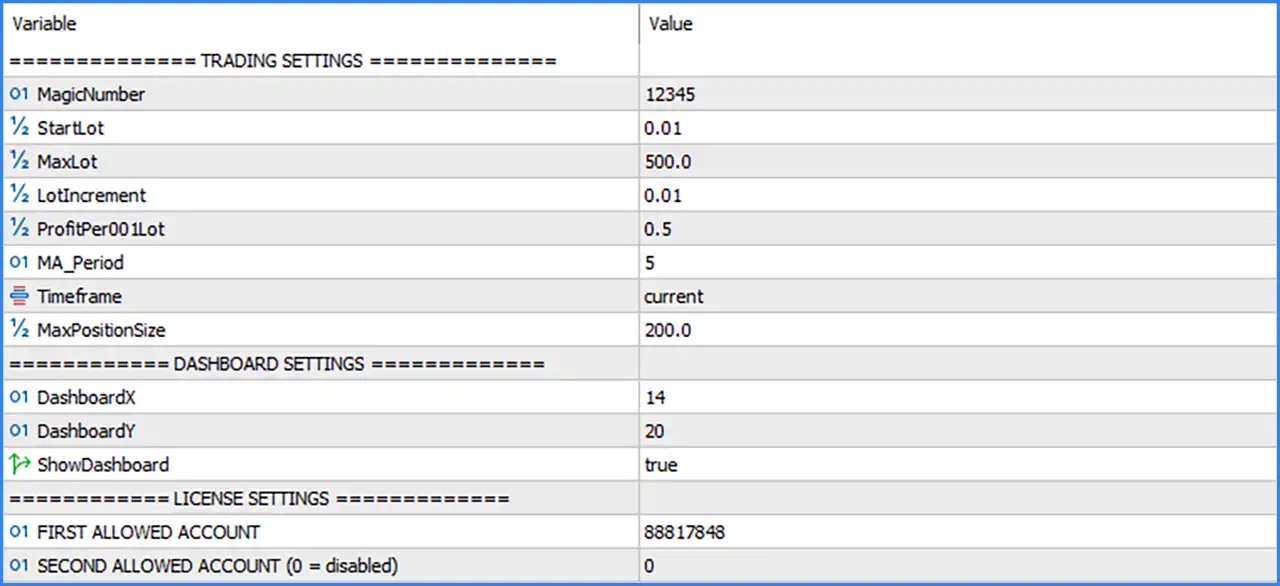
Trading Settings
🔹 MagicNumber = 12345 – Assigns a unique identification number to trades opened by Gold Killer EA MT5. This allows the EA to distinguish its positions from manual trades and positions managed by other Expert Advisors.
🔹 StartLot = 0.01 – Defines the initial trading lot size used by the EA when opening a new trading position. The default value of 0.01 represents a micro lot and provides a starting point for position sizing.
🔹 MaxLot = 500.0 – Sets the maximum permitted lot size for the EA's trading operations. This parameter establishes an upper limit on trading volume to help control position sizing as the lot size changes.
🔹 LotIncrement = 0.01 – Determines the lot size increment used when increasing trading volume. With a value of 0.01, the lot size increases in increments of 0.01 lots when the EA applies its lot adjustment logic.
🔹 ProfitPer001Lot = 0.5 – Sets the profit target reference to 0.5 for every 0.01 lot traded. This parameter defines the configured profit calculation basis according to the EA's internal lot-based profit management logic.
🔹 MA_Period = 5 – Defines the Moving Average calculation period as 5. This setting controls the number of price periods used in the MA calculation, influencing how quickly the indicator responds to market price movements.
🔹 Timeframe = current – Determines the timeframe used by the EA for its trading calculations. The current setting means the EA uses the timeframe of the chart to which it is attached.
🔹 MaxPositionSize = 200.0 – Specifies the maximum position size allowed by the EA. This parameter establishes a position-size limit to help control the total trading volume managed by the system.
Dashboard Settings
🔹 DashboardX = 14 – Sets the horizontal position of the EA dashboard on the MetaTrader 5 chart. The value 14 determines its placement along the X-axis.
🔹 DashboardY = 20 – Sets the vertical position of the EA dashboard on the chart. The default value of 20 controls its placement along the Y-axis.
🔹 ShowDashboard = true – Enables the on-chart dashboard display. When set to true, the EA displays its dashboard interface, allowing traders to view the available information directly on the trading chart.
License Settings
🔹 FIRST ALLOWED ACCOUNT = 88817848 – Specifies the first authorized trading account number permitted to use Gold Killer EA MT5. The EA uses this account information as part of its account-based license verification.
🔹 SECOND ALLOWED ACCOUNT (0 = disabled) = 0 – Defines an additional authorized trading account number. The default value of 0 means that the second account authorization slot is disabled.
Conclusion
Gold Killer EA MT5 provides a range of configurable parameters covering trading volume, profit management, Moving Average calculations, position limits, dashboard display, and account authorization.
Its default configuration includes a StartLot of 0.01, MaxLot of 500.0, LotIncrement of 0.01, ProfitPer001Lot of 0.5, and MA_Period of 5. The EA also uses the current chart timeframe, a MaxPositionSize of 200.0, and MagicNumber 12345.
Before running Gold Killer EA MT5 on a live trading account, traders should carefully review the lot size limits, profit calculation settings, and position management parameters. Testing the EA on a demo account is recommended to understand its behavior and evaluate the appropriate configuration for individual trading requirements.