

Introduction
Gold Catcher EA MT4 is an automated trading Expert Advisor (EA) designed for the MetaTrader 4 platform. Identified as Gold Catcher V2, the EA provides configurable news filtering, automated lot sizing, trade multiplication, Stop Loss, Take Profit, and Trailing Stop management.

Its configuration includes economic news restrictions, adjustable position sizing based on account equity, maximum trade limits, and customizable trailing-stop parameters. The EA also provides an information field indicating a reference capital of $1,000 per 0.01 lot for one trading pair, with 30M/H1 timeframe settings.
Understanding the Gold Catcher EA MT4 settings helps traders configure position sizes, manage trading risks, control news exposure, and customize automated trade management.
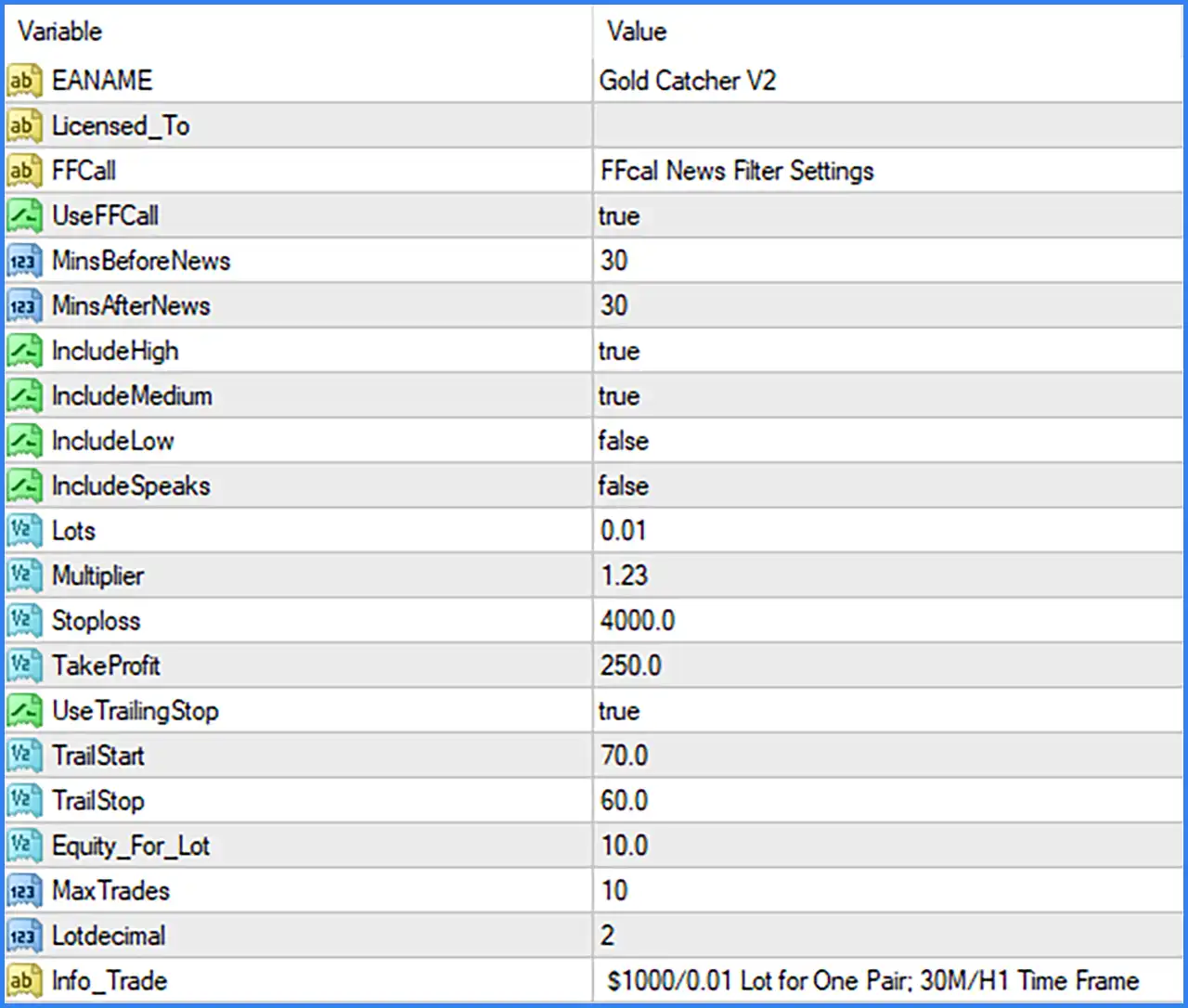
FFCall News Filter Settings
🔹 FFCall = FFcal News Filter Settings: Section heading for the FFCal economic news filtering configuration, which provides parameters for managing trading activity around scheduled economic announcements.
🔹 UseFFCall = true: Enables the FFCal news filter, allowing the EA to apply its configured economic news restrictions when processing trading opportunities.
🔹 MinsBeforeNews = 30: Sets the news restriction period to 30 minutes before a scheduled economic announcement, helping the EA avoid entering trades immediately before important news events.
🔹 MinsAfterNews = 30: Sets the news restriction period to 30 minutes after a scheduled economic announcement, allowing the EA to avoid potentially volatile market conditions following news releases.
🔹 IncludeHigh = true: Enables filtering for high-impact economic news events, helping reduce exposure to significant market movements caused by important announcements.
🔹 IncludeMedium = true: Enables filtering for medium-impact economic news events, allowing the EA to consider additional economic announcements when applying its news restrictions.
🔹 IncludeLow = false: Disables filtering for low-impact economic news events, meaning these announcements are excluded from the configured news-filtering conditions.
🔹 IncludeSpeaks = false: Disables filtering for scheduled speeches and speaking events, meaning these events are not included in the configured news restrictions.
Lot Size and Money Management Settings
🔹 Lots = 0.01: Sets the initial trading volume to 0.01 lots, defining the configured starting position size for trades opened by Gold Catcher EA MT4.
🔹 Multiplier = 1.23: Sets the lot multiplier to 1.23, defining the factor used to increase trading volume when the EA applies its progressive position-sizing mechanism.
🔹 Equity_For_Lot = 10.0: Sets the equity reference value to 10.0 for the EA's lot-sizing calculations. This parameter is used by the internal money management mechanism to determine trading volume according to account equity.
🔹 Lotdecimal = 2: Sets the number of decimal places used for lot-size calculations to 2, allowing the EA to calculate trading volumes with two decimal digits.
Stop Loss and Take Profit Settings
🔹 Stoploss = 4000.0: Sets the Stop Loss distance to 4000.0 points or the EA's corresponding distance units, defining the configured price movement against an open position before Stop Loss protection is triggered.
🔹 TakeProfit = 250.0: Sets the Take Profit target to 250.0 points or the EA's corresponding distance units, defining the configured favorable price movement required to reach the profit target.
Trailing Stop Settings
🔹 UseTrailingStop = true: Enables the Trailing Stop function, allowing the EA to adjust the protective Stop Loss as the market moves in a favorable direction.
🔹 TrailStart = 70.0: Sets the Trailing Stop activation threshold to 70.0 points, determining when the EA begins applying its trailing-stop management mechanism after a position reaches the configured profit level.
🔹 TrailStop = 60.0: Sets the Trailing Stop distance to 60.0 points, defining the distance maintained between the market price and the trailing Stop Loss according to the EA's internal management logic.
Trade Management Settings
🔹 MaxTrades = 10: Sets the maximum number of trades to 10, limiting the number of positions that Gold Catcher EA MT4 can manage according to its internal order-management rules.
🔹 Info_Trade = $1000/0.01 Lot for One Pair; 30M/H1 Time Frame: Displays the EA's trading reference information, indicating $1,000 of account capital per 0.01 lot for one currency pair, with the recommended or referenced timeframes of 30 minutes (M30) and 1 hour (H1).