

This guide walks through the inputs of GOLD-PIP MINER EA MT4 with the values recommended for live trading. The set files that come with the EA already contain these settings, so you can load them in one click and adjust only what your broker or account needs.
🔢 GOLD-PIP MINER EA MT4 Settings Guide – Complete Parameter Explanation
GOLD-PIP MINER EA is a professional automated Gold trading Expert Advisor developed for MetaTrader 4. It combines intelligent money management, automatic lot sizing, session-based trading filters, MACD confirmation, spread protection, and dynamic lot-doubling functionality to optimize trading performance.
The EA also includes built-in dashboard tools, execution controls, and trading session alerts, allowing traders to customize their trading environment while maintaining disciplined risk management.

🔢 Installation Panel Parameters
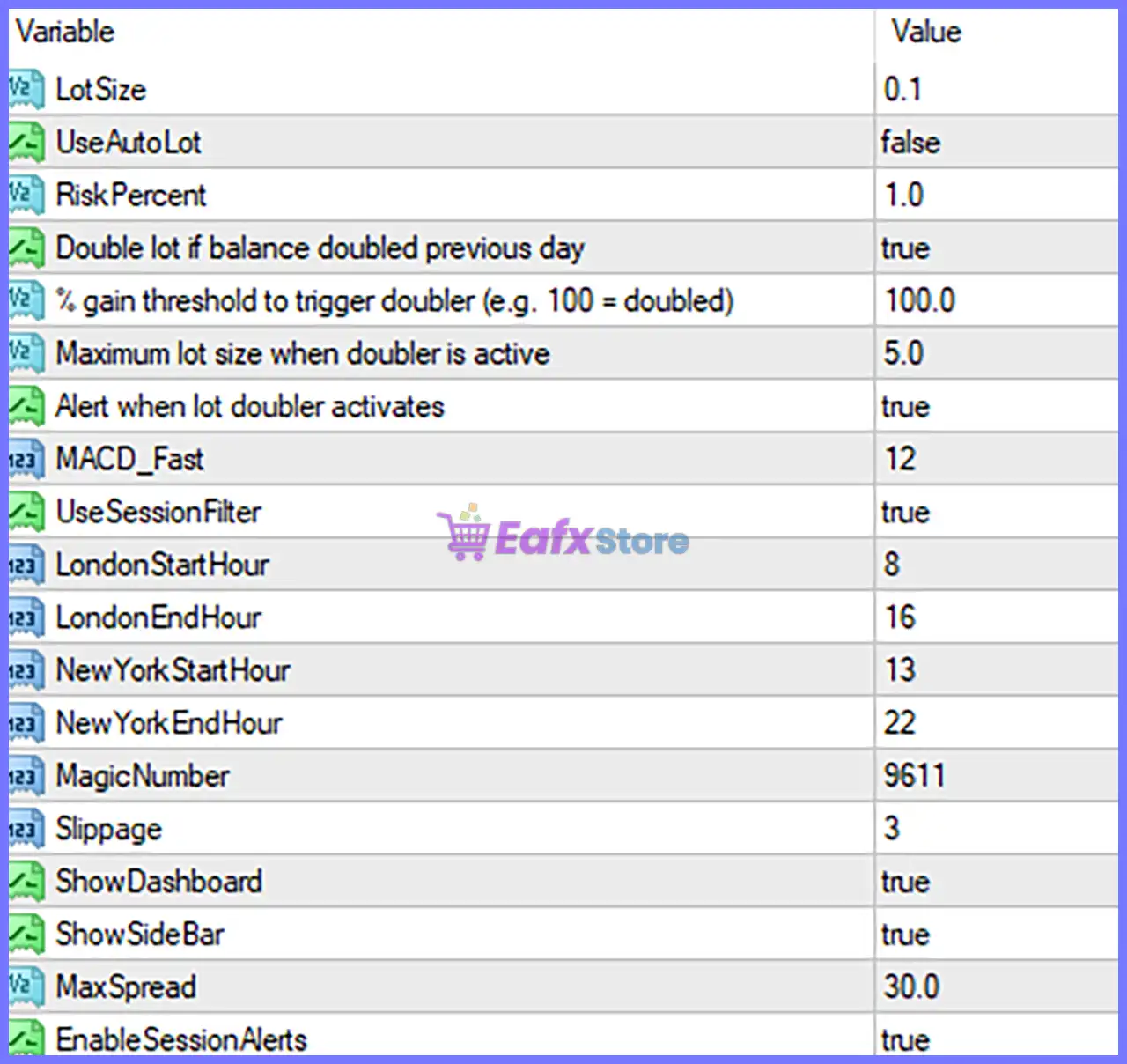
Below are the details of the parameters in the advisor’s trading system settings table:
🔶 Money Management
🔹 LotSize = 0.1 – Sets the default fixed trading volume to 0.1 lots when automatic lot sizing is disabled.
🔹 UseAutoLot = false – Disables automatic lot calculation, causing the EA to use the manually configured LotSize = 0.1.
🔹 RiskPercent = 1.0 – Sets the automatic risk level to 1.0% of the account balance when Auto Lot mode is enabled.
🔶 Dynamic Lot Doubler
🔹 Double lot if balance doubled previous day = true – Automatically enables the lot-doubling feature when the account balance has doubled compared to the previous trading day.
🔹 % gain threshold to trigger doubler (e.g. 100 = doubled) = 100.0 – Activates the lot doubler after achieving a 100.0% account gain.
🔹 Maximum lot size when doubler is active = 5.0 – Limits the doubled trading volume to a maximum of 5.0 lots.
🔹 Alert when lot doubler activates = true – Displays an alert whenever the automatic lot doubler becomes active.
🔶 Trading Indicator
🔹 MACD_Fast = 12 – Sets the MACD Fast EMA period to 12, which is used by the EA's internal trading logic.
🔶 Session Filter
🔹 UseSessionFilter = true – Enables session-based trading restrictions so the EA only trades during the configured market sessions.
🔹 LondonStartHour = 8 – Trading begins during the London session at 08:00.
🔹 LondonEndHour = 16 – Trading during the London session ends at 16:00.
🔹 NewYorkStartHour = 13 – Trading begins during the New York session at 13:00.
🔹 NewYorkEndHour = 22 – Trading during the New York session ends at 22:00.
🔶 Trade Identification & Execution
🔹 MagicNumber = 9611 – Unique identifier assigned to all trades opened by GOLD-PIP MINER EA MT4, allowing independent trade management.
🔹 Slippage = 3 – Allows a maximum execution slippage of 3 points before rejecting an order.
🔶 User Interface
🔹 ShowDashboard = true – Displays the EA's trading dashboard directly on the chart.
🔹 ShowSideBar = true – Shows the sidebar containing additional trading information and status indicators.
🔶 Market Protection
🔹 MaxSpread = 30.0 – Prevents opening new trades whenever the current spread exceeds 30.0 points.
🔶 Notifications
🔹 EnableSessionAlerts = true – Enables notifications when the configured trading sessions begin or end.
🔢 Conclusion
GOLD-PIP MINER EA offers a practical combination of automated money management, intelligent session filtering, spread protection, MACD-based market analysis and dynamic lot management.
With configurable trading hours for both the London and New York sessions, built-in dashboard tools, and automatic notification features, the EA provides traders with a flexible and disciplined framework for automated Gold trading.
Properly configuring each parameter can help improve execution quality, manage risk effectively, and adapt the EA to different broker environments and trading styles.
🔢 FAQs
❓ What is the purpose of the Magic Number in GOLD-PIP MINER EA MT4?
The MagicNumber = 9611 uniquely identifies all trades opened by the EA, allowing it to manage its own positions independently from manual trades or other Expert Advisors.
❓ Should I enable Auto Lot or use a Fixed Lot Size?
If you want dynamic position sizing based on account risk, enable UseAutoLot. Otherwise, keep it disabled to trade with the fixed LotSize = 0.1.
❓ How does the Session Filter improve trading performance?
The Session Filter limits trading to the configured London (08:00–16:00) and New York (13:00–22:00) sessions, helping the EA focus on periods of higher market liquidity.
❓ What does the Dynamic Lot Doubler feature do?
When enabled, the EA automatically increases position sizes after achieving the configured 100.0% account gain, while respecting the Maximum lot size = 5.0 limit.
❓ Why is the Max Spread setting important?
The MaxSpread = 30.0 filter helps prevent new trades during periods of unusually high spreads, reducing trading costs and improving execution quality.
Get GOLD-PIP MINER EA MT4
Download GOLD-PIP MINER EA MT4 with its set files, read the full product details and requirements here: GOLD-PIP MINER EA MT4 →