

Introduction
Gold Thief EA is an automated trading Expert Advisor (EA) designed for the MetaTrader 5 platform, featuring configurable risk management, automated trading execution, economic news filtering, and a real-time trading dashboard.
The EA provides dedicated risk configuration parameters, including initial lot size, maximum risk per trade, and maximum account risk. These settings allow traders to customize position sizing and define their preferred exposure levels.

Gold Thief EA also incorporates an optional economic news filter with automatic GMT synchronization, pending order management, and configurable trading suspension periods before and after important economic announcements. Its integrated dashboard provides on-chart trading information with adjustable positioning, font size, and refresh intervals.
This guide explains all the available Gold Thief EA MT5 input settings, preserving the original parameter names and default values to help traders understand and configure the Expert Advisor.
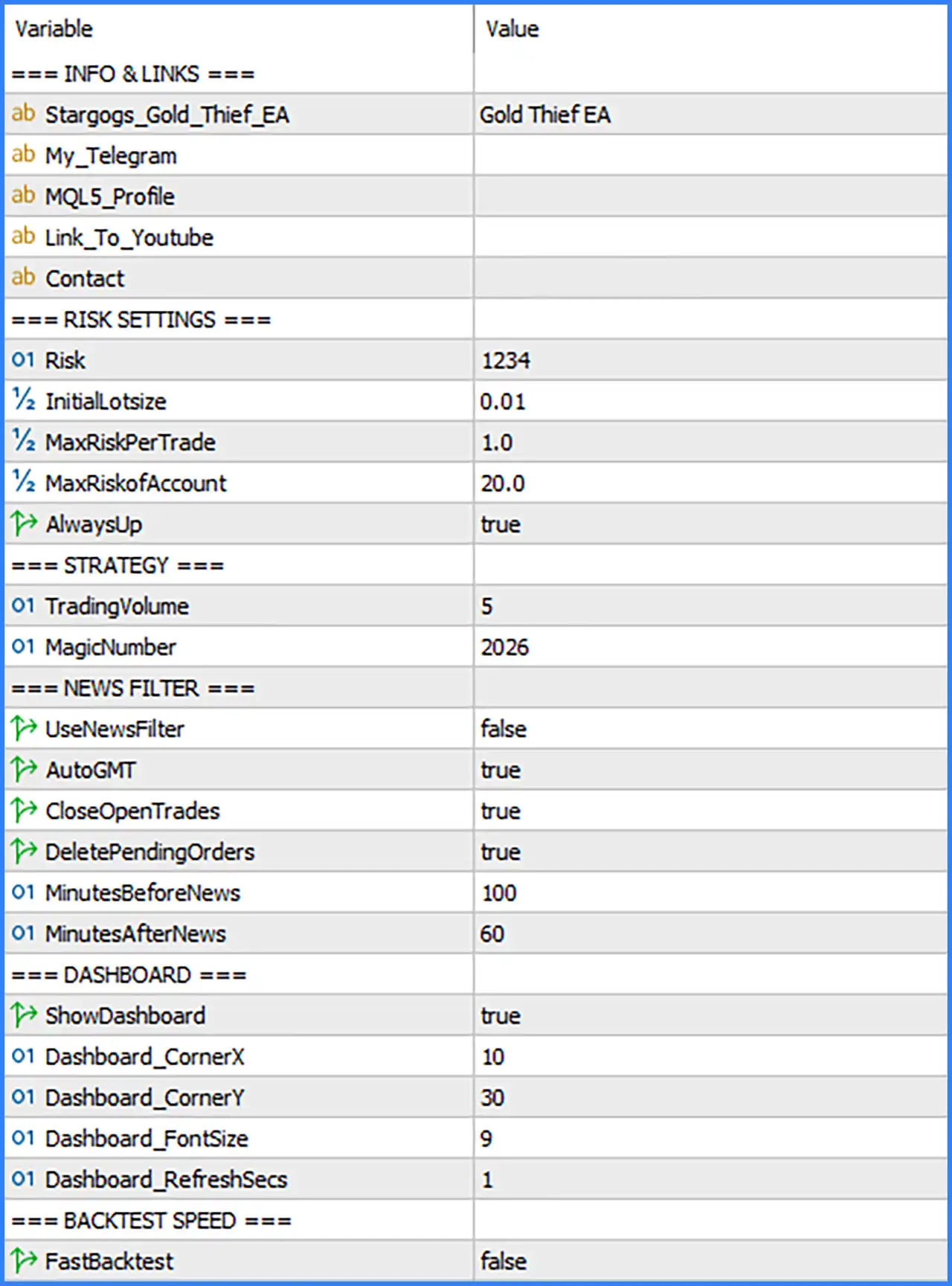
Information and Links Settings
🔹 Stargogs_Gold_Thief_EA: Gold Thief EA – Displays the EA identification name, allowing traders to recognize the Gold Thief EA configuration within the MetaTrader 5 input settings.
🔹 My_Telegram: Blank – Provides a field for the developer's Telegram contact or community link. The current configuration does not contain a Telegram address.
🔹 MQL5_Profile: Blank – Provides a field for the developer's MQL5 profile URL, allowing users to access the developer's profile and related products when a link is supplied.
🔹 Link_To_Youtube: Blank – Provides an optional YouTube link for tutorials, trading demonstrations, or instructional videos related to Gold Thief EA MT5. No URL is configured in the supplied settings.
🔹 Contact: Blank – Provides an optional contact information field for technical support or communication with the EA developer. The current value is empty.
Risk Settings
🔹 Risk: 1234 – Sets the numerical Risk parameter to 1234. This is an EA-specific input whose exact function and calculation method are not identified by the displayed label, so its internal purpose should be confirmed with the developer.
🔹 InitialLotsize: 0.01 – Sets the initial trading volume to 0.01 lots, defining the starting position size used by Gold Thief EA MT5 when opening trades.
🔹 MaxRiskPerTrade: 1.0 – Sets the maximum risk per trade parameter to 1.0, establishing the configured individual trade risk limit according to the EA's internal risk calculation.
🔹 MaxRiskofAccount: 20.0 – Sets the maximum account risk parameter to 20.0, defining the configured overall account risk threshold used by the EA's risk management system.
🔹 AlwaysUp: true – Enables the AlwaysUp option, activating the EA's internal AlwaysUp functionality. The precise trading behavior associated with this parameter depends on the developer's implementation and should be verified before modifying it.
Strategy Settings
🔹 TradingVolume: 5 – Sets the TradingVolume parameter to 5, defining the configured trading volume input used by the EA's strategy. Its exact relationship with InitialLotsize and the resulting order volume should be verified through testing.
🔹 MagicNumber: 2026 – Assigns the Magic Number 2026 to trades generated by Gold Thief EA MT5, allowing the Expert Advisor to identify and manage its own trading orders separately from manual positions and other automated systems.
Economic News Filter Settings
🔹 UseNewsFilter: false – Disables the economic news filter, allowing Gold Thief EA MT5 to continue evaluating trading opportunities without applying the configured news-related trading restrictions.
🔹 AutoGMT: true – Enables automatic GMT synchronization, allowing the EA to automatically determine the relevant GMT time reference for its economic news filtering and scheduling functions.
🔹 CloseOpenTrades: true – Enables the option to close existing open trades when the news management conditions are triggered. This function is relevant when the economic news filter is activated.
🔹 DeletePendingOrders: true – Enables automatic deletion of pending orders when the configured news protection conditions are triggered, helping prevent pending orders from being activated during restricted economic news periods.
🔹 MinutesBeforeNews: 100 – Sets the pre-news protection period to 100 minutes, defining how long before a scheduled economic announcement the EA should apply its configured news management actions.
🔹 MinutesAfterNews: 60 – Sets the post-news protection period to 60 minutes, defining how long after an economic announcement the EA should maintain its news-related trading restrictions.
Dashboard Settings
🔹 ShowDashboard: true – Enables the on-chart information dashboard, allowing traders to view the trading information provided by Gold Thief EA MT5 directly within the MetaTrader 5 interface.
🔹 Dashboard_CornerX: 10 – Sets the dashboard's horizontal corner positioning parameter to 10, controlling its placement along the chart's horizontal axis.
🔹 Dashboard_CornerY: 30 – Sets the dashboard's vertical corner positioning parameter to 30, controlling its placement along the chart's vertical axis.
🔹 Dashboard_FontSize: 9 – Sets the dashboard font size to 9, determining the text size used to display trading information on the chart.
🔹 Dashboard_RefreshSecs: 1 – Sets the dashboard refresh interval to 1 second, allowing the displayed information to update at one-second intervals.
Backtest Speed Settings
🔹 FastBacktest: false – Disables fast backtesting mode, meaning the EA operates without activating the optional accelerated backtesting functionality. This setting may affect how the EA handles certain display or processing operations during Strategy Tester simulations, depending on its internal implementation.
Conclusion
Gold Thief EA MT5 provides a configurable automated trading environment with dedicated risk parameters, strategy identification, optional economic news protection, and an integrated information dashboard.
The supplied configuration uses an initial lot size of 0.01, a MaxRiskPerTrade value of 1.0, and a MaxRiskofAccount value of 20.0. These parameters provide the main reference points for configuring the EA's position sizing and risk management behavior.
For economic news management, the EA has automatic GMT synchronization enabled, with a pre-news period of 100 minutes and a post-news period of 60 minutes. The options to close open trades and delete pending orders are also enabled, although the main news filter is currently disabled.
The dashboard is enabled with a font size of 9 and a refresh interval of 1 second, providing traders with continuously updated on-chart information. Meanwhile, FastBacktest remains disabled in the supplied configuration.
Overall, Gold Thief EA MT5 offers several useful customization options for automated trading and trade management. Traders should pay particular attention to the risk parameters, initial lot size, and the interaction between the news filter and automatic order management.
Before using Gold Thief EA MT5 on a live account, it is recommended to verify the developer-specific parameters, test the EA under different market conditions, and evaluate its actual risk exposure through backtesting and demo trading.