

Introduction
Gold AQF EA MT5 is an automated trading Expert Advisor (EA) designed for the MetaTrader 5 platform, featuring configurable trading strategies, flexible position sizing, and optional economic news filtering.
The EA provides two position-sizing options: fixed lot trading and risk-percentage-based trading. Users can select their preferred strategy, configure news impact levels, define trading restrictions around economic announcements, and manage pending orders through dedicated news filter settings.
Gold AQF EA MT5 also includes a customizable on-chart control panel with background image support and an optimization option for faster backtesting in the MetaTrader 5 Strategy Tester.
This guide explains all available input parameters, their default values, and their functions to help traders understand and configure Gold AQF EA MT5.
Risk Management and Lot Size Settings
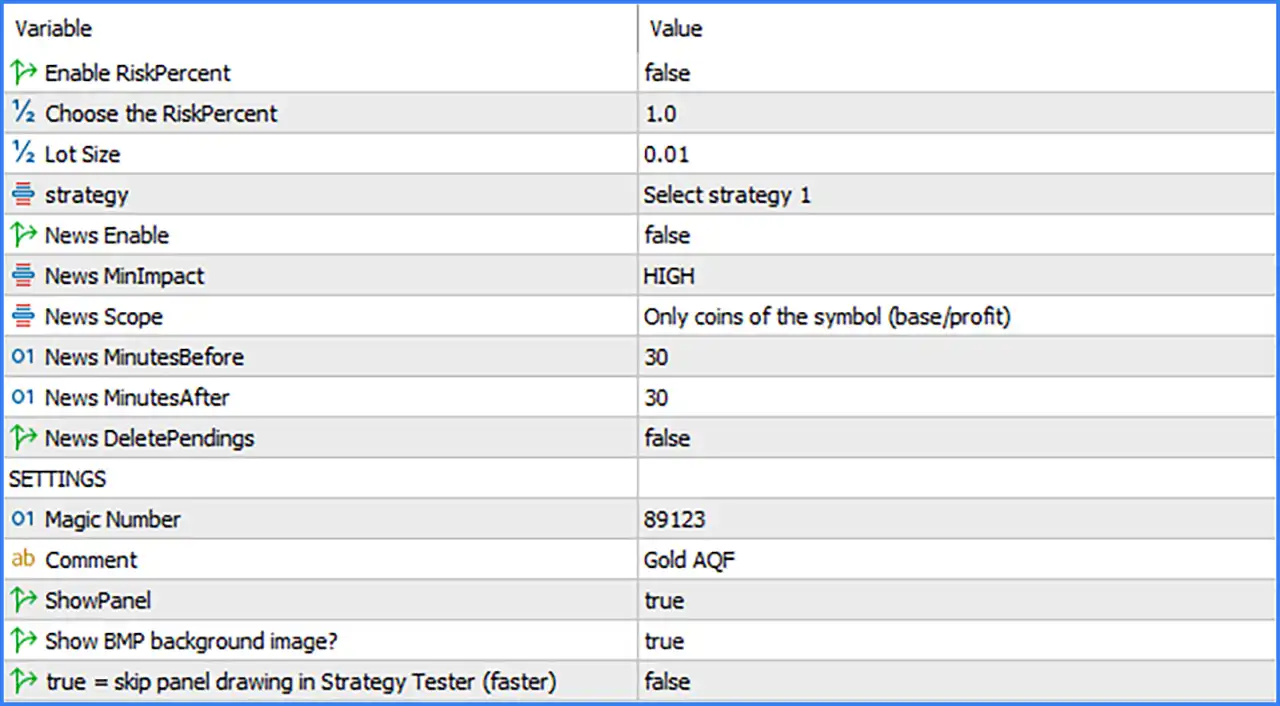
🔹 Enable RiskPercent: false – Enables or disables risk-percentage-based position sizing. When set to false, the EA uses the fixed lot size configured in the Lot Size parameter instead of calculating volume based on the selected risk percentage.
🔹 Choose the RiskPercent: 1.0 – Sets the risk percentage to 1.0 for each trade when Enable RiskPercent is activated. This parameter determines the configured risk level used by the EA's position-sizing calculation.
🔹 Lot Size: 0.01 – Sets the fixed trading volume to 0.01 lots. This value is used when percentage-based risk management is disabled, providing a relatively small starting position size.
Trading Strategy Settings
🔹 strategy: Select strategy 1 – Selects the trading strategy configuration used by Gold AQF EA MT5. The current setting selects Strategy 1, while other available strategy choices depend on the EA's internal programming.
Economic News Filter Settings
🔹 News Enable: false – Enables or disables the economic news filter. When activated, the EA can apply trading restrictions around scheduled economic announcements according to the configured news parameters.
🔹 News MinImpact: HIGH – Sets the minimum economic news impact level to HIGH. When the news filter is enabled, this setting identifies high-impact announcements as the minimum impact category to consider.
🔹 News Scope: Only coins of the symbol (base/profit) – Restricts news filtering to currencies associated with the current trading symbol, including its base and profit currencies. This helps focus the filter on economic announcements relevant to the traded instrument.
🔹 News MinutesBefore: 30 – Sets the news avoidance period to 30 minutes before a scheduled economic announcement, helping prevent new trades from being opened immediately before important news releases.
🔹 News MinutesAfter: 30 – Sets the news avoidance period to 30 minutes after an economic announcement, allowing the market time to react before normal trading activity resumes.
🔹 News DeletePendings: false – Disables automatic deletion of pending orders during news-related trading restrictions. Existing pending orders are not automatically deleted through this particular option.
General EA Settings
🔹 SETTINGS: ---------------- – Section heading for the general configuration parameters, including trade identification and chart display options.
🔹 Magic Number: 89123 – Assigns the unique Magic Number 89123 to trades opened by Gold AQF EA MT5. This identifier helps MetaTrader 5 distinguish the EA's positions from manual trades and orders generated by other automated systems.
🔹 Comment: Gold AQF – Sets the custom order comment to Gold AQF, making it easier to identify trades generated by this Expert Advisor in the trading history and terminal.
Dashboard and Chart Display Settings
🔹 ShowPanel: true – Enables the on-chart information panel, allowing traders to view the EA's available dashboard interface directly on the MetaTrader 5 chart.
🔹 Show BMP background image?: true – Enables the display of a BMP background image for the EA's visual panel, providing a customized chart interface.
🔹 true = skip panel drawing in Strategy Tester (faster): false – Controls whether the EA skips drawing its dashboard panel during Strategy Tester operations. Since the value is false, the panel drawing is not skipped through this option, which may result in additional visual processing during backtesting.
Conclusion
Gold AQF EA provides a straightforward but flexible configuration for automated trading, combining selectable trading strategies, configurable lot sizing, optional risk-percentage management, and economic news filtering.
The displayed configuration uses Strategy 1, a fixed lot size of 0.01, and a risk percentage setting of 1.0. However, percentage-based risk management is currently disabled, meaning the EA uses the fixed lot configuration rather than the risk percentage setting.
The economic news filter is also disabled by default, although its parameters are configured to monitor high-impact news events affecting the currencies associated with the traded symbol. The news filter includes a 30-minute restriction before and after announcements, together with an optional pending-order deletion function.
Additionally, Gold AQF provides an enabled dashboard and BMP background image display, allowing traders to monitor the EA through its on-chart interface.