

Introduction
AXL Gold SMC EA is an automated trading Expert Advisor (EA) designed for the MetaTrader 4 platform, with a configuration focused on Gold trading and multiple trading management modules.

The EA features a global money management system with adjustable initial lot size, lot exponent, maximum lot limits, and equity risk controls. It also includes configurable trading schedules to manage market exposure around the weekend, automatically closing trading activity on Friday and resuming on Monday.
One of its notable features is the use of three separate trading configurations: AXL-1 (HILO), AXL-2 (15), and AXL-3 (16). Each module has independent order limits, trailing stop settings, pip step parameters, slippage values, and Magic Numbers.
This guide provides a complete explanation of all available input parameters and their default values to help traders understand and configure AXL Gold SMC.
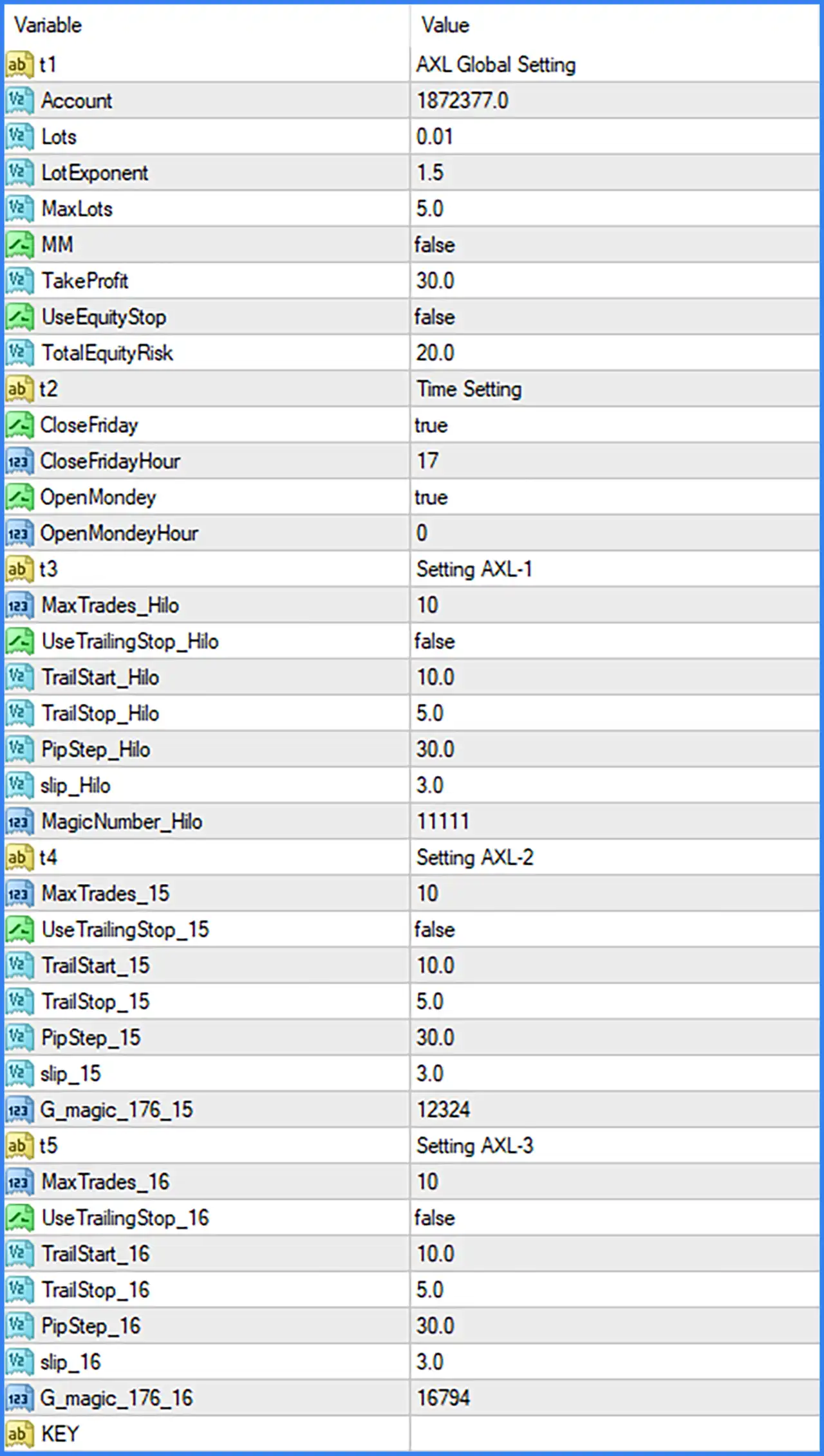
Global Money Management Settings
🔹 t1: AXL Global Setting – Identifies the main global configuration section, containing the EA's general account, lot sizing, money management, and equity protection parameters.
🔹 Account: 1872377.0 – Sets the account-related reference value to 1872377.0, which may be used by the EA for account-based calculations or internal account management. Its exact purpose should be verified through the developer's documentation.
🔹 Lots: 0.01 – Sets the initial trading lot size to 0.01 lots, defining the default starting position volume used by the EA.
🔹 LotExponent: 1.5 – Sets the lot multiplication exponent to 1.5, controlling how trading volume increases between successive positions when the corresponding lot management logic is active.
🔹 MaxLots: 5.0 – Sets the maximum permitted trading volume to 5.0 lots, providing an upper limit for position sizing and helping prevent lot sizes from exceeding the configured threshold.
🔹 MM: false – Disables the Money Management function, meaning the EA does not activate this particular money management mode under the current configuration.
🔹 TakeProfit: 30.0 – Sets the global Take Profit parameter to 30.0, defining the configured profit target used by the EA's trading management system.
🔹 UseEquityStop: false – Disables the equity stop mechanism, meaning the EA does not use this specific automatic equity-based closing function in the displayed configuration.
🔹 TotalEquityRisk: 20.0 – Sets the total equity risk parameter to 20.0, defining the configured risk threshold associated with the EA's equity management system. Its exact percentage or monetary interpretation depends on the internal programming.
Trading Time Settings
🔹 t2: Time Setting – Identifies the trading schedule configuration section, which controls when the EA stops trading before the weekend and resumes trading at the beginning of the following week.
🔹 CloseFriday: true – Enables the Friday closing function, allowing the EA to apply its configured Friday trading shutdown procedure.
🔹 CloseFridayHour: 17 – Sets the Friday closing time to 17:00, defining the hour at which the EA is configured to stop or close trading activity before the weekend.
🔹 OpenMonday: true – Enables the Monday reopening function, allowing the EA to resume its trading activity at the configured time after the weekend.
🔹 OpenMondayHour: 0 – Sets the Monday reopening time to 00:00, allowing the EA to resume trading from the beginning of Monday according to the relevant trading clock.
AXL-1 – HILO Strategy Settings
🔹 t3: Setting AXL-1 – Identifies the first trading configuration, named AXL-1, which contains the HILO-related order management and trailing stop parameters.
🔹 MaxTrades_Hilo: 10 – Sets the maximum number of trades permitted by the HILO module to 10, controlling the number of positions managed by this trading configuration.
🔹 UseTrailingStop_Hilo: false – Disables trailing stop functionality for the HILO module, meaning this specific module does not activate its trailing stop mechanism under the current settings.
🔹 TrailStart_Hilo: 10.0 – Sets the trailing stop activation threshold to 10.0, defining the configured profit distance required before trailing management begins when enabled.
🔹 TrailStop_Hilo: 5.0 – Sets the trailing stop distance to 5.0, determining the configured distance maintained between the market price and the protective stop level when trailing is activated.
🔹 PipStep_Hilo: 30.0 – Sets the HILO pip step to 30.0, defining the configured spacing between relevant trading levels or successive positions managed by this module.
🔹 slip_Hilo: 3.0 – Sets the permitted slippage parameter to 3.0 for the HILO module, controlling the allowed difference between the requested execution price and the actual trade execution price.
🔹 MagicNumber_Hilo: 11111 – Assigns Magic Number 11111 to HILO module trades, allowing the EA to identify and manage positions generated by this specific trading configuration.
AXL-2 – Setting 15 Configuration
🔹 t4: Setting AXL-2 – Identifies the second trading configuration, named AXL-2, which uses a separate set of order management, trailing stop, and trade identification parameters.
🔹 MaxTrades_15: 10 – Sets the maximum number of trades permitted by the AXL-2 module to 10, limiting the number of positions managed by this configuration.
🔹 UseTrailingStop_15: false – Disables trailing stop functionality for AXL-2, meaning the module does not use its configured trailing stop mechanism while this option remains disabled.
🔹 TrailStart_15: 10.0 – Sets the trailing stop activation threshold to 10.0, determining the required profit distance before trailing management can begin when enabled.
🔹 TrailStop_15: 5.0 – Sets the trailing stop distance to 5.0, defining the configured protective stop distance used by the AXL-2 trading module.
🔹 PipStep_15: 30.0 – Sets the pip step parameter to 30.0, controlling the configured spacing between trading levels or successive positions in the AXL-2 module.
🔹 slip_15: 3.0 – Sets the permitted slippage value to 3.0 for AXL-2 trades, helping control the acceptable execution price difference when orders are placed.
🔹 G_magic_176_15: 12324 – Assigns Magic Number 12324 to the AXL-2 module, allowing its trades to be identified separately from other EA trading configurations.
AXL-3 – Setting 16 Configuration
🔹 t5: Setting AXL-3 – Identifies the third trading configuration, named AXL-3, which contains its own order limits, trailing stop parameters, pip step, slippage, and Magic Number settings.
🔹 MaxTrades_16: 10 – Sets the maximum number of trades permitted by the AXL-3 module to 10, controlling the number of positions managed by this configuration.
🔹 UseTrailingStop_16: false – Disables trailing stop functionality for AXL-3, meaning this module does not activate its dedicated trailing stop mechanism under the current configuration.
🔹 TrailStart_16: 10.0 – Sets the trailing stop activation threshold to 10.0, defining the configured profit distance required before trailing stop management can begin when enabled.
🔹 TrailStop_16: 5.0 – Sets the trailing stop distance to 5.0, specifying the configured distance used to manage protective stop levels for AXL-3 positions.
🔹 PipStep_16: 30.0 – Sets the pip step parameter to 30.0, defining the configured spacing between trading levels or successive positions within the AXL-3 module.
🔹 slip_16: 3.0 – Sets the permitted slippage value to 3.0 for AXL-3 trades, controlling the acceptable execution price difference for this trading configuration.
🔹 G_magic_176_16: 16794 – Assigns Magic Number 16794 to AXL-3 trades, allowing the EA to distinguish positions generated by this module from other trading configurations.
Conclusion
AXL Gold SMC EA MT4 provides a multi-module automated trading configuration with global money management, weekend trading controls, and three independent trading settings: AXL-1 (HILO), AXL-2 (15), and AXL-3 (16).
The displayed configuration uses an initial lot size of 0.01, a LotExponent of 1.5, a maximum lot size of 5.0, and a global Take Profit of 30.0. It also includes a TotalEquityRisk value of 20.0, although the dedicated equity stop function is currently disabled.
Each of the three trading modules has a maximum of 10 trades, a pip step of 30.0, and a slippage setting of 3.0. Their trailing stop functions are all disabled by default, despite having individual activation thresholds of 10.0 and trailing distances of 5.0.
Another important feature is the weekend trading schedule, which enables Friday closing at 17:00 and Monday reopening at 00:00.
Overall, AXL Gold SMC EA MT4 offers flexible configuration options for automated Gold trading and multi-module position management. Traders should pay particular attention to the LotExponent of 1.5, MaxLots of 5.0, and TotalEquityRisk of 20.0, as these settings may significantly influence overall account exposure.
Before deploying the EA on a live account, traders should verify the meaning of its account-related parameters, test each trading module independently, and evaluate the effects of lot multiplication and maximum trade limits through backtesting and demo trading.