

Introduction to Golden Dad EA MT4
Golden Dad EA is an automated Forex trading Expert Advisor (EA) designed for MetaTrader 4, featuring flexible lot sizing, automatic risk-based volume calculation, spread protection, trailing stop management, and customizable trading hours.

The EA supports both fixed lot sizing and automatic lot sizing, allowing traders to adjust their trading volume according to account capital and risk preferences. It also includes configurable trading identification through Magic Number and order comments.
Golden Dad EA MT4 provides several important trading management options, including maximum spread control, default Stop Loss, trailing activation, and trading session restrictions. These settings help traders customize the EA's operation according to their broker conditions and money management requirements.
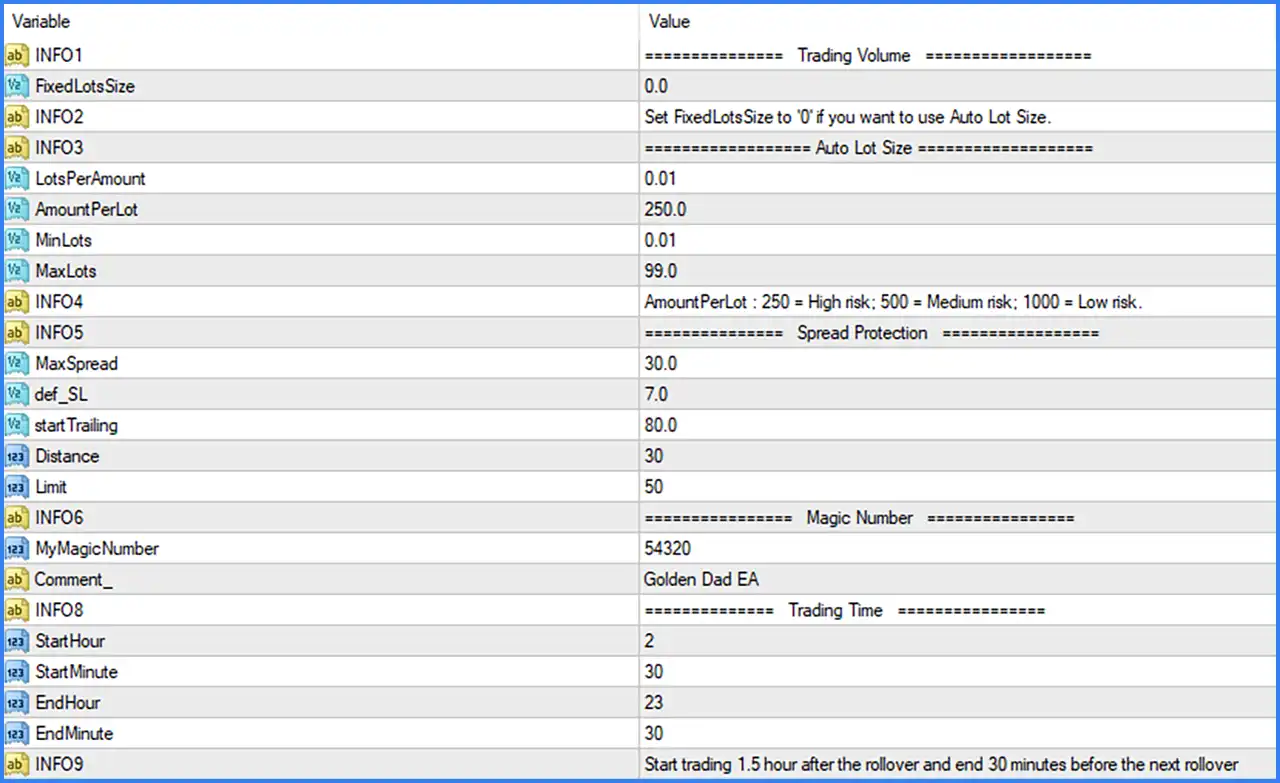
Trading Volume Settings
🔹 INFO1 = Trading Volume – Section heading identifying the trading volume configuration, where traders can select fixed or automatic lot sizing.
🔹 FixedLotsSize = 0.0 – Sets the fixed trading lot size; the value 0.0 means fixed lot sizing is disabled, allowing the EA to use Automatic Lot Size instead.
🔹 INFO2 = Set FixedLotsSize to '0' if you want to use Auto Lot Size – Instruction explaining that FixedLotsSize must be set to 0 to activate automatic position sizing.
Automatic Lot Size Settings
🔹 INFO3 = Auto Lot Size – Section heading for the automatic trading volume calculation parameters.
🔹 LotsPerAmount = 0.01 – Defines the trading volume of 0.01 lots used in the automatic lot sizing calculation.
🔹 AmountPerLot = 250.0 – Sets the account amount associated with the LotsPerAmount value, determining how trading volume scales with account capital.
🔹 MinLots = 0.01 – Sets the minimum permitted trading volume to 0.01 lots when automatic lot sizing is enabled.
🔹 MaxLots = 99.0 – Sets the maximum permitted trading volume to 99.0 lots, limiting the EA's automatically calculated position size.
🔹 INFO4 = AmountPerLot: 250 = High risk; 500 = Medium risk; 1000 = Low risk – Provides the EA's recommended automatic lot sizing risk categories: 250 for High Risk, 500 for Medium Risk, and 1000 for Low Risk.
Spread Protection and Trade Management
🔹 INFO5 = Spread Protection – Section heading containing spread control, default Stop Loss, and trailing management parameters.
🔹 MaxSpread = 30.0 – Sets the maximum permitted spread to 30.0; this parameter defines the spread threshold used by the EA to control trade entries.
🔹 def_SL = 7.0 – Sets the default Stop Loss parameter to 7.0, defining the configured initial loss protection value for trading positions.
🔹 startTrailing = 80.0 – Sets the profit distance of 80.0 at which the trailing management is configured to start protecting an open position.
🔹 Distance = 30 – Sets the trailing distance to 30, defining the configured gap used when managing the protective stop level.
🔹 Limit = 50 – Sets the trailing management limit to 50, providing an additional numerical control for the EA's trailing stop functionality.
Magic Number and Order Identification
🔹 INFO6 = Magic Number – Section heading identifying the order management and trade identification settings.
🔹 MyMagicNumber = 54320 – Assigns the Magic Number 54320 to trades opened by Golden Dad EA MT4, helping distinguish its positions from manual trades and other Expert Advisors.
🔹 Comment_ = Golden Dad EA – Sets the order comment to Golden Dad EA, allowing traders to identify the EA's orders more easily in the trading terminal.
Trading Time Settings
🔹 INFO8 = Trading Time – Section heading containing the EA's trading session configuration.
🔹 StartHour = 2 – Sets the trading session starting hour to 02:00.
🔹 StartMinute = 30 – Sets the trading session starting minute to 30, making the configured starting time 02:30.
🔹 EndHour = 23 – Sets the trading session ending hour to 23:00.
🔹 EndMinute = 30 – Sets the trading session ending minute to 30, making the configured ending time 23:30.
🔹 INFO9 = Start trading 1.5 hour after the rollover and end 30 minutes before the next rollover – Provides an additional trading schedule instruction: Golden Dad EA MT4 should begin trading 1.5 hours after the broker's daily rollover and stop trading 30 minutes before the next rollover.
Conclusion
Golden Dad EA MT4 offers a flexible trading configuration with automatic lot sizing, spread protection, Stop Loss management, trailing functionality, and adjustable trading hours.
Its default configuration uses FixedLotsSize = 0.0 to select automatic lot sizing, with LotsPerAmount = 0.01, AmountPerLot = 250.0, MinLots = 0.01, and MaxLots = 99.0.
For risk management, traders can select the recommended AmountPerLot values of 250 for High Risk, 500 for Medium Risk, or 1000 for Low Risk. The EA also includes MaxSpread = 30.0, def_SL = 7.0, and trailing parameters of 80.0, 30, and 50.
Overall, Golden Dad EA MT4 provides customizable trading volume and trade management settings. Traders should test the configuration on a demo account before using it on a live account and verify the exact units and behavior of the trailing parameters.