

Introduction to Golden Phoenix EA MT4
Golden Phoenix EA is an automated trading Expert Advisor (EA) designed for the MetaTrader 4 platform. Its configuration combines technical indicators, volatility analysis, and automated trade management to support systematic trading decisions.

The EA provides adjustable parameters for fixed lot sizing, Stop Loss, Take Profit, Trailing Stop, Moving Average, RSI, and ATR indicators. It also includes trade identification settings, slippage control, and customizable dashboard appearance.
These settings allow traders to adjust trade execution, manage potential trading risks, and configure technical indicator parameters according to their trading strategies.
Below is a complete explanation of all 13 input parameters displayed in the Golden Phoenix EA MT4 settings panel.
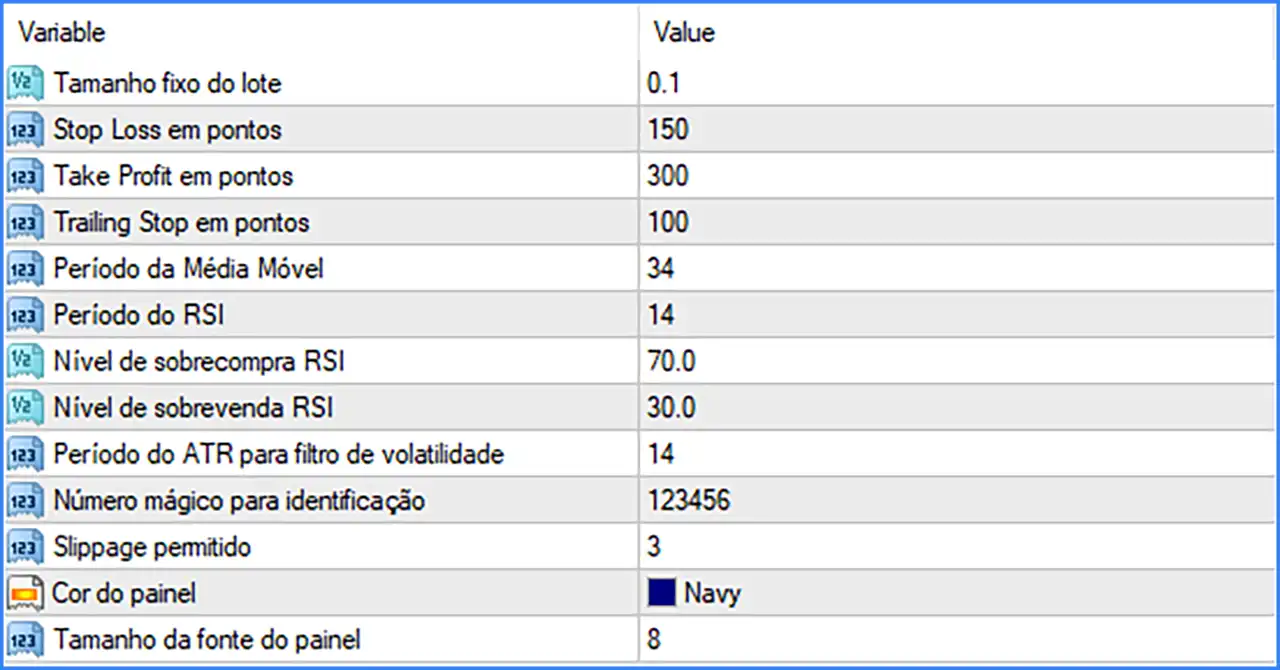
Lot Size and Trade Management Settings
This section controls trading volume and the main parameters used to manage open positions.
🔹 Tamanho fixo do lote (Fixed Lot Size) = 0.1: Sets the fixed trading volume to 0.1 lots per position, determining the default trade size used by Golden Phoenix EA MT4 when opening orders.
🔹 Stop Loss em pontos (Stop Loss in Points) = 150: Sets the Stop Loss distance to 150 points, defining the maximum configured price movement against an open position before the EA triggers its stop-loss mechanism.
🔹 Take Profit em pontos (Take Profit in Points) = 300: Sets the Take Profit distance to 300 points, establishing the target price movement required for the EA to close a position at the configured profit level.
🔹 Trailing Stop em pontos (Trailing Stop in Points) = 100: Sets the trailing stop distance to 100 points, allowing the EA to adjust the Stop Loss as the market moves favorably and potentially protect accumulated profits.
Moving Average Settings
The Moving Average indicator helps analyze market direction by smoothing price movements over a specified number of candles.
🔹 Período da Média Móvel (Moving Average Period) = 34: Sets the Moving Average calculation period to 34 candles, determining the number of historical price bars used to calculate the average price and provide trend-related information for the EA.
RSI Indicator Settings
The Relative Strength Index (RSI) is a momentum indicator commonly used to identify overbought and oversold market conditions.
🔹 Período do RSI (RSI Period) = 14: Sets the RSI calculation period to 14 candles, determining the historical price data used to measure market momentum and identify potential trading conditions.
🔹 Nível de sobrecompra RSI (RSI Overbought Level) = 70.0: Sets the RSI overbought threshold to 70.0, allowing the EA to identify potentially overbought market conditions when the RSI reaches or exceeds this level.
🔹 Nível de sobrevenda RSI (RSI Oversold Level) = 30.0: Sets the RSI oversold threshold to 30.0, allowing the EA to identify potentially oversold market conditions when the RSI reaches or falls below this level.
ATR Volatility Filter Settings
The Average True Range (ATR) indicator measures market volatility by analyzing price ranges over a specified period. It can help trading systems evaluate changing market conditions.
🔹 Período do ATR para filtro de volatilidade (ATR Period for Volatility Filter) = 14: Sets the ATR calculation period to 14 candles, determining the historical price data used by the volatility filter to evaluate market fluctuations and identify trading conditions.
Trade Identification and Execution Settings
This section contains parameters for identifying the EA's orders and controlling execution conditions.
🔹 Número mágico para identificação (Magic Number for Identification) = 123456: Assigns the Magic Number 123456 to trades opened by Golden Phoenix EA MT4, allowing MetaTrader 4 to distinguish the EA's positions from manually opened trades and orders managed by other Expert Advisors.
🔹 Slippage permitido (Allowed Slippage) = 3: Sets the permitted slippage to 3 points, defining the acceptable price deviation during order execution according to the broker's execution conditions.
Dashboard Display Settings
The Display section allows traders to customize the visual appearance of the EA's information panel on the trading chart.
🔹 Cor do painel (Panel Color) = Navy: Sets the dashboard panel color to Navy, giving the EA's chart interface a dark navy-blue appearance.
🔹 Tamanho da fonte do painel (Panel Font Size) = 8: Sets the dashboard font size to 8, controlling the text size displayed in the EA's information panel for chart monitoring.
Conclusion
Golden Phoenix EA MT4 offers a straightforward yet configurable automated trading setup, combining technical indicators with essential trade management and execution controls.
Its default configuration uses a fixed lot size of 0.1, a Stop Loss of 150 points, a Take Profit of 300 points, and a Trailing Stop of 100 points. For market analysis, the EA includes a 34-period Moving Average, RSI (14) with overbought and oversold levels of 70.0 and 30.0, and an ATR volatility filter with a period of 14.
Additionally, the Magic Number 123456 and allowed slippage of 3 points help configure trade identification and execution conditions, while the Navy dashboard theme and font size 8 provide basic interface customization.
Before using Golden Phoenix EA MT4 on a live account, traders should test the default configuration on a demo account and evaluate the relationship between lot size, Stop Loss, Take Profit, and trailing stop behavior. The actual monetary risk also depends on the trading instrument, broker specifications, and account conditions.