
Introduction
GPlus EA is an automated trading Expert Advisor (EA) designed for the MetaTrader 4 platform. It features configurable trading hours, initial lot sizing, distance parameters, and pip-step settings to customize its automated trading operations.
The EA provides a time-based trading filter that allows users to define when automated trading can operate. It also includes a Magic Number for trade identification, customizable order comments, and adjustable initial trading volume.
With its straightforward configuration, GPlus EA allows traders to customize trading schedules, position sizes, and distance-related parameters according to their preferred trading setup.

GPlus EA MT4 Settings Explained
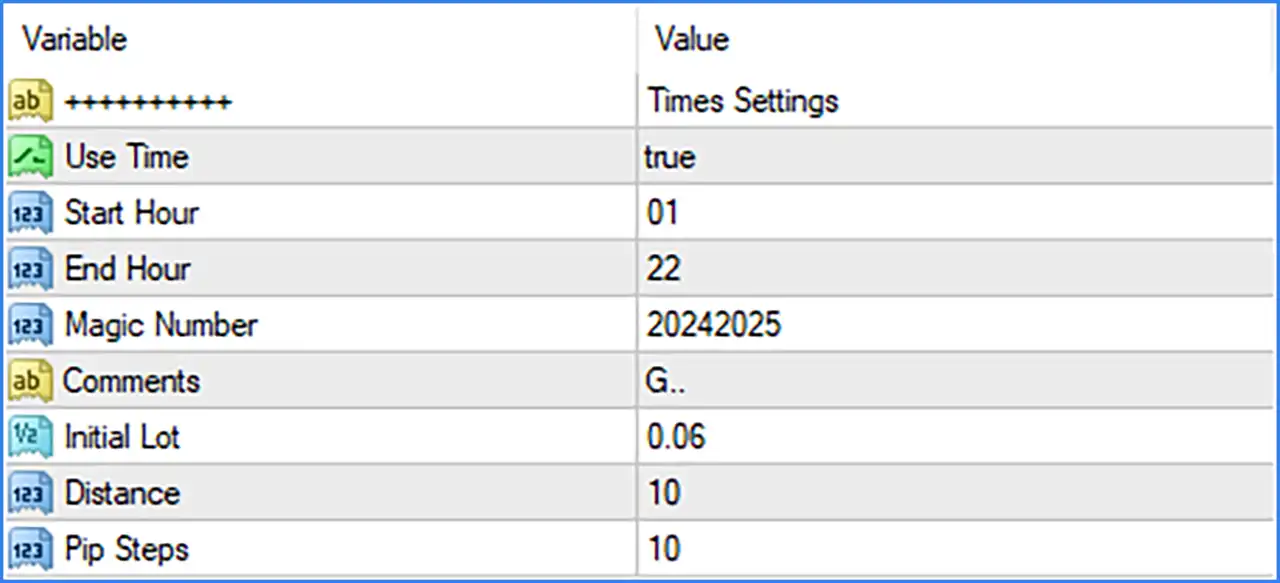
Time Settings
🔹 Times Settings – Main configuration section containing the EA's trading schedule parameters and time-based restrictions.
🔹 Use Time = true – Enables the trading time filter. When activated, the EA follows the configured Start Hour and End Hour to control its permitted trading period.
🔹 Start Hour = 01 – Defines the starting hour of the trading schedule as 01:00. The EA can begin its configured trading operations from this hour.
🔹 End Hour = 22 – Sets the ending hour of the trading schedule to 22:00. This determines when the configured trading period finishes.
Trade Identification Settings
🔹 Magic Number = 20242025 – Assigns Magic Number 20242025 to trades managed by GPlus EA MT4. This unique identifier helps distinguish the EA's trading positions from manually opened trades and orders managed by other Expert Advisors.
🔹 Comments = G.. – Defines the comment attached to orders opened by the EA. The default comment is G.., helping users identify trades associated with GPlus EA MT4 in the MetaTrader 4 terminal.
Lot Size Settings
🔹 Initial Lot = 0.06 – Sets the initial trading volume to 0.06 lots. This is the default starting lot size used by GPlus EA MT4 when initiating its trading operations.
Distance and Pip Step Settings
🔹 Distance = 10 – Defines the distance parameter as 10. This value establishes the configured price-distance reference used by the EA's internal trading logic or order management system.
🔹 Pip Steps = 10 – Sets the pip-step parameter to 10, providing the configured pip increment reference for the EA's trading operations and distance-related calculations.
Conclusion
GPlus EA MT4 provides a simple and customizable trading configuration with time-based restrictions, initial lot sizing, trade identification, and adjustable distance parameters.
The supplied settings enable the time filter, with trading scheduled from 01:00 to 22:00. The EA uses an initial lot size of 0.06, Magic Number 20242025, and the trade comment G...
Its Distance and Pip Steps parameters are both configured to 10, providing the default references for its internal trading and order management logic.
Before deploying GPlus EA MT4 on a live trading account, traders should carefully evaluate the initial lot size of 0.06 and verify how the Distance and Pip Steps parameters influence order placement. It is also important to confirm the broker server time to ensure that the configured trading schedule operates as expected.