

Introduction
TrendMaster FX MT4 is an automated trading Expert Advisor (EA) designed for the MetaTrader 4 platform. It features adaptive market analysis, configurable trading directions, dynamic risk management, and automated position control.
The EA incorporates hedging protection, additional trading filters, maximum drawdown controls, and customizable lot-sizing methods. It also provides separate risk configurations for backtesting and live trading, allowing traders to adjust risk exposure according to different trading environments.
With its intelligent dynamic parameters, flexible position management, and automated drawdown protection, TrendMaster FX MT4 offers a comprehensive set of configuration options for traders seeking a customizable automated Forex trading solution.
TrendMaster FX MT4 Settings Explained
General Settings and Trade Identification
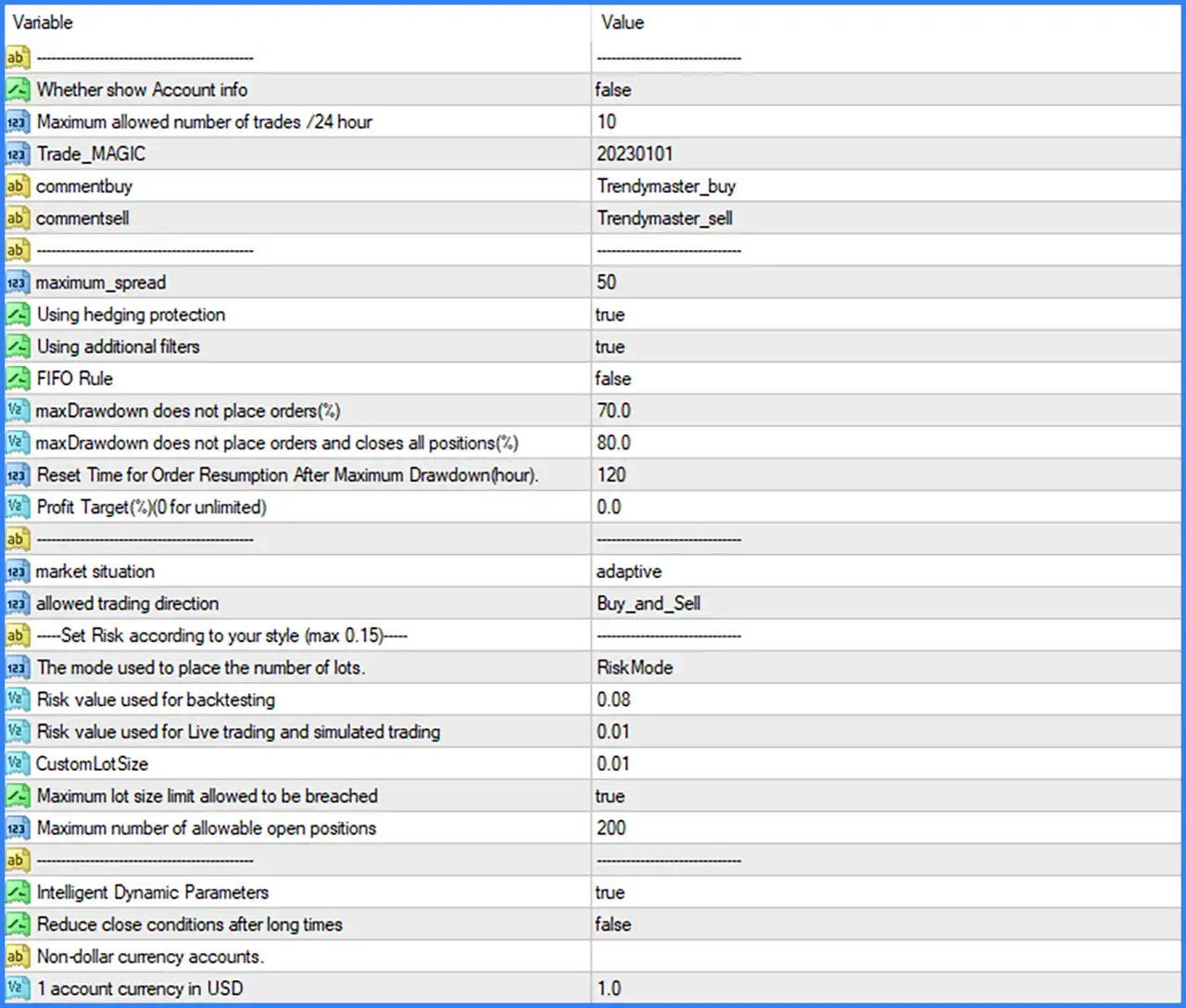
🔹 Whether show Account info = false – Controls whether account information is displayed on the trading chart. The default value of false hides the account information panel.
🔹 Maximum allowed number of trades /24 hour = 10 – Sets the maximum number of trades the EA can open within a 24-hour period to 10, helping limit daily trading frequency.
🔹 Trade_MAGIC = 20230101 – Assigns Magic Number 20230101 to trades managed by TrendMaster FX MT4, allowing the EA to identify and distinguish its positions from manual trades and other Expert Advisors.
🔹 commentbuy = Trendymaster_buy – Defines the trade comment attached to Buy orders. The default comment is Trendymaster_buy, making Buy positions easier to identify.
🔹 commentsell = Trendymaster_sell – Defines the trade comment attached to Sell orders. The default comment is Trendymaster_sell, helping distinguish Sell positions from Buy positions.
Trading Protection and Filters
🔹 maximum_spread = 50 – Sets the maximum permitted spread threshold to 50 points. This parameter helps prevent the EA from opening trades when the market spread exceeds the configured limit.
🔹 Using hedging protection = true – Enables the hedging protection feature, allowing the EA to apply its internal protection rules related to hedging and trading exposure.
🔹 Using additional filters = true – Activates additional trading filters to help evaluate market conditions before executing trading operations.
🔹 FIFO Rule = false – Controls the application of the First In, First Out (FIFO) trading rule. The default value of false disables this additional FIFO restriction.
Maximum Drawdown Protection
🔹 maxDrawdown does not place orders(%) = 70.0 – Sets the drawdown threshold to 70.0%, at which the EA stops placing new orders according to this protection condition.
🔹 maxDrawdown does not place orders and closes all positions(%) = 80.0 – Defines a maximum drawdown threshold of 80.0%. When this condition is reached, the EA is configured to stop opening new orders and close all existing positions.
🔹 Reset Time for Order Resumption After Maximum Drawdown(hour) = 120 – Sets the waiting period after maximum drawdown protection is triggered to 120 hours, equivalent to 5 days, before order placement can resume according to the EA's internal rules.
🔹 Profit Target(%)(0 for unlimited) = 0.0 – Defines the profit target as a percentage of the account. The default value of 0.0 disables the profit target limit, allowing trading to continue without this specific profit cap.
Market Conditions and Trading Direction
🔹 market situation = adaptive – Selects the adaptive market condition mode, allowing the EA to adjust its trading behavior according to its internal market analysis.
🔹 allowed trading direction = Buy_and_Sell – Allows the EA to execute both Buy and Sell trades, providing flexibility to participate in bullish and bearish market conditions.
Risk Management and Lot Sizing
🔹 Set Risk according to your style (max 0.15) – Identifies the risk configuration section, indicating that the maximum recommended or permitted risk parameter is 0.15 according to the EA's displayed setting description.
🔹 The mode used to place the number of lots = RiskMode – Selects RiskMode as the position-sizing method, allowing the EA to calculate trading volume according to its configured risk values rather than relying exclusively on a fixed lot size.
🔹 Risk value used for backtesting = 0.08 – Sets the risk value used during historical strategy testing to 0.08, defining the risk configuration applied to backtesting.
🔹 Risk value used for Live trading and simulated trading = 0.01 – Sets the risk value for live and simulated trading to 0.01, providing a separate risk configuration from the backtesting setting.
🔹 CustomLotSize = 0.01 – Defines the custom lot-size parameter as 0.01 lots, providing a predefined volume reference for the EA's position-sizing configuration.
🔹 Maximum lot size limit allowed to be breached = true – Enables the option to exceed the configured maximum lot-size limit. This setting allows the EA's internal lot-sizing logic to bypass the normal maximum lot restriction when applicable.
🔹 Maximum number of allowable open positions = 200 – Sets the maximum permitted number of simultaneously open positions to 200, defining the configured upper limit for active trades.
Intelligent Dynamic Parameters
🔹 Intelligent Dynamic Parameters = true – Enables the intelligent dynamic parameter functionality, allowing the EA to adjust selected trading parameters automatically according to its internal strategy logic.
🔹 Reduce close conditions after long times = false – Controls whether the EA reduces or adjusts its position-closing conditions after extended periods. The default value of false disables this additional adjustment.
Non-Dollar Currency Account Settings
🔹 Non-dollar currency accounts – Identifies the configuration section for accounts whose deposit currency is different from USD. This section provides a conversion reference for calculating account-related values.
🔹 1 account currency in USD = 1.0 – Defines the USD conversion reference for the account currency as 1.0. This parameter is relevant when the EA manages accounts using a non-USD deposit currency.
Conclusion
TrendMaster FX MT4 offers a flexible automated trading configuration combining adaptive market analysis, risk-based lot sizing, hedging protection, and maximum drawdown management.
The supplied settings use RiskMode for position sizing, with a backtesting risk value of 0.08 and a live or simulated trading risk value of 0.01. The custom lot-size reference is 0.01, while the maximum allowable number of open positions is configured at 200.
For account protection, the EA uses a 70.0% drawdown threshold to stop opening new orders and an 80.0% threshold to stop trading and close all existing positions. It also includes a 120-hour waiting period before order placement can resume after maximum drawdown protection is triggered.
Additional features include adaptive market conditions, Buy_and_Sell trading directions, a maximum spread of 50 points, and intelligent dynamic parameters.
Before deploying TrendMaster FX MT4 on a live account, traders should carefully review the drawdown thresholds, risk values, maximum lot-size restrictions, and open-position limits. In particular, the 70.0% and 80.0% drawdown settings are extremely high and should be reviewed to establish more conservative account protection levels.