
Introduction
OAVA EA is an automated trading Expert Advisor (EA) designed for the MetaTrader 4 platform. It provides configurable trading parameters, including indicator periods, signal ratings, lot management, Stop Loss (SL), Take Profit (TP), and trading session controls.
The EA also features an economic news filter that can avoid high-impact news events, configurable trading hours, and adjustable execution parameters. Traders can customize position sizing through fixed lots, maximum lot limits, and a lot coefficient.
With its combination of market signal settings, news protection, and automated trade management, OAVA EA offers flexibility for traders looking to customize their automated trading strategy according to their preferred trading conditions.
OAVA EA MT4 Settings Explained
Strategy and Indicator Settings
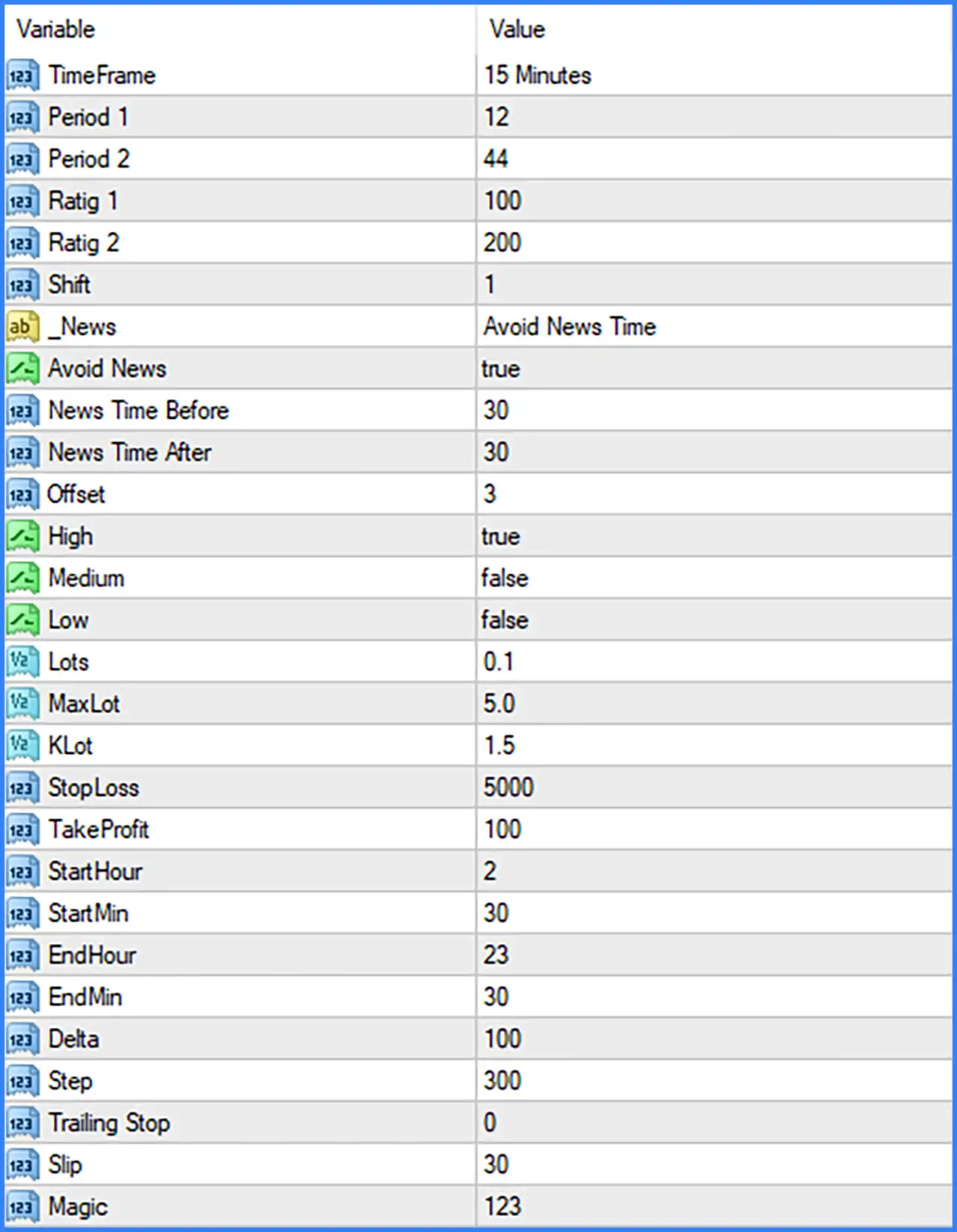
🔹 TimeFrame = 15 Minutes – Sets the strategy calculation timeframe to M15 (15-minute chart), defining the timeframe used by the EA to evaluate its trading conditions.
🔹 Period 1 = 12 – Defines the first indicator or strategy calculation period as 12. This parameter controls the first period used by the EA's internal trading logic.
🔹 Period 2 = 44 – Sets the second indicator or strategy calculation period to 44, providing an additional calculation reference for the EA's trading signals.
🔹 Ratig 1 = 100 – Sets the first rating parameter to 100. This value represents the configured rating threshold or reference used by the EA's internal strategy calculations.
🔹 Ratig 2 = 200 – Sets the second rating parameter to 200, providing another rating reference for the EA's signal evaluation and trading logic.
🔹 Shift = 1 – Defines the indicator or signal shift as 1, specifying the data-bar offset used by the EA when accessing its calculated values.
Economic News Filter Settings
🔹 _News = Avoid News Time – Identifies the economic news protection section and indicates that the EA is configured with an Avoid News Time approach.
🔹 Avoid News = true – Enables the economic news avoidance function, allowing the EA to restrict trading activity around selected economic announcements.
🔹 News Time Before = 30 – Sets the news protection period before an economic event to 30 minutes, helping prevent trading immediately before scheduled announcements.
🔹 News Time After = 30 – Defines the waiting period after an economic announcement as 30 minutes, allowing the market additional time to stabilize before trading resumes.
🔹 Offset = 3 – Sets the news time offset parameter to 3. This value is used as a time adjustment reference by the news-related configuration; its exact time-zone convention depends on the EA's implementation.
🔹 High = true – Enables filtering for high-impact economic news events, helping the EA avoid trading during potentially volatile market conditions.
🔹 Medium = false – Disables the medium-impact news filter, meaning medium-impact economic announcements are not selected for filtering through this option.
🔹 Low = false – Disables the low-impact news filter, allowing the EA to ignore low-impact economic announcements when applying its news restrictions.
Lot Size and Money Management
🔹 Lots = 0.1 – Sets the initial trading volume to 0.1 lots, defining the default position size used by the EA's lot management configuration.
🔹 MaxLot = 5.0 – Establishes the maximum permitted lot size at 5.0 lots, providing an upper limit for position sizing.
🔹 KLot = 1.5 – Sets the lot coefficient or multiplier parameter to 1.5. This value may influence how the EA adjusts trading volume according to its internal money management logic.
Stop Loss and Take Profit Settings
🔹 Stoploss = 5000 – Sets the Stop Loss parameter to 5000 points, defining the configured protective distance for trading positions according to the EA's price-distance calculation.
🔹 TakeProfit = 100 – Sets the Take Profit parameter to 100 points, establishing the configured profit-taking target for the EA's trading positions.
Trading Time Settings
🔹 StartHour = 2 – Defines the starting hour of the trading session as 02:00, determining when the EA's configured trading period begins.
🔹 StartMin = 30 – Sets the starting minute to 30. Combined with StartHour = 2, the configured trading session begins at 02:30.
🔹 EndHour = 23 – Defines the ending hour of the trading session as 23:00, specifying when the EA's configured trading period finishes.
🔹 EndMin = 30 – Sets the ending minute to 30. Combined with EndHour = 23, the configured trading session ends at 23:30.
Trade Management and Execution Settings
🔹 Delta = 100 – Sets the Delta parameter to 100, providing a configurable numerical reference used by the EA's internal trading or trade management logic.
🔹 Step = 300 – Defines the Step parameter as 300, specifying the configured step value used by the EA's internal trading calculations or position management.
🔹 Trailing Stop = 0 – Sets the trailing stop parameter to 0. This value indicates that no positive trailing-stop distance is configured; verify whether zero disables the trailing stop functionality in this EA.
🔹 Slip = 30 – Sets the permitted slippage parameter to 30 points, defining the allowed execution price deviation when the EA submits trading orders.
🔹 Magic = 123 – Assigns Magic Number 123 to trades opened by OAVA EA MT4, allowing the EA to identify and distinguish its positions from manual trades and orders managed by other Expert Advisors.
Conclusion
OAVA EA MT4 provides a configurable automated trading system with M15 strategy settings, adjustable signal parameters, lot management, news filtering, and automated trade execution controls.
The supplied configuration uses TimeFrame = 15 Minutes, Period 1 = 12, Period 2 = 44, Ratig 1 = 100, and Ratig 2 = 200. Its initial lot size is 0.1, with a maximum lot limit of 5.0 and a KLot coefficient of 1.5.
For trade protection, the EA is configured with Stoploss = 5000 and TakeProfit = 100. Its trading schedule runs from 02:30 to 23:30, while the economic news filter avoids high-impact events using 30-minute restrictions before and after announcements.
Additional parameters such as Delta = 100, Step = 300, Trailing Stop = 0, and Slip = 30 provide further customization of the EA's trading and execution behavior.
Before using OAVA EA MT4 on a live trading account, traders should carefully verify the Stop Loss and Take Profit units, lot multiplier behavior, news time offset, and trailing stop configuration. Demo testing is recommended to understand how the EA executes trades under different market conditions and to ensure that its risk settings are appropriate for the available trading capital.