

Introduction
GX12 E-SCALP EA is an automated trading Expert Advisor (EA) designed for the MetaTrader 4 platform. It provides configurable trade execution, lot multiplication, risk management, Stop Loss, Take Profit, and Trailing Stop functionality.

The EA includes several trading controls, such as automatic trading activation, ECN broker compatibility, one-trade mode, maximum trade limits, and signal-based position management. It also features a customizable trading time filter that allows users to define specific trading sessions.
Understanding the GX12 E-SCALP EA settings helps traders configure trade execution, adjust position sizes, manage trading exposure, and customize automated risk management according to their trading preferences.
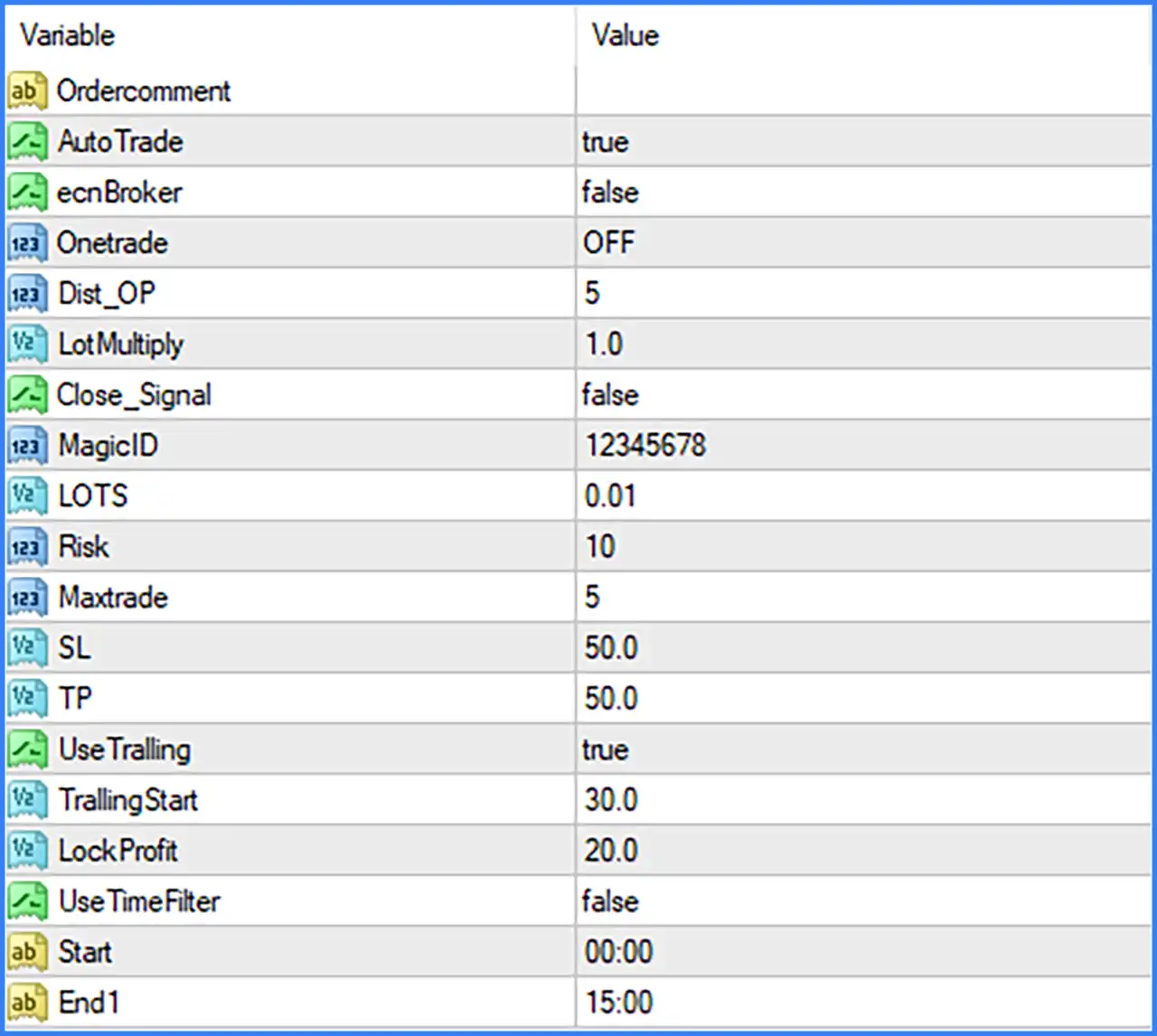
General Trading Settings
🔹 Ordercomment = (Blank): Defines the order comment field, which can be used to identify trades opened by GX12 E-SCALP EA in the MetaTrader 4 trading terminal. The default value is blank.
🔹 AutoTrade = true: Enables automatic trading, allowing the EA to execute trading operations according to its programmed strategy and configured trading conditions.
🔹 ecnBroker = false: Disables the ECN broker mode. This setting determines whether the EA uses its specific ECN-compatible order execution procedure.
🔹 Onetrade = OFF: Disables one-trade mode, allowing the EA to operate without restricting its trading activity to a single trade through this option.
🔹 Dist_OP = 5: Sets the Dist_OP parameter to 5, defining the configured distance used by the EA's order placement or trading operation logic.
🔹 LotMultiply = 1.0: Sets the lot multiplication factor to 1.0, establishing the position-size multiplier applied by the EA when calculating subsequent trading volumes.
🔹 Close_Signal = false: Disables signal-based position closing, meaning the EA does not activate this particular closing function under the default configuration.
Trade Identification Settings
🔹 MagicID = 12345678: Assigns Magic Number 12345678 to trades managed by GX12 E-SCALP EA MT4, allowing the EA to identify and manage its own positions separately from manual trades or other Expert Advisors.
Lot Size and Risk Management Settings
🔹 LOTS = 0.01: Sets the trading volume to 0.01 lots, defining the configured lot size used for automated trade execution.
🔹 Risk = 10: Sets the risk parameter to 10, defining the configured risk value used by the EA's internal risk management or position-sizing calculations. The exact percentage or calculation method is not specified in the Inputs screenshot.
🔹 Maxtrade = 5: Limits the maximum number of trades to 5, helping control the number of positions opened or managed by the EA according to its internal trading rules.
Stop Loss and Take Profit Settings
🔹 SL = 50.0: Sets the Stop Loss parameter to 50.0, defining the configured protective distance used to limit potential losses on open positions.
🔹 TP = 50.0: Sets the Take Profit parameter to 50.0, defining the configured profit-taking distance at which the EA aims to close its trading positions.
Trailing Stop and Profit Protection Settings
🔹 UseTrailing = true: Enables the Trailing Stop function, allowing the EA to adjust the protective Stop Loss as the market moves in a favorable direction.
🔹 TrailingStart = 30.0: Sets the Trailing Stop activation threshold to 30.0, determining the profit distance required before the EA begins applying its trailing-stop mechanism.
🔹 LockProfit = 20.0: Sets the profit-locking parameter to 20.0, defining the configured profit level used by the EA's profit protection mechanism when managing favorable trades.
Trading Time Filter Settings
🔹 UseTimeFilter = false: Disables the trading time filter, allowing GX12 E-SCALP EA MT4 to operate without applying the configured Start and End1 time restrictions.
🔹 Start = 00:00: Sets the trading session starting time to 00:00, defining when the EA is permitted to begin trading if the time filter is enabled.
🔹 End1 = 15:00: Sets the trading session ending time to 15:00, defining the configured cutoff time for the trading session when the time filter is enabled.