Introduction to Combined SCCC EA MT4
Combined SCCC EA is an automated scalping Expert Advisor (EA) designed for the MetaTrader 4 (MT4) platform. The EA focuses on managing multiple positions with customizable lot scaling, profit targets and order distance control.
With support for fixed lots, optional martingale logic, and account-currency-based basket closing, this EA is suitable for traders seeking flexible short-term trading strategies with structured position management.
General Settings
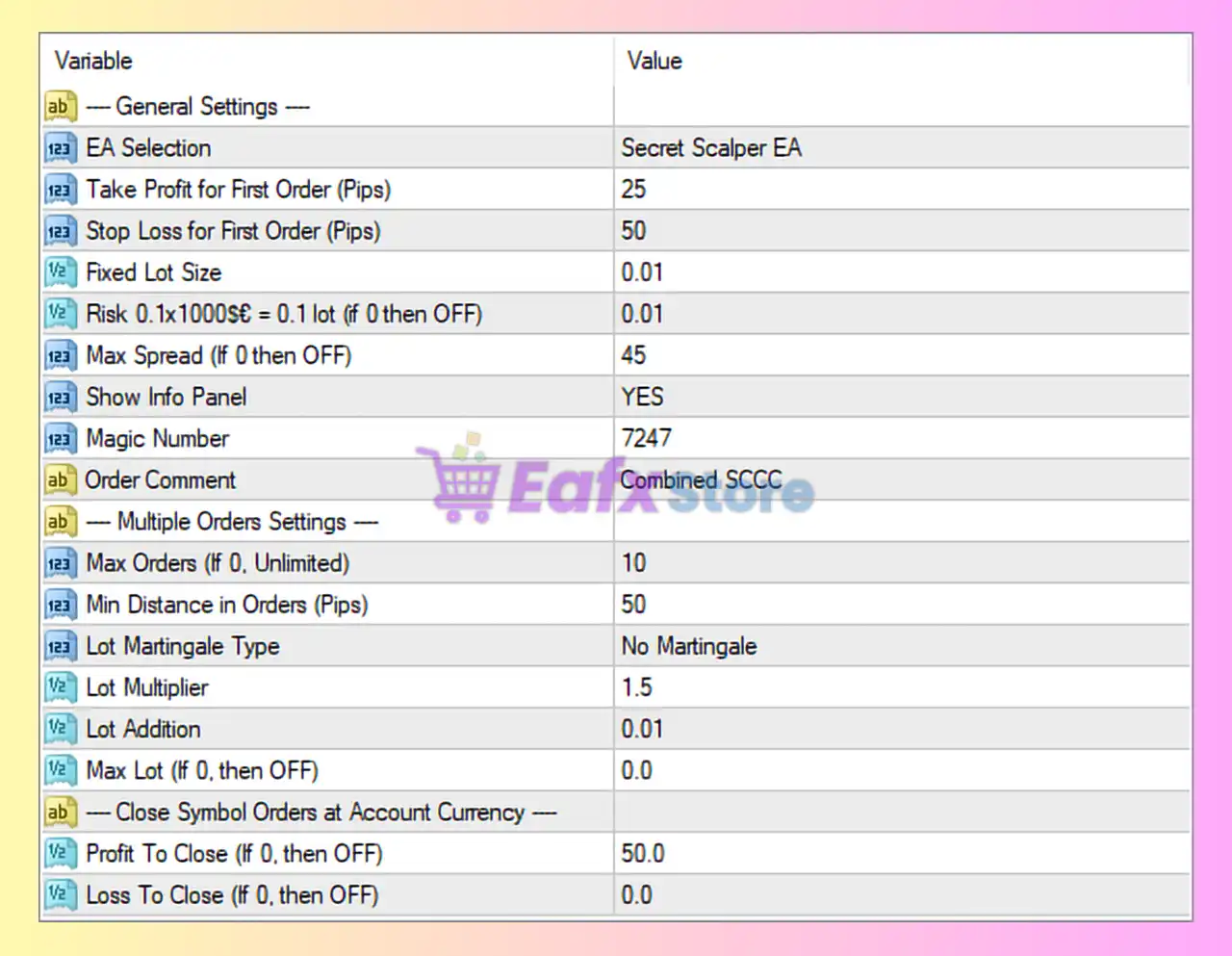
- EA Selection = Secret Scalper EA: Selects the trading strategy profile named “Secret Scalper EA”.
- Take Profit for First Order (Pips) = 25: Sets the Take Profit target for the first order at 25 pips.
- Stop Loss for First Order (Pips) = 50: Defines the Stop Loss for the first order at 50 pips.
- Fixed Lot Size = 0.01: Uses a fixed lot size of 0.01 for trade entries.
- Risk 0.1×1000$ = 0.1 lot (if 0 then OFF) = 0.01: Risk scaling value set to 0.01; controls automatic lot sizing relative to account balance.
- Max Spread (if 0 then OFF) = 45: Maximum allowed spread set to 45 points; trading is blocked above this level.
- Show Info Panel = YES: Enables the on-chart information panel display.
- Magic Number = 7247: Unique identifier (7247) used to manage EA trades independently.
- Order Comment = Combined SCCC: Adds “Combined SCCC” as the trade comment for all orders.
Multiple Orders Settings
- Max Orders (If 0, Unlimited) = 10: Allows a maximum of 10 simultaneously open orders.
- Min Distance Orders (Pips) = 50: Minimum distance of 50 pips required between orders.
- Lot Martingale Type = No Martingale: Disables martingale lot multiplication strategy.
- Lot Multiplier = 1.5: Multiplies lot size by 1.5 for additional positions if scaling logic is enabled.
- Lot Addition = 0.01: Adds 0.01 lot increment to subsequent orders.
- Max Lot (If 0, then OFF) = 0.0: No maximum lot restriction because value is set to 0.0.
Close Symbol Orders at Account Currency
- Profit To Close (If 0, then OFF) = 50.0: Closes all symbol orders once combined profit reaches 50.0 account currency units.
- Loss To Close (If 0, then OFF) = 0.0: Loss-based basket closing is disabled because value is set to 0.0.
Conclusion
The Combined SCCC EA MT4 settings provide a structured framework for scalping and multi-order trade management. With configurable Stop Loss (SL), Take Profit (TP), spread filters, and optional lot scaling features, the EA offers flexibility for both conservative and aggressive trading styles.
Understanding these parameters helps traders optimize execution, control risk exposure and improve overall trading consistency.
FAQs
❓ What does Take Profit for First Order = 25 mean?
It sets the profit target of the first trade to 25 pips.
❓ Why is Max Spread = 45 important?
It prevents trading during high spread conditions that may increase trading costs.
❓ What does Lot Martingale Type = No Martingale do?
It disables martingale-based lot multiplication after losses.
❓ Why is Max Orders = 10 useful?
It limits the number of simultaneously open trades to reduce overexposure.
❓ What happens when Profit To Close = 50.0 is reached?
The EA closes all open symbol orders once total profit reaches 50.0 in account currency.