

This guide walks through the inputs of HFT PropFirm EA MT5 with the values recommended for live trading. The set files that come with the EA already contain these settings, so you can load them in one click and adjust only what your broker or account needs.
🔢 HFT PropFirm EA MT5 – Complete Settings Guide & Parameter Explanation
HFT PropFirm EA MT5 is a high-frequency trading Expert Advisor designed specifically for prop firm challenges and funded trading accounts.
The EA focuses on rapid market execution, dynamic money management, profit-target control, drawdown protection, trailing stop functionality and time-based trading filters.
With configurable risk settings and HFT-style entry logic, it aims to maximize trading opportunities while maintaining compliance with proprietary trading firm rules.
🔢 Installation Panel Parameters
Below are the details of the parameters in the advisor’s trading system settings table:
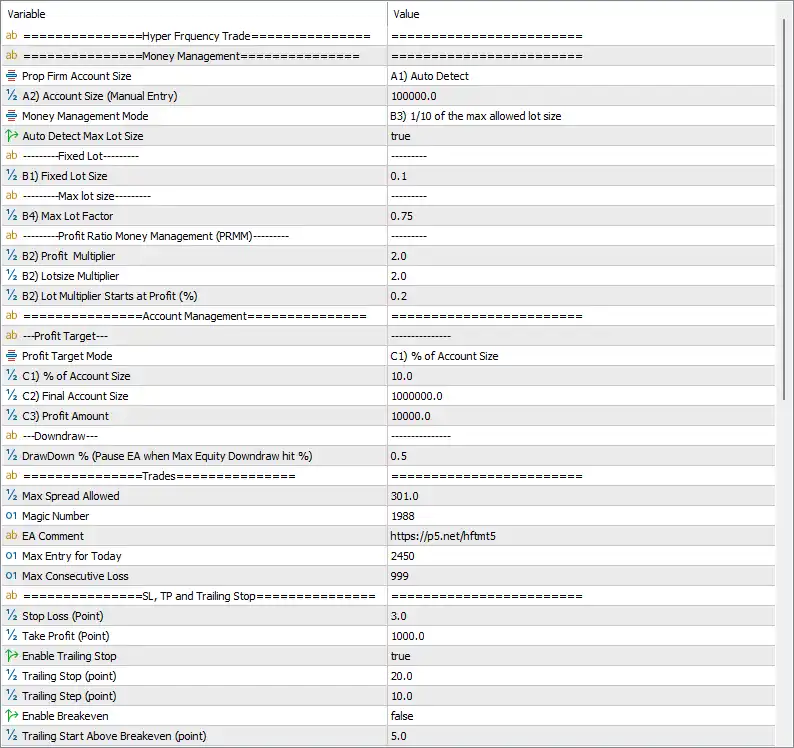
🔶 Hyper Frequency Trade – Money Management Settings
🔹 Prop Firm Account Size = A1) Auto Detect — The EA automatically detects the prop firm account size.
🔹 A2) Account Size (Manual Entry) = 100000.0 — Manual account size value used when auto-detection is not selected.
🔹 Money Management Mode = B3) 1/10 of the max allowed lot size — Position sizing is based on one-tenth of the broker’s maximum permitted lot size.
🔹 Auto Detect Max Lot Size = true — Automatically detects the broker's maximum allowable lot size.
🔶 Fixed Lot Settings
🔹 B1) Fixed Lot Size = 0.1 — Uses a fixed trading volume of 0.1 lots when Fixed Lot mode is selected.
🔶 Maximum Lot Size Settings
🔹 B4) Max Lot Factor = 0.75 — Limits calculated lot size to 75% of the maximum allowed lot size.
🔶 Profit Ratio Money Management (PRMM)
🔹 B2) Profit Multiplier = 2.0 — Profit target multiplier used in dynamic money management calculations.
🔹 B2) Lotsize Multiplier = 2.0 — Lot size increases by a factor of 2.0 under PRMM rules.
🔹 B2) Lot Multiplier Starts at Profit (%) = 0.2 — Lot scaling begins after achieving 0.2% profit.
🔶 Account Management Settings
Profit Target
🔹 Profit Target Mode = C1) % of Account Size — Profit targets are calculated as a percentage of account size.
🔹 C1) % of Account Size = 10.0 — Trading objective is 10.0% of account size.
🔹 C2) Final Account Size = 1000000.0 — Final account growth target is set to 1,000,000.0.
🔹 C3) Profit Amount = 10000.0 — Fixed profit target amount is 10,000.0 units.
Drawdown Protection
🔹 DrawDown % (Pause EA when Max Equity Drawdown hit %) = 0.5 — The EA pauses trading if equity drawdown reaches 0.5%.
🔶 Trade Settings
🔹 Max Spread Allowed = 301.0 — Maximum permitted spread for opening trades is 301.0 points.
🔹 Magic Number = 1988 — Unique identifier assigned to EA trades.
🔹 EA Comment = https://p5.net/hftmt5 — Comment attached to all EA-generated orders.
🔹 Max Entry for Today = 2450 — Maximum number of entries allowed in a single trading day.
🔹 Max Consecutive Loss = 999 — Trading continues until 999 consecutive losses occur.
🔶 Stop Loss, Take Profit & Trailing Stop
🔹 Stop Loss (Point) = 3.0 — Initial stop loss is set to 3.0 points.
🔹 Take Profit (Point) = 1000.0 — Profit target is set to 1000.0 points.
🔹 Enable Trailing Stop = true — Dynamic trailing stop management is enabled.
🔹 Trailing Stop (point) = 20.0 — Trailing stop distance is 20.0 points.
🔹 Trailing Step (point) = 10.0 — Trailing stop updates every 10.0 points.
🔹 Enable Breakeven = false — Breakeven function is disabled.
🔹 Trailing Start Above Breakeven (point) = 5.0 — Trailing would begin 5.0 points above breakeven level if breakeven were enabled.
🔶 Strategy Settings
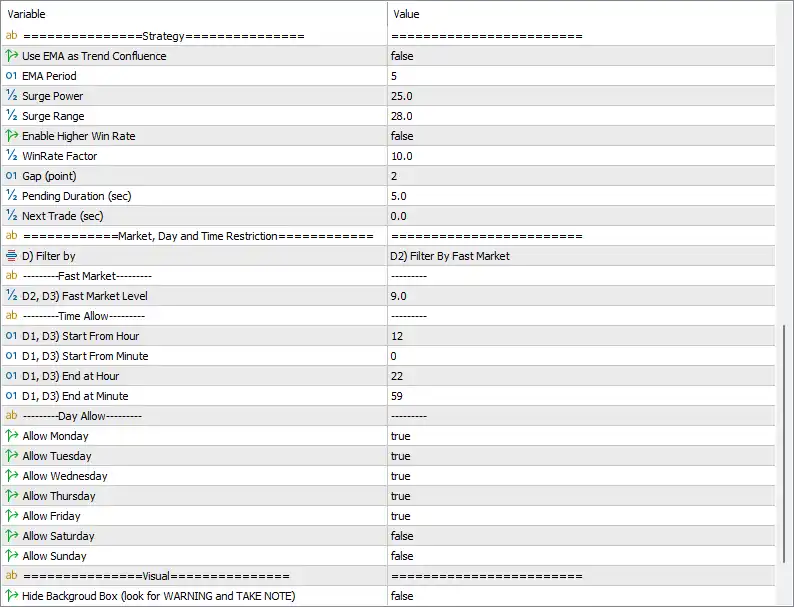
🔹 Use EMA as Trend Confluence = false — EMA trend confirmation is disabled.
🔹 EMA Period = 5 — EMA period used for trend analysis when enabled.
🔹 Surge Power = 25.0 — Required strength level for surge detection.
🔹 Surge Range = 28.0 — Defines the acceptable range for market surge detection.
🔹 Enable Higher Win Rate = false — Enhanced win-rate filtering is disabled.
🔹 WinRate Factor = 10.0 — Win-rate optimization factor value.
🔹 Gap (point) = 2 — Minimum price gap requirement between trade opportunities.
🔹 Pending Duration (sec) = 5.0 — Pending orders remain active for 5 seconds.
🔹 Next Trade (sec) = 0.0 — No delay before the next trade opportunity.
🔶 Market, Day & Time Restrictions
Filter Settings
🔹 Filter by = D2) Filter By Fast Market — Trading conditions are filtered using fast-market detection.
Fast Market Filter
🔹 D2, D3) Fast Market Level = 9.0 — Fast-market sensitivity threshold is set to 9.0.
Trading Time Window
🔹 D1, D3) Start From Hour = 12 — Trading begins at hour 12.
🔹 D1, D3) Start From Minute = 0 — Trading starts at minute 00.
🔹 D1, D3) End at Hour = 22 — Trading ends at hour 22.
🔹 D1, D3) End at Minute = 59 — Trading ends at minute 59.
🔶 Trading Days
🔹 Allow Monday = true — Trading is permitted on Monday.
🔹 Allow Tuesday = true — Trading is permitted on Tuesday.
🔹 Allow Wednesday = true — Trading is permitted on Wednesday.
🔹 Allow Thursday = true — Trading is permitted on Thursday.
🔹 Allow Friday = true — Trading is permitted on Friday.
🔹 Allow Saturday = false — Trading is disabled on Saturday.
🔹 Allow Sunday = false — Trading is disabled on Sunday.
🔶 Visual Settings
🔹 Hide Background Box (look for WARNING and TAKE NOTE) = false — The background warning panel remains visible on the chart.
🔢 Configuration Summary
🔹 Account Size: 100000.0
🔹 Money Management Mode: 1/10 of Maximum Allowed Lot Size
🔹 Fixed Lot Size: 0.1
🔹 Profit Target: 10.0% of Account Size
🔹 Drawdown Protection: 0.5%
🔹 Stop Loss: 3.0 points
🔹 Take Profit: 1000.0 points
🔹 Trailing Stop: Enabled
🔹 EMA Trend Filter: Disabled
🔹 Fast Market Filter Level: 9.0
🔹 Trading Hours: 12:00 – 22:59
🔹 Trading Days: Monday to Friday
🔹 Magic Number: 1988
🔢 Conclusion
HFT PropFirm EA MT5 is built for traders seeking a high-frequency trading solution optimized for prop firm environments. The EA combines dynamic money management, strict drawdown controls, profit-target monitoring, fast-market filtering, and trailing stop protection. In this configuration, it operates with a 0.5% drawdown limit, 1000-point take profit, 3-point stop loss, and a trading window from 12:00 to 22:59, making it suitable for disciplined prop firm trading strategies.
Get HFT PropFirm EA MT5
Download HFT PropFirm EA MT5 with its set files, read the full product details and requirements here: HFT PropFirm EA MT5 →