

This guide walks through the inputs of Quantum Queen X MT5 with the values recommended for live trading. The set files that come with the EA already contain these settings, so you can load them in one click and adjust only what your broker or account needs.
🔢 Quantum Queen X MT5 Settings Guide – Complete Parameter Explanation
Quantum Queen X MT5 is a professional automated Gold trading Expert Advisor designed for intelligent position management, automatic lot calculation, multi-strategy execution, and adaptive risk control.
Optimized for XAUUSD, the EA combines multiple built-in trading strategies, flexible money management, execution protection, and customizable visual settings, making it suitable for both conservative and medium-risk traders. Below is a complete explanation of every parameter shown in the settings panel.
🔢 Installation Panel Parameters
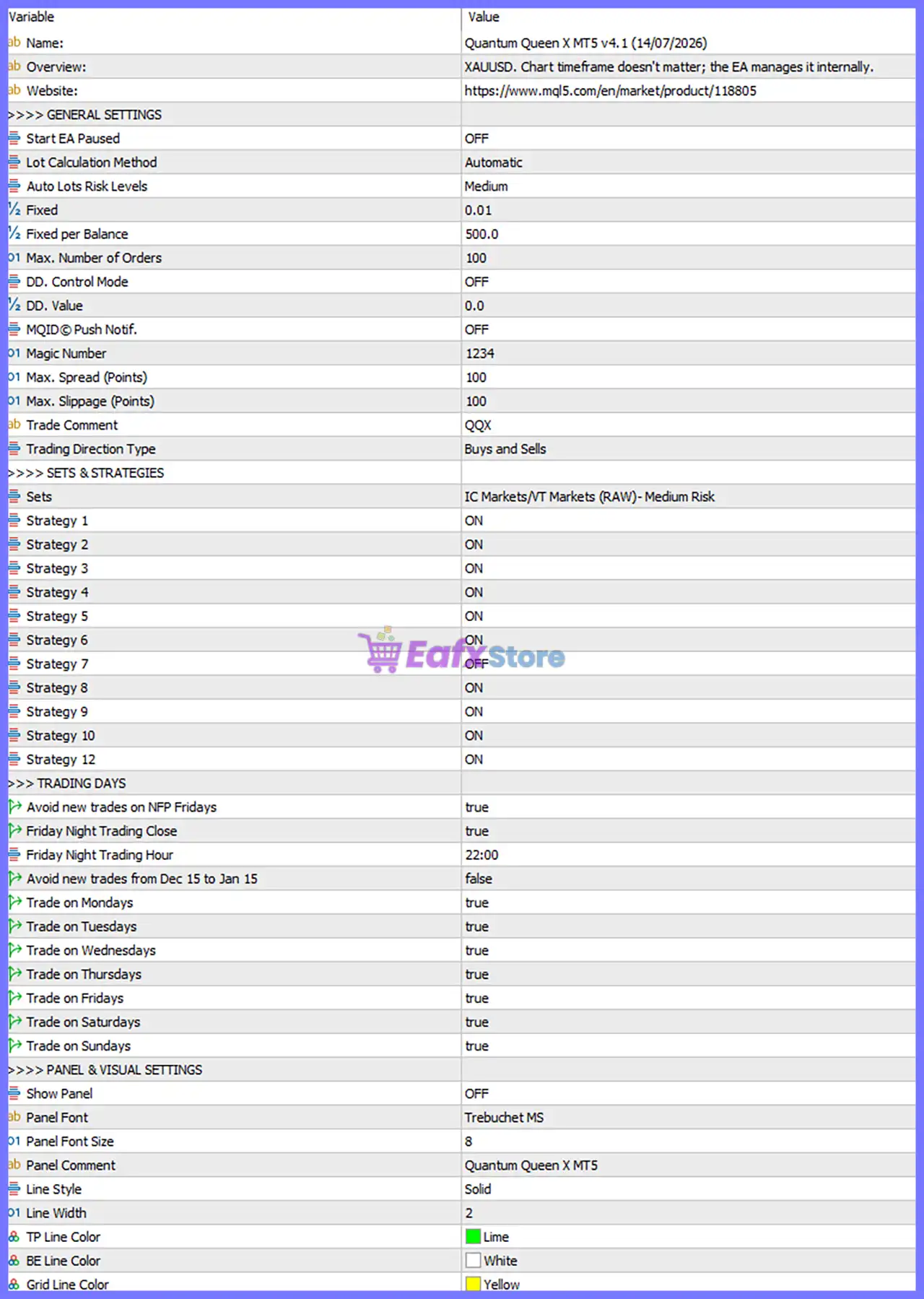
Below are the details of the parameters in the advisor’s trading system settings table:
🔄 General Settings
🔹 Start EA Paused = OFF – The EA starts trading immediately after being attached to the chart.
🔹 Lot Calculation Method = Automatic – Automatically calculates position size according to the selected risk profile.
🔹 Auto Lots Risk Levels = Medium – Uses the predefined Medium risk profile for automatic lot sizing.
🔹 Fixed = 0.01 – Uses a fixed trading volume of 0.01 lots when automatic lot calculation is disabled.
🔹 Fixed per Balance = 500.0 – Uses 0.01 lots for every 500.0 units of account balance in automatic lot calculations.
🔹 Max. Number of Orders = 100 – Limits the maximum number of simultaneously managed orders to 100.
🔹 DD. Control Mode = OFF – Disables automatic drawdown protection.
🔹 DD. Value = 0.0 – No drawdown limit is configured because Drawdown Control is disabled.
🔹 MQID® Push Notif. = OFF – Push notifications to mobile devices are disabled.
🔹 Magic Number = 1234 – Unique identifier assigned to all trades opened by Quantum Queen X MT5.
🔹 Max. Spread (Points) = 100 – Prevents new trades when the current spread exceeds 100 points.
🔹 Max. Slippage (Points) = 100 – Allows a maximum execution slippage of 100 points.
🔹 Trade Comment = QQX – Adds the custom trade comment "QQX" to every order.
🔹 Trading Direction Type = Buys and Sells – Allows the EA to open both Buy and Sell positions.
🔄 Sets & Strategies
🔹 Sets = IC Markets/VT Markets (RAW) - Medium Risk – Uses the optimized preset designed for IC Markets and VT Markets RAW accounts with a Medium Risk profile.
🔹 Strategy 1 = ON – Enables Strategy 1.
🔹 Strategy 2 = ON – Enables Strategy 2.
🔹 Strategy 3 = ON – Enables Strategy 3.
🔹 Strategy 4 = ON – Enables Strategy 4.
🔹 Strategy 5 = ON – Enables Strategy 5.
🔹 Strategy 6 = ON – Enables Strategy 6.
🔹 Strategy 7 = OFF – Disables Strategy 7.
🔹 Strategy 8 = ON – Enables Strategy 8.
🔹 Strategy 9 = ON – Enables Strategy 9.
🔹 Strategy 10 = ON – Enables Strategy 10.
🔹 Strategy 12 = ON – Enables Strategy 12.
🔄 Trading Days
🔹 Avoid New Trades on NFP Fridays = true – Prevents opening new positions during Non-Farm Payroll (NFP) Fridays.
🔹 Friday Night Trading Close = true – Automatically closes trading on Friday night.
🔹 Friday Night Trading Hour = 22:00 – Stops trading at 22:00 on Fridays.
🔹 Avoid New Trades from Dec 15 to Jan 15 = false – Holiday trading restriction is disabled, allowing trading between December 15 and January 15.
🔹 Trade on Mondays = true – Enables trading on Monday.
🔹 Trade on Tuesdays = true – Enables trading on Tuesday.
🔹 Trade on Wednesdays = true – Enables trading on Wednesday.
🔹 Trade on Thursdays = true – Enables trading on Thursday.
🔹 Trade on Fridays = true – Enables trading on Friday.
🔹 Trade on Saturdays = true – Enables trading on Saturday.
🔹 Trade on Sundays = true – Enables trading on Sunday.
🔄 Panel & Visual Settings
🔹 Show Panel = OFF – Disables the on-chart information panel.
🔹 Panel Font = Trebuchet MS – Uses Trebuchet MS as the dashboard font.
🔹 Panel Font Size = 8 – Sets the dashboard font size to 8.
🔹 Panel Comment = Quantum Queen X MT5 – Displays Quantum Queen X MT5 as the panel title.
🔹 Line Style = Solid – Uses Solid style for graphical lines.
🔹 Line Width = 2 – Draws chart lines with a width of 2.
🔹 TP Line Color = Lime – Displays the Take Profit line in Lime color.
🔹 BE Line Color = White – Displays the Break-Even line in White.
🔹 Grid Line Color = Yellow – Displays the grid or reference lines in Yellow.
🔢 Conclusion
Quantum Queen X MT5 is a feature-rich automated trading system that combines intelligent money management, multiple built-in trading strategies, execution protection, and flexible scheduling into a single Expert Advisor.
With automatic lot calculation, configurable drawdown controls, optimized broker presets, and customizable visual settings, the EA provides traders with a balanced solution for automated XAUUSD trading. Properly configuring each parameter helps maximize performance while maintaining disciplined risk management across different market conditions.
🔢 FAQs
❓ What market is Quantum Queen X MT5 designed for?
Quantum Queen X MT5 is specifically optimized for XAUUSD (Gold), and its internal logic manages timeframe selection automatically.
❓ Should I use Automatic Lot Calculation or Fixed Lots?
The recommended setting is Lot Calculation Method = Automatic with the Medium risk profile. If preferred, you can disable automatic sizing and trade with the configured Fixed = 0.01 lots.
❓ Why is Strategy 7 disabled while the others are enabled?
The selected preset IC Markets/VT Markets (RAW) - Medium Risk has Strategy 7 = OFF, indicating it is excluded from the optimized configuration while the remaining enabled strategies contribute to the EA's trading decisions.
❓ What is the purpose of the Friday Night Trading Close feature?
With Friday Night Trading Close = true and Friday Night Trading Hour = 22:00, the EA stops trading before the weekend to reduce exposure to market gaps and low-liquidity conditions.
❓ Can I customize the appearance of the EA on the chart?
Yes. You can adjust the Panel Font, Font Size, Panel Comment, Line Style, Line Width, and the colors of the Take Profit, Break-Even, and Grid lines to match your preferred chart layout.
Get Quantum Queen X MT5
Download Quantum Queen X MT5 with its set files, read the full product details and requirements here: Quantum Queen X MT5 →