


🔢 QuatronPro EA MT4 – Complete Settings Guide for Automated Forex Trading
QuatronPro EA is an advanced automated Forex trading Expert Advisor (EA) designed for MetaTrader 4 platforms. The EA combines smart money management, trailing stop systems, break-even protection, drawdown control and flexible trading session scheduling.
With support for automated lot scaling and safe closing features, QuatronPro EA helps traders optimize risk management and improve long-term trading stability.
🔢 Installation Panel Parameters
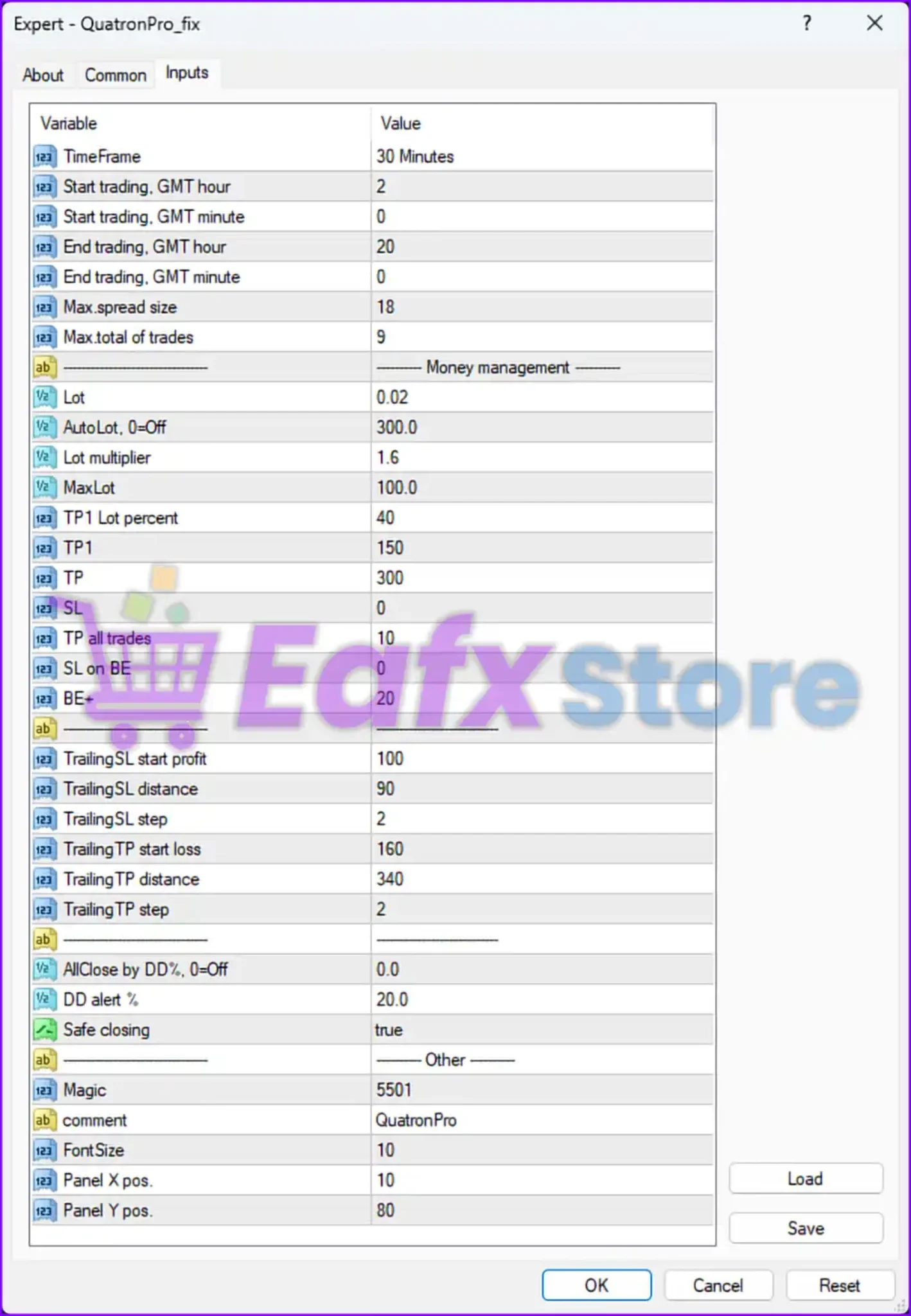
Below are the details of the parameters in the advisor’s trading system settings table:
🔶 General Trading Settings
🔹 TimeFrame = 30 Minutes — Sets the trading timeframe to M30 (30-Minute chart).
🔹 Start trading, GMT hour = 2 — Defines the trading session start hour at GMT+2.
🔹 Start trading, GMT minute = 0 — Defines the trading session start minute as 00.
🔹 End trading, GMT hour = 20 — Defines the trading session end hour at GMT+20.
🔹 End trading, GMT minute = 0 — Defines the trading session end minute as 00.
🔹 Max.spread size = 18 — Sets the maximum allowable spread to 18 points/pips.
🔹 Max.total of trades = 9 — Limits the maximum number of simultaneous open trades to 9.
🔶 Money Management Settings
🔹 Lot = 0.02 — Sets the default fixed trading lot size to 0.02 lots.
🔹 AutoLot, 0=Off = 300.0 — Enables automatic lot sizing based on account conditions with a value of 300.0.
🔹 Lot multiplier = 1.6 — Multiplies lot sizes by 1.6 during scaling or recovery sequences.
🔹 MaxLot = 100.0 — Defines the maximum allowed lot size as 100.0 lots.
🔹 TP1 Lot percent = 40 — Closes 40% of the position volume at the first Take Profit level.
🔹 TP1 = 150 — Sets the first Take Profit target to 150 points/pips.
🔹 TP = 300 — Sets the final Take Profit target to 300 points/pips.
🔹 SL = 0 — Disables fixed Stop Loss protection.
🔹 TP all trades = 10 — Closes all open trades when combined profit reaches 10 units/pips.
🔹 SL on BE = 0 — Disables Stop Loss placement at break-even.
🔹 BE+ = 20 — Sets the break-even plus profit offset to 20 points/pips.
🔶 Trailing Stop & Recovery Settings
🔹 TrailingSL start profit = 100 — Activates trailing Stop Loss after 100 points/pips profit.
🔹 TrailingSL distance = 90 — Sets the trailing Stop Loss distance to 90 points/pips.
🔹 TrailingSL step = 2 — Adjusts trailing Stop Loss in steps of 2 points/pips.
🔹 TrailingTP start loss = 160 — Activates trailing Take Profit management after 160 points/pips drawdown/loss conditions.
🔹 TrailingTP distance = 340 — Sets the trailing Take Profit distance to 340 points/pips.
🔹 TrailingTP step = 2 — Adjusts trailing Take Profit in steps of 2 points/pips.
🔶 Risk Management Settings
🔹 AllClose by DD%, 0=Off = 0.0 — Disables automatic closing of all trades based on drawdown percentage.
🔹 DD alert % = 20.0 — Triggers a drawdown warning alert at 20.0% drawdown.
🔹 Safe closing = true — Enables safe trade closing procedures for better order management.
🔶 Other Settings
🔹 Magic = 5501 — Assigns the unique Magic Number 5501 for identifying EA trades.
🔹 comment = QuatronPro — Adds the trade comment “QuatronPro” to all executed orders.
🔹 FontSize = 10 — Sets the chart panel font size to 10.
🔹 Panel X pos. = 10 — Positions the information panel 10 pixels from the X-axis.
🔹 Panel Y pos. = 80 — Positions the information panel 80 pixels from the Y-axis.
🔢 Conclusion
QuatronPro EA is a professional automated Forex trading robot designed for traders seeking advanced money management and dynamic trade handling.
The EA combines trailing stop systems, multiple Take Profit levels, drawdown alerts, and automated lot scaling to provide flexible risk management for MetaTrader trading environments.
With configurable session timing, spread protection, and safe closing features, QuatronPro EA offers a reliable solution for traders aiming to improve consistency and account protection.
🔢 FAQs
❓ What is QuatronPro EA?
QuatronPro EA is an automated Forex Expert Advisor that uses advanced money management and trailing systems for MetaTrader trading platforms.
❓ Does QuatronPro EA support automatic lot sizing?
Yes, the EA includes an AutoLot feature with configurable lot scaling parameters.
❓ Can QuatronPro EA use trailing stop management?
Yes, the EA supports dynamic Trailing Stop Loss and Trailing Take Profit systems.
❓ How many trades can QuatronPro EA open simultaneously?
The EA allows a maximum of 9 open trades at the same time.
❓ Does QuatronPro EA include drawdown protection?
Yes, the EA includes drawdown alerts and optional automatic closing protection based on account drawdown percentage.



