

Introduction
SpaceX Gold Pro EA MT4 is an automated trading robot designed for Gold (XAUUSD) trading on the MetaTrader 4 platform. It primarily uses a scalping approach combined with technical analysis, swing trading logic, and advanced harmonic and Elliott Wave pattern parameters to identify potential trading opportunities.
The EA provides configurable trade management features, including fixed lot sizing, lot multiplication, recovery settings, maximum spread restrictions, trading-hour controls, and high-impact news filtering. It also includes optional trailing stop functionality, drawdown-related controls, and broker compatibility settings.
With its M15 timeframe configuration, SpaceX Gold Pro EA MT4 offers traders flexibility in adjusting trading frequency, position sizing, market conditions, and risk management according to their trading preferences.

Trading Strategy Settings
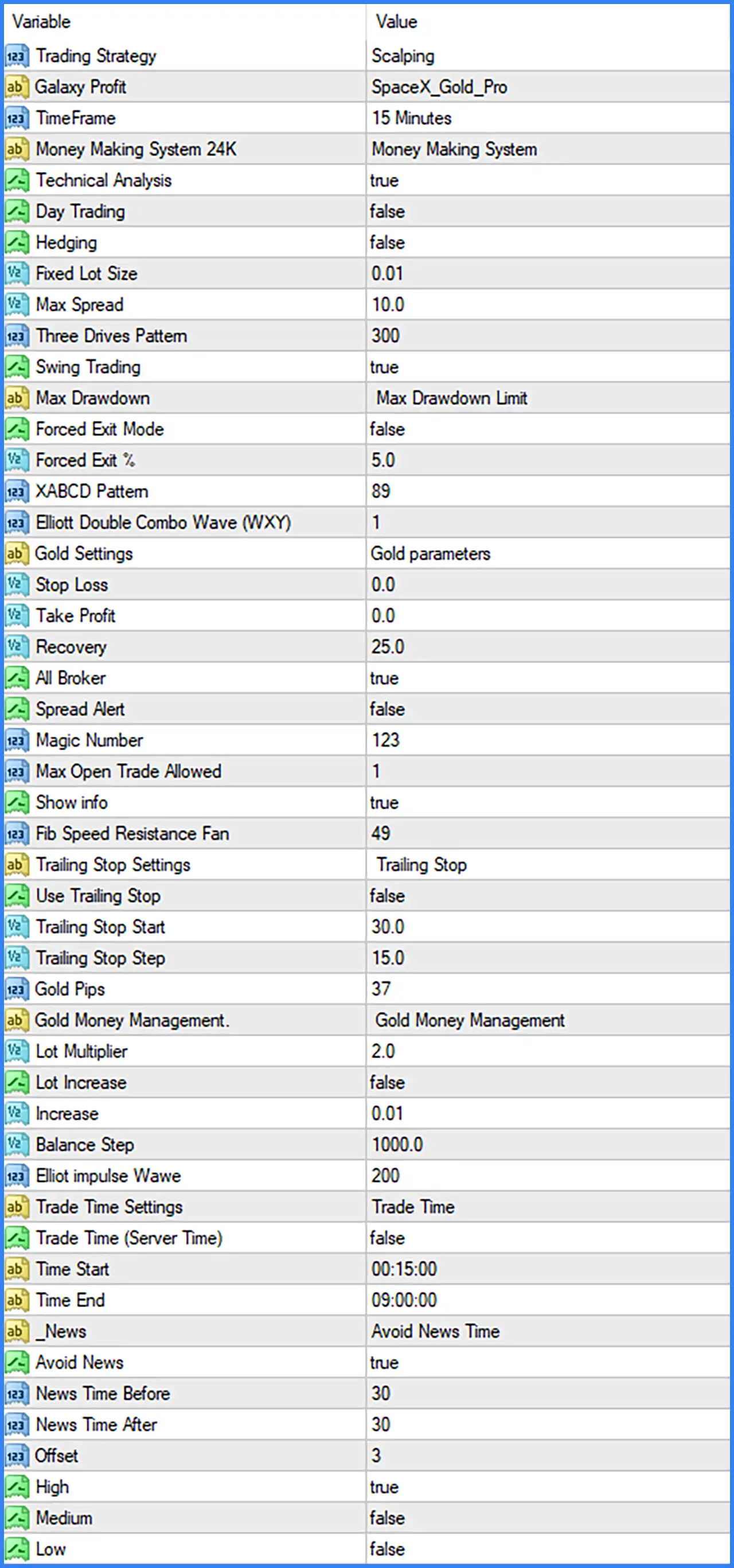
🔹 Trading Strategy: Scalping – Defines the primary trading approach. The EA is configured to use scalping logic to identify and execute short-term trading opportunities.
🔹 Galaxy Profit: SpaceX_Gold_Pro – Identifies the selected trading system or internal strategy configuration used by the EA.
🔹 TimeFrame: 15 Minutes – Sets the trading timeframe to M15, allowing the EA to analyze market movements using 15-minute candlesticks.
🔹 Money Making System 24K: Money Making System – Selects the internal trading system configuration responsible for the EA's trading methodology.
🔹 Technical Analysis: true – Enables technical analysis functions to evaluate market conditions and identify potential trading opportunities.
🔹 Day Trading: false – Disables the dedicated day-trading mode, allowing the EA to operate according to its other enabled trading configurations.
🔹 Hedging: false – Disables the hedging option, preventing the EA from using its dedicated hedging functionality.
🔹 Swing Trading: true – Enables swing trading functionality, allowing the EA to incorporate broader price movements when evaluating trading opportunities.
Lot Size and Trading Parameters
🔹 Fixed Lot Size: 0.01 – Sets the initial fixed trading volume to 0.01 lots, providing a relatively small starting position size.
🔹 Max Spread: 10.0 – Defines the maximum permitted spread for opening trades. The EA uses this threshold to avoid entering positions when spread conditions exceed the configured limit.
🔹 Three Drives Pattern: 300 – Sets the numerical parameter associated with the Three Drives harmonic pattern, which can be used in the EA's pattern recognition calculations.
🔹 XABCD Pattern: 89 – Configures the numerical parameter associated with the XABCD harmonic pattern, which is commonly used to identify potential market reversal structures.
🔹 Elliott Double Combo Wave (WXY): 1 – Selects the Elliott Wave Double Combo configuration, associated with the WXY corrective wave structure.
🔹 Elliot impulse Wave: 200 – Sets the numerical parameter associated with Elliott impulse wave analysis, which can help the EA evaluate directional market structures.
🔹 Fib Speed Resistance Fan: 49 – Configures the Fibonacci Speed Resistance Fan parameter, which is associated with analyzing potential support, resistance, and price movement levels.
Drawdown and Risk Management Settings
🔹 Max Drawdown: Max Drawdown Limit – Selects the maximum drawdown limit configuration, which is associated with the EA's drawdown management functionality.
🔹 Forced Exit Mode: false – Disables the forced exit mode, meaning this specific emergency exit functionality is not activated by the current configuration.
🔹 Forced Exit %: 5.0 – Sets the forced exit percentage threshold to 5.0. This value is available for the forced exit function when the corresponding mode is enabled.
🔹 Stop Loss: 0.0 – Sets the Stop Loss parameter to 0.0. This may indicate that a fixed Stop Loss is disabled or left to another internal exit mechanism.
🔹 Take Profit: 0.0 – Sets the Take Profit parameter to 0.0. This may indicate that a fixed Take Profit is disabled or that the EA relies on other exit conditions.
🔹 Recovery: 25.0 – Configures the recovery parameter to 25.0, which is associated with the EA's recovery management system. Its exact calculation method depends on the internal algorithm.
🔹 Max Open Trade Allowed: 1 – Limits the EA to a maximum of 1 simultaneously open trade, helping control exposure and prevent multiple concurrent positions.
Broker and Trade Management Settings
🔹 All Broker: true – Enables the all-broker compatibility option, allowing the EA to use its general broker compatibility configuration.
🔹 Spread Alert: false – Disables spread alerts, so the EA's dedicated spread warning function is not active.
🔹 Magic Number: 123 – Assigns the unique Magic Number 123 to identify and manage trades opened by this EA separately from other trading systems.
🔹 Show info: true – Enables the on-screen information display, allowing traders to view available EA information directly on the MetaTrader 4 chart.
Gold Trading Settings
🔹 Gold Settings: Gold parameters – Selects the predefined Gold trading parameter configuration, allowing the EA to apply settings intended for Gold market conditions.
🔹 Gold Pips: 37 – Sets the Gold pip-related parameter to 37, which may be used in the EA's internal price-distance calculations and trade management.
Trailing Stop Settings
🔹 Trailing Stop Settings: Trailing Stop – Opens the trailing stop configuration section, which contains the parameters used to manage trailing stop functionality.
🔹 Use Trailing Stop: false – Disables trailing stop functionality. The EA will not use this specific trailing stop mechanism while this option remains disabled.
🔹 Trailing Stop Start: 30.0 – Sets the trailing stop activation threshold to 30.0. This determines the configured profit distance at which trailing stop management can begin when enabled.
🔹 Trailing Stop Step: 15.0 – Sets the trailing stop adjustment interval to 15.0, defining the configured step used when updating the stop level.
Gold Money Management Settings
🔹 Gold Money Management: Gold Money Management – Selects the Gold-specific money management configuration used to control trading volume and position sizing.
🔹 Lot Multiplier: 2.0 – Sets the lot multiplication factor to 2.0, allowing the EA's configured position-sizing logic to multiply the trading volume by a factor of 2 when applicable.
🔹 Lot Increase: false – Disables the additional lot increase function, preventing this specific volume-increase mechanism from being activated.
🔹 Increase: 0.01 – Sets the additional lot increase value to 0.01, which can be used by the EA when the lot increase function is enabled.
🔹 Balance Step: 1000.0 – Sets the balance step parameter to 1000.0, potentially determining the account balance interval used by the EA's money management calculations.
Trading Time Settings
🔹 Trade Time Settings: Trade Time – Opens the trading schedule configuration section, where traders can define the permitted trading period.
🔹 Trade Time (Server Time): false – Disables the server-time option, meaning the EA does not use this specific server-time setting for its trading schedule.
🔹 Time Start: 00:15:00 – Sets the beginning of the configured trading window to 00:15:00, allowing the EA to start trading after the specified time.
🔹 Time End: 09:00:00 – Sets the end of the trading window to 09:00:00, restricting new trading activity according to the configured schedule.
Economic News Filter Settings
🔹 _News: Avoid News Time – Identifies the economic news filtering section, which contains the parameters used to manage trading around scheduled news events.
🔹 Avoid News: true – Enables the news filter, allowing the EA to avoid opening trades during the configured high-impact news periods.
🔹 News Time Before: 30 – Sets the news avoidance period to 30 minutes before a scheduled news event, helping reduce exposure to potential pre-news volatility.
🔹 News Time After: 30 – Sets the news avoidance period to 30 minutes after a scheduled news event, allowing the market time to stabilize following important announcements.
🔹 Offset: 3 – Sets the news-time offset parameter to 3, which may be used to adjust the news schedule according to the EA's internal time calculation.
🔹 High: true – Enables filtering for high-impact economic news events, helping the EA avoid potentially volatile market conditions.
🔹 Medium: false – Disables filtering for medium-impact economic news events, meaning these events are not specifically excluded by this setting.
🔹 Low: false – Disables filtering for low-impact economic news events, allowing the EA to operate without applying this additional news restriction.
Conclusion
SpaceX Gold Pro EA MT4 combines scalping and swing trading configurations with technical analysis and harmonic and Elliott Wave pattern parameters to support automated Gold trading. Its settings provide control over fixed lot sizing, lot multiplication, recovery parameters, maximum open positions, trading hours, and economic news filtering.
The current configuration uses a fixed lot size of 0.01, a maximum of 1 open trade, and a maximum spread setting of 10.0. It also enables high-impact news filtering while keeping forced exit mode and trailing stop functionality disabled.
Traders should pay particular attention to the Stop Loss and Take Profit values of 0.0, the lot multiplier of 2.0, and the recovery setting of 25.0. These parameters should be carefully tested to understand their impact on account exposure and trading risk before using the EA on a live account.