

This guide walks through the inputs of LuminaFX EA MT5 with the values recommended for live trading. The set files that come with the EA already contain these settings, so you can load them in one click and adjust only what your broker or account needs.
🔢 LuminaFX EA MT5 Settings Explained – Complete Parameter Guide
LuminaFX EA is a fully automated Forex Expert Advisor (EA) designed to trade multiple currency pairs with built-in risk management, profit protection, and flexible trade management. It provides configurable trade limits, equity-based position sizing, customizable Stop Loss (SL) and Take Profit (TP) levels, trailing stop functionality, and multi-symbol trading support, making it suitable for traders seeking a simple yet effective automated MT5 trading solution.
🔢 LuminaFX EA MT5 Parameters Explained
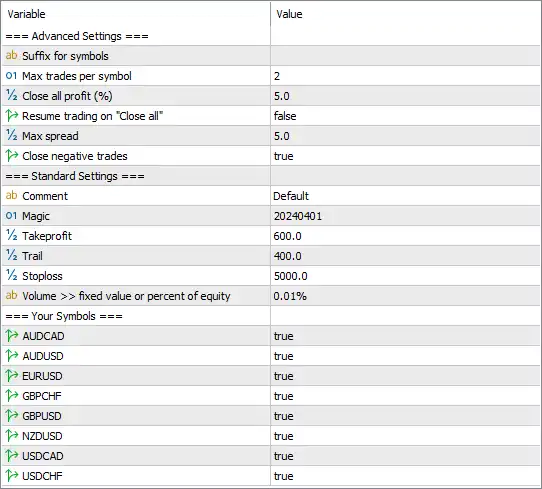
🔶 Advanced Settings
🔹 Suffix for symbols – Allows you to enter your broker's symbol suffix (for example: .m, .pro, .ecn) if required; the default value is blank.
🔹 Max trades per symbol = 2 – Limits the EA to a maximum of 2 simultaneous open positions for each enabled currency pair.
🔹 Close all profit (%) = 5.0 – Closes all open positions once the total floating profit reaches 5.0% of the account.
🔹 Resume trading on "Close all" = false – Prevents the EA from immediately opening new trades after executing the global Close All function.
🔹 Max spread = 5.0 – Allows new trades only when the market spread is 5.0 or lower, helping reduce trading costs.
🔹 Close negative trades = true – Enables automatic closing of losing positions when the EA's management conditions are met.
🔶 Standard Settings
🔹 Comment = Default – Adds "Default" as the trade comment for positions opened by LuminaFX EA MT5.
🔹 Magic = 20240401 – Assigns Magic Number 20240401 to uniquely identify and manage the EA's trades.
🔹 Takeprofit = 600.0 – Sets the default Take Profit target to 600.0 points.
🔹 Trail = 400.0 – Activates the trailing stop after the position reaches 400.0 points of profit.
🔹 Stoploss = 5000.0 – Sets the default Stop Loss to 5000.0 points for each trade.
🔹 Volume >> fixed value or percent of equity = 0.01% – Uses 0.01% of account equity as the position sizing method according to the selected money management mode.
🔶 Enabled Trading Symbols
🔹 AUDCAD = true – Enables automated trading on the AUDCAD currency pair.
🔹 AUDUSD = true – Enables automated trading on the AUDUSD currency pair.
🔹 EURUSD = true – Enables automated trading on the EURUSD currency pair.
🔹 GBPCHF = true – Enables automated trading on the GBPCHF currency pair.
🔹 GBPUSD = true – Enables automated trading on the GBPUSD currency pair.
🔹 NZDUSD = true – Enables automated trading on the NZDUSD currency pair.
🔹 USDCAD = true – Enables automated trading on the USDCAD currency pair.
🔹 USDCHF = true – Enables automated trading on the USDCHF currency pair.
🔢 Conclusion
LuminaFX EA MT5 provides a streamlined yet powerful automated trading system with configurable risk controls, multi-symbol support, equity-based position sizing, spread protection, trailing stop management, and automatic profit handling. Its flexible settings allow traders to customize trading behavior while maintaining disciplined risk management across multiple Forex pairs.
🔢 FAQs
❓ What is the default Magic Number in LuminaFX EA MT5?
The default Magic Number is 20240401, allowing the EA to uniquely identify and manage its own trades.
❓ How many trades can LuminaFX EA MT5 open per currency pair?
By default, the EA allows a maximum of 2 simultaneous trades for each enabled symbol.
❓ Does LuminaFX EA MT5 include a trailing stop?
Yes. The default configuration activates the trailing stop after 400.0 points of profit.
❓ Which currency pairs are enabled by default?
The default setup enables AUDCAD, AUDUSD, EURUSD, GBPCHF, GBPUSD, NZDUSD, USDCAD, and USDCHF.
❓ Can LuminaFX EA MT5 automatically close all profitable positions?
Yes. The Close all profit (%) feature closes all open positions once the combined floating profit reaches 5.0% of the account balance or equity threshold configured by the EA.
Get LuminaFX EA MT5
Download LuminaFX EA MT5 with its set files, read the full product details and requirements here: LuminaFX EA MT5 →