

📊 What is EA New Player MT5?
The EA New Playeris a flexible automated trading system designed with advanced grid, martingale, trailing stop, and news filters to optimize performance under different market conditions. The settings shown in the panel highlight how it balances risk control, profit management and adaptive trading logic.
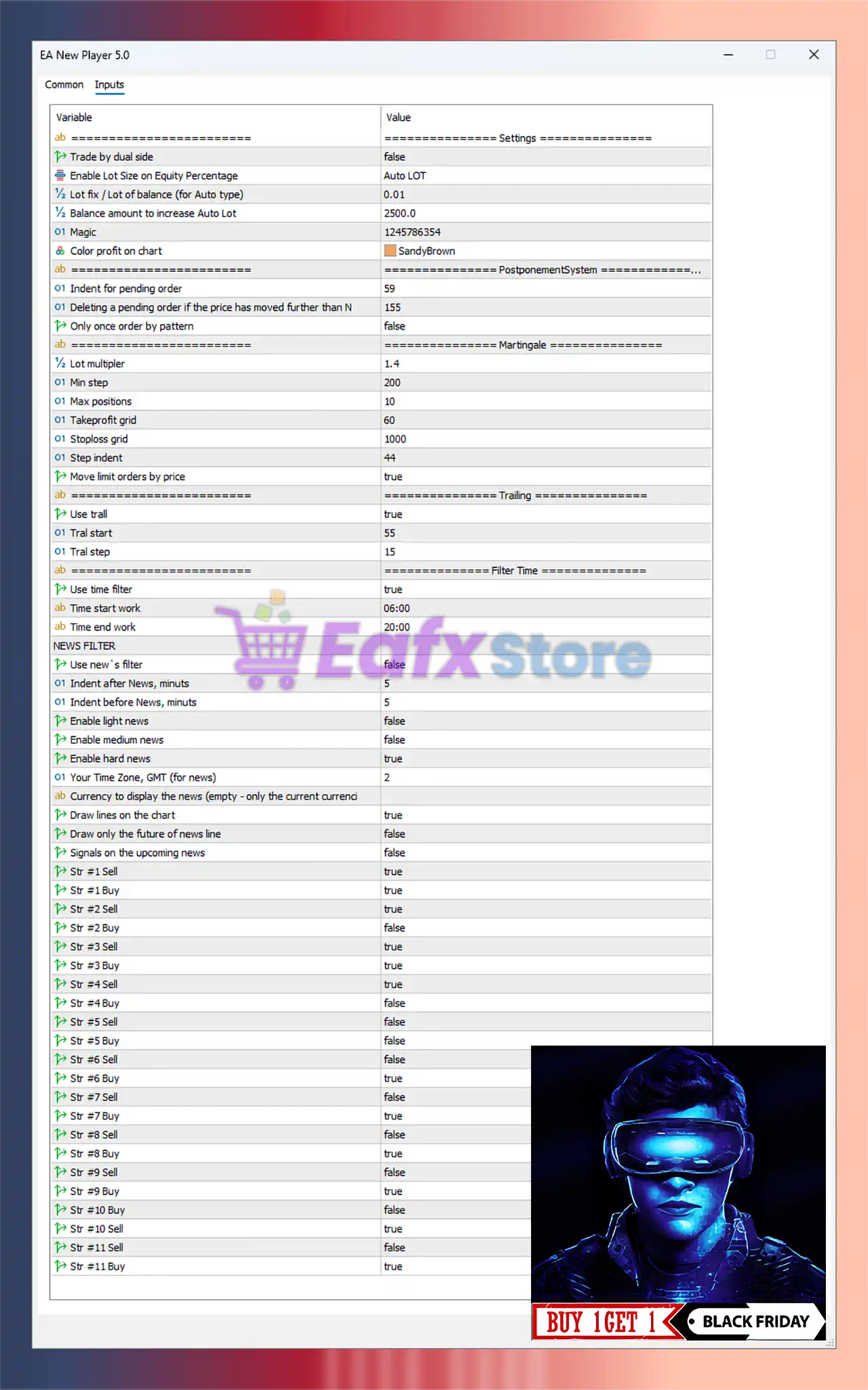
🔄 General Settings
- Lot Sizing: Auto Lot enabled, with a base lot of 0.01 and scaling every $2500 balance.
- Magic Number: Unique trade identification (1245786354).
- Profit Display: Colored chart visualization (SandyBrown).
👉 This ensures the EA can adapt position size to account equity, making it suitable for long-term compounding.
🔄 Postponement System
- Pending Order Indent: 59 points.
- Delete Pending Orders: If price moves beyond 155 points.
- Only One Order per Pattern: Disabled.
👉 Allows flexible order placement while avoiding invalidated breakout zones.
🔄 Martingale System
- Lot Multiplier: 1.4 (moderate risk scaling).
- Min Step: 200 points between orders.
- Max Positions: 10 trades.
- Take Profit Grid: 60 points.
- Stop Loss Grid: 1000 points.
- Step Indent: 44 points.
- Move Limit Orders by Price: Enabled.
👉 With a controlled martingale multiplier (1.4) and a cap of 10 trades, risk is contained compared to aggressive martingale EAs.
🔄 Trailing Stop System
- Trailing Enabled: True.
- Trail Start: 55 points.
- Trail Step: 15 points.
👉 This ensures profitable trades are locked in while still leaving room for trend continuation.
🔄 Time Filter
- Trading Hours: 06:00 – 20:00 (day trading only).
- Prevents overnight risks such as low liquidity and swap fees.
🔄 News Filter
- Enabled for Hard News: True (prevents trading during high-impact events).
- Light & Medium News: Disabled (focuses only on major volatility events).
- Indent Before/After News: 5 minutes buffer.
- Draw News on Chart: True – helps visualize upcoming events.
👉 This filter protects the EA from sudden spikes during major economic announcements.
🔄 Strategy Selection
The EA offers multiple strategies (Buy/Sell from Str #1 to Str #11).
- Enabled: Str #1 Sell, Str #1 Buy, Str #2 Sell, Str #3 Buy, Str #3 Sell, Str #4 Sell, Str #7 Buy, Str #9 Buy, Str #9 Sell, Str #10 Buy, Str #11 Buy.
- Disabled: Others.
👉 This combination activates trend-following and reversal entries, ensuring diversification in trading logic.
🔄 Conclusion – How EA New Player MT5 Works
The EA New Player MT5 configuration demonstrates a balanced grid + martingale system with protective filters for safer trading:
- ✅ Risk-Adjusted Lot Sizing with auto-scaling for account growth.
- ✅ Controlled Martingale (1.4 multiplier, 10 max trades).
- ✅ Trailing Stops for securing profits dynamically.
- ✅ Time Filter for intraday trading (avoiding overnight exposure).
- ✅ News Filter to stay out during high-impact events.
- ✅ Multi-Strategy Activation for broader adaptability.
⚠️ The EA still relies on grid and martingale mechanics, which means potential drawdowns in highly volatile, one-directional markets. Proper risk allocation and VPS use are strongly recommended.
👉 Overall, this setup makes EA New Player MT5 ideal for traders looking for diversified intraday grid trading with controlled martingale and enhanced safety mechanisms, suitable for both prop firm challenges and personal trading accounts.