SEMI HFT EA MT5 is a high-frequency sell-trades Expert Advisor (EA) designed for MetaTrader 5 (MT5), incorporating news filtering, Martingale strategies, Grid trading and intelligent risk control. The EA allows traders to automate entry points with high accuracy while managing volatility through advanced filters and multi-layered recovery logic.
🎯 News Filter (Multi Currency)
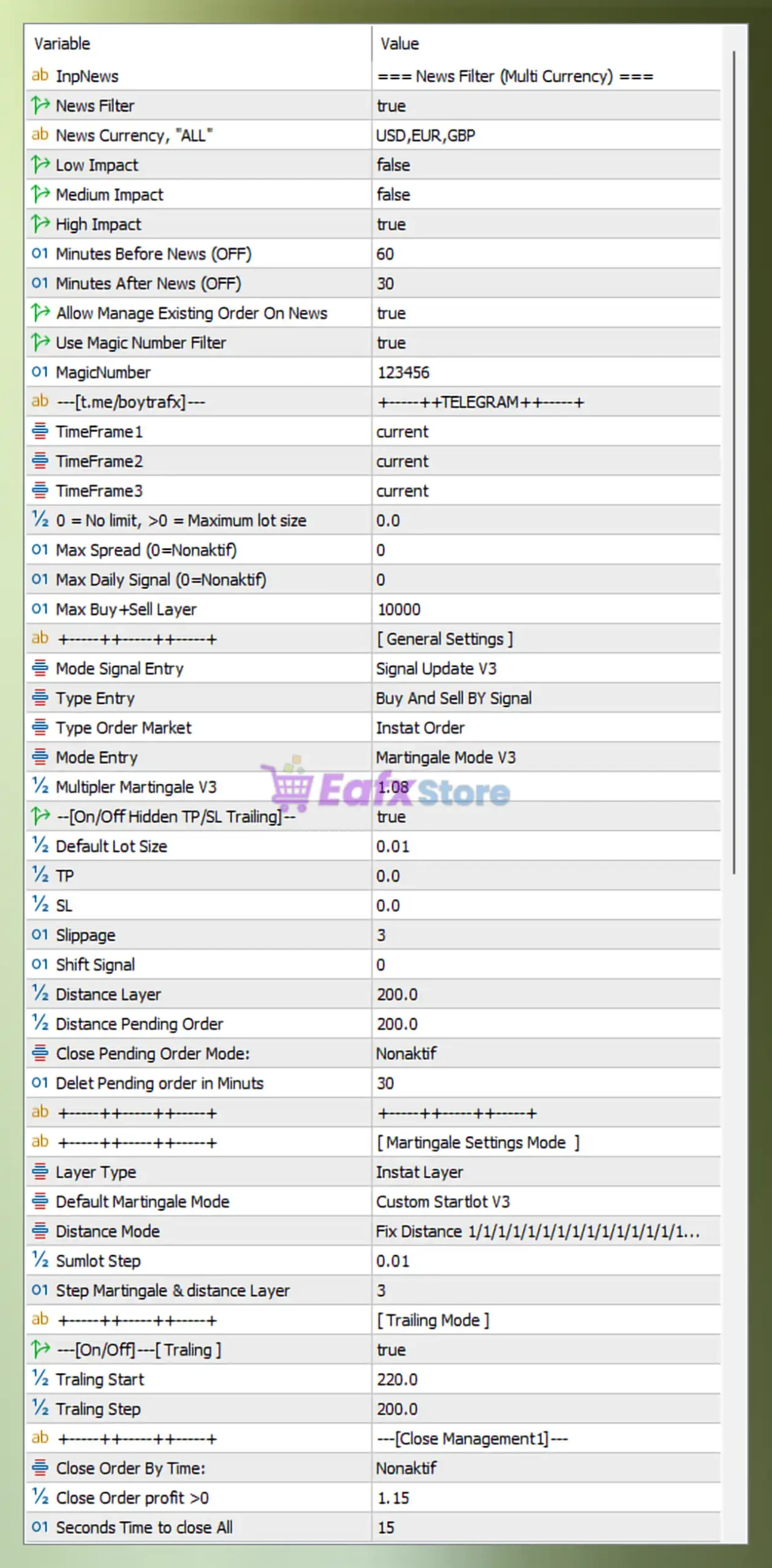
- InpNews = === News Filter (Multi Currency) === – Section label defining all news filter configurations.
- News Filter = true – Activates trading restriction during economic news events.
- News Currency, “ALL” = USD,EUR,GBP – Applies news filtering to USD, EUR, and GBP currencies.
- Low Impact = false – Low-impact news is ignored and does not affect trading.
- Medium Impact = false – Medium-impact news is ignored.
- High Impact = true – High-impact news events block new trades.
- Minutes Before News (OFF) = 60 – Stops opening trades 60 minutes before news release.
- Minutes After News (OFF) = 30 – Resumes trading 30 minutes after news release.
- Allow Manage Existing Order On News = true – Existing orders are still managed during news.
- Use Magic Number Filter = true – Filters trades by a unique identifier.
- MagicNumber = 123456 – Unique ID used to track EA trades.
🎯 Signal & Timeframe Settings
- [t.me/boytrafx] = +++++TELEGRAM+++++ – Informational label referencing signal provider.
- TimeFrame1 = current – Uses the current chart timeframe as primary signal source.
- TimeFrame2 = current – Uses current timeframe as secondary confirmation.
- TimeFrame3 = current – Uses current timeframe as third confirmation layer.
🎯 General Trading Limits
- 0 = No limit, >0 = Maximum lot size = 0.0 – No maximum lot restriction applied.
- Max Spread (0=Nonaktif) = 0 – Spread filter disabled (no spread limit).
- Max Daily Signal (0=Nonaktif) = 0 – Unlimited number of signals per day.
- Max Buy+Sell Layer = 10000 – Allows up to 10,000 total grid layers.
🎯 Entry & Execution Settings
- Mode Signal Entry = Signal Update V3 – Uses version 3 signal processing logic.
- Type Entry = Buy And Sell By Signal – Executes both buy and sell trades based on signals.
- Type Order Market = Instant Order – Orders are executed instantly at market price.
- Mode Entry = Martingale Mode V3 – Applies Martingale strategy version 3.
- Multiplier Martingale V3 = 1.08 – Each new position increases lot size by 1.08x.
🎯 Lot Size & Risk Parameters
- [On/Off Hidden TP/SL Trailing] = true – Enables hidden take profit, stop loss, and trailing.
- Default Lot Size = 0.01 – Initial trade lot size is 0.01.
- TP = 0.0 – No fixed take profit level.
- SL = 0.0 – No fixed stop loss level.
- Slippage = 3 – Maximum slippage allowed is 3 points.
- Shift Signal = 0 – No delay applied to signal execution.
🎯 Grid & Distance Configuration
- Distance Layer = 200.0 – Distance between grid layers is 200 points.
- Distance Pending Order = 200.0 – Pending orders are spaced 200 points apart.
- Close Pending Order Mode = Nonaktif – Pending order auto-close is disabled.
- Delet Pending order in Minutes = 30 – Pending orders expire after 30 minutes.
🎯 Martingale Settings Mode
- Layer Type = Instat Layer – Orders are placed instantly without delay.
- Default Martingale Mode = Custom Startlot V3 – Uses custom starting lot configuration.
- Distance Mode = Fix Distance 1/1/1/1/1/1/1/1/1/1/1/1/… – Maintains fixed spacing across all layers.
- Sumlot Step = 0.01 – Lot size increases in increments of 0.01.
- Step Martingale & distance Layer = 3 – Martingale scaling applied every 3 layers.
🎯 Trailing Mode Settings
- [On/Off] Trailing = true – Enables trailing stop functionality.
- Trailing Start = 220.0 – Trailing activates after 220 points profit.
- Trailing Step = 200.0 – Trailing adjusts every 200 points.
🎯 Close Management Settings
- Close Order By Time = Nonaktif – Time-based auto close is disabled.
- Close Order profit >0 = 1.15 – Closes orders when profit exceeds 1.15.
- Seconds Time to close All = 15 – All orders close within 15 seconds when triggered.
🎯 Floating & Balance Control
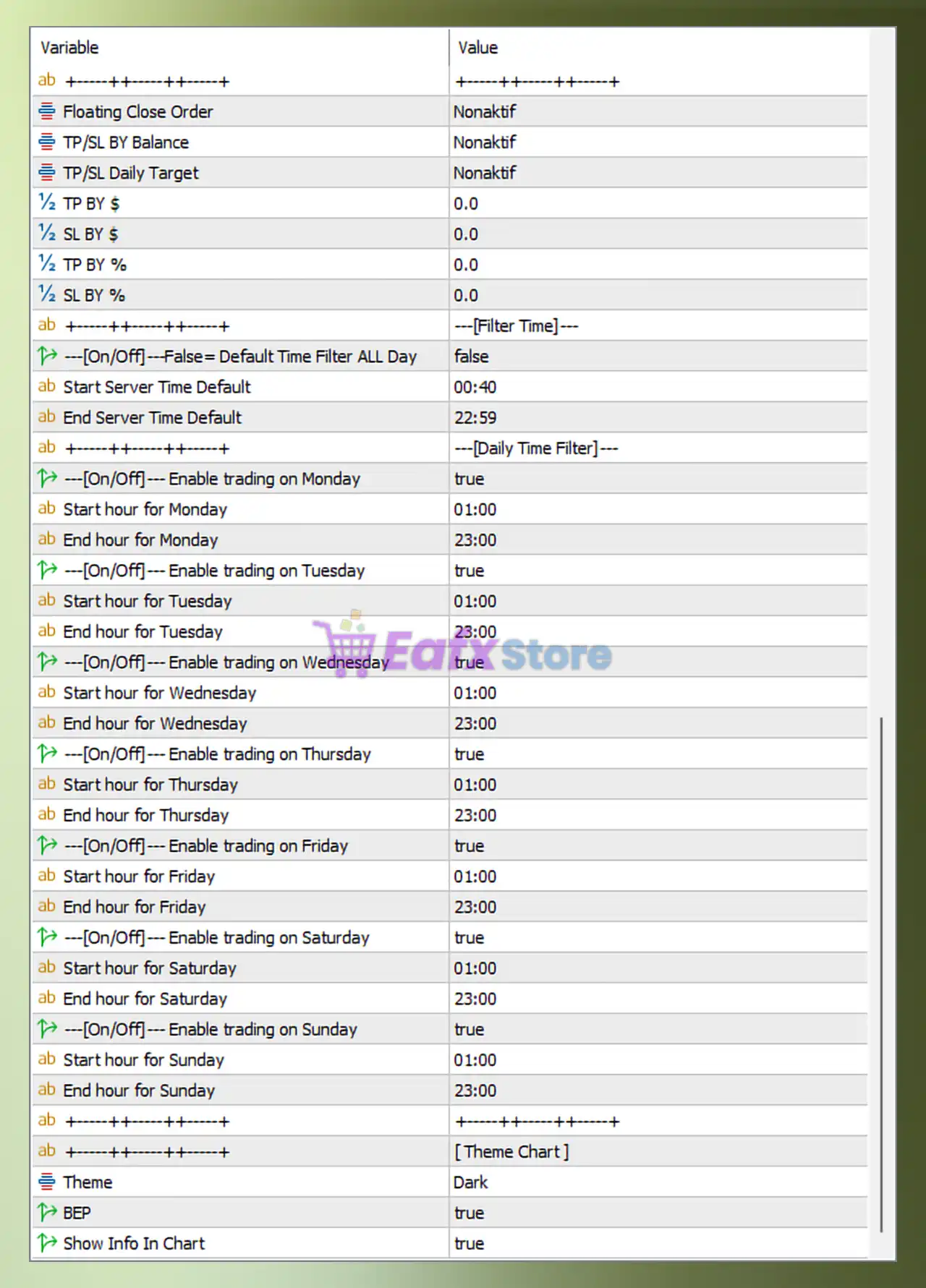
- Floating Close Order = Nonaktif – Floating profit/loss auto-close disabled.
- TP/SL By Balance = Nonaktif – No TP/SL based on account balance.
- TP/SL Daily Target = Nonaktif – Daily profit/loss target disabled.
- TP By $ = 0.0 – No fixed take profit in USD.
- SL By $ = 0.0 – No fixed stop loss in USD.
- TP By % = 0.0 – No percentage-based take profit.
- SL By % = 0.0 – No percentage-based stop loss.
🎯 Time Filter Settings
- [On/Off] Default Time Filter ALL Day = false – Time filter is active (not 24h trading).
- Start Server Time Default = 00:40 – Trading starts at 00:40 server time.
- End Server Time Default = 22:59 – Trading stops at 22:59 server time.
🎯 Daily Trading Schedule
- Enable trading on Monday = true – Trading allowed on Monday.
- Start hour for Monday = 01:00 – Starts trading Monday at 01:00.
- End hour for Monday = 23:00 – Stops trading Monday at 23:00.
- Enable trading on Tuesday = true – Trading allowed on Tuesday.
- Start hour for Tuesday = 01:00 – Starts trading Tuesday at 01:00.
- End hour for Tuesday = 23:00 – Stops trading Tuesday at 23:00.
- Enable trading on Wednesday = true – Trading allowed on Wednesday.
- Start hour for Wednesday = 01:00 – Starts trading Wednesday at 01:00.
- End hour for Wednesday = 23:00 – Stops trading Wednesday at 23:00.
- Enable trading on Thursday = true – Trading allowed on Thursday.
- Start hour for Thursday = 01:00 – Starts trading Thursday at 01:00.
- End hour for Thursday = 23:00 – Stops trading Thursday at 23:00.
- Enable trading on Friday = true – Trading allowed on Friday.
- Start hour for Friday = 01:00 – Starts trading Friday at 01:00.
- End hour for Friday = 23:00 – Stops trading Friday at 23:00.
- Enable trading on Saturday = true – Trading allowed on Saturday.
- Start hour for Saturday = 01:00 – Starts trading Saturday at 01:00.
- End hour for Saturday = 23:00 – Stops trading Saturday at 23:00.
- Enable trading on Sunday = true – Trading allowed on Sunday.
- Start hour for Sunday = 01:00 – Starts trading Sunday at 01:00.
- End hour for Sunday = 23:00 – Stops trading Sunday at 23:00.
🎯 Chart Display Settings
- Theme = Dark – Uses dark mode for chart interface.
- BEP = true – Displays break-even point on chart.
- Show Info In Chart = true – Displays EA information overlay on chart.
✅ Summary
The SEMI HFT EA MT5 settings showcase a powerful combination of Martingale, Grid spacing, trailing logic, and strict news filtering (USD, EUR, GBP). This configuration is optimized for controlled high-frequency trading with flexible risk management and continuous market engagement.