

This guide walks through the inputs of PulseTrend Algo EA MT5 with the values recommended for live trading. The set files that come with the EA already contain these settings, so you can load them in one click and adjust only what your broker or account needs.
🔢 PulseTrend Algo EA MT5 Settings Explained – Complete Parameter Guide
PulseTrend Algo EA is a fully automated MetaTrader 5 Expert Advisor designed to trade multiple JPY and commodity-related currency pairs using its proprietary PulseTrend algorithm.
The EA offers flexible symbol selection, manual or balance-based lot sizing, and configurable money management, making it suitable for traders who want to control risk while trading several instruments from a single MT5 chart.
🔢 Installation Panel Parameters
Below are the details of the parameters in the advisor’s trading system settings table:
🔶 General Settings
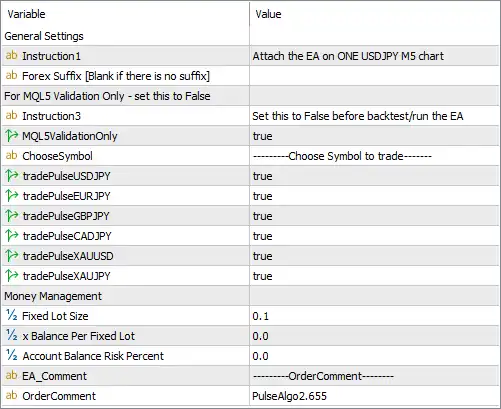
🔹 Instruction 1 = Attach the EA on ONE USDJPY M5 chart – Install the EA on a single USDJPY M5 chart to manage all supported trading symbols.
🔹 Forex Suffix [Blank if there is no suffix] = (Blank) – Enter your broker's symbol suffix (such as .m, -pro, or _ecn) if required; leave blank when no suffix exists.
🔹 Instruction 3 = For MQL5 Validation Only - set this to False – Reminder indicating that the validation option is intended only for MQL5 Market verification.
🔹 Instruction 3 = Set this to False before backtest/run the EA – Before performing a real backtest or live trading, change the validation option to False.
🔹 MQL5ValidationOnly = true – Enables MQL5 Validation Mode. Set this parameter to false before normal trading or strategy testing.
🔶 Symbol Selection
🔹 ChooseSymbol = Choose Symbol to trade – Section used to enable or disable trading for each supported currency pair.
🔹 tradePulseUSDJPY = true – Enables automated trading for USDJPY.
🔹 tradePulseEURJPY = true – Enables automated trading for EURJPY.
🔹 tradePulseGBPJPY = true – Enables automated trading for GBPJPY.
🔹 tradePulseCADJPY = true – Enables automated trading for CADJPY.
🔹 tradePulseXAUUSD = true – Enables automated trading for XAUUSD (Gold).
🔹 tradePulseXAUJPY = true – Enables automated trading for XAUJPY (Gold vs Japanese Yen).
🔶 Money Management
🔹 Fixed Lot Size = 0.1 – Uses a fixed trading volume of 0.10 lots whenever fixed lot sizing is selected.
🔹 Balance Per Fixed Lot = 0.0 – Defines the account balance allocated for each fixed lot. A value of 0.0 disables balance-based fixed lot calculation.
🔹 Account Balance Risk Percent = 0.0 – Sets the percentage of account balance to risk per trade. A value of 0.0 disables percentage-based risk management.
🔶 Order Settings
🔹 OrderComment = PulseAlgo2.655 – Adds the trade comment "PulseAlgo2.655" to every position opened by the EA for identification and trade management.
🔢 Conclusion
PulseTrend Algo EA MT5 is a straightforward yet flexible multi-symbol Expert Advisor that allows traders to automate trading across several JPY currency pairs and Gold instruments from a single USDJPY M5 chart. With configurable symbol activation, manual lot sizing, optional balance-based money management, and customizable order identification, the EA provides a simple setup while maintaining flexibility for different trading styles and account sizes.
🔢 FAQs
❓ Which chart should I attach PulseTrend Algo EA MT5 to?
Attach the EA to one USDJPY M5 chart, as specified in the setup instructions.
❓ Can PulseTrend Algo EA MT5 trade multiple symbols simultaneously?
Yes. The EA can trade USDJPY, EURJPY, GBPJPY, CADJPY, XAUUSD, and XAUJPY, depending on which symbols are enabled.
❓ What is the purpose of the MQL5ValidationOnly setting?
It is intended only for MQL5 Market validation and should be changed to false before live trading or backtesting.
❓ Does the EA support money management?
Yes. It supports both fixed lot sizing and account balance risk management, depending on how the parameters are configured.
❓ What does the OrderComment parameter do?
It labels every trade with "PulseAlgo2.655", allowing the EA to identify and manage its own positions efficiently.
Get PulseTrend Algo EA MT5
Download PulseTrend Algo EA MT5 with its set files, read the full product details and requirements here: PulseTrend Algo EA MT5 →