

This guide walks through the inputs of EvoTrade EA MT4 with the values recommended for live trading. The set files that come with the EA already contain these settings, so you can load them in one click and adjust only what your broker or account needs.
🔢 EvoTrade EA MT4 – Complete Settings Guide for Automated Forex Trading
EvoTrade EA MT4 is an advanced automated Forex trading Expert Advisor (EA) designed for MetaTrader 4 (MT4). The EA combines intelligent money management, percentage-based lot allocation, trailing stop protection, prop firm compatibility settings and economic news filtering.
With customizable risk controls and graphical interface features, EvoTrade EA MT4 provides traders with a flexible and professional automated trading solution.
🔢 Installation Panel Parameters
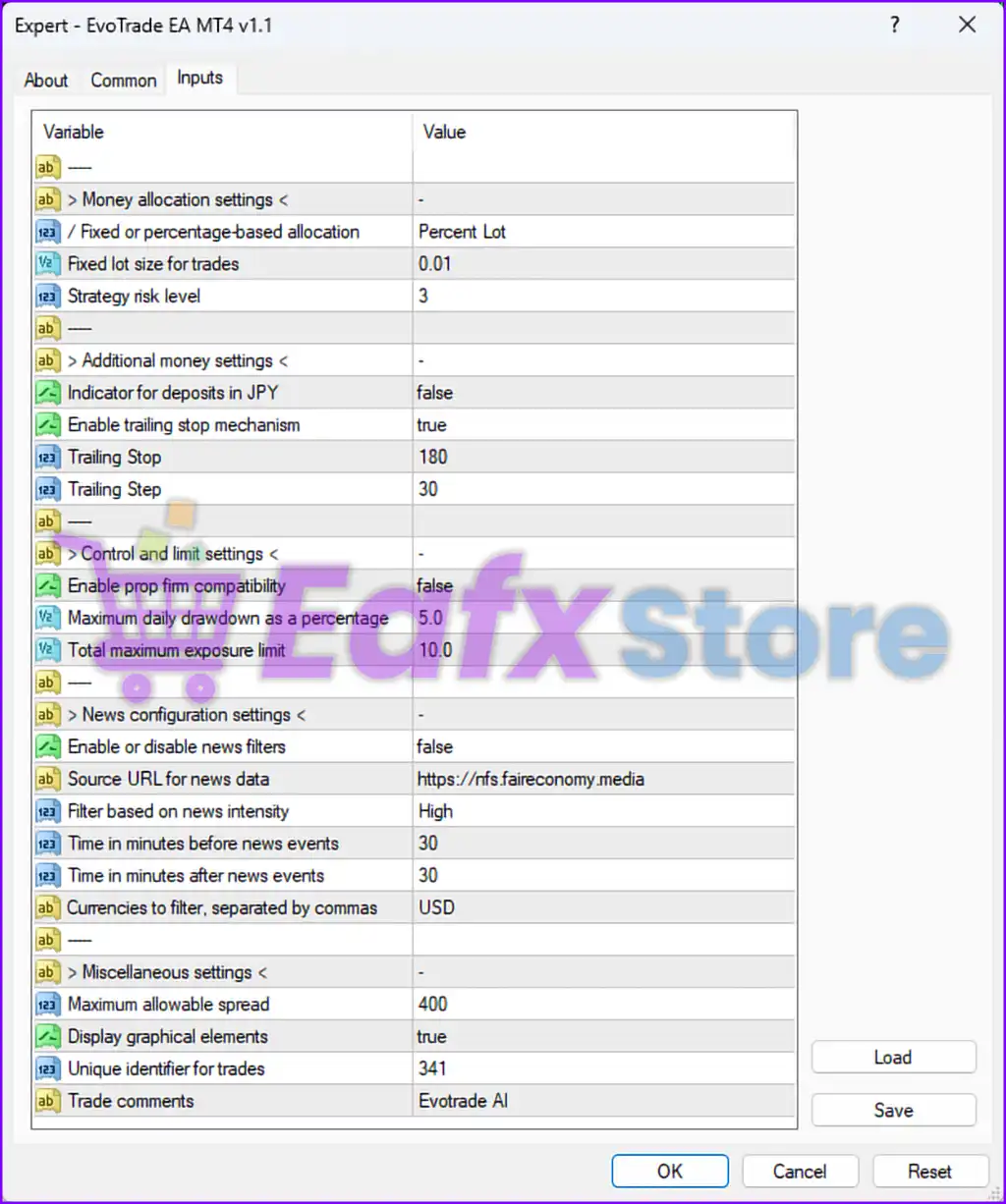
Below are the details of the parameters in the advisor’s trading system settings table:
🔶 Money Allocation Settings
🔹 Fixed or percentage-based allocation = Percent Lot — Uses percentage-based lot allocation instead of fixed lot sizing.
🔹 Fixed lot size for trades = 0.01 — Sets the default fixed lot size to 0.01 lots when fixed allocation is used.
🔹 Strategy risk level = 3 — Defines the trading strategy risk level as 3.
🔶 Additional Money Settings
🔹 Indicator for deposits in JPY = false — Disables JPY-specific deposit calculations.
🔹 Enable trailing stop mechanism = true — Activates the trailing stop management system.
🔹 Trailing Stop = 180 — Sets the trailing stop distance to 180 points/pips.
🔹 Trailing Step = 30 — Defines the trailing stop adjustment step as 30 points/pips.
🔶 Control and Limit Settings
🔹 Enable prop firm compatibility = false — Disables proprietary trading firm compatibility restrictions.
🔹 Maximum daily drawdown as a percentage = 5.0 — Limits maximum daily drawdown to 5.0%.
🔹 Total maximum exposure limit = 10.0 — Sets the total maximum account exposure limit to 10.0%.
🔶 News Configuration Settings
🔹 Enable or disable news filters = false — Disables economic news filtering.
🔹 Source URL for news data = https://nfs.faireconomy.media — Uses the Fair Economy Media source for news event data.
🔹 Filter based on news intensity = High — Configures the news filter to monitor high-impact economic events.
🔹 Time in minutes before news events = 30 — Stops trading 30 minutes before major news releases.
🔹 Time in minutes after news events = 30 — Resumes trading 30 minutes after major news releases.
🔹 Currencies to filter, separated by commas = USD — Applies news filtering to USD-related economic events.
🔶 Miscellaneous Settings
🔹 Maximum allowable spread = 400 — Sets the maximum permitted spread to 400 points/pips.
🔹 Display graphical elements = true — Enables graphical trading elements and chart displays.
🔹 Unique identifier for trades = 341 — Assigns the unique trade identifier (Magic Number) 341.
🔹 Trade comments = Evotrade AI — Adds the custom trade comment “Evotrade AI” to all executed trades.
🔢 Conclusion
EvoTrade EA MT4 is a modern automated Forex trading robot that focuses on intelligent money management, trailing stop protection, and advanced exposure controls. With percentage-based lot allocation, configurable drawdown limits, and integrated news filter settings, the EA provides traders with a flexible and risk-conscious trading solution for MetaTrader 4. Proper optimization of risk parameters, trailing stop settings, and exposure limits can help improve long-term trading consistency and account stability.
🔢 FAQs
❓ What is EvoTrade EA MT4?
EvoTrade EA MT4 is an automated Forex trading Expert Advisor for MetaTrader 4 that combines advanced money management and trailing stop systems.
❓ Does EvoTrade EA MT4 support percentage-based lot sizing?
Yes, the EA uses “Percent Lot” allocation for percentage-based risk and lot management.
❓ Can EvoTrade EA MT4 use a trailing stop system?
Yes, the trailing stop mechanism is enabled with a Trailing Stop value of 180 and a Trailing Step of 30.
❓ Does EvoTrade EA MT4 include news filtering?
Yes, the EA supports economic news filtering, although it is currently disabled in the displayed settings.
❓ What is the maximum daily drawdown setting in EvoTrade EA MT4?
The EA limits the maximum daily drawdown to 5.0% of account balance.
Get EvoTrade EA MT4
Download EvoTrade EA MT4 with its set files, read the full product details and requirements here: EvoTrade EA MT4 →