

This guide walks through the inputs of Quantum Titan MT5 EA with the values recommended for live trading. The set files that come with the EA already contain these settings, so you can load them in one click and adjust only what your broker or account needs.
🔢 Quantum Titan MT5 Settings: Complete Parameter Guide
Quantum Titan MT5 is a configurable Expert Advisor designed to automate trading while giving users control over core trading direction, risk management, money management, recovery behavior, trading days, and strategy settings. The configuration shown below provides a clear overview of how the EA is currently set up, including every visible parameter and its exact value.
Understanding these settings is essential before running Quantum Titan MT5 on a live trading account because parameters such as risk percentage, lot sizing, recovery mode, trading days, and strategy mode can directly influence the EA's trading behavior.
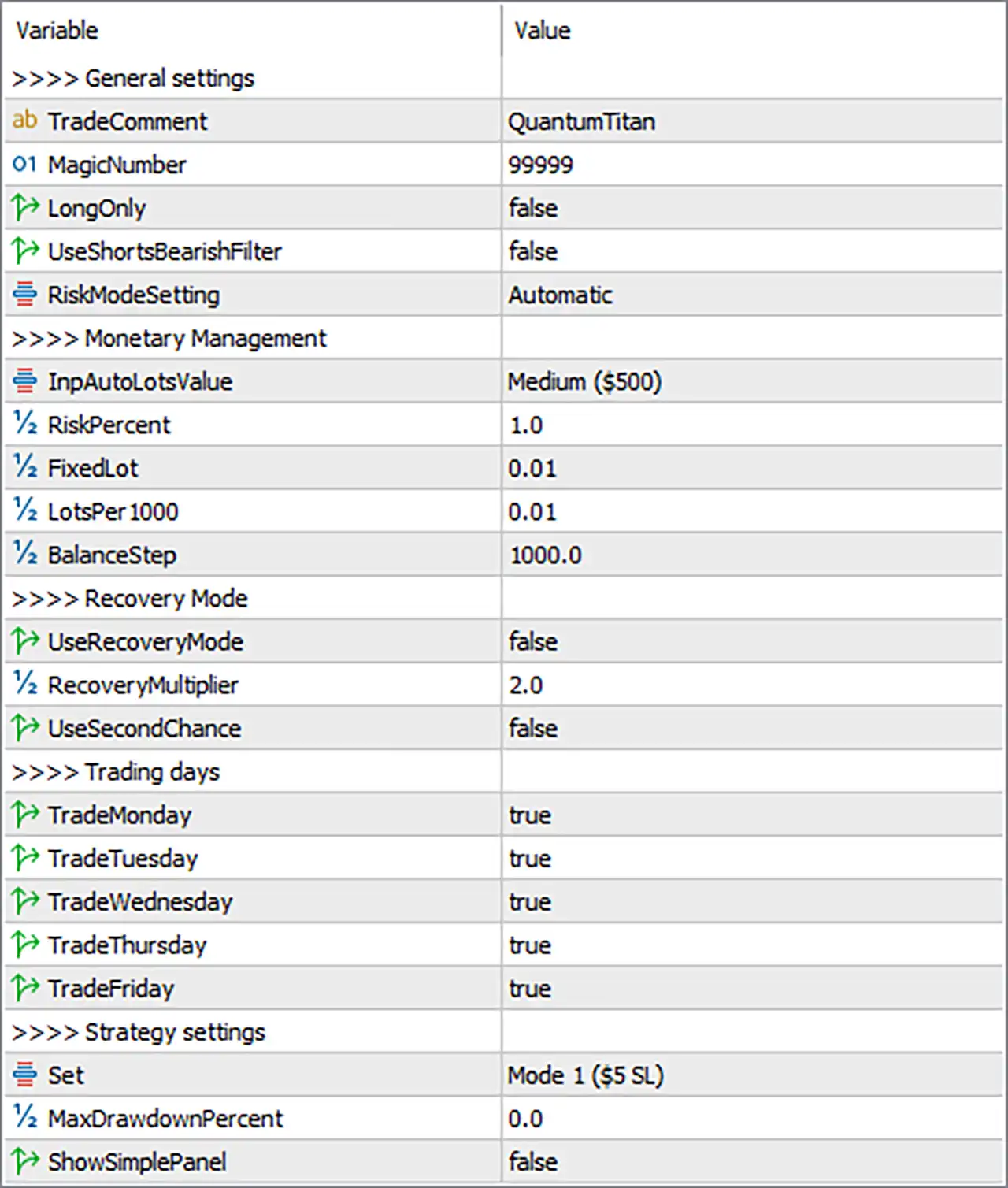
🔢 Quantum Titan MT5 Parameters & Settings
🔄 General Settings
🔹 TradeComment: QuantumTitan — Defines the comment attached to trades opened by the EA, making Quantum Titan trades easier to identify in the MT5 terminal and trading history.
🔹 MagicNumber: 99999 — The unique identification number used by the EA to distinguish its own trades from trades generated by other Expert Advisors or manual trading.
🔹 LongOnly: false — Allows the EA to trade both directions rather than restricting it to long/buy positions only.
🔹 UseShortsBearishFilter: false — Disables the bearish filter specifically designed to control short/sell trading conditions.
🔹 RiskModeSetting: Automatic — Sets the EA's risk-management mode to Automatic, allowing the system to manage the applicable risk configuration automatically.
🔄 Monetary Management
🔹 InpAutoLotsValue: Medium ($500) — Selects the Medium automatic-lot profile associated with a $500 reference value for the EA's money-management configuration.
🔹 RiskPercent: 1.0 — Sets the configured risk percentage to 1.0, representing the risk level used by the EA's risk-based money-management system.
🔹 Fixedlot: 0.01 — Defines a fixed trading volume of exactly 0.01 lots when fixed-lot sizing is applicable.
🔹 LotsPer1000: 0.01 — Sets the lot-sizing parameter to 0.01 lots per 1000 units of the relevant account balance/equity calculation.
🔹 BalanceStep: 1000.0 — Sets the balance-sizing increment to exactly 1000.0, which is used as the step for balance-based lot calculations.
🔄 Recovery Mode
🔹 UseRecoveryMode: false — Disables the EA's recovery mode, meaning the recovery-specific position-sizing mechanism is not enabled in the displayed configuration.
🔹 RecoveryMultiplier: 2.0 — Defines a recovery multiplier of exactly 2.0; this value becomes relevant if Recovery Mode is enabled.
🔹 UseSecondChance: false — Disables the Second Chance feature, so the EA will not use this additional recovery/opportunity mechanism in the current configuration.
🔄 Trading Days
🔹 TradeMonday: true — Enables trading on Monday.
🔹 TradeTuesday: true — Enables trading on Tuesday.
🔹 TradeWednesday: true — Enables trading on Wednesday.
🔹 TradeThursday: true — Enables trading on Thursday.
🔹 TradeFriday: true — Enables trading on Friday.
🔄 Strategy Settings
🔹 Set: Mode 1 ($5 SL) — Selects Strategy Mode 1, identified in the settings as $5 SL, which determines the strategy configuration used by the EA.
🔹 MaxDrawdownPercent: 0.0 — Sets the maximum drawdown percentage parameter to exactly 0.0 in the displayed configuration.
🔹 ShowSimplePanel: false — Disables the Simple Panel display on the MT5 chart.
🔢 Quick Configuration Summary
🔹 Trade Direction: Both long and short trading are permitted because LongOnly = false.
🔹 Short Bearish Filter: Disabled because UseShortsBearishFilter = false.
🔹 Risk Management: Automatic mode with RiskPercent = 1.0.
🔹 Automatic Lot Profile: Medium ($500).
🔹 Fixed Lot: 0.01.
🔹 Lot Scaling: 0.01 lots per 1000 balance units with a 1000.0 balance step.
🔹 Recovery Mode: Disabled with UseRecoveryMode = false.
🔹 Recovery Multiplier: 2.0, applicable if recovery mode is activated.
🔹 Second Chance: Disabled with UseSecondChance = false.
🔹 Trading Schedule: Monday through Friday are all enabled.
🔹 Strategy: Mode 1 ($5 SL).
🔹 Maximum Drawdown Parameter: 0.0.
🔹 Simple Panel: Disabled.
🔹 Trade Identifier: MagicNumber = 99999.
🔹 Trade Comment: QuantumTitan.
🔢 Conclusion
Quantum Titan MT5 is configured with a relatively straightforward structure combining automatic risk management, a 1.0 risk percentage, 0.01 fixed-lot sizing, weekday trading from Monday through Friday, and a selected Mode 1 ($5 SL) strategy. Recovery Mode and Second Chance are both disabled, while long-only trading is also disabled, allowing the EA's configuration to support both trading directions.
The most important parameters to review before deployment are RiskPercent 1.0, InpAutoLotsValue Medium ($500), Fixedlot 0.01, LotsPer1000 0.01, BalanceStep 1000.0, and Set Mode 1 ($5 SL). Traders should also understand how these parameters behave with their specific broker, account type, symbol specifications, and available margin before using the EA on a live account.
🔢 FAQs
❓ What is the MagicNumber of Quantum Titan MT5?
The configured MagicNumber is 99999, which helps MT5 identify and separate Quantum Titan trades from other trading activity.
❓ What risk percentage is configured for Quantum Titan MT5?
The displayed RiskPercent value is 1.0. The actual monetary risk can still depend on the EA's internal money-management logic, account conditions, symbol specifications, and other settings.
❓ Does Quantum Titan MT5 trade every weekday?
Yes. TradeMonday, TradeTuesday, TradeWednesday, TradeThursday, and TradeFriday are all set to true.
❓ Is Recovery Mode enabled in the current settings?
No. UseRecoveryMode is set to false, and UseSecondChance is also set to false.
❓ Which strategy mode is selected?
The configured strategy is Mode 1 ($5 SL). This is the exact strategy label shown in the provided MT5 settings.
Get Quantum Titan MT5 EA
Download Quantum Titan MT5 EA with its set files, read the full product details and requirements here: Quantum Titan MT5 EA →