Introduction to Queens Royal Knights MT5
Queens Royal Knights EA is a multi-strategy automated trading Expert Advisor (EA) designed for the MetaTrader 5 (MT5) platform. The EA supports multiple currency pair configurations, grid trading systems, recovery strategies and flexible auto lot management.
With separate strategy activation controls for each currency pairs and advanced drawdown management options, this EA is suitable for traders looking for a diversified and highly customizable trading solution.
Full Parameters
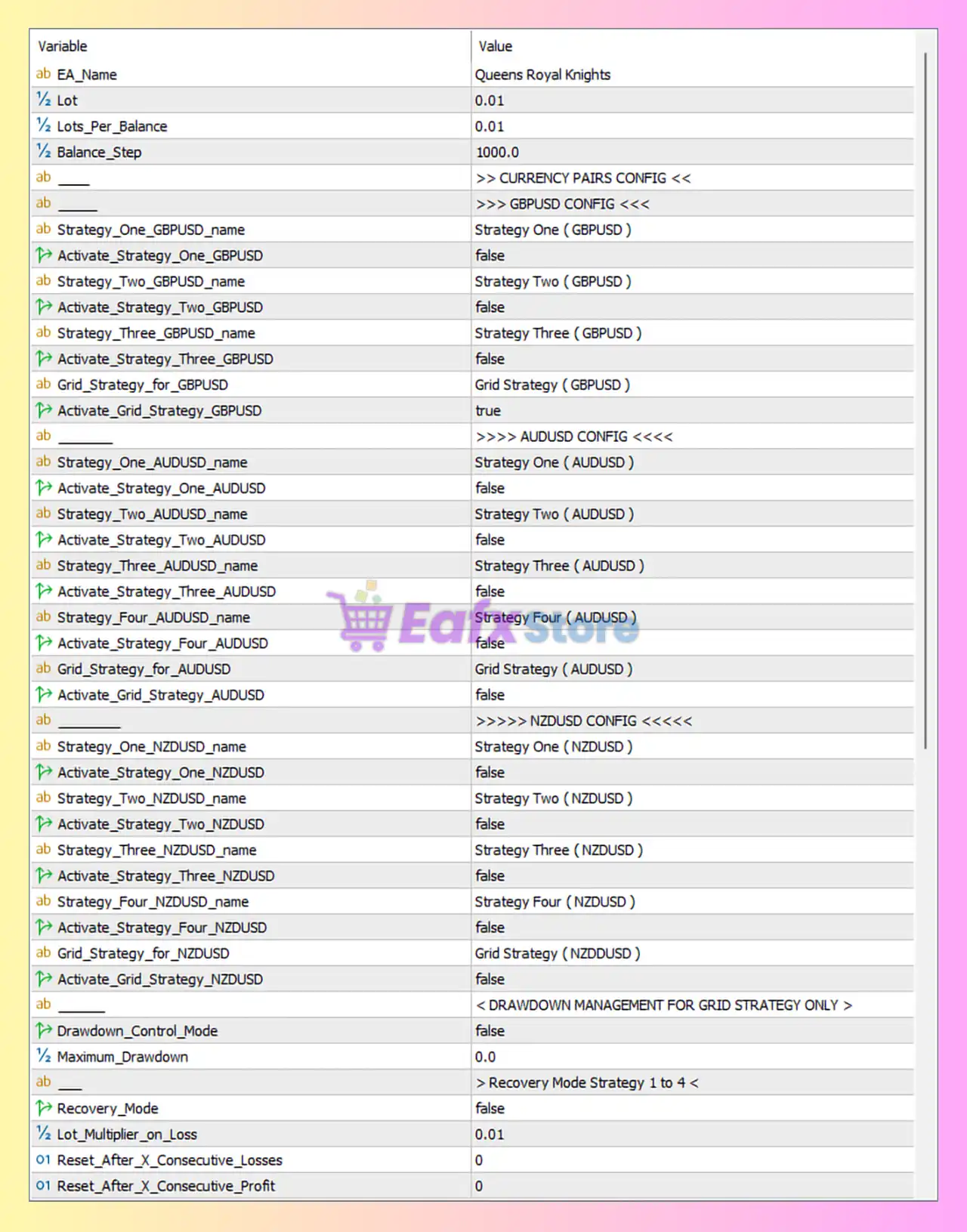
- EA_Name = Queens Royal Knights: Defines the Expert Advisor name as “Queens Royal Knights”.
- Lot = 0.01: Sets the default fixed lot size to 0.01.
- Lots_Per_Balance = 0.01: Allocates 0.01 lot for each balance step increment.
- Balance_Step = 1000.0: Defines that every 1000.0 account balance units increase lot sizing proportionally.
CURRENCY PAIRS CONFIG
GBPUSD CONFIG
- Strategy_One_GBPUSD_name = Strategy One ( GBPUSD ): Name assigned to Strategy One for GBPUSD.
- Activate_Strategy_One_GBPUSD = false: Disables Strategy One for GBPUSD.
- Strategy_Two_GBPUSD_name = Strategy Two ( GBPUSD ): Name assigned to Strategy Two for GBPUSD.
- Activate_Strategy_Two_GBPUSD = false: Disables Strategy Two for GBPUSD.
- Strategy_Three_GBPUSD_name = Strategy Three ( GBPUSD ): Name assigned to Strategy Three for GBPUSD.
- Activate_Strategy_Three_GBPUSD = false: Disables Strategy Three for GBPUSD.
- Grid_Strategy_for_GBPUSD = Grid Strategy ( GBPUSD ): Grid strategy profile assigned to GBPUSD.
- Activate_Grid_Strategy_GBPUSD = true: Enables Grid Strategy for GBPUSD.
AUDUSD CONFIG
- Strategy_One_AUDUSD_name = Strategy One ( AUDUSD ): Name assigned to Strategy One for AUDUSD.
- Activate_Strategy_One_AUDUSD = false: Disables Strategy One for AUDUSD.
- Strategy_Two_AUDUSD_name = Strategy Two ( AUDUSD ): Name assigned to Strategy Two for AUDUSD.
- Activate_Strategy_Two_AUDUSD = false: Disables Strategy Two for AUDUSD.
- Strategy_Three_AUDUSD_name = Strategy Three ( AUDUSD ): Name assigned to Strategy Three for AUDUSD.
- Activate_Strategy_Three_AUDUSD = false: Disables Strategy Three for AUDUSD.
- Strategy_Four_AUDUSD_name = Strategy Four ( AUDUSD ): Name assigned to Strategy Four for AUDUSD.
- Activate_Strategy_Four_AUDUSD = false: Disables Strategy Four for AUDUSD.
- Grid_Strategy_for_AUDUSD = Grid Strategy ( AUDUSD ): Grid strategy profile assigned to AUDUSD.
- Activate_Grid_Strategy_AUDUSD = false: Disables Grid Strategy for AUDUSD.
NZDUSD CONFIG
- Strategy_One_NZDUSD_name = Strategy One ( NZDUSD ): Name assigned to Strategy One for NZDUSD.
- Activate_Strategy_One_NZDUSD = false: Disables Strategy One for NZDUSD.
- Strategy_Two_NZDUSD_name = Strategy Two ( NZDUSD ): Name assigned to Strategy Two for NZDUSD.
- Activate_Strategy_Two_NZDUSD = false: Disables Strategy Two for NZDUSD.
- Strategy_Three_NZDUSD_name = Strategy Three ( NZDUSD ): Name assigned to Strategy Three for NZDUSD.
- Activate_Strategy_Three_NZDUSD = false: Disables Strategy Three for NZDUSD.
- Strategy_Four_NZDUSD_name = Strategy Four ( NZDUSD ): Name assigned to Strategy Four for NZDUSD.
- Activate_Strategy_Four_NZDUSD = false: Disables Strategy Four for NZDUSD.
- Grid_Strategy_for_NZDUSD = Grid Strategy ( NZDUSD ): Grid strategy profile assigned to NZDUSD.
- Activate_Grid_Strategy_NZDUSD = false: Disables Grid Strategy for NZDUSD.
DRAWDOWN MANAGEMENT FOR GRID STRATEGY ONLY
- Drawdown_Control_Mode = false: Disables drawdown protection mode for grid strategies.
- Maximum_Drawdown = 0.0: Maximum drawdown limit set to 0.0, effectively disabled.
Recovery Mode Strategy 1 to 4
- Recovery_Mode = false: Disables recovery mode for strategies 1 to 4.
- Lot_Multiplier_on_Loss = 0.01: Applies a 0.01 lot multiplier after losses.
- Reset_After_X_Consecutive_Losses = 0: No reset occurs after consecutive losses because value is 0.
- Reset_After_X_Consecutive_Profit = 0: No reset occurs after consecutive profitable trades because value is 0.
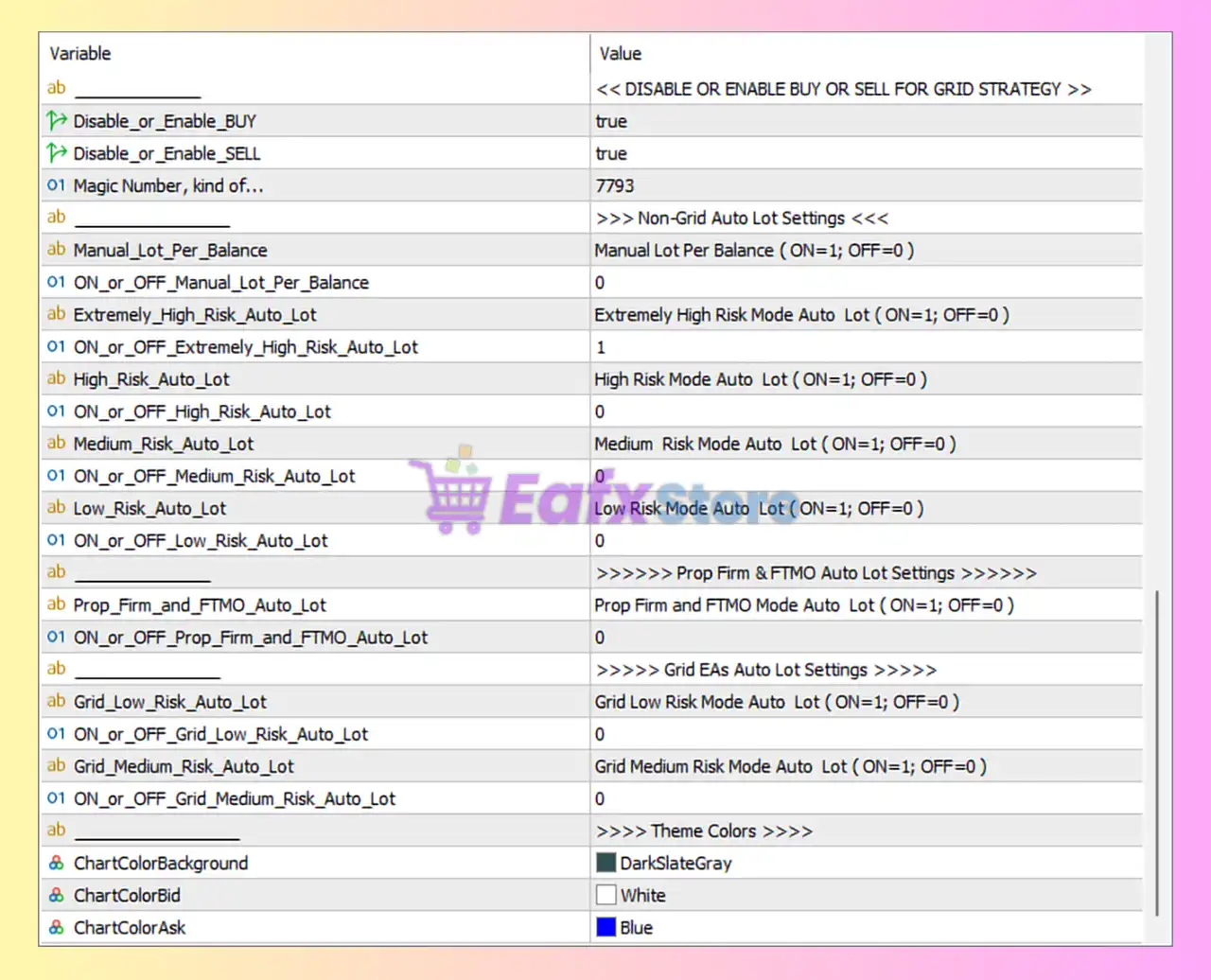
DISABLE OR ENABLE BUY OR SELL FOR GRID STRATEGY
- Disable_or_Enable_BUY = true: Enables BUY trades for the grid strategy.
- Disable_or_Enable_SELL = true: Enables SELL trades for the grid strategy.
- Magic Number, kind of… = 7793: Unique identifier (7793) used for EA trade management.
Non-Grid Auto Lot Settings
- Manual_Lot_Per_Balance = Manual Lot Per Balance (ON=1; OFF=0): Description of manual lot-per-balance mode.
- ON_or_OFF_Manual_Lot_Per_Balance = 0: Disables manual lot-per-balance mode.
- Extremely_High_Risk_Auto_Lot = Extremely High Risk Mode Auto Lot (ON=1; OFF=0): Description for extremely high-risk auto lot mode.
- ON_or_OFF_Extremely_High_Risk_Auto_Lot = 1: Enables extremely high-risk auto lot mode.
- High_Risk_Auto_Lot = High Risk Mode Auto Lot (ON=1; OFF=0): Description for high-risk auto lot mode.
- ON_or_OFF_High_Risk_Auto_Lot = 0: Disables high-risk auto lot mode.
- Medium_Risk_Auto_Lot = Medium Risk Mode Auto Lot (ON=1; OFF=0): Description for medium-risk auto lot mode.
- ON_or_OFF_Medium_Risk_Auto_Lot = 0: Disables medium-risk auto lot mode.
- Low_Risk_Auto_Lot = Low Risk Mode Auto Lot (ON=1; OFF=0): Description for low-risk auto lot mode.
- ON_or_OFF_Low_Risk_Auto_Lot = 0: Disables low-risk auto lot mode.
Prop Firm & FTMO Auto Lot Settings
- Prop_Firm_and_FTMO_Auto_Lot = Prop Firm and FTMO Mode Auto Lot (ON=1; OFF=0): Description for prop firm auto lot mode.
- ON_or_OFF_Prop_Firm_and_FTMO_Auto_Lot = 0: Disables Prop Firm and FTMO auto lot mode.
Grid EAs Auto Lot Settings
- Grid_Low_Risk_Auto_Lot = Grid Low Risk Mode Auto Lot (ON=1; OFF=0): Description for low-risk grid auto lot mode.
- ON_or_OFF_Grid_Low_Risk_Auto_Lot = 0: Disables low-risk grid auto lot mode.
- Grid_Medium_Risk_Auto_Lot = Grid Medium Risk Mode Auto Lot (ON=1; OFF=0): Description for medium-risk grid auto lot mode.
- ON_or_OFF_Grid_Medium_Risk_Auto_Lot = 0: Disables medium-risk grid auto lot mode.
Theme Colors
- ChartColorBackground = DarkSlateGray: Sets chart background color to DarkSlateGray.
- ChartColorBid = White: Sets bid price line color to White.
- ChartColorAsk = Blue: Sets ask price line color to Blue.
Conclusion
The Queens Royal Knights EA settings provide a highly flexible framework for managing multiple strategies, grid systems and currency pairs simultaneously. With configurable recovery modes, advanced auto lot controls, and pair-specific activation settings, traders can customize the EA for both aggressive and conservative trading approaches. Understanding each parameter helps improve strategy optimization, risk management and overall trading efficiency.
FAQs
❓ What does Activate_Grid_Strategy_GBPUSD = true mean?
It enables the grid trading strategy specifically for GBPUSD.
❓ Why is Drawdown_Control_Mode = false important?
It means drawdown protection is currently disabled for grid strategies.
❓ What is the purpose of Magic Number = 7793?
It uniquely identifies trades managed by Queens Royal Knights EA MT5.
❓ Why is ON_or_OFF_Extremely_High_Risk_Auto_Lot = 1 risky?
It enables aggressive lot scaling, increasing both potential profits and losses.
❓ Can I activate strategies individually for each currency pair?
Yes, each strategy and grid mode can be enabled or disabled separately for GBPUSD, AUDUSD, and NZDUSD.