Introduction to Kovner System EA MT4
Kovner System EA is an automated trading Expert Advisor (EA) developed for the MetaTrader 4 (MT4) platform, focusing on risk-controlled trade execution and trailing stop management.
The EA combines free margin-based money management with customizable stop loss and trailing logic, making it suitable for traders who prefer disciplined automation with dynamic profit protection.
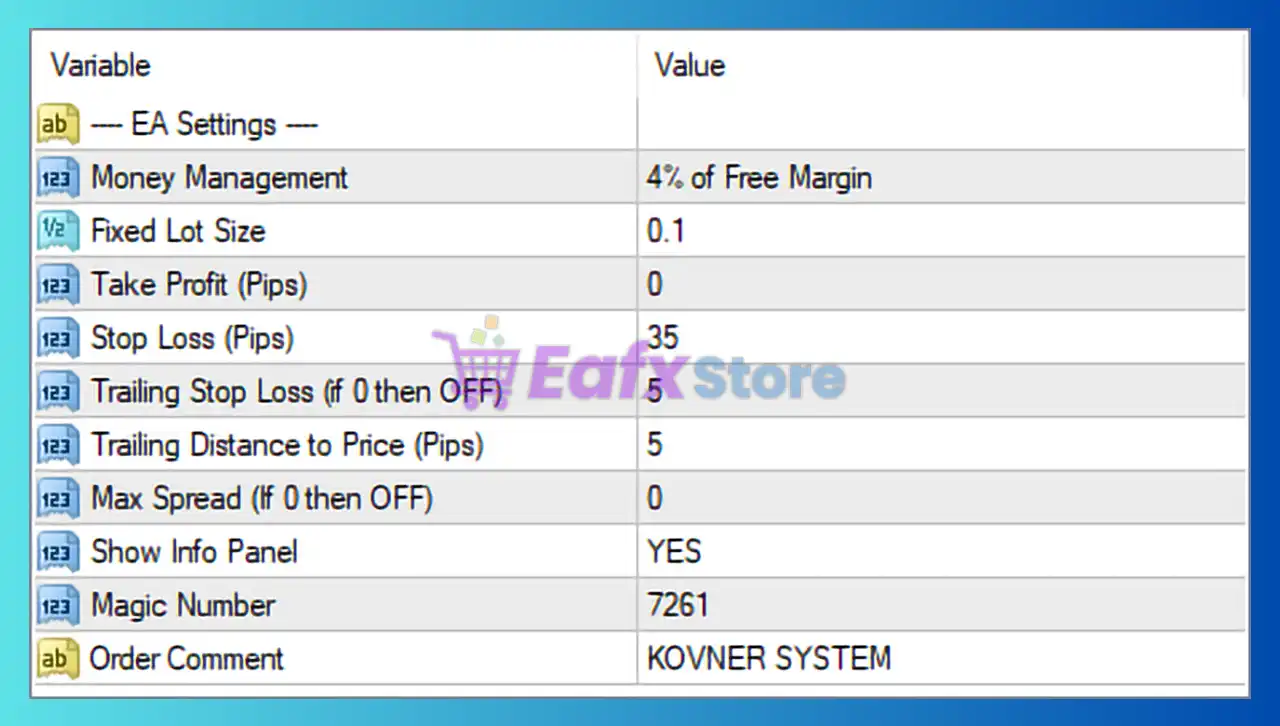
Kovner System EA Settings
- Money Management = 4% of Free Margin: Uses 4% of available free margin to calculate trade exposure and manage position sizing dynamically.
- Fixed Lot Size = 0.1: Sets the fixed trading lot size to 0.1 when fixed lot trading is applied.
- Take Profit (Pips) = 0: Take Profit is disabled because the value is set to 0, allowing trades to run without a fixed profit target.
- Stop Loss (Pips) = 35: Defines the Stop Loss level at 35 pips to limit trade losses.
- Trailing Stop Loss (If 0 then OFF) = 5: Enables trailing stop with a trailing distance of 5 pips.
- Trailing Distance to Price (Pips) = 5: Maintains a 5-pip distance between current market price and the trailing stop level.
- Max Spread (If 0 then OFF) = 0: Spread filtering is disabled because the value is set to 0.
- Show Info Panel = YES: Displays the information panel directly on the trading chart.
- Magic Number = 7261: Unique identifier (7261) used to manage and track trades opened by the EA.
- Order Comment = KOVNER SYSTEM: Adds “KOVNER SYSTEM” as the comment label for all executed trades.
Conclusion
The Kovner System EA MT4 settings provide a straightforward yet effective framework for automated trading with dynamic money management and trailing stop protection. By using free margin-based exposure calculations and flexible trade management settings, the EA helps traders maintain controlled risk while allowing profitable trades to develop naturally. Understanding these parameters can improve strategy optimization and overall trading discipline.
FAQs
❓ What does Money Management = 4% of Free Margin mean?
It means the EA uses 4% of available free margin to determine trading exposure and lot sizing.
❓ Why is Take Profit (Pips) = 0 important?
It disables fixed Take Profit, allowing trades to close using trailing stop or other logic.
❓ What does Trailing Stop Loss = 5 do?
It locks in profits by moving the Stop Loss 5 pips behind the market price.
❓ Why is Max Spread = 0 set this way?
It disables spread filtering, meaning the EA can trade regardless of spread size.
❓ What is the purpose of Magic Number = 7261?
It uniquely identifies trades opened by Kovner System EA MT4 for proper trade management.