

This guide walks through the inputs of RM-SCALPER EA MT4 with the values recommended for live trading. The set files that come with the EA already contain these settings, so you can load them in one click and adjust only what your broker or account needs.
🔢 RM-SCALPER EA – Complete Settings & Parameters Guide
RM-SCALPER EA is an automated MetaTrader Expert Advisor (EA) developed for scalping strategies with customizable risk management, trade spacing, multiplier systems and visual panel controls.
The EA is designed to help traders execute fast market entries while maintaining flexible control over trading sessions, profit targets and interface appearance.
🔢 RM-SCALPER EA Settings Explained
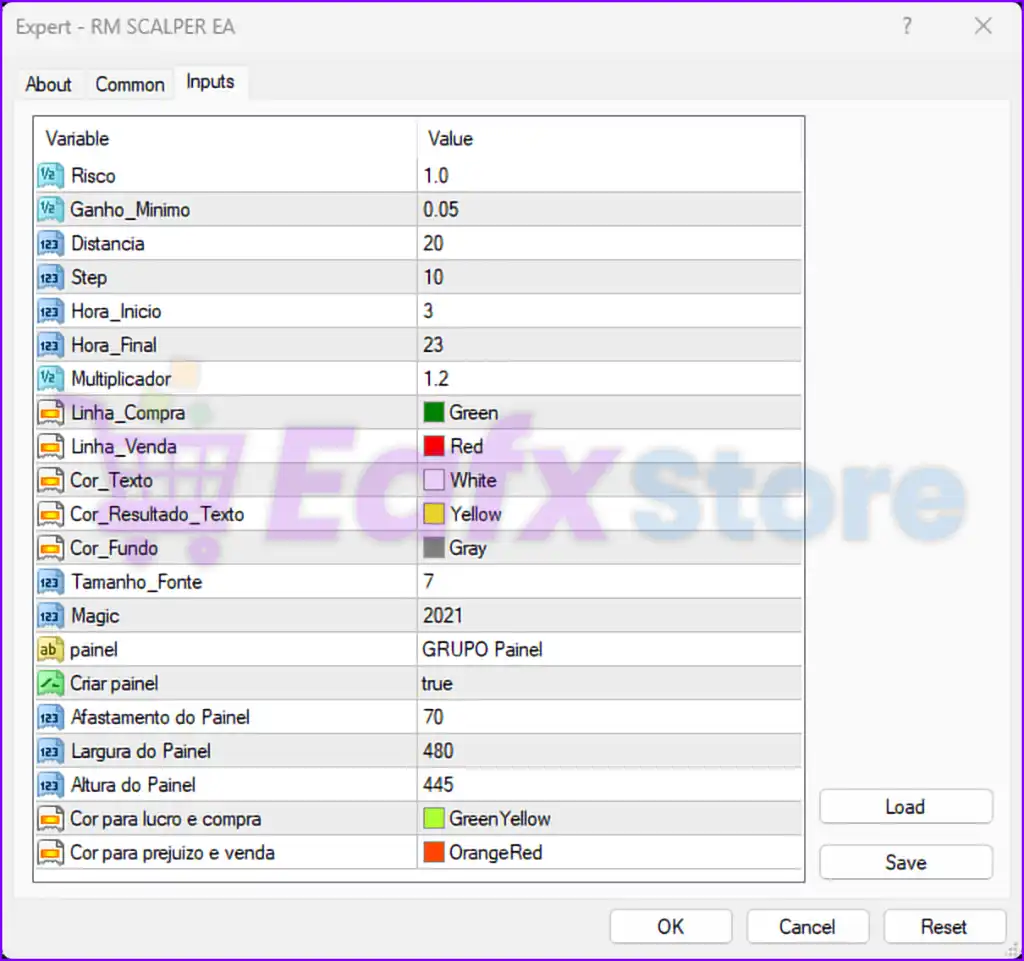
Below are the details of the parameters in the advisor’s trading system settings table:
🔶 Trading & Risk Management Settings
🔹 Risco = 1.0 — Defines the trading risk level used by the EA for order management calculations.
🔹 Ganho_Minimo = 0.05 — Sets the minimum profit target value to 0.05 before closing trades or securing gains.
🔹 Distancia = 20 — Defines the distance between trade entries or grid positions at 20 points/pips.
🔹 Step = 10 — Sets the incremental step distance between orders to 10 points/pips.
🔹 Hora_Inicio = 3 — Allows the EA to start trading operations at hour 3.
🔹 Hora_Final = 23 — Stops the EA from opening new trades after hour 23.
🔹 Multiplicador = 1.2 — Applies a lot multiplier of 1.2 for progressive order sizing or recovery trading.
🔶 Chart & Visual Display Settings
🔹 Linha_Compra = Green — Sets the Buy trade line color to Green.
🔹 Linha_Venda = Red — Sets the Sell trade line color to Red.
🔹 Cor_Texto = White — Configures the chart text color as White.
🔹 Cor_Resultado_Texto = Yellow — Sets the result or statistics text color to Yellow.
🔹 Cor_Fundo = Gray — Defines the chart or panel background color as Gray.
🔹 Tamanho_Fonte = 7 — Sets the display font size to 7.
🔶 Trade Identification Settings
🔹 Magic = 2021 — Assigns Magic Number 2021 for identifying EA-generated trades.
🔶 Panel Configuration Settings
🔹 painel = GRUPO Painel — Displays the panel group or panel section label.
🔹 Criar painel = true — Enables the graphical trading information panel on the chart.
🔹 Afastamento do Painel = 70 — Sets the panel offset distance to 70 pixels or units.
🔹 Largura do Painel = 480 — Defines the panel width as 480.
🔹 Altura do Painel = 445 — Defines the panel height as 445.
🔶 Profit & Loss Color Settings
🔹 Cor para lucro e compra = GreenYellow — Sets the color for profitable trades and buy operations to GreenYellow.
🔹 Cor para prejuizo e venda = OrangeRed — Sets the color for losing trades and sell operations to OrangeRed.
🔢 Conclusion
RM-SCALPER EA is a lightweight yet flexible MT4 scalping robot that combines dynamic trade spacing, multiplier-based recovery management, trading hour filters and customizable chart visualization tools.
With adjustable risk parameters and a built-in graphical panel, the EA provides traders with efficient market execution and user-friendly monitoring capabilities for scalping strategies.
🔢 FAQs
❓ What is RM-SCALPER EA?
RM-SCALPER EA is an automated scalping Expert Advisor developed for the MetaTrader 4 platform.
❓ Does RM-SCALPER EA support lot multipliers?
Yes, the EA includes a multiplier system with the default value set to 1.2.
❓ What is the Magic Number used in RM-SCALPER EA?
The default Magic Number is 2021.
❓ Can RM-SCALPER EA limit trading hours?
Yes, the EA includes configurable start and end trading hours.
❓ Does RM-SCALPER EA include a graphical information panel?
Yes, the EA supports a customizable on-chart information panel with adjustable size and colors.
Get RM-SCALPER EA MT4
Download RM-SCALPER EA MT4 with its set files, read the full product details and requirements here: RM-SCALPER EA MT4 →