

This guide walks through the inputs of Titan Scalper EA MT4 Unlimited with the values recommended for live trading. The set files that come with the EA already contain these settings, so you can load them in one click and adjust only what your broker or account needs.
Titan Scalper EA MT4 Settings Explained
Titan Scalper EA is a professional automated scalping Expert Advisor created for the MetaTrader 4 platform. Developed by the Titan Scalper Team, the EA focuses on low-spread trading conditions, intelligent money management, and advanced trade safety controls. With features such as automatic lot sizing, trade filtering, volume analysis, and customizable risk/reward parameters, Titan Scalper EA is designed for traders seeking fast and disciplined forex scalping automation.
Full Parameters
The detailed settings are below:
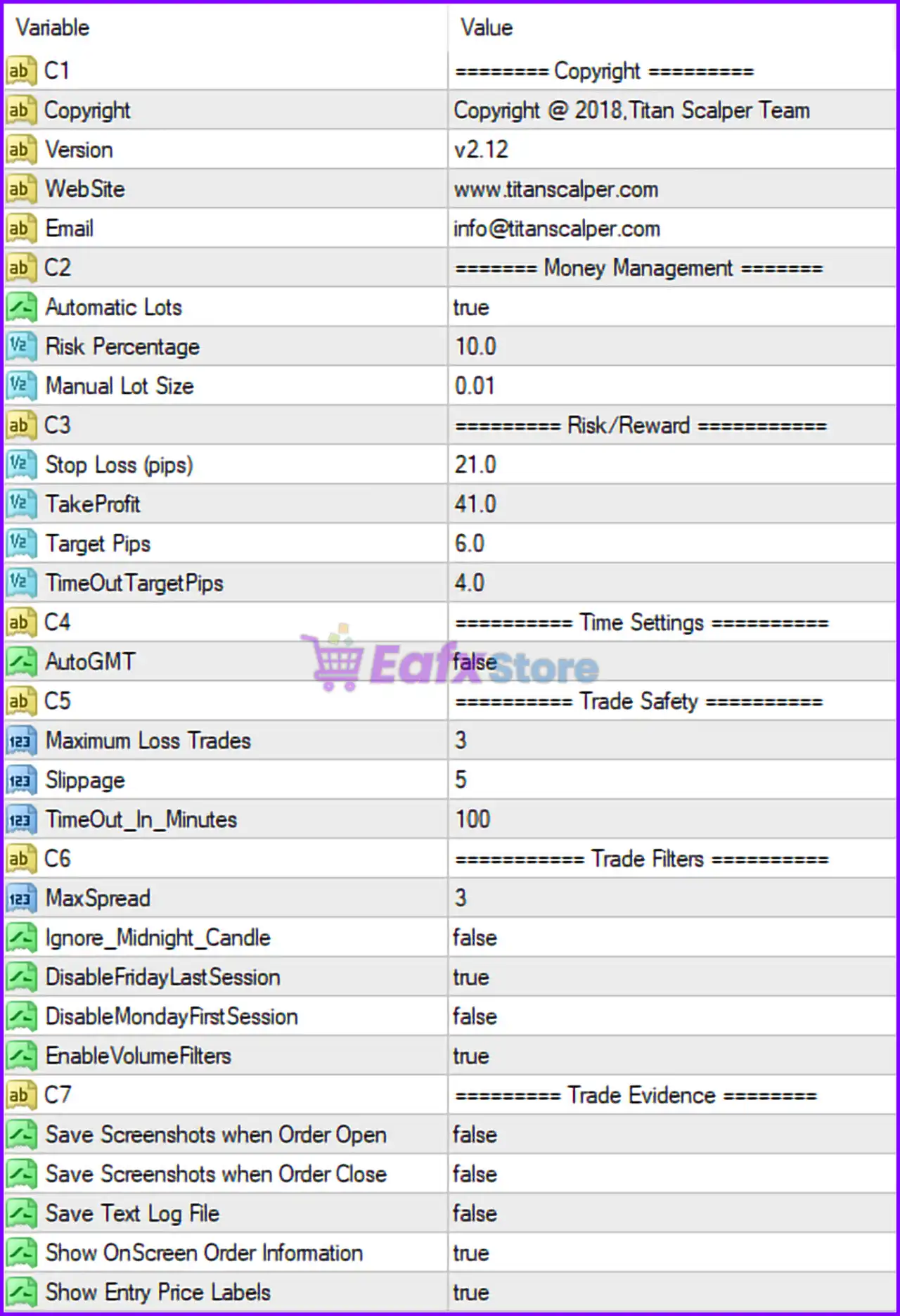
========= Money Management =========
🔹 Automatic Lots = true: Enables automatic lot size calculation based on account risk settings.
🔹 Risk Percentage = 10.0: Sets the trading risk to 10.0% of the account balance per trade.
🔹 Manual Lot Size = 0.01: Defines the fixed lot size as 0.01 lots when manual lot sizing is used.
========= Risk/Reward =========
🔹 Stop Loss (pips) = 21.0: Sets the Stop Loss distance to 21.0 pips.
🔹 TakeProfit = 41.0: Sets the Take Profit target to 41.0 pips.
🔹 Target Pips = 6.0: Defines the primary scalping profit target at 6.0 pips.
🔹 TimeOutTargetPips = 4.0: Sets a fallback Take Profit target of 4.0 pips during timeout conditions.
========= Time Settings =========
🔹 AutoGMT = false: Disables automatic GMT offset detection.
========= Trade Safety =========
🔹 Maximum Loss Trades = 3: Stops or limits trading activity after 3 consecutive losing trades.
🔹 Slippage = 5: Maximum allowed slippage configured at 5 points/pips.
🔹 TimeOut_In_Minutes = 100: Trade timeout duration set to 100 minutes.
========= Trade Filters =========
🔹 MaxSpread = 3: Maximum allowed spread restricted to 3 points/pips.
🔹 Ignore_Midnight_Candle = false: Midnight candle analysis remains enabled.
🔹 DisableFridayLastSession = true: Disables trading during the final Friday trading session.
🔹 DisableMondayFirstSession = false: Allows trading during the first Monday trading session.
🔹 EnableVolumeFilters = true: Activates volume-based trade filtering.
========= Trade Evidence =========
🔹 Save Screenshots when Order Open = false: Disables automatic screenshot capture when opening trades.
🔹 Save Screenshots when Order Close = false: Disables automatic screenshot capture when closing trades.
🔹 Save Text Log File = false: Disables saving detailed text log files.
🔹 Show OnScreen Order Information = true: Displays active order information directly on the chart.
🔹 Show Entry Price Labels = true: Displays trade entry price labels on the chart.
Conclusion
The Titan Scalper EA MT4 settings provide a professional and structured scalping environment with advanced risk controls and intelligent trade filtering. By combining automatic lot sizing, low-spread execution, volume analysis, and trade safety protections, the EA is optimized for fast-paced forex trading conditions. Understanding these settings helps traders improve execution quality, manage account risk effectively and maintain disciplined automated trading performance.
FAQs
❓ What does Automatic Lots = true mean?
It automatically calculates lot size based on the selected account risk percentage.
❓ Why is MaxSpread = 3 important?
It ensures trades are only opened under low-spread market conditions.
❓ What is the purpose of Maximum Loss Trades = 3?
It helps protect the account by limiting trading after 3 consecutive losing trades.
❓ Why is DisableFridayLastSession = true used?
It avoids trading during the final Friday session to reduce weekend gap risks.
❓ What does EnableVolumeFilters = true do?
It uses market volume analysis to filter and improve trade entry quality.
Get Titan Scalper EA MT4 Unlimited
Download Titan Scalper EA MT4 Unlimited with its set files, read the full product details and requirements here: Titan Scalper EA MT4 Unlimited →